
PasteAI
БесплатноНе проверенAn MCP server that lets AI publish markdown documents to a clean, themed web UI. One tool call creates a shareable doc.

Описание
An MCP server that lets AI publish markdown documents to a clean, themed web UI. One tool call creates a shareable doc.
README
PasteAI
Human review of beautiful reports, generated by AI
AI publishes markdown documents via MCP. You read them in a clean, themed web UI.
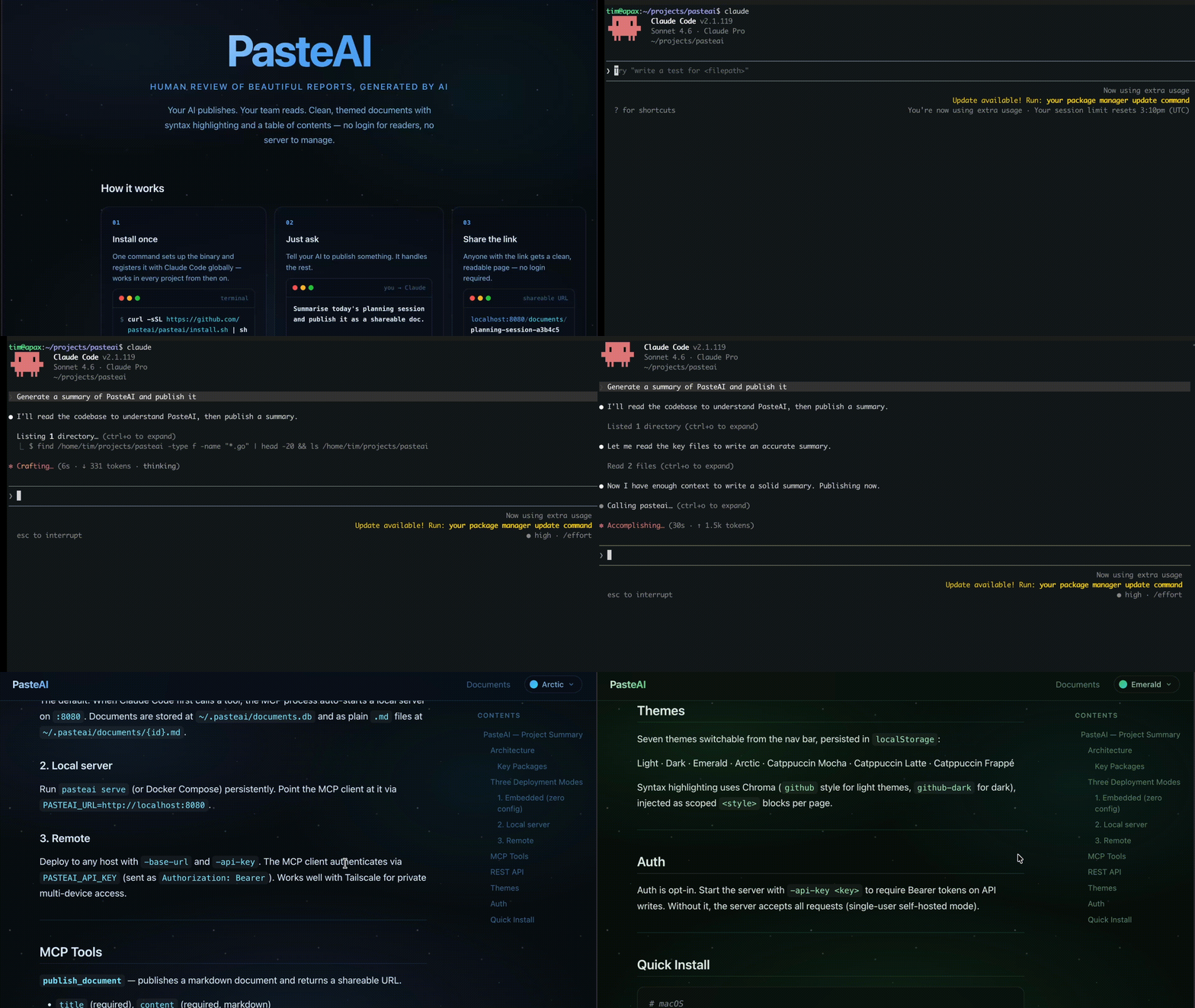
Quickstart
Run /setup in Claude Code — it installs the binary and configures MCP. Then restart your editor to activate.
Or install manually:
# macOS
brew install pasteai/pasteai/pasteai

# Windows
scoop bucket add pasteai https://github.com/pasteai/scoop-pasteai
scoop install pasteai

# Linux (Debian/Ubuntu)
# Download the .deb from https://github.com/pasteai/pasteai/releases/latest

# Any platform — prebuilt binary
curl -sSL https://raw.githubusercontent.com/pasteai/pasteai/main/install.sh | sh

# With Go
go install github.com/pasteai/pasteai/cmd/pasteai@latest
Then run pasteai setup to register with your AI editor(s). It configures Claude Code, Kiro, and opencode simultaneously.
To configure manually, add the entry to the appropriate config file:
Claude Code (~/.claude.json) and Kiro (~/.kiro/settings/mcp.json):
{
  "mcpServers": {
    "pasteai": {
      "command": "/full/path/to/pasteai",
      "args": ["mcp"]
    }
  }
}
opencode (~/.config/opencode/opencode.json):
{
  "mcp": {
    "pasteai": {
      "type": "local",
      "command": ["/full/path/to/pasteai", "mcp"]
    }
  }
}
Use the absolute path from which pasteai or $(go env GOPATH)/bin/pasteai — AI editors do not inherit your shell PATH.
Restart your editor, then ask: "Summarise what we discussed and publish it."
CLI Reference
| Command | Description |
|---|---|
pasteai setup |
Configure MCP in Claude Code, Kiro, and opencode (interactive or via flags) |
pasteai setup -mode embedded |
Configure without prompts (non-interactive) |
pasteai doctor |
Diagnose common setup problems |
pasteai serve [flags] |
Start the HTTP server |
pasteai mcp |
Start the MCP server (used by Claude Code) |
pasteai version |
Print version |
Which mode?
| Situation | Mode |
|---|---|
| Claude Code on your laptop | Embedded — default, nothing to configure |
| Claude running in a container or remote VM | Local server — run pasteai serve on the host, set PASTEAI_URL |
| Sharing with a team or reading across devices | Remote — deploy with -base-url, use Tailscale for private access |
Three Modes
1. Embedded (zero config)
Add the MCP config above and restart Claude Code. When Claude first calls a tool, PasteAI starts a local server automatically. Documents stored at ~/.pasteai/documents.db and as plain markdown files at ~/.pasteai/documents/{id}.md — readable without the server running.
2. Local server
Run the server persistently with Docker Compose and point the MCP client at it:
# docker-compose.yml
services:
  pasteai:
    image: ghcr.io/pasteai/pasteai:latest
    ports:
      - "8080:8080"
    volumes:
      - ${HOME}/.pasteai:/data
    restart: unless-stopped
mkdir -p ~/.pasteai
docker compose up -d
In ~/.claude.json:
{
  "mcpServers": {
    "pasteai": {
      "command": "/full/path/to/pasteai",
      "args": ["mcp"],
      "env": { "PASTEAI_URL": "http://localhost:8080" }
    }
  }
}
Good when you want the server always running, independent of Claude Code. For systemd, launchd, or nohup alternatives, see docs/server-setup.md.
3. Remote
Point PASTEAI_URL at any PasteAI instance. Both PASTEAI_API_KEY and -base-url are required on the server for remote access to work correctly.
Start the server with:
pasteai serve -api-key <your-key> -base-url https://your-server.example.com
In ~/.claude.json:
{
  "mcpServers": {
    "pasteai": {
      "command": "/full/path/to/pasteai",
      "args": ["mcp"],
      "env": {
        "PASTEAI_URL": "https://your-server.example.com",
        "PASTEAI_API_KEY": "your-key"
      }
    }
  }
}
Tailscale
To read documents from your phone or another machine, use Tailscale. Start pasteai serve, then browse to http://<tailscale-ip>:8080 from any device on your tailnet. Set -base-url http://<tailscale-ip>:8080 so document links resolve correctly.
MCP Tools
publish_document — publish a markdown document, returns a shareable URL.
| Parameter | Required | Description |
|---|---|---|
title |
yes | Document title |
content |
yes | Markdown content |
author |
no | Author name |
visibility |
no | public (default) or unlisted (link-only) |
list_documents — returns recent public documents.
get_document — retrieve a document by ID, including its full markdown content.
| Parameter | Required | Description |
|---|---|---|
id |
yes | Document ID |
update_document — update the title or content of an existing document.
| Parameter | Required | Description |
|---|---|---|
id |
yes | Document ID |
title |
no | New title (omit to keep existing) |
content |
no | New markdown content (omit to keep existing) |
delete_document — permanently delete a document by ID.
| Parameter | Required | Description |
|---|---|---|
id |
yes | Document ID |
claude.ai Custom Connectors (streamable-HTTP MCP)
To connect a deployed PasteAI server to claude.ai as a Custom Connector, start the server with -enable-mcp-http. This mounts a stateless streamable-HTTP MCP endpoint at /mcp alongside the web UI:
pasteai serve \
  -api-key <your-key> \
  -base-url https://your-server.example.com \
  -enable-mcp-http
Then in claude.ai → Settings → Connectors, add:
https://your-server.example.com/mcp
The /mcp endpoint requires the same Bearer token as the API when -api-key is set. The stdio transport (pasteai mcp) is unaffected — both can run simultaneously.
REST API
| Method | Path | Description |
|---|---|---|
POST |
/api/documents |
Create a document |
GET |
/api/documents |
List recent public documents |
GET |
/api/documents/{id} |
Get a document (with content) |
PUT |
/api/documents/{id} |
Update title or content |
DELETE |
/api/documents/{id} |
Delete a document |
GET |
/d/{id}/raw |
Raw markdown source |
curl -X POST http://localhost:8080/api/documents \
  -H 'Content-Type: application/json' \
  -d '{"title": "My Report", "content": "# Hello\n\nThis is my report.", "author": "Claude"}'
Response includes a url field: http://localhost:8080/d/{id}
Themes
Switch themes using the selector in the top nav. Choice is saved in localStorage.
Light · Dark · Emerald · Arctic · Catppuccin Mocha · Catppuccin Latte · Catppuccin Frappé
Contributing & License
Установка PasteAI
У этого сервера нет опубликованного пакета — он собирается из исходников. Открой репозиторий и следуй инструкции в README.
▸ github.com/pasteai/pasteaiFAQ
PasteAI MCP бесплатный?
Да, PasteAI MCP бесплатный — установка в пару кликов через Unyly без оплаты.
Нужен ли API-ключ для PasteAI?
Нет, PasteAI работает без API-ключей и переменных окружения.
PasteAI — hosted или self-hosted?
Self-hosted: сервер запускается локально на твоей машине командой из раздела установки.
Как установить PasteAI в Claude Desktop, Claude Code или Cursor?
Открой PasteAI на unyly.org, выбери вкладку своего клиента (Claude Desktop, Claude Code, Cursor) и нажми Install — конфиг сгенерируется автоматически, без правки JSON.
Похожие MCP
LibreOffice Tools
Enables AI agents to read, write, and edit Office documents via LibreOffice with token-efficient design. Supports multiple formats including DOCX, XLSX, PPTX, a
 автор: passerbyflutter
dannote/figma-use
Full Figma control: create shapes, text, components, set styles, auto-layout, variables, export. 80+ tools.
 автор: dannote
Logo.dev
Search and retrieve company logos by brand or domain. Customize size, format, and theme to match your design needs. Accelerate design, prototyping, and content
 автор: NOVA-3951
PIX4Dmatic
Enables GUI automation for controlling PIX4Dmatic on Windows through MCP. Supports launching, focusing, capturing screenshots, sending hotkeys, clicking UI elem
 автор: jangjo123
Compare PasteAI with
Не уверен что выбрать?
Найди свой стек за 60 секунд
Автор?
Embed-бейдж для README
Похожее
Все в категории design