
Patch Usage
БесплатноНе проверенEnables Claude to read your Patch API budget usage, including spend, burn rate, and account details, directly from chat.

Описание
Enables Claude to read your Patch API budget usage, including spend, burn rate, and account details, directly from chat.
README
Ask Claude how much of your Patch API budget you have used, straight from your chat. No more opening the dashboard and squinting at charts.
"How much of my Patch budget is left this month?"
"Am I going to run out before it resets?"
"Show me my spend for the last week."
This is a small MCP server. MCP (Model Context Protocol) is just a safe way to give Claude an extra skill. Once it is installed, Claude can read your Patch usage for you. It can only read your data unless you explicitly ask it to do something more (see Safety).
What it shows you
It reads the exact same numbers you see on your Patch dashboard:
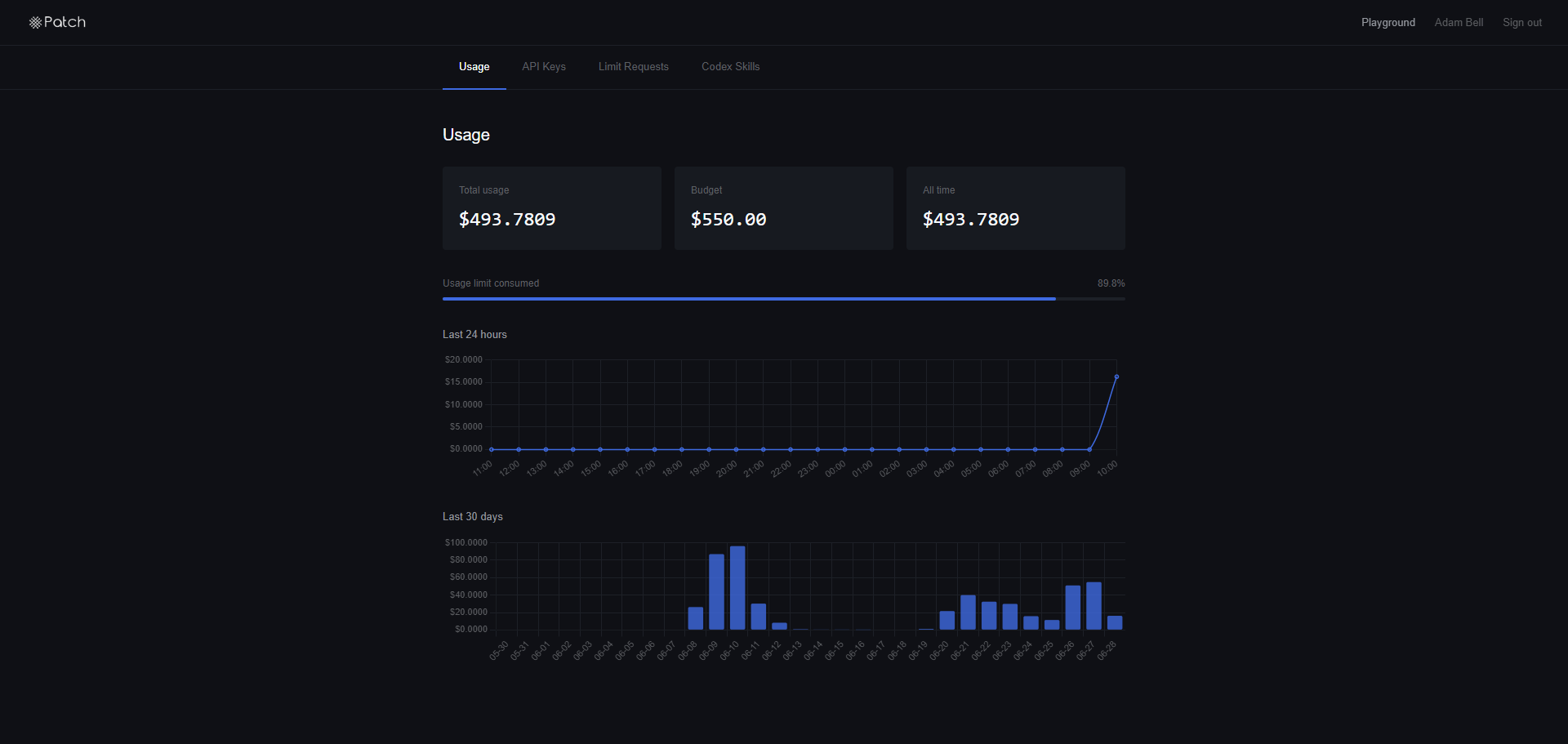
Plus a few things the dashboard does not show, like a projection of when you will run out at your current pace.
Setup (about 5 minutes, no coding needed)
There are two steps: (1) install a small helper program, then (2) give Claude your Patch sign-in so it can read your usage.
Step 1: Install uv (one time)
uv is a tiny tool that runs the server. You only ever do this once.
Open PowerShell (press the Windows key, type PowerShell, press Enter) and paste this line:
powershell -ExecutionPolicy ByPass -c "irm https://astral.sh/uv/install.ps1 | iex"
Close and reopen PowerShell when it finishes. (On a Mac, paste curl -LsSf https://astral.sh/uv/install.sh | sh into the Terminal instead.)
Step 2: Get your Patch token
This is the key that lets the server read your usage and nobody else's.
- Go to https://oai.joinpatch.org and sign in.
- Press F12 to open the developer panel, then click the Console tab.
- Click into the console, type this, and press Enter:
localStorage.getItem('patch_token') - It prints a long line of letters in quotes (it starts with
eyJ...). Copy everything between the quotes.
Keep that copied. You need it in the next step.
Step 3: Connect it to Claude
In PowerShell, paste the command below, but replace PASTE_YOUR_TOKEN_HERE with the token you just copied:
claude mcp add patch-usage --scope user --env PATCH_TOKEN=PASTE_YOUR_TOKEN_HERE -- uvx --from git+https://github.com/h1kv/patch-usage-mcp patch-usage-mcp
uvx downloads and runs the server straight from GitHub, so there is nothing to clone and no folder to keep track of. Because this repository is private, your machine needs to be signed in to GitHub first (if git clone https://github.com/h1kv/patch-usage-mcp works for you, so will this).
That is it. Restart Claude (close it and open it again) and just ask: "How much of my Patch budget have I used?"
To check it worked, run claude mcp list and look for patch-usage: ... Connected.
Keeping it working: refreshing your token
Your Patch token expires every few days for security. When it does, Claude will tell you the token has expired and show you what to do. To fix it, get a fresh token (repeat Step 2 above) and run:
claude mcp remove patch-usage --scope user
Then run the Step 3 command again with the new token. That is the whole refresh.
What you can ask for
Every value is in US dollars. Everything in the first three groups is read-only.
Usage and account
| Ask Claude about... | Tool | What you get |
|---|---|---|
| Budget, spend, percent used | get_usage_summary |
Monthly limit, spend this month, all-time spend, reset date, throttle status, remaining, percent used |
| Spend per day | get_usage_daily |
The last ~30 days, one figure per day |
| Spend per hour | get_usage_hourly |
The last ~24 hours, one figure per hour |
| Your account | get_account |
Your name, email, when you joined |
| Your API keys | list_api_tokens |
Each key's name, prefix, and dates (never the full secret) |
| Your limit requests | list_rate_limit_requests |
Each budget-increase request and whether it was approved |
Smart insights
| Ask Claude... | Tool | What you get |
|---|---|---|
| "Will I run out before reset?" | get_burn_rate |
Average daily spend, projected month-end total, projected overage, and the date you are on track to run dry |
| "Give me the full picture" | get_spend_report |
Everything above in one tidy summary, ready to read |
Managing API keys (optional, guarded)
| Ask Claude... | Tool | Notes |
|---|---|---|
| "Create a new API key" | create_api_token |
Makes a live key. The secret is shown only once. |
| "Revoke a key" | revoke_api_token |
Permanently deletes a key. |
Safety
The two key-management tools can change your account, so they have two locks on them:
- They are flagged as destructive, so Claude asks your permission before running them.
- They do nothing on the first call. They only show you a preview of what would happen. They act only when you confirm. So a key can never be created or deleted by accident.
For the strongest protection, do not add create_api_token or revoke_api_token to any "always allow" list, so Claude always asks first.
A few things were left out on purpose:
- Requesting a budget increase is not included, because a real person on the Patch team reviews those. Asking for one should be a deliberate human action, not something Claude does. You can still see your requests with
list_rate_limit_requests. - Admin tools are not included. This account is not an admin, so they would not work anyway.
For developers
src/patch_usage_mcp/
  client.py      Authenticated HTTP client. Maps every failure to a clear message.
  analytics.py   Pure functions for burn-rate and spend-report math (no network).
  server.py      The MCP server: wires endpoints to tools, sets safety annotations.
tests/           Unit tests (mocked HTTP, no live token needed).
Run the test suite:
uv sync --extra dev
uv run pytest
To run your local working copy instead of the published GitHub version, clone the repo and point uv at the folder:
git clone https://github.com/h1kv/patch-usage-mcp
cd patch-usage-mcp
uv run patch-usage-mcp
Configuration is via environment variables:
PATCH_TOKEN(required): your Patch session JWT.PATCH_BASE_URL(optional): defaults tohttps://oai.joinpatch.org/api.PATCH_CLIENT_ID(optional): value of theX-Patch-Clientheader sent on every request, so Patch can tell MCP traffic apart from human browser traffic in its logs. Defaults topatch-usage-mcp. Set a custom value (for example a machine name) to tag your own requests, or set it empty to drop the header. The requestUser-Agentis alwayspatch-usage-mcp/<version>either way.
If you prefer to register the server by hand, add this to your MCP config instead of using claude mcp add:
{
  "mcpServers": {
    "patch-usage": {
      "command": "uvx",
      "args": ["--from", "git+https://github.com/h1kv/patch-usage-mcp", "patch-usage-mcp"],
      "env": { "PATCH_TOKEN": "eyJhbGci...yourtoken..." }
    }
  }
}
Установка Patch Usage
У этого сервера нет опубликованного пакета — он собирается из исходников. Открой репозиторий и следуй инструкции в README.
▸ github.com/h1kv/patch-usage-mcpFAQ
Patch Usage MCP бесплатный?
Да, Patch Usage MCP бесплатный — установка в пару кликов через Unyly без оплаты.
Нужен ли API-ключ для Patch Usage?
Нет, Patch Usage работает без API-ключей и переменных окружения.
Patch Usage — hosted или self-hosted?
Доступен hosted-вариант: Unyly запускает сервер в облаке, локальная установка не обязательна.
Как установить Patch Usage в Claude Desktop, Claude Code или Cursor?
Открой Patch Usage на unyly.org, выбери вкладку своего клиента (Claude Desktop, Claude Code, Cursor) и нажми Install — конфиг сгенерируется автоматически, без правки JSON.
Похожие MCP
Gmail
Read, send and search emails from Claude
 автор: Google
Slack
Send, search and summarize Slack messages
 автор: Slack
Runbear
No-code MCP client for team chat platforms, such as Slack, Microsoft Teams, and Discord.
Discord Server
A community discord server dedicated to MCP by [Frank Fiegel](https://github.com/punkpeye)
Compare Patch Usage with
Не уверен что выбрать?
Найди свой стек за 60 секунд
Автор?
Embed-бейдж для README
Похожее
Все в категории communication