
Pdf Filler
БесплатноНе проверенEnables filling any PDF form, including scanned or AcroForm, through a browser-based drag-and-drop editor. Works entirely locally with no data leaving the machi

Описание
Enables filling any PDF form, including scanned or AcroForm, through a browser-based drag-and-drop editor. Works entirely locally with no data leaving the machine.
README
An MCP server that lets Claude fill any PDF form — scanned or AcroForm — through a browser-based drag-and-drop editor.
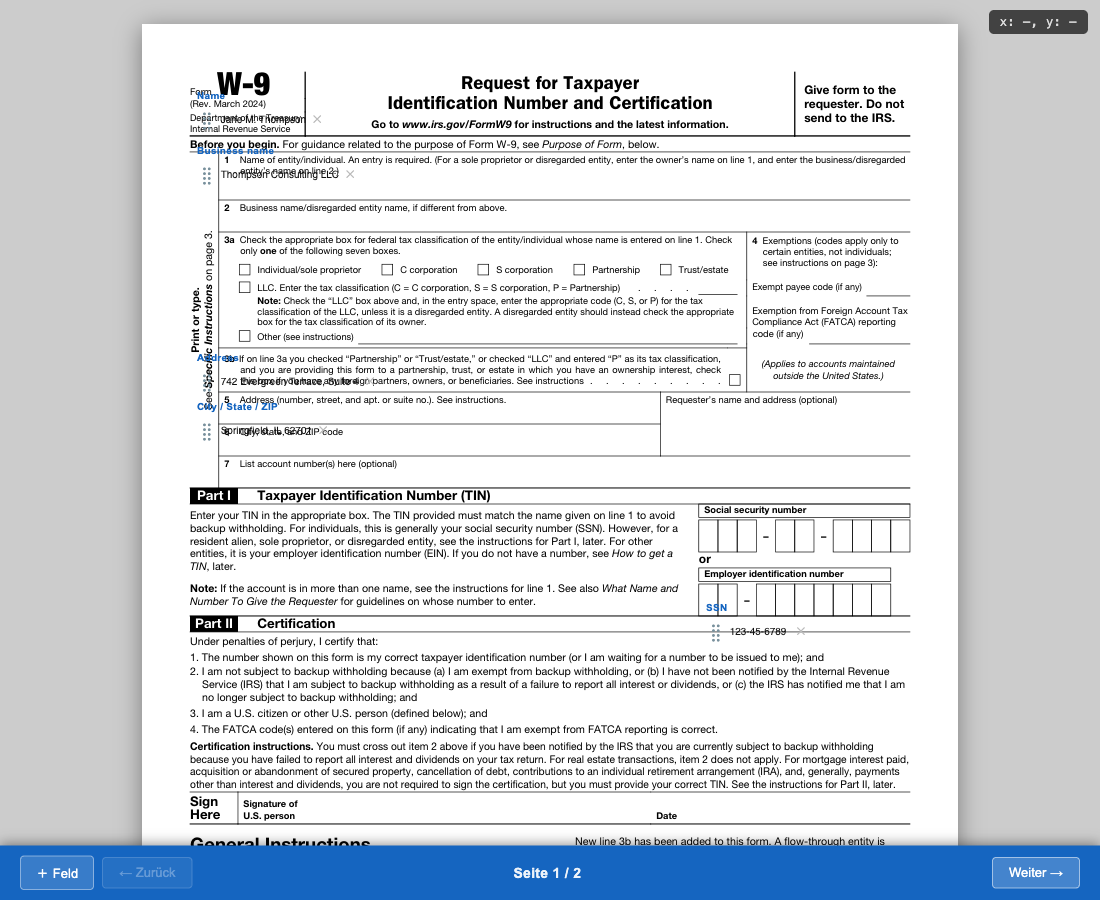
Editor — drag, reposition and edit fields directly on the rendered PDF page:
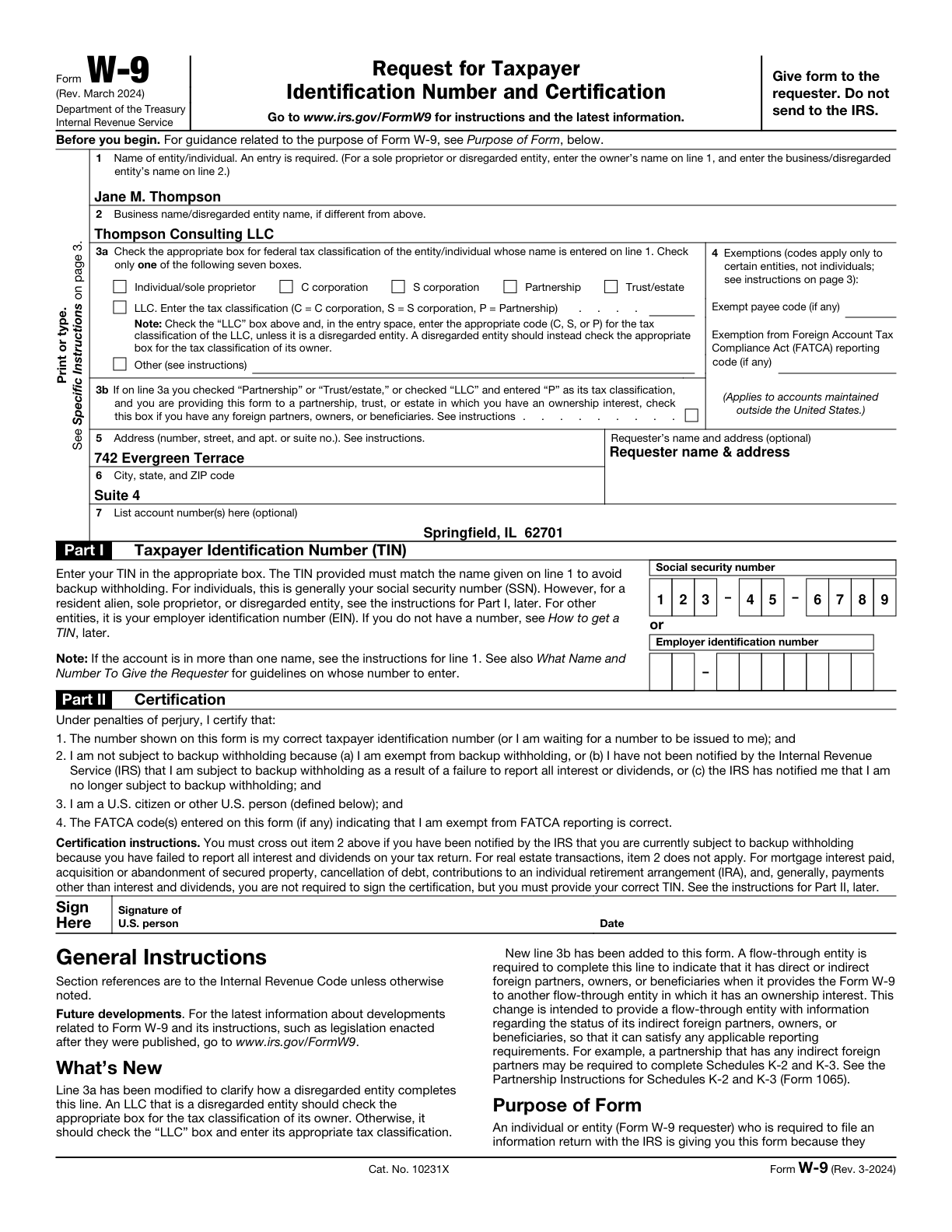
Result — the generated PDF with all fields overlaid:
How it works
- Claude renders the PDF to images and inspects the layout
- Claude places markers on each field and iterates until placement is correct
- Claude opens the editor — a self-contained HTML page where you drag fields, edit values and click Fertig
- PDF is generated automatically — the editor POSTs to a local receiver which runs headless Playwright to produce the final PDF
The entire stack runs locally. No data leaves your machine.
Tools exposed
| Tool | Description |
|---|---|
pdf_render |
Render all pages to PNG at a given DPI, returns scale factor |
pdf_preview |
Overlay numbered coloured marker dots on a page for iterative placement verification |
pdf_editor_multi |
Generate a multi-page drag-and-drop HTML editor pre-filled with field values |
pdf_fill |
Directly overlay text on a PDF without opening the browser editor |
pdf_merge |
Merge per-page PDFs into a single file |
pdf_memory_get |
Retrieve saved field layout for a known form type |
pdf_memory_set |
Save verified field layout so the same form can be filled again instantly |
pdf_receiver_start |
Start the local HTTP receiver that auto-generates the PDF on Fertig |
pdf_receiver_wait |
Block until the user clicks Fertig and the PDF is ready |
Prerequisites
- Python 3.9+
- pymupdf (
pip install pymupdf) - pypdf (
pip install pypdf) — for merging - Node.js + Playwright — for the auto-PDF-generation step (
npm i -g playwright)
Installation
1. Clone
git clone https://github.com/patroqueeet/pdf-filler-mcp.git ~/.claude/pdf-filler
2. Register with Claude Code
Add to ~/.mcp.json:
{
  "mcpServers": {
    "pdf-filler": {
      "command": "python3",
      "args": ["~/.claude/pdf-filler/filler.py", "serve"]
    }
  }
}
Restart Claude Code — the pdf_* tools will be available in any session.
Typical workflow
User: Fill out /tmp/application.pdf with my personal data

Claude:
  1. pdf_render       → get page images + scale_factor
  2. pdf_preview      → place marker dots, read result image, adjust
  3. pdf_memory_get   → check if layout is already saved
  4. pdf_receiver_start → start PDF receiver on port 7789
  5. pdf_editor_multi → open editor in browser
  6. pdf_receiver_wait → wait for user to click Fertig
  → returns: { done: true, output_path: "/tmp/application_filled.pdf" }
Editor features
- Click to create a field anywhere on the document image
- Drag the ⣿ handle to reposition
- Tab between fields; inline editing
- Checkbox type available via the ➕ button
- Multi-page navigation with per-page field state
- Print CSS hides all editor chrome — only text overlays are printed
Running the tests
pip install pymupdf pypdf pytest pytest-timeout
pytest tests/ -v
License
MIT — see LICENSE.
Установка Pdf Filler
У этого сервера нет опубликованного пакета — он собирается из исходников. Открой репозиторий и следуй инструкции в README.
▸ github.com/patroqueeet/pdf-filler-mcpFAQ
Pdf Filler MCP бесплатный?
Да, Pdf Filler MCP бесплатный — установка в пару кликов через Unyly без оплаты.
Нужен ли API-ключ для Pdf Filler?
Нет, Pdf Filler работает без API-ключей и переменных окружения.
Pdf Filler — hosted или self-hosted?
Self-hosted: сервер запускается локально на твоей машине командой из раздела установки.
Как установить Pdf Filler в Claude Desktop, Claude Code или Cursor?
Открой Pdf Filler на unyly.org, выбери вкладку своего клиента (Claude Desktop, Claude Code, Cursor) и нажми Install — конфиг сгенерируется автоматически, без правки JSON.
Похожие MCP
Playwright
Browser automation, scraping, screenshots
 автор: Microsoft
Puppeteer
Browser automation and web scraping.
 автор: modelcontextprotocol
opentabs-dev/opentabs
Plugin-based MCP server + Chrome extension that gives AI agents access to web applications through the user's authenticated browser session. 100+ plugins with a
 автор: opentabs-dev
robhunter/agentdeals
1,500+ developer infrastructure deals, free tiers, and startup programs across 54 categories. Search deals, compare vendors, plan stacks, and track pricing chan
 автор: robhunter
Compare Pdf Filler with
Не уверен что выбрать?
Найди свой стек за 60 секунд
Автор?
Embed-бейдж для README
Похожее
Все в категории browse