
PDF to Markdown Converter
БесплатноНе проверенConverts PDF documents to Markdown format while preserving document structure, enabling content migration and making PDF content more accessible and editable.

Описание
Converts PDF documents to Markdown format while preserving document structure, enabling content migration and making PDF content more accessible and editable.
README
MCP-PDF2MD Service
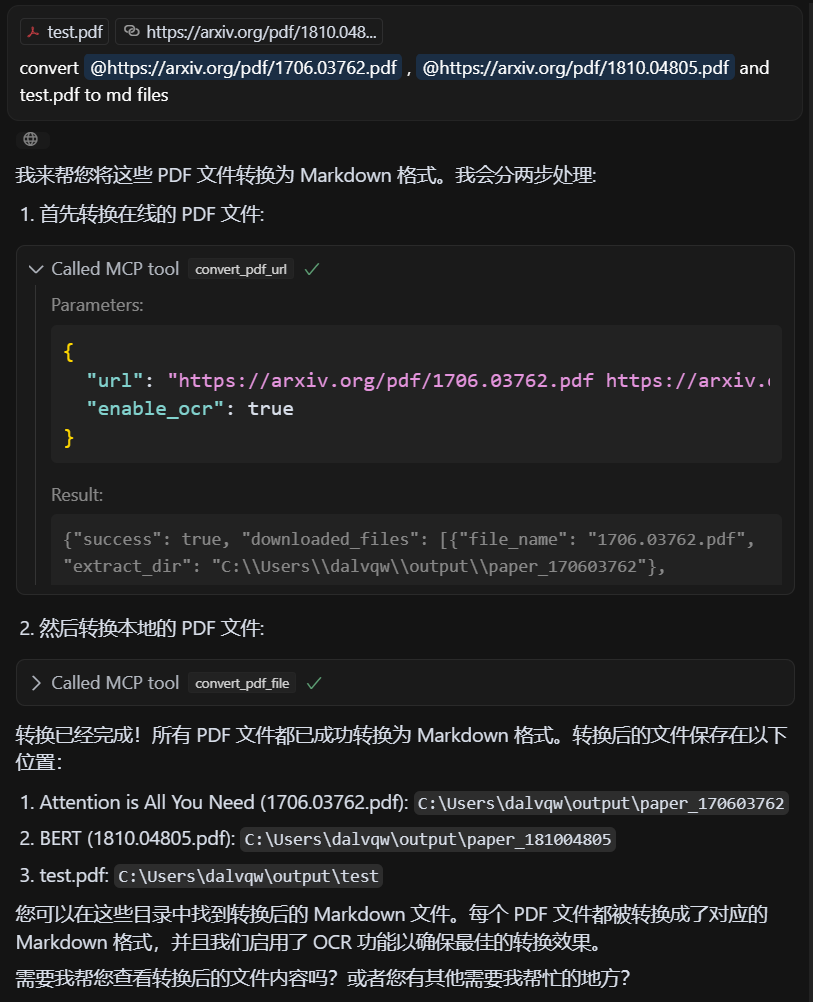
An MCP-based high-performance PDF to Markdown conversion service powered by MinerU API, supporting batch processing for local files and URL links with structured output.
Key Features
- Format Conversion: Convert PDF files to structured Markdown format.
- Multi-source Support: Process both local PDF files and URL links.
- Intelligent Processing: Automatically select the best processing method.
- Batch Processing: Support multi-file batch conversion for efficient handling of large volumes of PDF files.
- MCP Integration: Seamless integration with LLM clients like Claude Desktop.
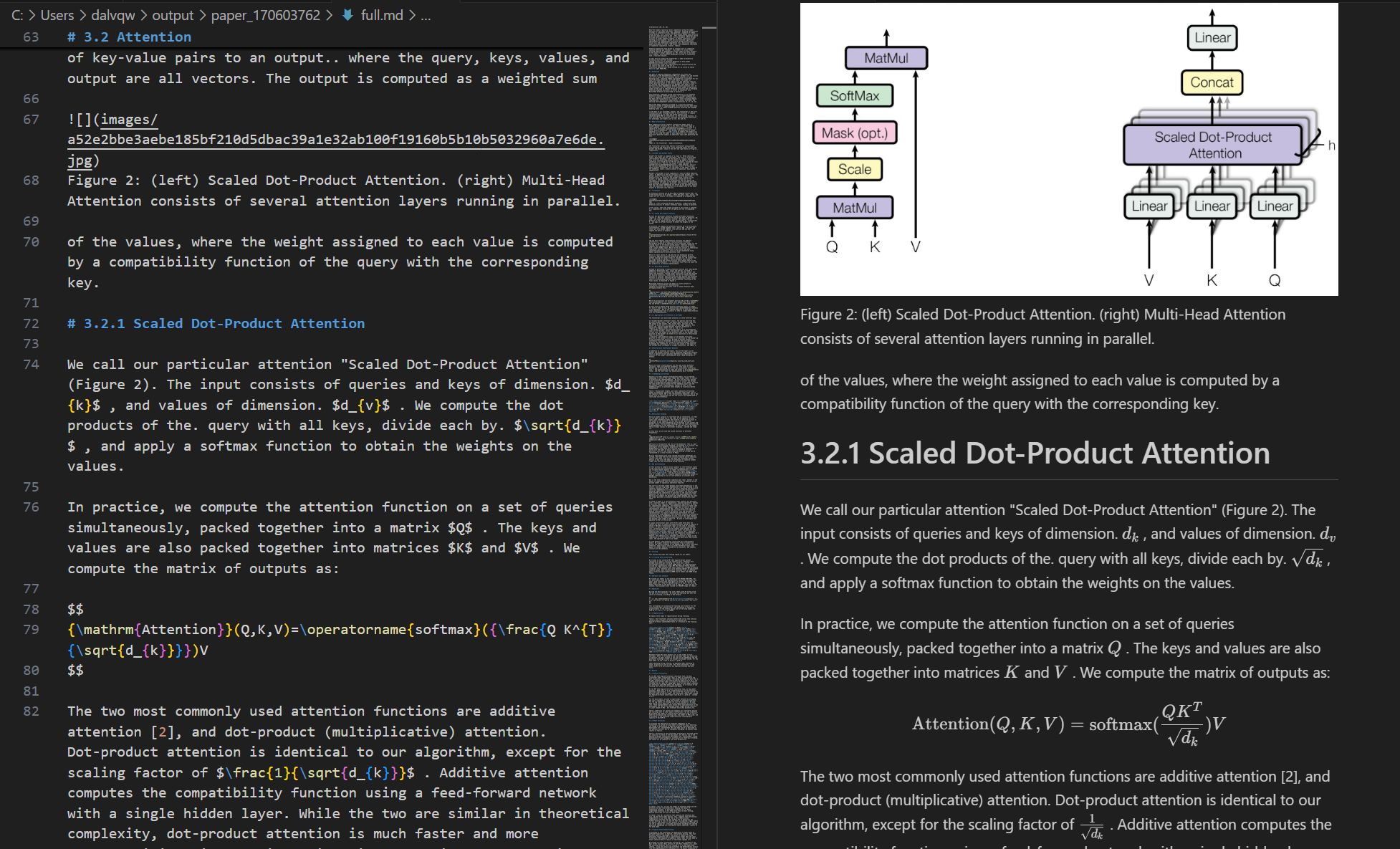
- Structure Preservation: Maintain the original document structure, including headings, paragraphs, lists, etc.
- Smart Layout: Output text in human-readable order, suitable for single-column, multi-column, and complex layouts.
- Formula Conversion: Automatically recognize and convert formulas in the document to LaTeX format.
- Table Extraction: Automatically recognize and convert tables in the document to structured format.
- Cleanup Optimization: Remove headers, footers, footnotes, page numbers, etc., to ensure semantic coherence.
- High-Quality Extraction: High-quality extraction of text, images, and layout information from PDF documents.
System Requirements
- Software: Python 3.10+
Quick Start
Clone the repository and enter the directory:
git clone https://github.com/FutureUnreal/mcp-pdf2md.git
cd mcp-pdf2md
Create a virtual environment and install dependencies:
Linux/macOS:
uv venv source .venv/bin/activate uv pip install -e .Windows:
uv venv
.venv\Scripts\activate
uv pip install -e .
Configure environment variables:
Create a
.envfile in the project root directory and set the following environment variables:MINERU_API_BASE=https://mineru.net/api/v4/extract/task MINERU_BATCH_API=https://mineru.net/api/v4/extract/task/batch MINERU_BATCH_RESULTS_API=https://mineru.net/api/v4/extract-results/batch MINERU_API_KEY=your_api_key_hereStart the service:
uv run pdf2md
Command Line Arguments
The server supports the following command line arguments:
Claude Desktop Configuration
Add the following configuration in Claude Desktop:
Windows:
{
    "mcpServers": {
        "pdf2md": {
            "command": "uv",
            "args": [
                "--directory",
                "C:\\path\\to\\mcp-pdf2md",
                "run",
                "pdf2md",
                "--output-dir",
                "C:\\path\\to\\output"
            ],
            "env": {
                "MINERU_API_KEY": "your_api_key_here"
            }
        }
    }
}
Linux/macOS:
{
    "mcpServers": {
        "pdf2md": {
            "command": "uv",
            "args": [
                "--directory",
                "/path/to/mcp-pdf2md",
                "run",
                "pdf2md",
                "--output-dir",
                "/path/to/output"
            ],
            "env": {
                "MINERU_API_KEY": "your_api_key_here"
            }
        }
    }
}
Note about API Key Configuration: You can set the API key in two ways:
- In the
.envfile within the project directory (recommended for development) - In the Claude Desktop configuration as shown above (recommended for regular use)
If you set the API key in both places, the one in the Claude Desktop configuration will take precedence.
MCP Tools
The server provides the following MCP tools:
- convert_pdf_url: Convert PDF URL to Markdown
- convert_pdf_file: Convert local PDF file to Markdown
Getting MinerU API Key
This project relies on the MinerU API for PDF content extraction. To obtain an API key:
- Visit MinerU official website and register for an account
- After logging in, apply for API testing qualification at this link
- Once your application is approved, you can access the API Management page
- Generate your API key following the instructions provided
- Copy the generated API key
- Use this string as the value for
MINERU_API_KEY
Note that access to the MinerU API is currently in testing phase and requires approval from the MinerU team. The approval process may take some time, so plan accordingly.
Demo
Input PDF
Output Markdown
License
MIT License - see the LICENSE file for details.
Credits
This project is based on the API from MinerU.
Установка PDF to Markdown Converter
У этого сервера нет опубликованного пакета — он собирается из исходников. Открой репозиторий и следуй инструкции в README.
▸ github.com/futureunreal/mcp-pdf2mdFAQ
PDF to Markdown Converter MCP бесплатный?
Да, PDF to Markdown Converter MCP бесплатный — установка в пару кликов через Unyly без оплаты.
Нужен ли API-ключ для PDF to Markdown Converter?
Нет, PDF to Markdown Converter работает без API-ключей и переменных окружения.
PDF to Markdown Converter — hosted или self-hosted?
Self-hosted: сервер запускается локально на твоей машине командой из раздела установки.
Как установить PDF to Markdown Converter в Claude Desktop, Claude Code или Cursor?
Открой PDF to Markdown Converter на unyly.org, выбери вкладку своего клиента (Claude Desktop, Claude Code, Cursor) и нажми Install — конфиг сгенерируется автоматически, без правки JSON.
Похожие MCP
GitHub
PRs, issues, code search, CI status
 автор: GitHub
Filesystem
Secure file operations with configurable access controls.
Memory
Knowledge graph-based persistent memory system.
Template MCP Server
A CLI tool to create a new Model Context Protocol server project with TypeScript support, dual transport options, and an extensible structure
 автор: mcpdotdirect
Compare PDF to Markdown Converter with
Не уверен что выбрать?
Найди свой стек за 60 секунд
Автор?
Embed-бейдж для README
Похожее
Все в категории development