
Petp
БесплатноНе проверенPython RPA toolkit with 80+ processors orchestrating browser automation, AI/LLM (10 providers), databases, SSH, email, and HTTP tasks. Configurable pipelines wi

Описание
Python RPA toolkit with 80+ processors orchestrating browser automation, AI/LLM (10 providers), databases, SSH, email, and HTTP tasks. Configurable pipelines with cron scheduling and loops. Runs as wxPython GUI, headless service, or Docker container. Built-in MCP Tool Server (Streamable-HTTP) for AI agent integration.
README
中文 | English
Python RPA toolkit with 80+ processors orchestrating browser automation, AI/LLM (10 providers), databases, SSH, email, and HTTP tasks. Configurable pipelines with cron scheduling and loops. Runs as wxPython GUI, headless service, or Docker container. Built-in MCP Tool Server (Streamable-HTTP) for AI agent integration.
Pipeline  1:n  Execution
Execution 1:n  Task
Task      1:1  Processor
Links: Web Intro | Web App | Changelog
Quick Start
1. Install Python 3.14
Download from python.org. On Windows, check "Add Python to PATH".
2. Install wxPython (GUI only)
Python 3.14 requires a development snapshot (click to expand)
The stable release (4.2.x on PyPI) does not support Python 3.14. Download a 4.3.0-alpha .whl from wxpython.org/Phoenix/snapshot-builds matching your platform:
# macOS Apple Silicon
uv pip install wxPython-4.3.0a1XXXX-cp314-cp314-macosx_11_0_arm64.whl

# Windows 64-bit
uv pip install wxPython-4.3.0a1XXXX-cp314-cp314-win_amd64.whl
Or auto-download via PETP (no wxPython needed):
python PETP_background.py --run-execution OOTB_DOWNLOAD_LATEST_WXPYTHON_mac_arm
For Python 3.12/3.13: pip install wxPython
3. Install Dependencies
pip install -U uv
uv pip install -r requirements.txt        # Full (GUI)
# or: uv pip install -r requirements-nogui.txt   # Headless
# or: uv pip install -r requirements-docker.txt  # Docker
Custom install — pick only what you need
uv pip install -r requirements/core.txt -r requirements/ssh-sftp.txt -r requirements/http-client.txt
See requirements/ directory for all available groups: ai-deepseek.txt, ai-gemini.txt, ai-ollama.txt, database.txt, excel-data.txt, mcp.txt, ocr.txt, web-automation.txt, etc.
4. Run
python PETP.py          # GUI
python PETP_background.py   # Headless service (port 8866)
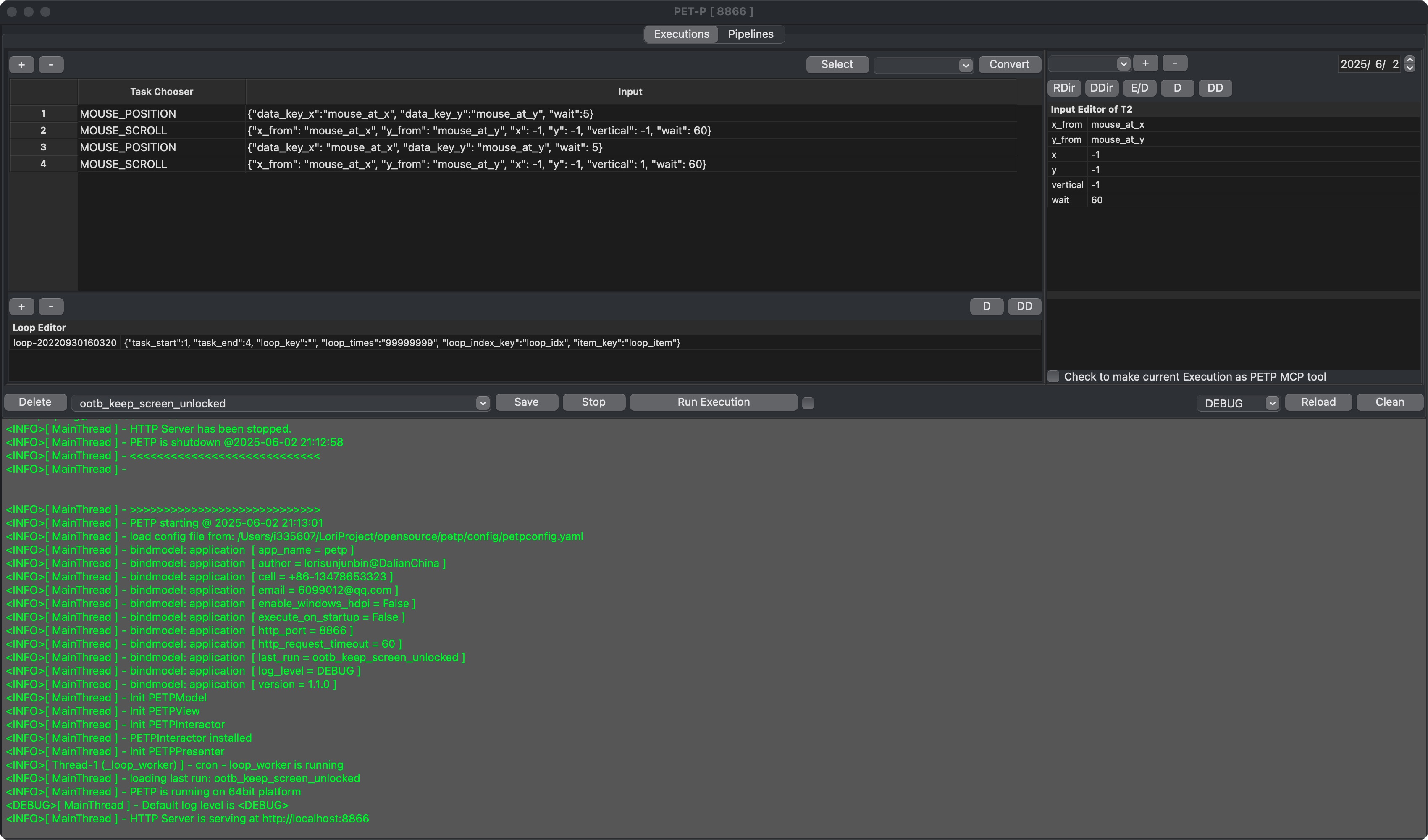
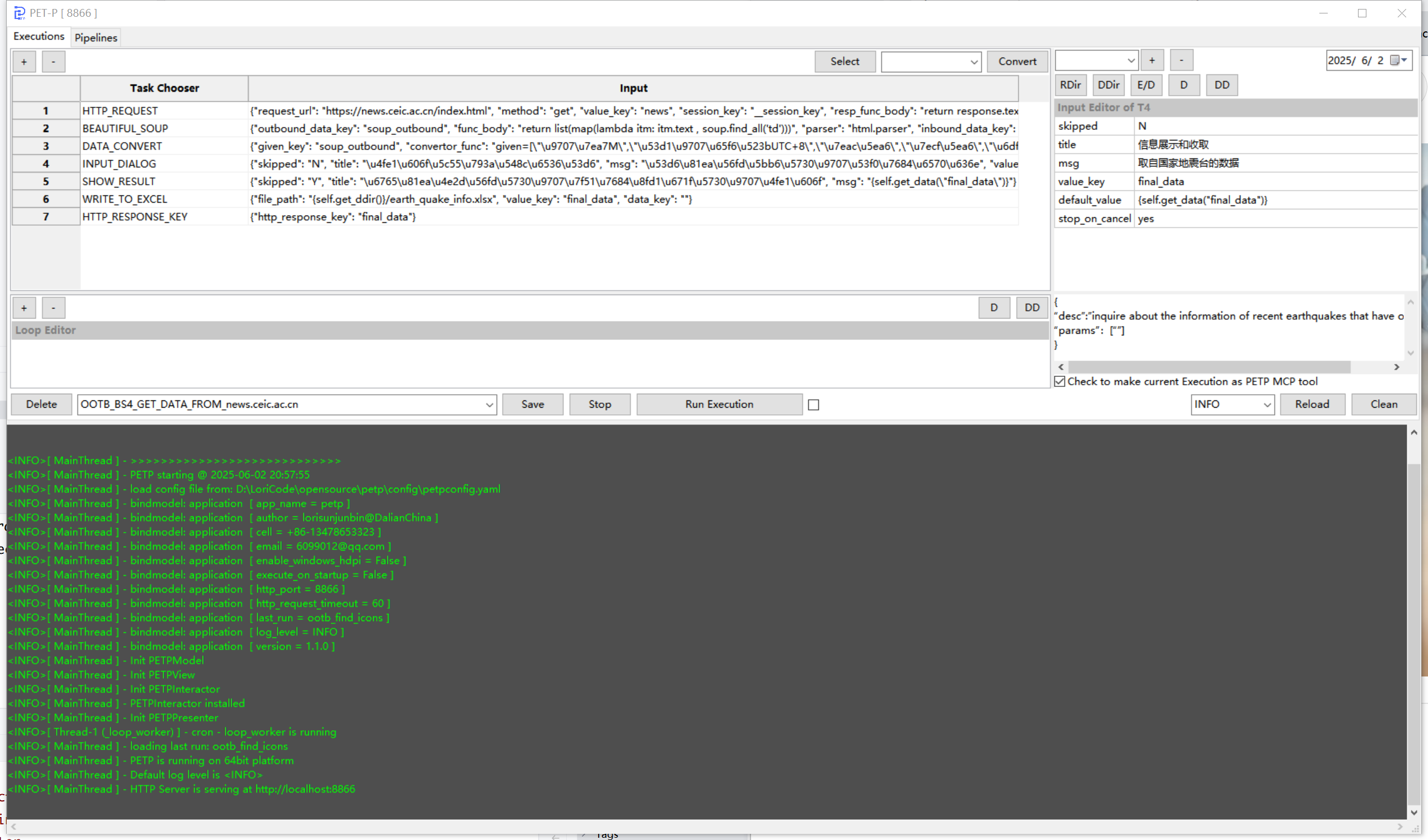
Screenshots
macOS
Windows
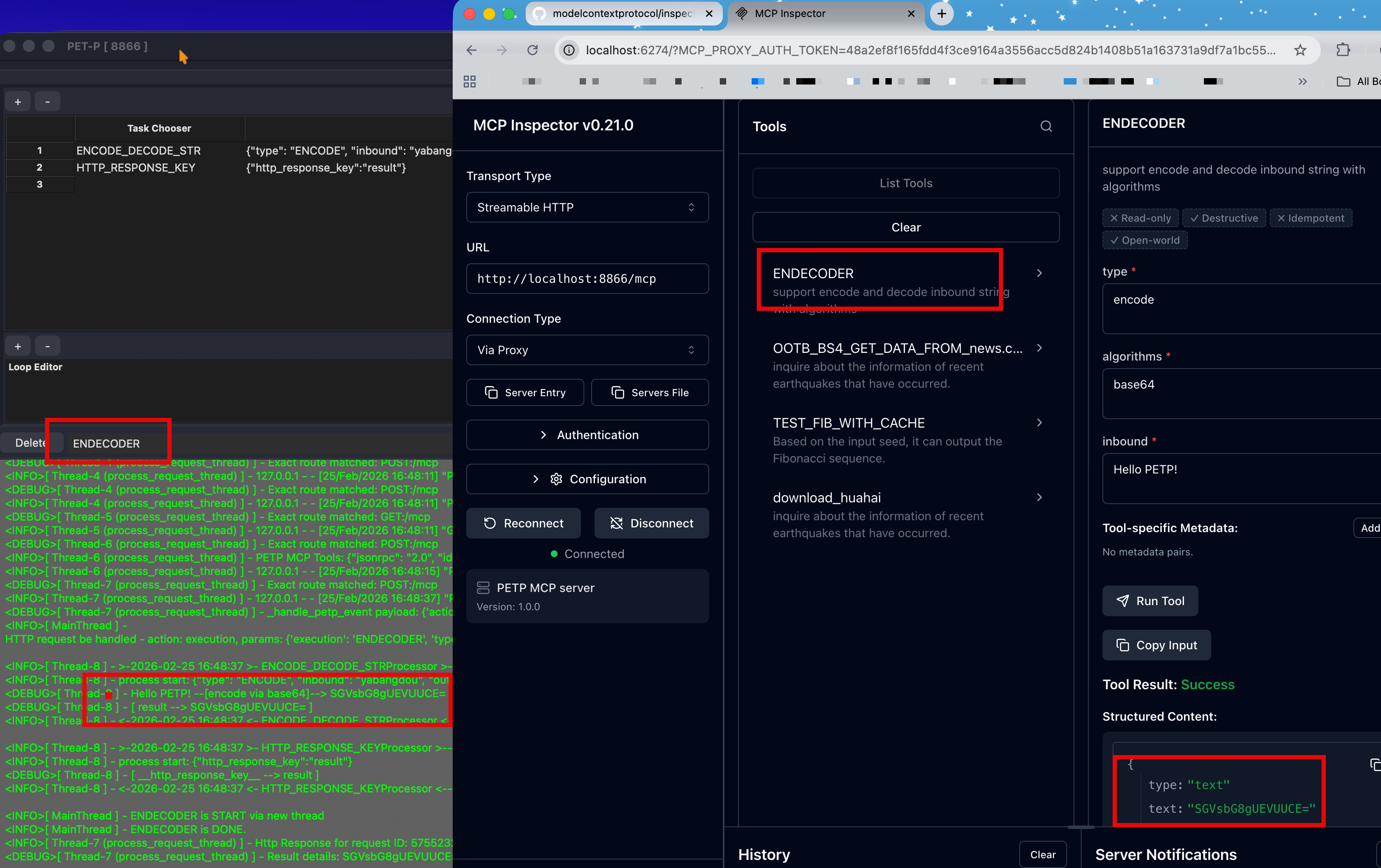
MCP Tool Server — integrate with Claude Code, Cursor, and other AI agents:
Features
| Category | Capabilities |
|---|---|
| Browser Automation (Selenium) | Navigate, click, key-in, collect, batch find, iFrame, cookies, screenshot. SAP Ariba Angular form controls: yes/no radio, cascading tree picker, single- & multi-select dropdowns, Material date picker. Chrome DevTools Recorder import. |
| SSH / SFTP (Paramiko) | SSH/SFTP sessions, remote commands, file upload/download. |
| File & Folder | Open, write, delete, read, find, watch & auto-move, ZIP/UNZIP. |
| Data & Spreadsheet | CSV/Excel read & write, collect, filter, group-by, mapping, masking, merge. Chinese almanac (CNLunar). |
| Database | MySQL, PostgreSQL, SAP HANA, SQLite — unified DB_ACCESS processor. |
| AI / LLM (10 providers) | DeepSeek, Gemini, Ollama, Zhipu, Anthropic, Qianfan, MiniMax, Doubao, Moonshot, OpenAI-compatible. Setup + Q&A + MCP tool calling. |
| AI Execution Generator | Natural language → task flow generation. Multi-turn chat, Processor browser, selective context, connection caching. |
| MCP | Standard MCP Tool Server (Streamable-HTTP). MCP client for all LLM providers. OOTB tools: weather query, daily almanac. |
| HTTP / Network | Configurable requests, response extraction, OAuth2/PKCE, Basic Auth, XSRF. |
| SMTP send (CC/BCC, HTML, attachments). IMAP receive (filter, attachment download). | |
| OCR & Captcha | Image text extraction (paddleocr/rapidocr/easyocr). Captcha solving (ddddocr). |
| Mouse & GUI (PyAutoGUI) | Click, scroll, position query. |
| Execution Control | Init params, nested execution, conditional stop/jump, IF_ELSE branching, loops, shell commands. |
| Portable Runtime | Self-contained, lightweight engine split out of PETP — runs a single Execution headless (incl. Selenium), decoupled from GUI/HTTP. Ideal for RPA: author & test in the GUI, run lightweight in portable/. cp -r into any Python project or cf push to Cloud Foundry; GUI-authored YAML runs unchanged. |
| Theme | 9 themes (System auto + 8 named) with live switching. |
🤖 AI Execution Generator
Highlight — Generate and modify PETP task flows through natural language conversation with LLM. Supports 10 LLM providers including Hyperspace, Anthropic, DeepSeek, Zhipu, Gemini, Ollama, and more.
Entry Points:
- Create Execution → "AI Generate" template
- Right-click taskGrid → "AI Assist" (modify existing) — pre-selects only the processors used in the current Execution to minimize token usage
- MCP Editor → "AI" button (auto-generate tool description)
Highlights:
- Multi-turn chat — ask questions, generate flows, modify tasks incrementally
- Processor browser — expandable TreeListCtrl with full documentation, search & filter
- Selective context — only checked Processors are sent to LLM (saves tokens)
- Connection caching — first-time validation, then instant reuse across sessions
- 10 LLM providers — minimal config: just set
ai_providerin petpconfig.yaml - 429 rate-limit defense — exponential backoff (2s / 4s / 8s), UI throttle ≥ 3s, per-call token accounting log
Token controls (new):
ai_max_response_tokens— hard upper bound on model output length (default 8192)ai_max_request_tokens— local pre-flight cap on request size (default 60000); over-limit prompts are rejected before hitting the provider
AI-Powered MCP Tool Publishing:
- One-click generation of
mcp_descJSON for exposing Executions as MCP tools - Auto-extracts input parameters from
INITIAL_PARAMSand output keys from result tasks - Generates AI-agent-friendly descriptions that help LLMs understand when to call the tool
- Smart merge — new fields are added without overwriting existing configuration
- Progress dialog with live status and preview before applying
AI Error Analysis & Auto-Fix:
- On execution failure, AI automatically analyzes the error with full context (failed task, surrounding tasks, traceback)
- Pinpoints root cause and suggests specific fixes
- One-click "Open AI Assist" pre-fills the diagnosis — continue fixing in multi-turn chat
Vision Model Support (Ollama):
AI_LLM_QANDAacceptsimage_pathparameter for multimodal prompts- Works with Ollama vision models (gemma4, llava, moondream, etc.)
- Image path supports expressions — dynamically reference files from previous tasks in
data_chain
Configuration (only ai_provider required, rest auto-fills from provider defaults):
application:
  ai_provider: zhipu              # or: deepseek, anthropic, hyperspace, gemini, ollama, etc.
  ai_model: ""                    # empty = provider default (e.g. GLM-5)
  ai_api_key: ""                  # empty = read from default env var (e.g. ZHIPU_ACCESS_KEY)
  ai_base_url: ""                 # empty = provider default URL
  ai_max_response_tokens: 8192
  ai_max_request_tokens: 60000
See Configuration Docs for full provider list and details.
Dynamic Function (_fn) & Expression Enhancements
All dynamic function parameters (_fn, _func, _func_body, lambda_*) receive the Processor instance as p, enabling full access to PETP utilities inside custom code:
# In _fn function body — p is the Processor instance
result = p.get_data("my_key")
p.populate_data("output", processed_value)
today = p.str_to_date("2026-05-11")
Available p methods in both expression and _fn contexts:
| Method | Description |
|---|---|
p.get_data(key) |
Read from data_chain |
p.get_deep_data([keys]) |
Nested data access |
p.get_data_chain() |
Get entire data_chain dict |
p.populate_data(k, v) |
Write to data_chain |
p.get_now_str() |
Current timestamp (YYYYMMDDHHmmss) |
p.get_now_in_str(fmt) |
Current time with custom format |
p.str_to_date(s, fmt) |
Parse date string to date object |
p.get_rdir() / p.get_ddir() / p.get_tdir() |
Resource/Download/Test directories |
p.expression2str(s) |
Evaluate f-string expression |
p.str2dict(s) / p.json2dict(s) |
String parsing utilities |
Edit Complex Value — Handy Tool button:
- Right-click any property → "Edit Complex Value" includes a Handy Tool button
- Automatically detects whether the parameter is an expression or
_fnfunction body - Expression context: snippets wrapped in
{p.xxx()}for f-string evaluation - Function body context: raw
p.xxx()calls plusimportstatements
Running Modes
| Mode | Command | GUI | Use Case |
|---|---|---|---|
| Desktop | python PETP.py |
Yes | Interactive development |
| Background | python PETP_background.py |
No | CLI, HTTP/MCP service |
| Docker | docker run -p 8866:8866 petp |
No | Server deployment |
| Portable | python portable/petp_run.py NAME |
No | Copy into another project / Cloud Foundry |
# Run one execution and exit
python PETP_background.py --run-execution ENDECODER --no-http

# Run execution with initial data
python PETP_background.py --run-execution MY_EXEC --init-data '{"key":"value"}' --no-http

# Run pipeline and exit
python PETP_background.py --run-pipeline DAILY_REPORT --no-http

# Run pipeline with initial data
python PETP_background.py --run-pipeline MY_PIPELINE --init-data '{"param":"value"}' --no-http

# Start HTTP/MCP service (default port 8866)
python PETP_background.py

# Custom port and auth token
python PETP_background.py --http-port 9090 --http-token my-secret-token

# Headless Selenium (Chrome without visible window)
python PETP_background.py --run-execution BROWSER_TASK --headless --no-http

# Override log level
python PETP_background.py --log-level DEBUG

# GUI-processor policy: skip (ignore) or abort (fail on GUI tasks)
python PETP_background.py --run-execution HAS_GUI_TASK --ui-policy skip --no-http
python PETP_background.py --run-execution HAS_GUI_TASK --ui-policy abort --no-http

# Stop a running background instance
python PETP_background.py --stop
All CLI arguments
| Argument | Default | Description |
|---|---|---|
--run-execution NAME |
— | Run execution on startup, then continue to HTTP or exit |
--run-pipeline NAME |
— | Run pipeline on startup (rejects if already running) |
--init-data JSON |
{} |
Inject JSON object into data_chain before run |
--no-http |
off | Exit after immediate job finishes (no HTTP server) |
--headless |
off | Headless Selenium browser (auto-enabled in Docker) |
--stop |
— | Stop running background instance (by PID) |
--http-port PORT |
8866 |
HTTP/MCP service port |
--http-token TOKEN |
from config | Bearer token for HTTP API auth |
--ui-policy {skip,abort} |
skip |
skip: silently skip GUI-only tasks; abort: fail execution |
--log-level LEVEL |
from config | DEBUG, INFO, WARNING, ERROR |
--nogui-enabled {true,false} |
true |
Set to false to disable background mode (exits immediately) |
Notes:
--run-executionand--run-pipelinecan be combined — both will run in sequence- Pipeline reentrant protection: if the same pipeline is already running, a second call returns
{"ok": false, "error": "Pipeline already running"} - Cron-enabled pipelines (
cronEnabled: truein YAML) auto-register as scheduled jobs instead of running immediately
Helper scripts for long-running sessions: see scripts/macos/start_petp.sh and scripts/windows/start_petp.ps1.
Portable Runtime
portable/ is a self-contained unit that runs a single Execution headlessly, decoupled from the GUI and HTTP layers. Copy portable/ into any Python project, or cf push it to Cloud Foundry.
from portable.petp_run import run
result = run("MY_EXECUTION", {"key": "value"})   # {"ok", "data", "error", "meta"}
Workflow: author the Execution in the desktop GUI → Ctrl+S → copy the YAML into portable/core/executions/ → python portable/petp_run.py NAME. The engine and YAML format are shared, so GUI-authored Executions run unchanged.
Chrome binaries (chrome-headless-shell + chromedriver, from Chrome for Testing) are placed under portable/webdriver/<system>/ and are not committed to git. On Cloud Foundry, manifest.yml + apt.yml (apt-buildpack) supply the required system .so libraries. See portable/README.md for full details.
MCP & AI Integration
PETP exposes executions as MCP tools via Streamable-HTTP on port 8866.
🔒 Auth is fail-closed. When
http_request_tokenis unset inpetpconfig.yaml, every protected endpoint (/petp/*,/mcp) returns501 Not Configured. Set a token before exposing the server (e.g. via Tailscale Funnel). Send it asAuthorization: Bearer <token>on every request.
🔒 Security hardening (Phase 2).
CMDprocessor: defaults toshlex.split(no shell). Setshell="yes"only for trusted commands needing pipes/redirects.- Dynamic
_fn/lambda_*parameters: run in a sandbox with__import__,open,eval,exec,compile,getattr,hasattrremoved. Whitelisted modules:re,json,datetime,math.- Encrypted password salt: override the public default by setting env
PETP_SALTor writing~/.petp/secret(POSIX mode0600). The default salt is logged with a WARNING —cryptocodeciphertext is not actually secret unless you set a custom salt.- Path traversal guard (opt-in): set
PETP_PATH_ALLOW_ROOTS=/path1:/path2to confine all file IO processors (READ_*,WRITE_*,OPEN_FILE,FILE_DELETE,UNZIP) to a whitelist of root directories. Default off — preserves existing yaml using absolute paths.- Request size limits: HTTP body capped at 4 MiB (
PETP_MAX_BODY_BYTES); JSON-RPC batch arrays capped at 64 items (PETP_MAX_BATCH_ITEMS). Both return413/400with no body parsing.- Log redaction (default on): values of sensitive keys (
api_key,password,token,authorization,secret, ...) are masked as***REDACTED***inprocess start/[Type] inputlog lines. Disable withPETP_LOG_REDACT=offfor ad-hoc debugging.
Performance (headless/Docker):
- Shared thread pool for concurrent tool calls (no per-request executor overhead)
- Static execution cache — zero filesystem I/O after startup (no stat/mtime checks)
- Processor class pre-loading on server start (eliminates cold-start latency)
- Real-time task-level SSE progress notifications during long-running
tools/call - Cached outputSchema parsing (same tool re-called without re-parsing mcp_desc JSON)
Built-in MCP Tools:
| Tool | Description | Input |
|---|---|---|
T_WEATHER_QUERY |
Query real-time weather (wttr.in) | city (e.g. "上海", "Tokyo") |
T_DAILY_ALMANAC |
Chinese almanac + holiday info (cnlunar + holiday-cn) | none (uses today) |
Claude Code / Cursor / any MCP client:
{
  "mcpServers": {
    "petp": {
      "type": "http",
      "url": "http://localhost:8866/mcp"
    }
  }
}
HTTP API (no MCP client needed):
# List tools
curl -H "Authorization: Bearer $TOKEN" http://localhost:8866/petp/tools

# Trigger execution
curl -X POST http://localhost:8866/petp/exec \
  -H "Authorization: Bearer $TOKEN" \
  -H "Content-Type: application/json" \
  -d '{"action":"execution","params":{"execution":"MY_EXEC"},"wait_for_result":"true"}'

# Trigger pipeline (sync)
curl -X POST http://localhost:8866/petp/exec \
  -H "Authorization: Bearer $TOKEN" \
  -H "Content-Type: application/json" \
  -d '{"action":"pipeline","params":{"pipeline":"MY_PIPELINE"},"wait_for_result":"true"}'

# Trigger pipeline (async — poll with /petp/result)
curl -X POST http://localhost:8866/petp/exec \
  -H "Authorization: Bearer $TOKEN" \
  -H "Content-Type: application/json" \
  -d '{"action":"pipeline","params":{"pipeline":"MY_PIPELINE"},"wait_for_result":"false"}'
| Endpoint | Description |
|---|---|
GET /health |
Health check |
GET,POST /mcp |
MCP Tool Server (Streamable-HTTP) |
GET /petp/tools |
List exposed tools |
POST /petp/exec |
Trigger execution or pipeline |
GET /petp/result?request_id=<id> |
Poll async result |
Build & Docker
# Standalone executable
python build/PETP_build.py   # → dist/PETP.app or dist/PETP.exe

# Docker — Background service (headless, port 8866)
./build/script/docker_build_bg.sh              # build + export tar
./build/script/docker_build_bg.sh --run        # build + start container
./build/script/docker_build_bg.sh --no-tar     # build only
./build/script/docker_build_bg.sh --push repo:tag  # push to registry
./build/script/docker_build_bg.sh --dirty      # use working dir (skip git archive)

# Docker — Web App (port 5555)
./build/script/docker_build_webapp.sh          # build + export tar
./build/script/docker_build_webapp.sh --run    # build + start container
./build/script/docker_build_webapp.sh --dirty  # use working dir (skip git archive)
Note: Build scripts default to
git archivemode — only git-tracked and staged files are included in the Docker context. Use--dirtyto include all working directory files (relies on.dockerignore).
Deploy to NAS
# Deploy BG image (scp + docker load + start container)
./build/script/deploy_bg_to_nas.sh
./build/script/deploy_bg_to_nas.sh --no-start   # only transfer + load
./build/script/deploy_bg_to_nas.sh --keep-tar   # don't delete remote tar

# Deploy Webapp image
./build/script/deploy_webapp_to_nas.sh

# Override NAS connection / port mapping
NAS_HOST=10.0.0.5 NAS_USER=myuser HOST_PORT=9090 ./build/script/deploy_webapp_to_nas.sh
| Environment Variable | Default | Description |
|---|---|---|
NAS_HOST |
192.168.1.100 |
NAS IP or hostname |
NAS_USER |
admin |
SSH username |
NAS_PORT |
22 |
SSH port |
NAS_DOCKER_DIR |
/tmp |
Remote temp dir for tar |
HOST_PORT |
8866 (BG) / 8088 (Webapp) |
Host port mapping |
Tailscale Funnel (run on NAS)
# Refresh funnel routes (reset + reconfigure)
sudo ./build/script/tailscale_funnel_refresh.sh

# Check current status only
./build/script/tailscale_funnel_refresh.sh --status
Routes configured:
/→localhost:8088(webapp)/mcp→localhost:8866(petp background)
Project Structure
| Directory | Description |
|---|---|
core/executions/ |
YAML execution definitions |
core/processors/ |
80+ processor implementations (one .py per task type) |
core/pipelines/ |
YAML pipeline definitions |
core/runtime/ |
Background runtime logic |
httpservice/ |
HTTP server & MCP handler |
mvp/ |
GUI layer (Model-View-Presenter, wxPython) |
config/ |
Runtime configuration (petpconfig.yaml) |
docs/ |
Detailed guides (EN / 中文) |
webapp/ |
Flask web app (docs) |
scripts/ |
macOS & Windows launcher scripts |
requirements/ |
Modular dependency groups |
build/ |
PyInstaller & Docker build scripts |
tools/ |
Maintenance scripts (migration, sync) |
testcoverage/ |
Tests and smoke scripts (incl. petp_http_endpoints.http for HTTP/MCP endpoint testing) |
Troubleshooting
| Problem | Solution |
|---|---|
ModuleNotFoundError |
Install the corresponding requirements/*.txt group |
| wxPython import error | Ensure .whl matches Python version — see snapshot builds |
| ChromeDriver mismatch | Download from Chrome for Testing |
| Port 8866 in use | Change http_port in config/petpconfig.yaml |
Documentation
| Guide | Description |
|---|---|
| Screenshots & Visual Tour | All platform screenshots with context |
| Running Modes & Scripts | Background mode, Docker, helper scripts, env vars |
| Dependencies | Modular groups, custom install, lock files |
| Configuration Reference | Config keys, CLI arguments, runtime result format |
| MCP & HTTP API | Full API reference, MCP inspector, tool schema |
| Pipeline & Cron | Cron scheduling, YAML format, examples |
| Parameter Migration | Rename guide for pre-2026-05 users |
Acknowledgements
Установка Petp
У этого сервера нет опубликованного пакета — он собирается из исходников. Открой репозиторий и следуй инструкции в README.
▸ github.com/lorisunjunbin/petpFAQ
Petp MCP бесплатный?
Да, Petp MCP бесплатный — установка в пару кликов через Unyly без оплаты.
Нужен ли API-ключ для Petp?
Нет, Petp работает без API-ключей и переменных окружения.
Petp — hosted или self-hosted?
Self-hosted: сервер запускается локально на твоей машине командой из раздела установки.
Как установить Petp в Claude Desktop, Claude Code или Cursor?
Открой Petp на unyly.org, выбери вкладку своего клиента (Claude Desktop, Claude Code, Cursor) и нажми Install — конфиг сгенерируется автоматически, без правки JSON.
Похожие MCP
Gmail
Read, send and search emails from Claude
 автор: Google
Slack
Send, search and summarize Slack messages
 автор: Slack
Runbear
No-code MCP client for team chat platforms, such as Slack, Microsoft Teams, and Discord.
Discord Server
A community discord server dedicated to MCP by [Frank Fiegel](https://github.com/punkpeye)
Compare Petp with
Не уверен что выбрать?
Найди свой стек за 60 секунд
Автор?
Embed-бейдж для README
Похожее
Все в категории communication