
Playback Mcp
БесплатноНе проверенMCP server that controls YouTube playback in your browser via the Playback MCP extension — play, seek, loop sections, save timestamps, build a video library

Описание
MCP server that controls YouTube playback in your browser via the Playback MCP extension — play, seek, loop sections, save timestamps, build a video library
README
Playback MCP
YouTube control for AI agents.
Loop, seek, sequence clips, and search transcripts in your real browser —
driven by Claude Code or any
MCP client.
Local-first, free, MIT.




Demo
What you can do with it
| 🎸 Music practice | Loop a passage and ramp the speed up pass by pass, hands-free. |
| 🗣️ Language learning | Slow a sentence down and jump to every place a phrase is spoken. |
| 📝 Study & notes | Summarize a lecture from its transcript and save timestamps to revisit. |
| 🍳 Cooking & how-tos | Turn a recipe or tutorial into written steps — or a clip reel of the key parts. |
| ✂️ Shorts & clips | Mine a long video for short-form ideas and pull the exact clips. |
| ⏭️ Skip the filler | Find the sponsor reads in a long podcast and jump past them. |
How it works
One broker owns the localhost port and routes each session to its own tab. Every
playback-mcp server shares a single library on disk.
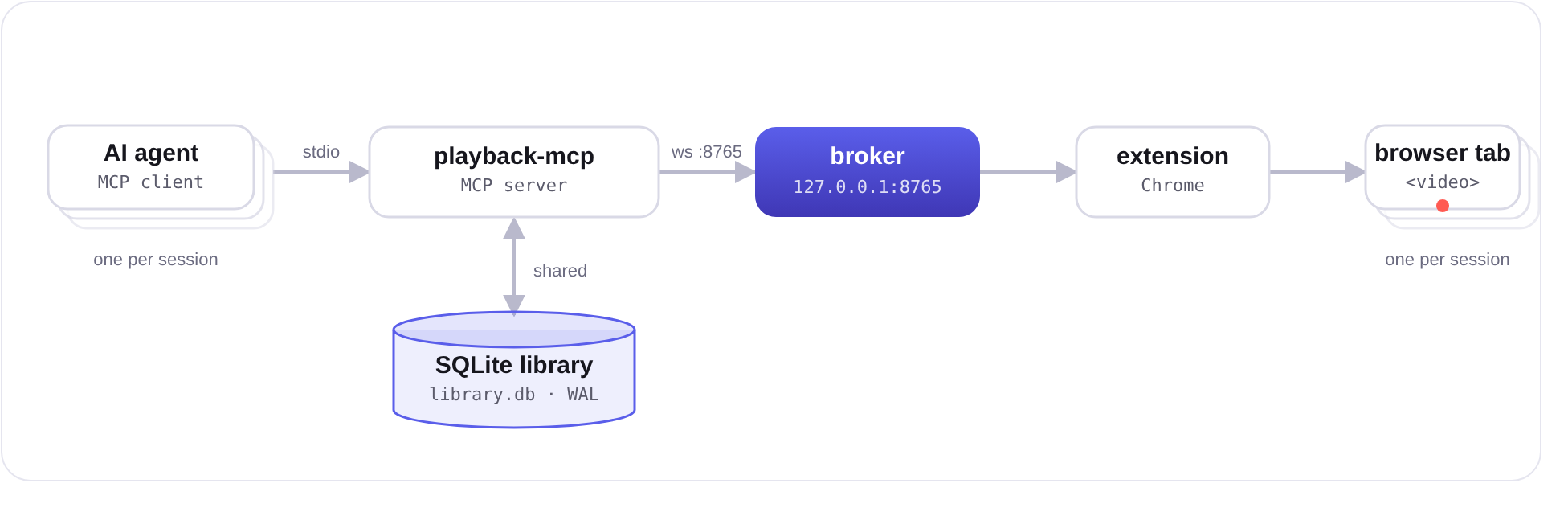
Run several sessions at once and each drives its own YouTube tab in parallel. The broker auto-starts on first use and idles out ~a minute after the last session closes.
Full multi-session architecture
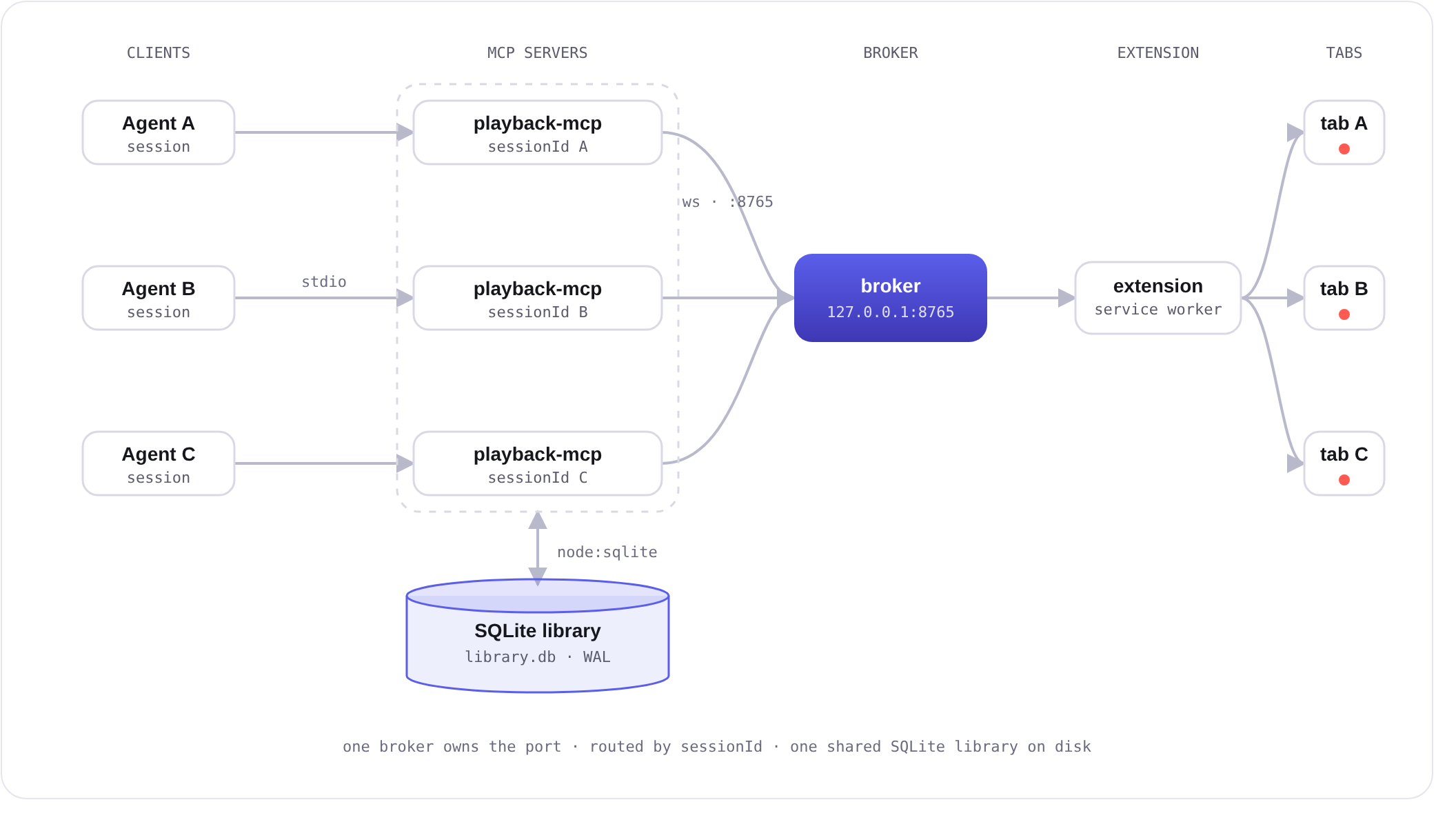
Each session gets a unique sessionId. The broker tags commands with it, multiplexes every
server onto the one extension connection, and routes events back only to the owning session.
Saved videos and timestamps live in a single WAL-mode SQLite database (node:sqlite) shared
across all servers. A WebSocket Origin allow-list at the handshake means only the extension
and local Node clients can connect — arbitrary web pages can't drive playback.
Install
The released way — no clone, no build. Requires Node 24 LTS (≥ 23.4; uses the built-in
node:sqlite) and Chrome.
Install the server — the playback-mcp package.
npm i -g playback-mcpAdd the extension — install Playback MCP from the Chrome Web Store. One click, and it stays up to date automatically. (Running a custom
YT_BRIDGE_PORT? The Web Store build bakes in port 8765 — build from source instead.)Register it with your MCP client. Any MCP client works — for Claude Code:
claude mcp add playback-mcp -- playback-mcpOr project-scoped (committed, shared with anyone who opens the repo) via a
.mcp.jsonat the repo root:{ "mcpServers": { "playback-mcp": { "command": "playback-mcp" } } }Open a YouTube video and ask — "pause it," "loop the chorus twice at 0.75×," "find where they mention hooks."
Tools
| Tool | What it does |
|---|---|
play / pause |
Resume (optionally from a time/label) or pause |
seek |
Jump to a time ("1:30", "90", "1m30s") or a saved timestamp label |
set_speed |
0.25×–2× playback rate |
set_volume |
Absolute 0–100 or relative "+10"/"-10" |
loop_section |
Loop a section N times, optionally with per-pass speeds (e.g. 0.5 → 0.75 → 1.0). Returns immediately; the loop runs in the browser |
stop_loop |
Cancel the active loop |
play_sequence |
Play a list of clips back-to-back, skipping the gaps between them. Returns immediately; runs in the browser |
stop_sequence |
Cancel the active clip sequence |
save_video / find_videos / open_video |
Build and search a library of saved videos; open them in a managed tab |
save_timestamp / list_timestamps / delete_timestamp |
Named positions and loopable sections per video |
get_transcript |
Caption transcript of the open video as [m:ss] text lines; optional start/end window and lang |
search_transcript |
Find a word/phrase in the transcript; returns timestamps with context — pair with seek to jump to a topic |
get_state |
Full player state; works even when the extension is disconnected |
Time inputs are forgiving: "90", "1:30", "1m30s", "1:02:03"; speeds accept "0.75x".
Safe by design
The extension only reads and writes the <video> element's own properties — currentTime,
playbackRate, volume, play/pause. It never clicks UI, never scrapes, and never automates
navigation beyond opening a watch URL. Everything runs on 127.0.0.1; your library lives in
a local SQLite file and nothing is sent to any external server.
Configuration
| Env var | Default | What |
|---|---|---|
YT_BRIDGE_PORT |
8765 |
WebSocket port between server and extension. The extension bundle captures this at build time, so if you change it you must rebuild the extension with the same env var set. |
PLAYBACK_MCP_DATA_DIR |
platform data dir¹ | Where the SQLite library lives (library.db) |
¹ Linux: ~/.local/share/playback-mcp (respects XDG_DATA_HOME) · macOS: ~/Library/Application Support/playback-mcp · Windows: %APPDATA%\playback-mcp
Build from source
For development, or to run a custom YT_BRIDGE_PORT (the released extension bakes in port
8765 at build time):
pnpm install
pnpm run build
- Open
chrome://extensions, enable Developer mode - Click Load unpacked and pick
extension/dist - Register the server:
claude mcp add playback-mcp -- node /abs/path/server/dist/index.js
Troubleshooting
- "Chrome extension is not connected" — make sure the extension is loaded and Chrome is running; it reconnects automatically within a few seconds.
- Tools work but nothing happens on screen — confirm this session's managed YouTube tab
still exists;
open_videocreates one. Each session controls only its own tab. - Multiple sessions — supported: each runs its own
playback-mcpand drives its own tab. They share a background broker daemon (playback-mcp-broker) that starts automatically on first use and shuts down ~a minute after the last session closes. - "This video has no captions available" / transcript errors —
get_transcriptandsearch_transcriptfetch captions straight from YouTube for the open video; some videos genuinely have no captions, andlangmust match an available track.
Development
pnpm run build
node scripts/mcp-poke.mjs       # full smoke test over real MCP stdio, no browser needed
node scripts/fake-extension.mjs # mock extension that acks all commands (for manual poking)
See CONTRIBUTING.md for the workflow, and SECURITY.md to report a vulnerability.
License
MIT © 2026 Blaise Moses
Установить Playback Mcp в Claude Desktop, Claude Code, Cursor
unyly install playback-mcpСтавит в Claude Desktop, Claude Code, Cursor и VS Code — сам разбирается с npx, uvx и сборкой из исходников.
Впервые? Поставь CLI: curl -fsSL https://unyly.org/install | sh
Или настроить вручную
Выполни в терминале:
claude mcp add playback-mcp -- npx -y playback-mcpПошаговые гайды: как установить Playback Mcp
FAQ
Playback Mcp MCP бесплатный?
Да, Playback Mcp MCP бесплатный — установка в пару кликов через Unyly без оплаты.
Нужен ли API-ключ для Playback Mcp?
Нет, Playback Mcp работает без API-ключей и переменных окружения.
Playback Mcp — hosted или self-hosted?
Self-hosted: сервер запускается локально на твоей машине командой из раздела установки.
Как установить Playback Mcp в Claude Desktop, Claude Code или Cursor?
Открой Playback Mcp на unyly.org, выбери вкладку своего клиента (Claude Desktop, Claude Code, Cursor) и нажми Install — конфиг сгенерируется автоматически, без правки JSON.
Похожие MCP
Playwright
Browser automation, scraping, screenshots
 автор: Microsoft
Puppeteer
Browser automation and web scraping.
 автор: modelcontextprotocol
opentabs-dev/opentabs
Plugin-based MCP server + Chrome extension that gives AI agents access to web applications through the user's authenticated browser session. 100+ plugins with a
 автор: opentabs-dev
robhunter/agentdeals
1,500+ developer infrastructure deals, free tiers, and startup programs across 54 categories. Search deals, compare vendors, plan stacks, and track pricing chan
 автор: robhunter
Compare Playback Mcp with
Не уверен что выбрать?
Найди свой стек за 60 секунд
Автор?
Embed-бейдж для README
Похожее
Все в категории browse