
Pocket MCP Manager
БесплатноНе проверенUnified management system for multiple MCP servers that allows users to add, launch, and control servers through a central proxy, eliminating the need to reconf

Описание
Unified management system for multiple MCP servers that allows users to add, launch, and control servers through a central proxy, eliminating the need to reconfigure connection settings when switching between servers.
README
A flexible and user-friendly management system for Model Context Protocol (MCP) servers, consisting of a client-server architecture that simplifies handling multiple MCP servers through a central interface.
Overview
The Pocket MCP Manager streamlines the process of working with multiple MCP servers by allowing you to:
- Add all your MCP servers to a central management UI
- Selectively launch specific servers through an intuitive interface
- Generate API keys linked to these running servers
- Connect to them through a single proxy MCP server in clients like Claude or Cursor
This approach means you only need to update a single API key in your AI tools when changing which MCP servers you want to use, rather than reconfiguring multiple connection settings.
Server Component
The server component is an MCP proxy server that:
- Accepts an API key from the client
- Connects to the already running MCP servers authorized by that key
- Exposes all connected servers' capabilities through a unified MCP interface
- Routes requests to the appropriate backend servers
Server Installation
# Clone the repository
git clone [email protected]:dailydaniel/pocket-mcp.git
cd pocket-mcp/server

# Install dependencies
npm install

# The build step runs automatically during installation
Connecting to Claude Desktop / Cursor
Add the following configuration to your Claude Desktop settings:
{
  "mcpServers": {
    "mcp-proxy": {
      "command": "node",
      "args": ["/full/path/to/pocket-mcp/server/build/index.js"],
      "env": {
        "MCP_API_KEY": "api_key_from_client",
        "CLIENT_API_URL": "http://localhost:<port>/api"
      }
    }
  }
}
Replace:
/full/path/to/pocket-mcp/server/build/index.jswith the absolute path to your server's build/index.js fileapi_key_from_clientwith the API key generated from the client UI<port>with the port shown in the API server logs (typically 8000)
Client Component
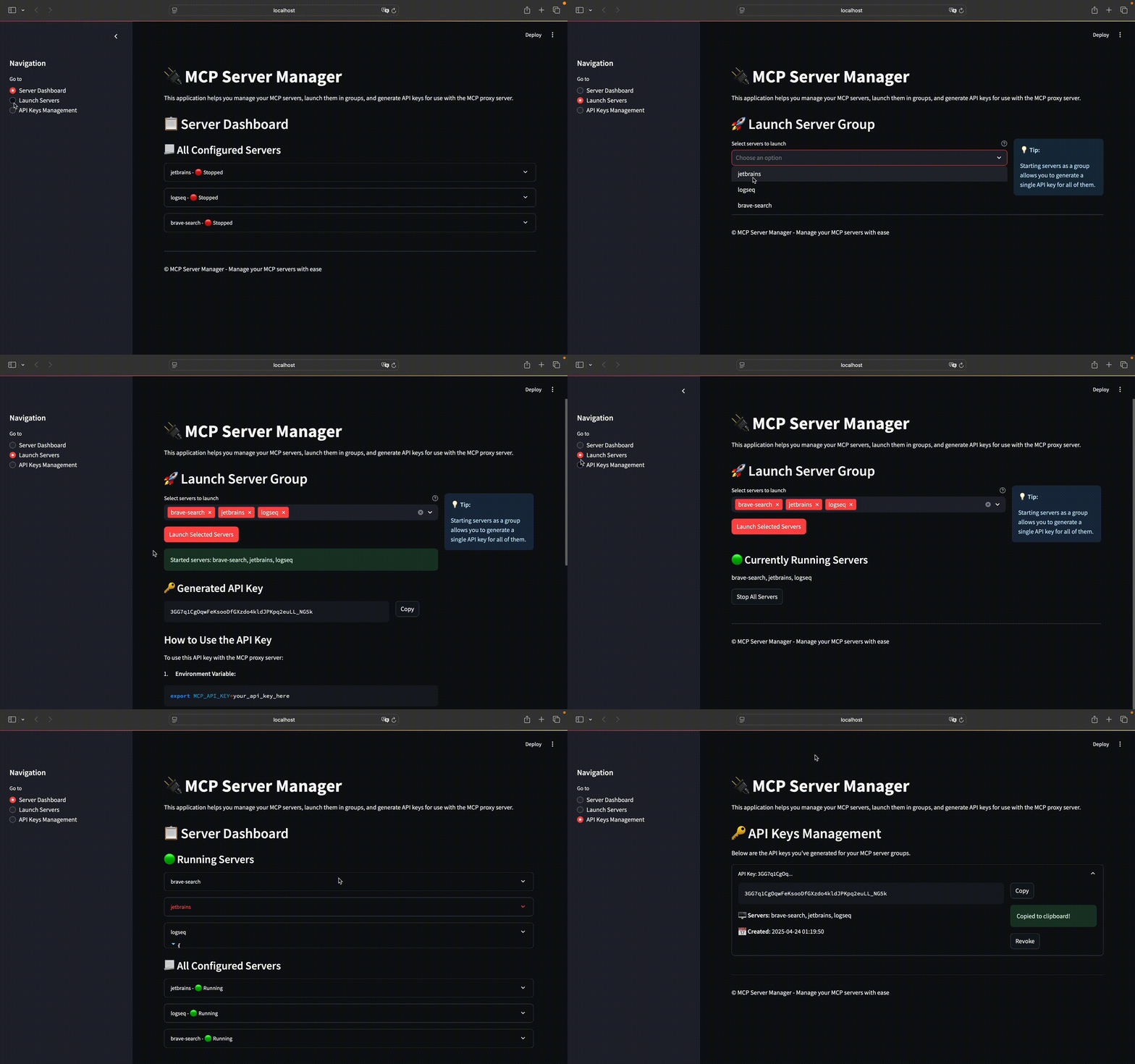
The client provides a web-based UI built with Streamlit for:
- Viewing all configured MCP servers
- Launching selected servers as a group
- Generating API keys for launched servers
- Managing existing API keys
Client Setup
# Navigate to the client directory
cd pocket-mcp/client

# Create and activate a virtual environment
python -m venv .venv --prompt "mcp-venv"
source .venv/bin/activate

# Install requirements
pip install -r requirements.txt

# Copy the example config
cp servers_config_example.json servers_config.json

# Edit the configuration with your MCP servers
vim servers_config.json

# Run the client
streamlit run app.py
Server Configuration Example
Create a servers_config.json file in the client directory with your MCP servers:
{
  "mcpServers": {
    "jetbrains": {
      "command": "npx",
      "args": ["-y", "@jetbrains/mcp-proxy"]
    },
    "logseq": {
      "command": "uvx",
      "args": ["mcp-server-logseq"],
      "env": {
        "LOGSEQ_API_TOKEN": "API_KEY",
        "LOGSEQ_API_URL": "http://127.0.0.1:<port>"
      }
    },
    "brave-search": {
      "command": "npx",
      "args": [
        "-y",
        "@modelcontextprotocol/server-brave-search"
      ],
      "env": {
        "BRAVE_API_KEY": "API_KEY"
      }
    }
  }
}
Replace API_KEY and <port> with your actual values.
Client Demo
Example LLM MCP Client
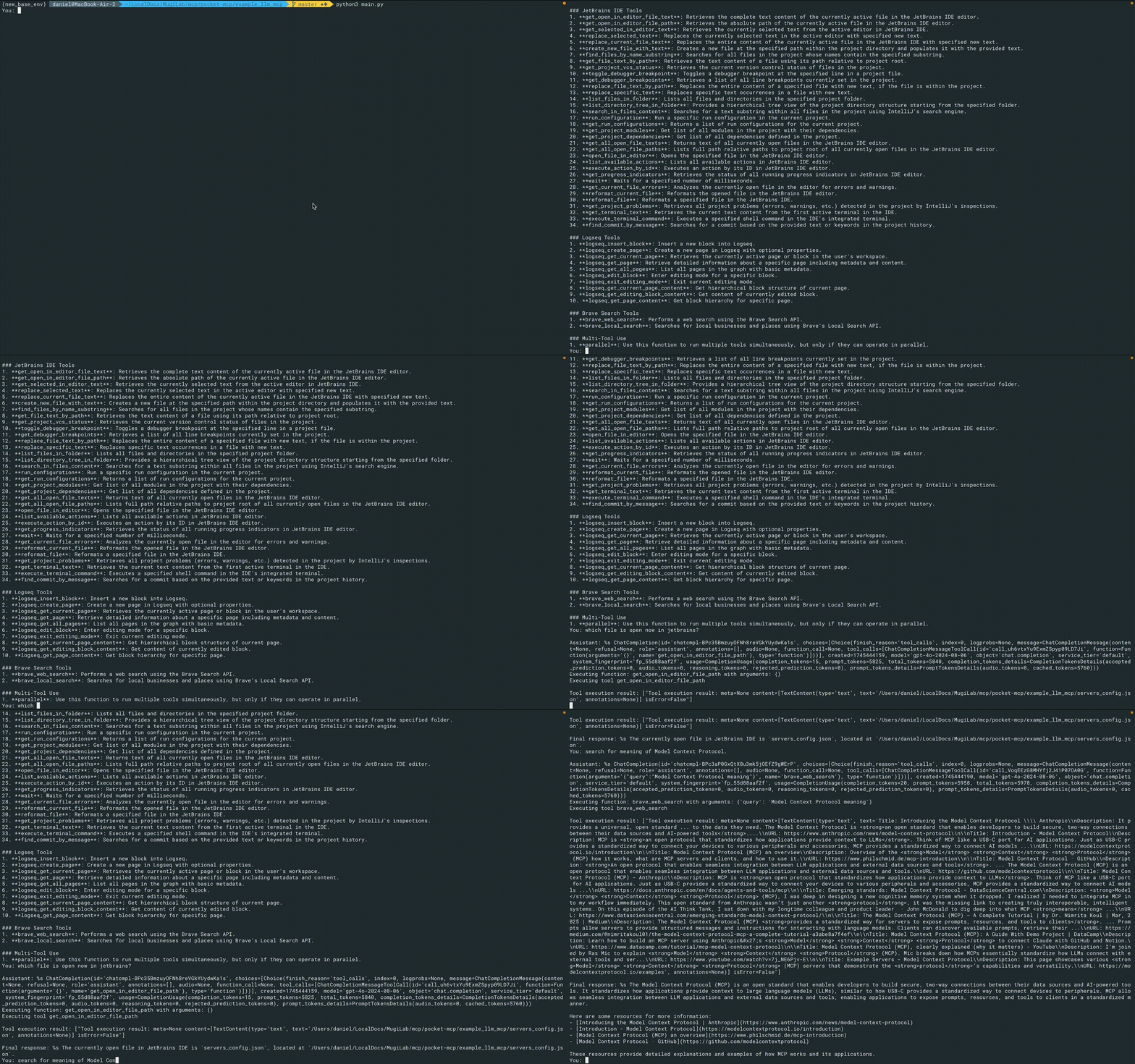
The repository includes an example client for chatting with LLMs using OpenAI API and MCP servers.
Setup and Usage
# Navigate to the example client directory
cd pocket-mcp/example_llm_mcp

# Copy the example environment file
cp .env.example .env

# Edit the .env file and add your OpenAI API key
vim .env

# Add server configurations to the servers_config.json file
cp servers_config_example.json servers_config.json

# Add API key from the client
vim servers_config.json

# If not already in a virtual environment
# May use the same virtual environment as for the client
source ../client/.venv/bin/activate

# Install requirements
pip install -r requirements.txt

# Run the client
python3 main.py
The example client will connect to your running MCP servers and allow you to chat with an LLM while utilizing MCP capabilities.
Chat Demo
Acknowledgments
- Server component based on mcp-proxy-server
- SSE implementation with mcp-proxy
TODO
- Add additional functionality to the client component
- Convert the server into a standalone npm module that can be installed with npx
- Delete cringe copyright notice from streamlit app :)
Установка Pocket MCP Manager
У этого сервера нет опубликованного пакета — он собирается из исходников. Открой репозиторий и следуй инструкции в README.
▸ github.com/dailydaniel/pocket-mcpFAQ
Pocket MCP Manager MCP бесплатный?
Да, Pocket MCP Manager MCP бесплатный — установка в пару кликов через Unyly без оплаты.
Нужен ли API-ключ для Pocket MCP Manager?
Нет, Pocket MCP Manager работает без API-ключей и переменных окружения.
Pocket MCP Manager — hosted или self-hosted?
Self-hosted: сервер запускается локально на твоей машине командой из раздела установки.
Как установить Pocket MCP Manager в Claude Desktop, Claude Code или Cursor?
Открой Pocket MCP Manager на unyly.org, выбери вкладку своего клиента (Claude Desktop, Claude Code, Cursor) и нажми Install — конфиг сгенерируется автоматически, без правки JSON.
Похожие MCP
GitHub
PRs, issues, code search, CI status
 автор: GitHub
Filesystem
Secure file operations with configurable access controls.
Memory
Knowledge graph-based persistent memory system.
Template MCP Server
A CLI tool to create a new Model Context Protocol server project with TypeScript support, dual transport options, and an extensible structure
 автор: mcpdotdirect
Compare Pocket MCP Manager with
Не уверен что выбрать?
Найди свой стек за 60 секунд
Автор?
Embed-бейдж для README
Похожее
Все в категории development