loading…
/ru
Весь каталог
PocketLantern
БесплатноНе проверенBlocker-aware decision layer for AI coding agents. Adds source-linked, time-sensitive blockers to AI technical choices — breaking changes, EOLs, lock-in, pricin

Описание
Blocker-aware decision layer for AI coding agents. Adds source-linked, time-sensitive blockers to AI technical choices — breaking changes, EOLs, lock-in, pricing shifts, and migration risk.
README
npm version npm downloads CI License: MIT
Your AI agent sounds confident. It missed the blockers.
Prices shift, versions break, licenses change. PocketLantern is a blocker-aware decision layer for AI coding agents, grounded in source-linked, time-sensitive facts.
Try these queries
Ask your AI agent after installing PocketLantern:
"Which auth provider — Clerk, Auth0, or Cognito?"
⚠️ Cognito password hashes are permanently non-exportable
⚠️ Auth0 password export requires support ticket — Free tier excluded
⚠️ Auth0 Rules/Hooks EOL 2026-11-18 — Actions not portable
✅ Clerk has the most flexible migration path
"Should I upgrade to Next.js 16?"
⚠️ Sync API access fully removed — all dynamic calls must be awaited
⚠️ Custom webpack config breaks next build
⚠️ next lint removed — switch to Biome or ESLint CLI
⚠️ Requires Node.js 20.9.0+, TypeScript 5.1.0+, React 19.0+
✅ Plan phased migration — codemod doesn't cover webpack or middleware
"Can I use the OpenAI Realtime API?"
⚠️ gpt-4o-realtime-preview removed 2026-05-07
⚠️ Beta interface (realtime=v1 header) removed same date
⚠️ GA event schema incompatible — 4 event renames
✅ Start on GA from day one — or plan dual-stack migration
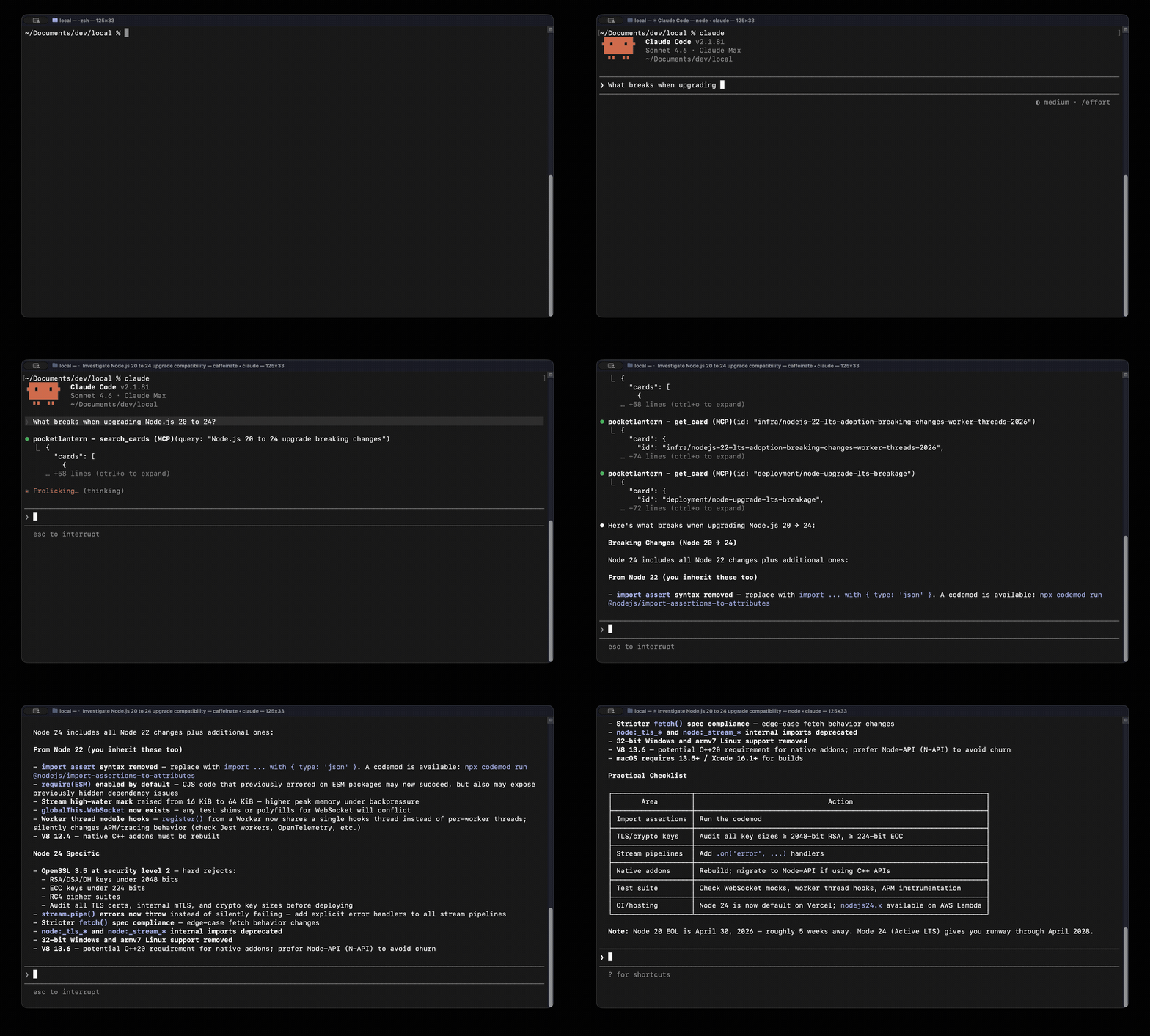
Three questions. Three blocker types. Same AI, different facts.
Quick start
Prerequisites: Node.js >= 22, an MCP client (Claude Code, Cursor, etc.)
npm install -g pocketlantern
Claude Code
In your project directory:
cd your-project
pocketlantern init
init registers the MCP server in ~/.claude.json and adds a one-line rule to your project's CLAUDE.md. Restart Claude Code (Ctrl+C, then run claude again), then ask your first query.
Cursor / Windsurf / other MCP clients
Add to your MCP config (Cursor: ~/.cursor/mcp.json):
{
  "mcpServers": {
    "pocketlantern": {
      "command": "pocketlantern-mcp"
    }
  }
}
Then add this line to your project rules (.cursorrules, Kiro steering file, etc.):
For technology decisions, upgrades, migrations, or licensing questions: before finalizing your answer, check the PocketLantern MCP server's search_cards tool for blockers in these bundled decision cards — your training data may be stale.
Reload MCP servers: Cursor — Cmd+Shift+P -> "MCP: Restart Servers". Windsurf — restart the editor.
More queries to try
"How did Vercel pricing change with Fluid Compute?" Billing split to Active CPU + Memory, shared-process concurrency breaks isolation
"Prisma or Drizzle for Edge/serverless?" Prisma v7 ESM + driver adapter breaking, Edge preview-only; Drizzle 0.30-1.0 also breaking
Verify installation
pocketlantern doctor               # check installation status
pocketlantern search "auth pricing" # search cards from CLI
How it works
PocketLantern is an MCP server. Your AI agent calls search_cards — and gets source-linked decision cards plus source-linked blocker warnings where available.
Agent asks question
  -> search_cards("clerk vs auth0 authentication")
  -> 3 cards + 5 blocker warnings (lock-in, EOL, export restrictions)
  -> Agent answers with source-linked constraints
Local cardset. Instant lookup. No vector database. No embeddings. Keyword search, card links, and source-linked blocker warnings where available. The value is in source-linked decision cards, not clever retrieval alone.
search_cards("auth", constraints:["serverless"]) -> cards + blockers
get_card("auth/clerk-vs-auth0-vs-cognito-2026")  -> full card with facts
get_related_cards(...)                           -> connected topics
What's included
Blocker-aware decision cards across 27 categories — plus source-linked blocker warnings from the bundled graph index. Ships with the npm package, works immediately, no network, no account:
| Category | What it covers |
|---|---|
| auth | Vendor lock-in, migration pain, SSO, RBAC, passkeys |
| frontend | Next.js, React, Svelte, Vite, Angular upgrade blockers |
| database | Prisma, Drizzle, Postgres, Aurora, Neon, Supabase |
| ai | OpenAI API migrations, model pricing, batch vs streaming |
| serverless | Vercel, Cloudflare Workers, Lambda cost and runtime |
| infra | Hosting platforms, Terraform, Node.js LTS, Python EOL |
| backend | Supabase vs Firebase, Express, job queues, realtime sync |
| + 18 more | deployment, devtools, testing, security, compliance, ... |
What a card looks like
Each card is a structured YAML file with source-linked facts and official reference links:
id: auth/clerk-vs-auth0-vs-cognito-2026
title: Clerk vs Auth0 vs Cognito Under Current Pricing and Feature Changes
problem: Select an auth vendor given recent pricing shifts, MAU economics, ...
constraints: [cost-sensitive, low-ops, enterprise, compliance, serverless]
candidates:
  - name: Clerk
    summary: "Pro starts at $20/mo, includes 50,000 MRUs per app..."
    when_to_use: "Choose for small-team + low-ops + cost-sensitive SaaS..."
    tradeoffs: "Best DX and fastest implementation..."
    cautions: "Be precise about org-member limits..."
    links:
      - https://clerk.com/pricing
      - https://clerk.com/docs/guides/organizations/configure
  - name: Auth0
    # ...
  - name: Amazon Cognito
    # ...
tags: [auth, clerk, auth0, pricing, passkeys, b2b, compliance]
related_cards: [auth/sso-for-b2b-saas, auth/rbac-vs-abac-vs-rebac]
updated: 2026-03-14
See packages/schema/src/card.ts for the full schema definition.
Project structure
pocketlantern/
  packages/schema/       <- Card schema (zod + TypeScript types)
  apps/mcp-server/       <- MCP server (search, retrieval, tool handlers)
  apps/cli/              <- CLI (validate, search, init, doctor)
  packages/knowledge/    <- Decision cards + graph index (data package)
  docs/                  <- User guides & roadmap
Monorepo: pnpm workspace. Build order: schema -> knowledge (no build) -> mcp-server -> cli.
Development
pnpm build              # Build all packages
pnpm test               # Run tests (299 tests)
pnpm test:coverage      # Run with coverage report
pnpm lint               # ESLint
pnpm format:check       # Prettier check
Missing a topic? Request coverage in Card Requests.
Contributing
Contributions to the tool (schema, MCP server, CLI, search) are welcome. See CONTRIBUTING.md for guidelines.
License
Как установить
Выполни в терминале:
claude mcp add pocketlantern -- npx 
