

Описание
AI-native, MCP-ready geospatial APIs for PostGIS
README

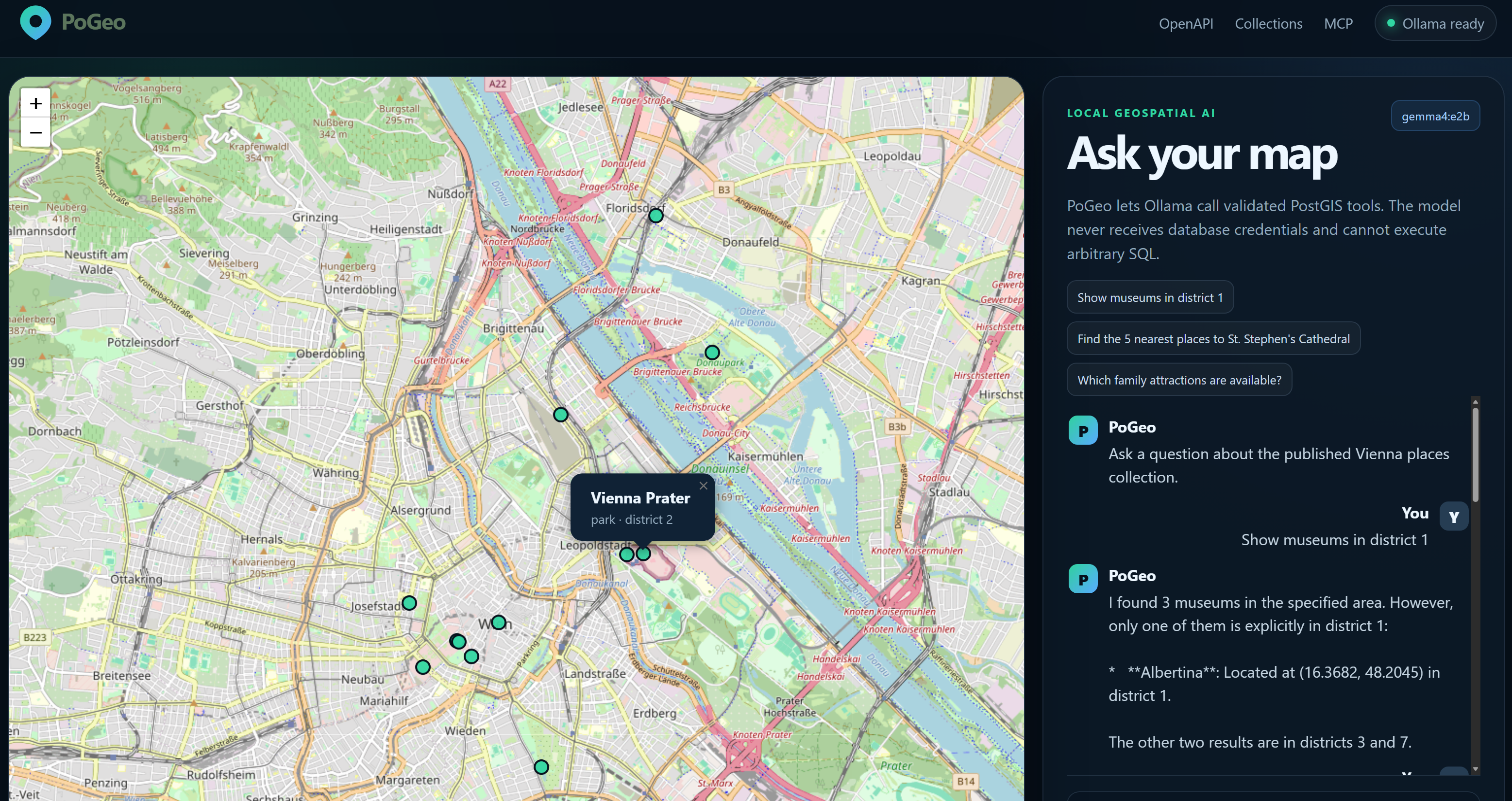
PoGeo turns an allowlisted PostGIS catalog into secure GeoJSON APIs, vector tiles, MCP tools, and a local-AI map assistant. It is designed as a focused modern geospatial server rather than a line-by-line replacement for GeoServer.
The demonstration includes Vienna points of interest, a responsive Leaflet map, and an Ollama chat
interface. The model can inspect collections and execute validated spatial tools, but it cannot run
arbitrary SQL or access database credentials.
Highlights
- FastAPI application with OpenAPI, health/readiness checks, CORS, security headers, and metrics.
- PostGIS-native querying for bounding boxes, property filters, nearest neighbours, GeoJSON, and MVT.
- MCP Streamable HTTP tools and resources mounted at
/mcp. - Ollama tool calling through the same validated geospatial functions used by MCP and REST.
- Catalog allowlist for PostgreSQL schemas, tables, identifiers, properties, limits, and geometry.
- Professional Docker Compose example with PostGIS, optional Ollama, model provisioning, and tests.
- Map-and-chat web application served by PoGeo without a separate frontend build system.
- Automated quality checks with Ruff, pytest, coverage, HTML reports, and GitHub Actions.
Architecture
graph TD
    UI[PoGeo Web App] --> API[FastAPI]
    GIS[GIS / Web Clients] --> API
    MCPCLIENT[AI Agent / MCP Client] --> MCP[MCP Streamable HTTP]
    API --> TOOLS[Shared PoGeo Tool Registry]
    MCP --> TOOLS
    OLLAMA[Ollama] <--> API
    OLLAMA --> TOOLS
    TOOLS --> VALIDATE[Catalog + Pydantic Validation]
    VALIDATE --> SQL[Parameterized PostGIS SQL]
    SQL --> POSTGIS[(PostgreSQL + PostGIS)]
REST, MCP, and Ollama do not maintain separate query implementations. They converge on the same catalog, request models, geospatial service, and parameterized SQL builder.
Quick start
API, web application, and PostGIS
docker compose up --build -d postgis pogeo
Open:
- Web application: http://localhost:8000
- OpenAPI/Swagger: http://localhost:8000/docs
- Collections: http://localhost:8000/collections
- Metrics: http://localhost:8000/metrics
- MCP endpoint:
http://localhost:8000/mcp
Include local AI with Ollama
docker compose --profile ai up --build -d
The ollama-pull service downloads ${OLLAMA_MODEL:-qwen3:4b} once and stores it in the
ollama-data volume. Model downloads can take time depending on the selected model and network.
Check progress with:
docker compose logs -f ollama ollama-pull
Select another tool-capable model:
OLLAMA_MODEL=qwen3:8b docker compose --profile ai up --build -d
Stop or reset
docker compose --profile ai down
# Delete databases and downloaded models as well:
docker compose --profile ai down -v
Try the geospatial API
List published collections:
curl http://localhost:8000/collections
Return museums in Vienna's first district:
curl "http://localhost:8000/collections/places/items?category=museum&district=1&limit=20"
Find the three nearest places to St. Stephen's Cathedral:
curl "http://localhost:8000/api/nearest?collection_id=places&longitude=16.3731&latitude=48.2085&limit=3"
Request a Mapbox Vector Tile:
curl --output places.pbf \
  http://localhost:8000/collections/places/tiles/12/2234/1422.pbf
Ask Ollama to use PoGeo tools:
curl http://localhost:8000/api/chat \
  -H "Content-Type: application/json" \
  -d '{
    "message": "Show all museums in district 1 and summarize them",
    "map_context": {
      "bbox": [16.30, 48.17, 16.44, 48.27],
      "zoom": 12,
      "visible_collections": ["places"]
    }
  }'
MCP
PoGeo uses the official Python MCP SDK and exposes a stateless Streamable HTTP server at:
http://localhost:8000/mcp
Available tools:
| Tool | Purpose |
|---|---|
list_collections |
Discover approved geospatial collections. |
describe_collection |
Read geometry, CRS, and allowed properties. |
query_features |
Query GeoJSON by bounding box and exact-match filters. |
find_nearest |
Perform PostGIS nearest-neighbour and radius searches. |
Resources:
pogeo://catalog
pogeo://collections/{collection_id}
Run the included client example after starting PoGeo:
python -m pip install -e .
python examples/mcp_client.py
The MCP interface intentionally does not expose execute_sql.
Catalog configuration
PoGeo publishes only entries declared in config/collections.yaml:
collections:
  - id: places
    title: Vienna Places
    schema: pogeo
    table: places
    id_column: id
    geometry_column: geom
    geometry_type: Point
    srid: 4326
    properties:
      - name
      - category
      - district
      - description
    default_limit: 100
    max_limit: 1000
Schema, table, geometry, ID, and property names are validated as PostgreSQL identifiers. Filters are accepted only for properties in this file. User and model values are always sent as query parameters.
Configuration
All settings use the POGEO_ environment prefix.
| Variable | Default | Description |
|---|---|---|
POGEO_DATABASE_URL |
local PostgreSQL URL | Async PostgreSQL connection string. |
POGEO_CATALOG_PATH |
config/collections.yaml |
Published collection catalog. |
POGEO_WEB_PATH |
web |
Static demonstration application. |
POGEO_OLLAMA_BASE_URL |
http://localhost:11434 |
Ollama server URL. |
POGEO_OLLAMA_MODEL |
qwen3:4b |
Tool-capable model used for chat. |
POGEO_OLLAMA_TIMEOUT_SECONDS |
180 |
AI request timeout. |
POGEO_MAX_FEATURES |
1000 |
Global maximum features per query. |
POGEO_MAX_TOOL_ITERATIONS |
5 |
Maximum tool calls in one chat request. |
POGEO_CORS_ORIGINS |
http://localhost:8000 |
Comma-separated allowed origins. |
Copy .env.example to .env for local customization.
API surface
GET  /health
GET  /ready
GET  /metrics
GET  /api/ai/status
POST /api/chat

GET  /api/ogc
GET  /conformance
GET  /collections
GET  /collections/{collectionId}
GET  /collections/{collectionId}/items
GET  /collections/{collectionId}/items/{featureId}
GET  /collections/{collectionId}/tiles/{z}/{x}/{y}.pbf
GET  /api/nearest

POST /mcp
The current OGC routes follow OGC API conventions, but PoGeo 0.1 does not yet claim complete conformance certification.
Development
Python 3.12 or newer is required.
python -m venv .venv
source .venv/bin/activate
python -m pip install -e ".[dev]"
make lint
make unit
Start the local services:
make up
# or with Ollama
make up-ai
Run the complete Docker integration suite and create reports/test-report.html:
make test
Security model
PoGeo's safe default is read-only:
- Collections and properties are explicitly allowlisted.
- PostgreSQL identifiers are validated and quoted.
- Values are parameterized and never interpolated into SQL.
- Arbitrary SQL is unavailable through REST, MCP, and Ollama.
- Feature and AI iteration limits are enforced by the server.
- PostgreSQL statements have a timeout.
- The application container is non-root, read-only, and uses
no-new-privileges. - Ollama receives schemas and result payloads, not credentials.
The Compose stack is a development example. Production deployments should add TLS, OIDC/OAuth, network policies, secret management, PostgreSQL row-level security, persistent audit logging, rate limiting, and a restrictive database role.
See SECURITY.md and docs/architecture.md.
Roadmap
- CQL2 text and JSON filters.
- OGC API Tiles metadata and formal conformance tests.
- PostgreSQL row-level-security context propagation.
- OIDC/OAuth protection for REST and MCP.
- Redis-backed tile and result caching.
- Additional spatial tools such as intersects, within-distance joins, and aggregation.
- Configurable styles and MapLibre vector-tile demonstration.
- Audited write workflows with explicit human approval.
License
Copyright 2026 Vahid Tavakkoli.
Licensed under the Apache License 2.0.
Установка PoGeo
У этого сервера нет опубликованного пакета — он собирается из исходников. Открой репозиторий и следуй инструкции в README.
▸ github.com/vtavakkoli/PoGeoFAQ
PoGeo MCP бесплатный?
Да, PoGeo MCP бесплатный — установка в пару кликов через Unyly без оплаты.
Нужен ли API-ключ для PoGeo?
Нет, PoGeo работает без API-ключей и переменных окружения.
PoGeo — hosted или self-hosted?
Self-hosted: сервер запускается локально на твоей машине командой из раздела установки.
Как установить PoGeo в Claude Desktop, Claude Code или Cursor?
Открой PoGeo на unyly.org, выбери вкладку своего клиента (Claude Desktop, Claude Code, Cursor) и нажми Install — конфиг сгенерируется автоматически, без правки JSON.
Похожие MCP
Fetch
Web content fetching and conversion for efficient LLM usage.
AWS KB Retrieval
Retrieval from AWS Knowledge Base using Bedrock Agent Runtime.
 автор: modelcontextprotocol
Spring AI MCP Server
Provides auto-configuration for setting up an MCP server in Spring Boot applications.
llm-analysis-assistant
A very streamlined mcp client that supports calling and monitoring stdio/sse/streamableHttp, and can also view request responses through the /logs page. It also
 автор: xuzexin-hz
Compare PoGeo with
Не уверен что выбрать?
Найди свой стек за 60 секунд
Автор?
Embed-бейдж для README
Похожее
Все в категории ai