
Pomera AI Commander by matbanik
БесплатноНе проверенDesktop text workbench with 22+ text processing tools for content transformation and analysis.

Описание
Desktop text workbench with 22+ text processing tools for content transformation and analysis.
README

A desktop text "workbench" + MCP server: clean, transform, extract, and analyze text fast—manually in a GUI or programmatically from AI assistants (Cursor / Claude Desktop / MCP clients).
Stop pasting text into 10 random websites. Pomera (GUI + MCP) - do web searches with MCP and save your work as Pomera Notes in case of text corruption in IDE! Your search API keys are stored encrypted in local database instead of JSON config file.
📊 Why AI needs Pomera! - Pomera's MCP tools reduce token usage upto 70-80% for deterministic operations.
Download latest release · Docs: Tools · MCP Guide · CrewAI Integration · Troubleshooting
60-second demo (what to expect)
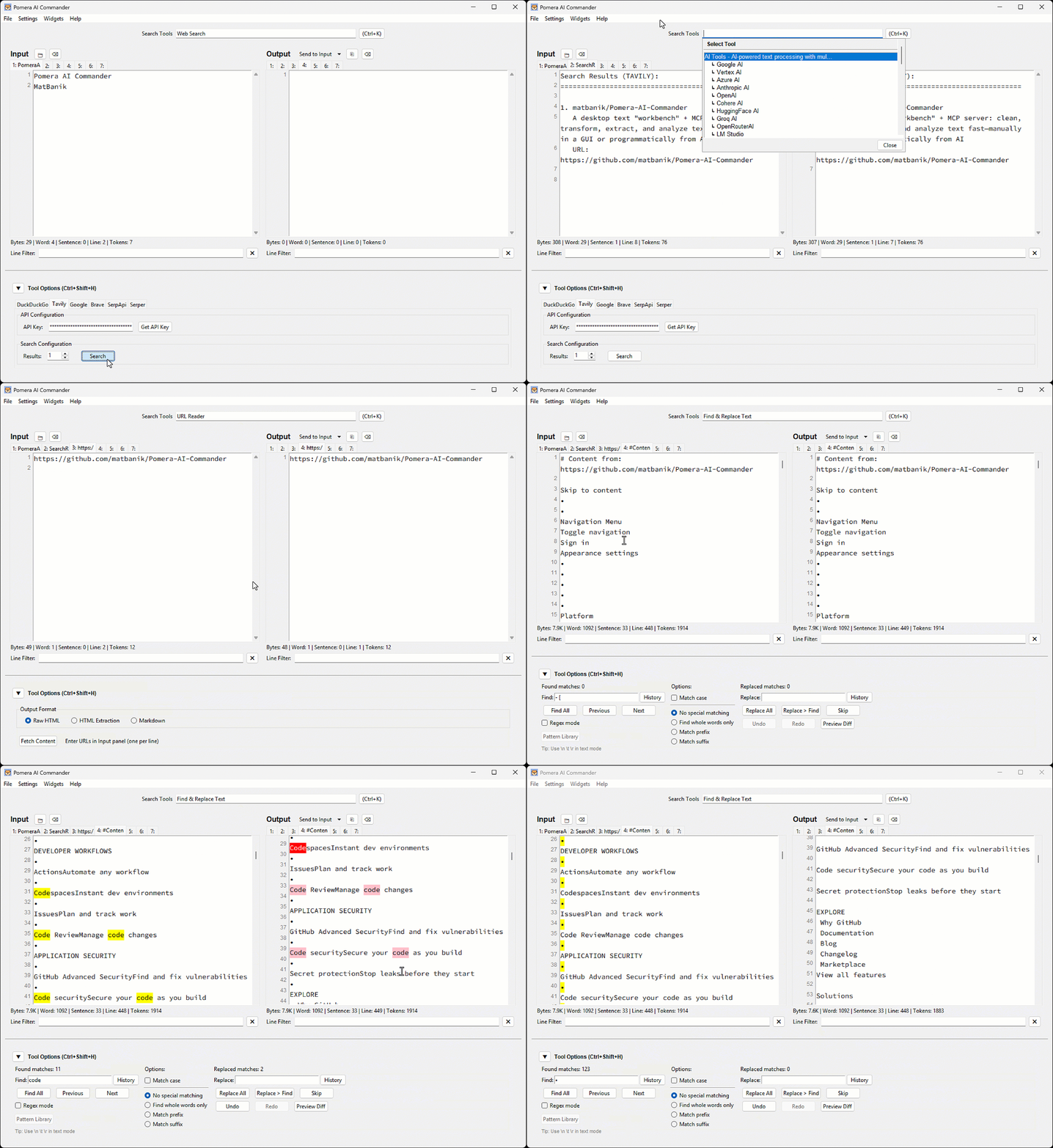
Best-for workflows
- Cleaning pasted logs / PDFs (whitespace, wrapping, stats)
- Extracting emails/URLs/IDs via regex
- Normalizing case, sorting, columns
- Hashing/encoding utilities
- Letting Cursor/Claude call these as MCP tools in a repeatable pipeline
Prerequisites
Python 3.8+ is required for all installation methods.
macOS (Homebrew)
# Tkinter support (replace @3.14 with your Python version)
brew install [email protected]
pip3 install requests reportlab python-docx
Ubuntu/Debian
sudo apt-get install python3-tk
pip3 install requests reportlab python-docx
Windows
Tkinter is included with Python from python.org.
pip install requests reportlab python-docx
Note: For PEP 668 protected environments, use
pip3 install --useror a virtual environment.
Install / Run
Option A — Prebuilt executable (recommended)
Download from Releases and run.
Option B — Python (PyPI)
pip install pomera-ai-commander
# then run:
pomera-ai-commander --help
Option C — Node.js (npm)
npm install -g pomera-ai-commander
# then run:
pomera-mcp --help
Create Desktop Shortcut
After installing via pip or npm, create a desktop shortcut for quick access:
# For pip install:
pomera-create-shortcut

# For npm install (from package directory):
python create_shortcut.py
MCP Server for AI Assistants
Pomera exposes 22 text processing tools via MCP. Configure your AI assistant:
Cursor (.cursor/mcp.json):
{
  "mcpServers": {
    "pomera": {
      "command": "pomera-ai-commander",
      "timeout": 3600
    }
  }
}
Claude Desktop (claude_desktop_config.json):
{
  "mcpServers": {
    "pomera": {
      "command": "pomera-ai-commander",
      "timeout": 3600
    }
  }
}
💡 Tip: If the simple command doesn't work, use the full path. Find it with:
# For npm install:
npm root -g
# Then use: <result>/pomera-ai-commander/pomera_mcp_server.py

# For pip install:
pip show pomera-ai-commander | grep Location
⏱️ Timeout: The
"timeout": 3600setting (in seconds) prevents MCP request timeouts during long-running AI operations likeresearchanddeepreasoning. Cline, Cursor, and Claude Desktop all default to a 60-second timeout, which is too short for AI calls involving web search + deep reasoning (60-300s). See Cline #1306.
See the full MCP Server Guide for Antigravity, executable configs, and troubleshooting.
License
MIT License - see LICENSE for details.
Установить Pomera AI Commander by matbanik в Claude Desktop, Claude Code, Cursor
unyly install pomera-ai-commander-by-matbanikСтавит в Claude Desktop, Claude Code, Cursor и VS Code — сам разбирается с npx, uvx и сборкой из исходников.
Впервые? Поставь CLI: curl -fsSL https://unyly.org/install | sh
Или настроить вручную
Выполни в терминале:
claude mcp add pomera-ai-commander-by-matbanik -- npx -y pomera-ai-commanderПошаговые гайды: как установить Pomera AI Commander by matbanik
FAQ
Pomera AI Commander by matbanik MCP бесплатный?
Да, Pomera AI Commander by matbanik MCP бесплатный — установка в пару кликов через Unyly без оплаты.
Нужен ли API-ключ для Pomera AI Commander by matbanik?
Нет, Pomera AI Commander by matbanik работает без API-ключей и переменных окружения.
Pomera AI Commander by matbanik — hosted или self-hosted?
Self-hosted: сервер запускается локально на твоей машине командой из раздела установки.
Как установить Pomera AI Commander by matbanik в Claude Desktop, Claude Code или Cursor?
Открой Pomera AI Commander by matbanik на unyly.org, выбери вкладку своего клиента (Claude Desktop, Claude Code, Cursor) и нажми Install — конфиг сгенерируется автоматически, без правки JSON.
Похожие MCP
Fetch
Web content fetching and conversion for efficient LLM usage.
AWS KB Retrieval
Retrieval from AWS Knowledge Base using Bedrock Agent Runtime.
 автор: modelcontextprotocol
Spring AI MCP Server
Provides auto-configuration for setting up an MCP server in Spring Boot applications.
llm-analysis-assistant
A very streamlined mcp client that supports calling and monitoring stdio/sse/streamableHttp, and can also view request responses through the /logs page. It also
 автор: xuzexin-hz
Compare Pomera AI Commander by matbanik with
Не уверен что выбрать?
Найди свой стек за 60 секунд
Автор?
Embed-бейдж для README
Похожее
Все в категории ai