
Postgres Neo4j Server
БесплатноНе проверенEnables natural language queries to a Neo4j knowledge graph built from PostgreSQL data, integrating with Claude Desktop and REST API.

Описание
Enables natural language queries to a Neo4j knowledge graph built from PostgreSQL data, integrating with Claude Desktop and REST API.
README
Python Neo4j PostgreSQL License: MIT
A production-ready data pipeline that transforms structured content from PostgreSQL into a Neo4j knowledge graph, with Model Context Protocol (MCP) integration for AI/LLM interactions.
🌟 Key Features
- Automated ETL Pipeline: Seamlessly transfer data from PostgreSQL to Neo4j
- Entity & Relationship Extraction: Automatic identification of people, organizations, and topics
- MCP Integration: Natural language queries through Claude Desktop or REST API
- Graph Analytics: Discover patterns and relationships in your data
- Docker Support: Easy deployment with containerization
- Extensible Architecture: Ready for AI/LLM enhancements
🏗️ Architecture Overview
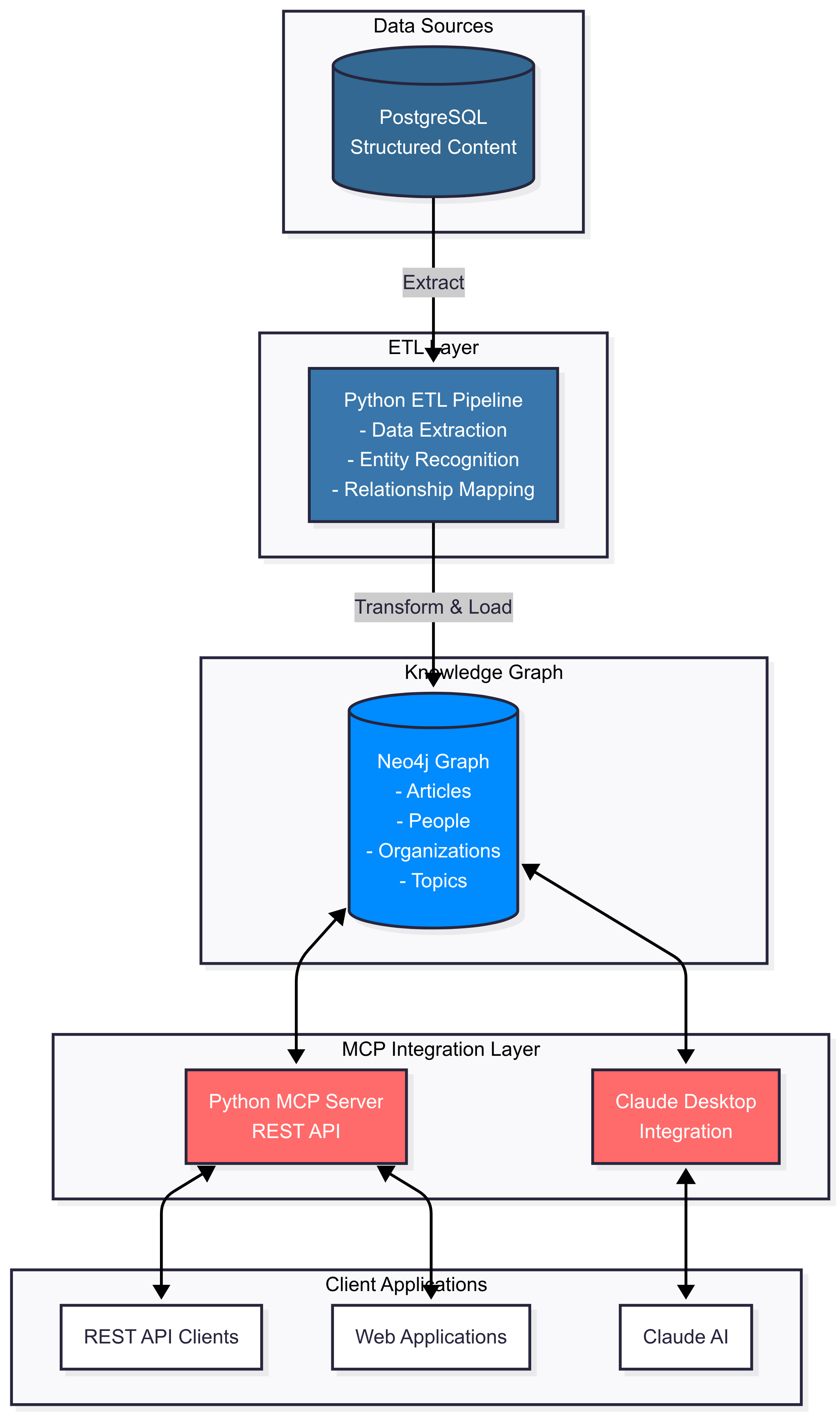
📋 Table of Contents
- System Requirements
- Quick Start
- Module Overview
- Installation
- Configuration
- Usage
- API Documentation
- Examples
- Docker Deployment
- Contributing
- License
💻 System Requirements
- Python 3.8 or higher
- PostgreSQL 14+
- Neo4j 5.0+ (Community or Enterprise)
- Node.js 16+ (for Claude Desktop integration)
- 4GB RAM minimum (8GB recommended)
- 10GB free disk space
🚀 Quick Start
# Clone the repository
git clone https://github.com/your-username/postgres-neo4j-mcp.git
cd postgres-neo4j-mcp

# Install dependencies
pip install -r requirements.txt

# Set up environment variables
cp .env.example .env
# Edit .env with your database credentials

# Run the ETL pipeline
python src/etl_pipeline.py

# Start the MCP server
python src/mcp_server.py

# Test the setup
python src/test_mcp_client.py
📦 Module Overview
Core Modules
1. ETL Pipeline (src/etl_pipeline.py)
The heart of the data transformation process.
Key Features:
- Connects to PostgreSQL and extracts structured content
- Transforms relational data into graph-ready format
- Creates nodes for Articles, People, Organizations, Topics, and Domains
- Establishes relationships based on content analysis
- Handles deduplication and data validation
Main Classes:
PostgreSQLConnector: Manages PostgreSQL connections and data retrievalNeo4jConnector: Handles Neo4j operations and graph creationPostgresToNeo4jETL: Orchestrates the complete ETL process
2. MCP Server (src/mcp_server.py)
Provides AI/LLM integration through a REST API.
Key Features:
- REST API endpoints for query execution
- Natural language to Cypher query conversion
- Schema introspection capabilities
- Support for both read and write operations
- Compatible with Claude Desktop and other LLM tools
API Endpoints:
/health: Service health check/schema: Get graph schema/execute: Execute Cypher or natural language queries/analyze: Analyze content for entity extraction
3. Test Client (src/test_mcp_client.py)
Comprehensive testing and demonstration tool.
Key Features:
- Automated test suite for all functionality
- Interactive query mode for manual testing
- Performance benchmarking
- Example queries and use cases
Data Schema
PostgreSQL Schema (sql/create_schema.sql)
structured_content
├── id (PRIMARY KEY)
├── domain (VARCHAR)
├── url (TEXT, UNIQUE)
├── title (TEXT)
├── content (TEXT)
├── author (VARCHAR)
├── published_date (TIMESTAMP)
├── category (VARCHAR)
├── tags (TEXT[])
├── entities (JSONB)
├── metadata (JSONB)
└── scraped_at (TIMESTAMP)
Neo4j Graph Schema (cypher/create_constraints.cypher)
Nodes:
├── Article (url, title, content, author, published_date, category)
├── Person (name)
├── Organization (name)
├── Topic (name)
└── Domain (name, type)

Relationships:
├── PUBLISHED_ON (Article → Domain)
├── MENTIONS_PERSON (Article → Person)
├── MENTIONS_ORGANIZATION (Article → Organization)
├── TAGGED_WITH (Article → Topic)
├── RELATED_TO (Article → Article)
└── SIMILAR_TO (Article → Article)
🔧 Installation
Step 1: Clone the Repository
git clone https://github.com/your-username/postgres-neo4j-mcp.git
cd postgres-neo4j-mcp
Step 2: Set Up Python Environment
# Create virtual environment
python -m venv venv

# Activate virtual environment
# On macOS/Linux:
source venv/bin/activate
# On Windows:
venv\Scripts\activate

# Install dependencies
pip install -r requirements.txt
Step 3: Set Up Databases
PostgreSQL Setup
# Create database
createdb content_scraper

# Run schema creation script
psql -U postgres -d content_scraper -f sql/create_schema.sql
Neo4j Setup
- Start Neo4j database
- Open Neo4j Browser (http://localhost:7474)
- Run the constraints script from
cypher/create_constraints.cypher
Step 4: Configure Environment
# Copy example environment file
cp .env.example .env

# Edit .env with your credentials
nano .env
⚙️ Configuration
Environment Variables
Create a .env file with the following variables:
# PostgreSQL Configuration
PG_HOST=localhost
PG_PORT=5432
PG_DATABASE=content_scraper
PG_USER=postgres
PG_PASSWORD=your_postgres_password

# Neo4j Configuration
NEO4J_URI=bolt://localhost:7687
NEO4J_USER=neo4j
NEO4J_PASSWORD=your_neo4j_password
NEO4J_DATABASE=neo4j

# MCP Server Configuration
MCP_SERVER_PORT=8080

# Optional: LLM Integration
OPENAI_API_KEY=your_openai_key
ANTHROPIC_API_KEY=your_anthropic_key
Claude Desktop Integration
Add to your Claude Desktop configuration file:
macOS: ~/Library/Application Support/Claude/claude_desktop_config.json
Windows: %APPDATA%\Claude\claude_desktop_config.json
{
  "mcpServers": {
    "local-neo4j": {
      "command": "uvx",
      "args": ["[email protected]"],
      "env": {
        "NEO4J_URI": "bolt://localhost:7687",
        "NEO4J_USERNAME": "neo4j",
        "NEO4J_PASSWORD": "your_password",
        "NEO4J_DATABASE": "neo4j",
        "NEO4J_NAMESPACE": "local"
      }
    }
  }
}
📖 Usage
Running the ETL Pipeline
# Run with default settings
python src/etl_pipeline.py

# Run with specific parameters
python src/etl_pipeline.py \
  --pg-password your_password \
  --neo4j-password your_password \
  --limit 100  # Process only 100 records
Starting the MCP Server
# Start the server
python src/mcp_server.py

# The server will be available at http://localhost:8080
Using the Test Client
# Run automated tests
python src/test_mcp_client.py

# Interactive mode
python src/test_mcp_client.py interactive
Example Queries
Natural Language Queries
# In interactive mode:
mcp> nl: show me all articles about AI
mcp> nl: find organizations mentioned in multiple domains
mcp> nl: count total number of nodes
Direct Cypher Queries
mcp> cypher: MATCH (a:Article)-[:TAGGED_WITH]->(t:Topic {name: 'AI'}) RETURN a.title
mcp> cypher: MATCH (p:Person)<-[:MENTIONS_PERSON]-(a:Article) RETURN p.name, count(a) as mentions
📡 API Documentation
REST API Endpoints
Health Check
GET /health
Response:
{
  "status": "healthy",
  "service": "neo4j-mcp-server"
}
Get Schema
GET /schema
Execute Query
POST /execute
Content-Type: application/json

{
  "query": "MATCH (n) RETURN count(n)",
  "type": "cypher",
  "parameters": {}
}
Natural Language Query
POST /execute
Content-Type: application/json

{
  "query": "show me all articles about AI",
  "type": "natural"
}
🐳 Docker Deployment
Using Docker Compose
# Build and start all services
docker-compose up -d

# View logs
docker-compose logs -f

# Stop services
docker-compose down
Individual Docker Commands
# Build the MCP server image
docker build -t neo4j-mcp-server .

# Run the container
docker run -d \
  -p 8080:8080 \
  --env-file .env \
  --name mcp-server \
  neo4j-mcp-server
🧪 Testing
Run the test suite:
# Run all tests
pytest tests/

# Run specific test file
pytest tests/test_etl.py

# Run with coverage
pytest --cov=src tests/
📊 Example Use Cases
1. Finding Cross-Domain Mentions
MATCH (o:Organization)<-[:MENTIONS_ORGANIZATION]-(a:Article)
WITH o, collect(DISTINCT a.domain) as domains
WHERE size(domains) > 1
RETURN o.name, domains
2. Article Similarity Analysis
MATCH (a1:Article)-[:TAGGED_WITH]->(t:Topic)<-[:TAGGED_WITH]-(a2:Article)
WHERE id(a1) < id(a2)
WITH a1, a2, collect(t.name) as shared_topics, count(t) as similarity
WHERE similarity >= 2
RETURN a1.title, a2.title, similarity
ORDER BY similarity DESC
3. Temporal Analysis
MATCH (a:Article)
WHERE a.published_date > datetime() - duration('P30D')
RETURN a.domain, count(a) as article_count
ORDER BY article_count DESC
🤝 Contributing
We welcome contributions! Please see our Contributing Guidelines for details.
- Fork the repository
- Create your feature branch (
git checkout -b feature/AmazingFeature) - Commit your changes (
git commit -m 'Add some AmazingFeature') - Push to the branch (
git push origin feature/AmazingFeature) - Open a Pull Request
📝 License
This project is licensed under the MIT License - see the LICENSE file for details.
🙏 Acknowledgments
- Neo4j team for the excellent graph database
- Anthropic for Claude and MCP protocol
- PostgreSQL community
- All contributors to this project
📧 Contact
- Project Link: https://github.com/your-username/postgres-neo4j-mcp
- Issues: https://github.com/your-username/postgres-neo4j-mcp/issues
Made with ❤️ by Faaiz Shah
Установка Postgres Neo4j Server
У этого сервера нет опубликованного пакета — он собирается из исходников. Открой репозиторий и следуй инструкции в README.
▸ github.com/faaizshah/Postgres-Neo4j-MCPFAQ
Postgres Neo4j Server MCP бесплатный?
Да, Postgres Neo4j Server MCP бесплатный — установка в пару кликов через Unyly без оплаты.
Нужен ли API-ключ для Postgres Neo4j Server?
Нет, Postgres Neo4j Server работает без API-ключей и переменных окружения.
Postgres Neo4j Server — hosted или self-hosted?
Доступен hosted-вариант: Unyly запускает сервер в облаке, локальная установка не обязательна.
Как установить Postgres Neo4j Server в Claude Desktop, Claude Code или Cursor?
Открой Postgres Neo4j Server на unyly.org, выбери вкладку своего клиента (Claude Desktop, Claude Code, Cursor) и нажми Install — конфиг сгенерируется автоматически, без правки JSON.
Похожие MCP
wenb1n-dev/SmartDB_MCP
A universal database MCP server supporting simultaneous connections to multiple databases. It provides tools for database operations, health analysis, SQL optim
 автор: wenb1n-dev
Postgres Server
This server enables interaction with PostgreSQL databases through the Model Context Protocol, optimized for the AWS Bedrock AgentCore Runtime. It provides tools
 автор: madhurprash
Postgres
Query your database in natural language
 автор: Anthropic
PostgreSQL
Read-only database access with schema inspection.
автор: modelcontextprotocolCompare Postgres Neo4j Server with
Не уверен что выбрать?
Найди свой стек за 60 секунд
Автор?
Embed-бейдж для README
Похожее
Все в категории data