
Powerbi Proxy
БесплатноНе проверенA self-hosted MCP server that proxies MCP clients to Power BI, using your own Entra tenant and Azure subscription. It enables DAX queries, workspace listing, an

Описание
A self-hosted MCP server that proxies MCP clients to Power BI, using your own Entra tenant and Azure subscription. It enables DAX queries, workspace listing, and dataset management while preserving user-specific row-level security.
README
A self-hosted MCP (Model Context Protocol) server that proxies MCP clients such as Claude to Power BI — using your own Entra tenant, your own Azure subscription. A drop-in workaround for Microsoft's broken hosted endpoint.
License: MIT Python 3.11+ FastMCP 3.x CI
This is a reference implementation, not a hosted service. This repository does not deploy anything into the maintainer's Azure tenant. You deploy your own copy into your own Azure subscription and Entra tenant.
The problem
Microsoft's hosted Power BI MCP endpoint at api.fabric.microsoft.com/v1/mcp/powerbi has been broken since early 2026:
AADSTS9010010: The resource parameter provided in the request
               doesn't match with the requested scopes
The discovery response emits a resourceUrl field that conflicts with the requested scopes against Entra's v2 endpoint. OAuth attempts fail in affected MCP clients. See microsoft/powerbi-modeling-mcp#68 for the full thread.
What this is
A self-hosted server (~275 lines) that:
- Runs its own OAuth proxy via FastMCP's
AzureProvider— never emits the offendingresourceUrlfield. - Each user signs in with their own Microsoft account.
- Per-request On-Behalf-Of token exchange — Power BI RLS applies per user, no shared service account.
- Single-tenant, enforced at startup (multi-tenant configs are rejected).
- Terraform spins up the whole thing on Azure App Service in one apply.
What this is not
- Not a managed service. You bring your own Entra app registration and your own Azure hosting.
- Not multi-tenant. Each deployment serves one Entra tenant. (You can run several copies.)
- Not a drop-in replacement for the Microsoft endpoint in the "zero-setup" sense. It is a drop-in replacement in the "actually works" sense.
Tools exposed
| Tool | Purpose |
|---|---|
list_workspaces |
Workspaces the signed-in user can see |
list_datasets |
Datasets in a workspace |
run_dax_query |
Arbitrary EVALUATE … DAX against a dataset, as the user |
list_measures, list_columns |
Stubs — schema enumeration is unsupported on imported datasets; the stubs explain why and suggest run_dax_query probes |
Deliberately narrow. Build your own @mcp.tool() functions on top of run_dax_query for domain-specific reports.
Architecture
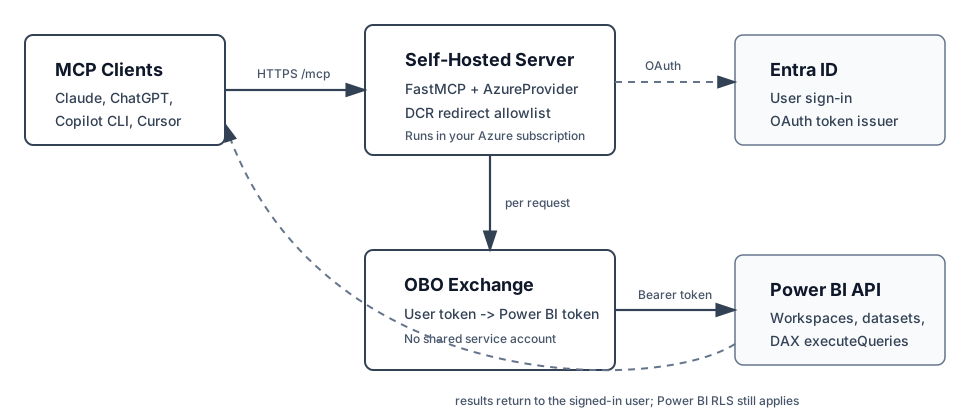
MCP client (Claude / other MCP clients)
       │  HTTPS
       ▼
  This server  ── AzureProvider OAuth proxy ──▶ login.microsoftonline.com
       │
       └── Per-request OBO exchange (azure-identity)
              │
              ▼
       Power BI REST API
       (queries run with the user's RLS — no service account)
Full auth flow and component breakdown in docs/architecture.md.
Known Working Clients
| Client | Redirect URI pattern | Status |
|---|---|---|
| Claude.ai | https://claude.ai/api/mcp/* |
Default pattern |
| ChatGPT | https://chatgpt.com/connector_platform_oauth_redirect |
Needs independent verification |
| GitHub Copilot CLI | TBD | Needs verification |
| Cursor | TBD | Needs verification |
Verified additions are welcome. Use the MCP client redirect URI issue template
or open a PR that updates this table and terraform.tfvars.example.
Quick start
Prerequisites
- An Azure subscription with admin rights to create app registrations
- Power BI tenant setting "Dataset Execute Queries REST API" enabled
- Terraform
>= 1.5.0 - Azure CLI for deployment
- Python
3.11+(for local development only)
1. Configure and apply Terraform
cd infra
cp terraform.tfvars.example terraform.tfvars
# Edit terraform.tfvars: set subscription_id, tenant_id, owner
terraform init
terraform plan        # review every resource before applying
terraform apply
When apply succeeds, Terraform prints a next_steps output that walks you through the remaining manual steps.
2. Grant admin consent
Portal → Entra ID → App registrations → <your-project>-server → API permissions → Grant admin consent.
3. (Strongly recommended) Configure Conditional Access
Your Entra app's sign-in surface is now exposed to the public internet. Without Conditional Access (or at minimum MFA), one phished password gives an attacker OBO'd Power BI access to that user.
See docs/azure-setup.md#conditional-access for the policy. Scope it to the new app registration — it won't affect anything else in your tenant.
4. Deploy
See docs/deployment-azure-app-service.md for the full Azure App Service deployment guide. The short version:
python -m zipfile -c app.zip pbi_mcp_remote.py requirements.txt
az webapp deploy \
  --name <your-project-name> \
  --resource-group <your-project-name>-rg \
  --src-path app.zip \
  --type zip
If you want deploys from your own GitHub repo instead, see docs/github-actions-deploy.md. This public repo does not deploy anything automatically.
5. Connect a client
Add the MCP endpoint to your client's custom connector configuration:
https://<your-project-name>.azurewebsites.net/mcp
(Replace <your-project-name> with whatever you set in terraform.tfvars.) First connection triggers a one-time OAuth consent prompt per user.
Local development
python -m venv .venv
.venv\Scripts\activate                  # Windows
# source .venv/bin/activate              # macOS/Linux

pip install -r requirements.txt
cp .env.example .env                     # fill in ALL values — JWT_SIGNING_KEY is required
uvicorn pbi_mcp_remote:app --host 127.0.0.1 --port 8000
For testing against a real MCP client locally, expose localhost:8000 via ngrok http 8000 (or your tunnel of choice) and update MCP_SERVER_URL to the public URL. Remember to add the tunnel's callback to MCP_ALLOWED_REDIRECT_URIS if you're not using Claude.ai.
Cost
The default Terraform path runs on Azure App Service B1 Linux (~$13/month). Key Vault is a few cents. Optional GitHub Actions OIDC has no direct cost.
To run cheaper: deploy the Docker image to a smaller host (Fly.io, Railway, a $5 VPS) — see the included Dockerfile. You lose the Key Vault wiring and have to manage secrets yourself; read SECURITY.md first.
Documentation
| File | What's in it |
|---|---|
| docs/architecture.md | Auth + data flow, components, network surface |
| docs/azure-setup.md | Admin consent, Conditional Access, Power BI tenant settings |
| docs/deployment-azure-app-service.md | Recommended Azure App Service deployment path |
| docs/github-actions-deploy.md | Optional GitHub Actions deploy setup for your own repo |
| docs/troubleshooting.md | Common errors and what they actually mean |
| SECURITY.md | Threat model, enforced guards, recommended hardening |
| CONTRIBUTING.md | How to propose changes |
| CHANGELOG.md | Release notes |
Contributing
PRs welcome — especially for additional verified MCP client redirect URI patterns (ChatGPT, Copilot CLI, Cursor, etc.). Verify in your own tenant first, then open a PR with the pattern and a note on how you tested it.
Out of scope: domain-specific report tools. Keep your business logic in your own fork. The goal here is a small, auditable surface that as many people as possible can deploy with confidence.
See CONTRIBUTING.md for details.
Related
- microsoft/powerbi-modeling-mcp#68 — the upstream bug this works around
- PrefectHQ/fastmcp — the MCP framework
- modelcontextprotocol.io — protocol spec
License
MIT — see LICENSE.
Установка Powerbi Proxy
У этого сервера нет опубликованного пакета — он собирается из исходников. Открой репозиторий и следуй инструкции в README.
▸ github.com/AviHack/powerbi-mcp-proxyFAQ
Powerbi Proxy MCP бесплатный?
Да, Powerbi Proxy MCP бесплатный — установка в пару кликов через Unyly без оплаты.
Нужен ли API-ключ для Powerbi Proxy?
Нет, Powerbi Proxy работает без API-ключей и переменных окружения.
Powerbi Proxy — hosted или self-hosted?
Доступен hosted-вариант: Unyly запускает сервер в облаке, локальная установка не обязательна.
Как установить Powerbi Proxy в Claude Desktop, Claude Code или Cursor?
Открой Powerbi Proxy на unyly.org, выбери вкладку своего клиента (Claude Desktop, Claude Code, Cursor) и нажми Install — конфиг сгенерируется автоматически, без правки JSON.
Похожие MCP
GitHub
PRs, issues, code search, CI status
 автор: GitHub
Filesystem
Secure file operations with configurable access controls.
Memory
Knowledge graph-based persistent memory system.
Template MCP Server
A CLI tool to create a new Model Context Protocol server project with TypeScript support, dual transport options, and an extensible structure
 автор: mcpdotdirect
Compare Powerbi Proxy with
Не уверен что выбрать?
Найди свой стек за 60 секунд
Автор?
Embed-бейдж для README
Похожее
Все в категории development