
Predictive Maintenance Server
БесплатноНе проверенEnables AI assistants to analyze vibration data, detect machinery faults, and generate professional diagnostic reports through natural conversation.

Описание
Enables AI assistants to analyze vibration data, detect machinery faults, and generate professional diagnostic reports through natural conversation.
README
Python 3.11+ DOI Tests codecov License: MIT
Give any AI assistant the ability to analyze vibration data, detect machinery faults, and generate professional diagnostic reports — through natural conversation.
An open-source MCP server and predictive maintenance AI agent that turns LLMs into condition monitoring assistants. Engineers describe what they need in plain language; the AI calls the right analysis tools and delivers results — bearing fault detection, risk assessment, anomaly detection, and remaining useful life estimation. Also available as a Claude Code plugin with 8 diagnostic skills. It's designed to support and accelerate expert decision-making.
Who is this for?
- Reliability & maintenance engineers who want fast vibration diagnostics in plain language — no coding required. It augments and accelerates expert judgment; it doesn't replace it.
- Developers & industrial-AI practitioners who want to expose predictive-maintenance workflows as MCP tools and build on top of them.
- Researchers & students working on bearing fault diagnosis, condition monitoring, or MCP / agent tooling.
Quick Start
Get running in ~3 minutes. On Windows, one script wires everything into Claude Desktop — it installs the venv, pre-compiles dependencies, and writes claude_desktop_config.json for you (OneDrive / cloud-sync paths included):
git clone https://github.com/LGDiMaggio/predictive-maintenance-mcp.git
cd predictive-maintenance-mcp
.\setup_claude.ps1
Restart Claude Desktop, then try:
"Load real_train/OuterRaceFault_1.csv and check if the bearing is healthy."
Manual config (macOS / Linux / other MCP clients)
Install the package:
pip install predictive-maintenance-mcp
Find the full path to uvx (which uvx on macOS/Linux, where uvx on Windows), then add to your client config — ~/Library/Application Support/Claude/claude_desktop_config.json (macOS) or %APPDATA%\Claude\claude_desktop_config.json (Windows):
{
  "mcpServers": {
    "predictive-maintenance": {
      "command": "/full/path/to/uvx",
      "args": ["predictive-maintenance-mcp"],
      "env": { "UV_LINK_MODE": "copy" }
    }
  }
}
Why the full path? Claude Desktop launches servers with a minimal
PATHthat often omits user-local tool directories (e.g.~/.local/bin). Using the full path touvxavoids a silent "command not found" failure. On Windows the typical path isC:\Users\<you>\.local\bin\uvx.exe.
More options: install from source · VS Code setup · Docker / HTTPS deployment · use with local LLMs (Ollama)
See It in Action

Full diagnostic workflow: load signal → spectral analysis → fault detection → severity assessment → report generation
What Can It Do?
Upload a vibration signal → get a professional diagnosis through conversation.
| You say | The AI does |
|---|---|
| "Is this bearing healthy?" | Loads the signal, runs spectral analysis, checks for fault patterns, classifies severity |
| "Generate a full diagnostic report" | Produces an interactive HTML report with charts, fault markers, and severity assessment |
| "Extract specs from test_pump_manual.pdf and diagnose the signal" | Reads the equipment manual, looks up the bearing model, calculates expected fault frequencies, matches them against the signal |
| "Train an anomaly detector on my healthy baselines, then flag anomalies" | Trains a machine learning model on normal data, scores new signals, highlights outliers |
The AI doesn't guess — it calls 36 specialized MCP endpoints (33 tools + 3 prompts) running locally on your machine. Every signal is referenced by a single signal_id handle from load to report. Your data never leaves your infrastructure.
See the full endpoint list (36 MCP endpoints: 33 tools, 3 prompts)
Signal Lifecycle (5)
| Tool | Description |
|---|---|
load_signal |
Load vibration file(s) (CSV, WAV, MAT, NPY, Parquet) with declared sampling rate and unit — returns the signal_id handle |
list_signals |
Browse signal files on disk (scope="disk") or loaded signals in memory (scope="memory") |
get_signal_info |
Signal metadata (sampling rate, duration, declared unit, source metadata) |
generate_test_signal |
Create a synthetic signal, auto-registered and immediately analyzable |
clear_signals |
Remove one signal or the whole in-memory cache |
Spectral & Statistical Analysis (6)
| Tool | Description |
|---|---|
analyze_fft |
Frequency spectrum with automatic peak detection |
analyze_envelope |
Envelope analysis for bearing fault detection (default band 500–5000 Hz) |
analyze_statistics |
Time-domain features (RMS, kurtosis, crest factor) |
extract_features_from_signal |
Segmented statistical feature extraction |
compute_power_spectral_density |
Power spectral density (Welch method) |
compute_spectrogram_stft |
Time-frequency spectrogram |
Diagnostics & Health Assessment (7)
| Tool | Description |
|---|---|
assess_severity |
Unified ISO 20816-3 severity assessment (signal or direct RMS reading, custom thresholds) — requires a declared signal unit, never guesses |
check_bearing_faults |
Unified fault-frequency matching (catalog bearing, explicit frequencies, or explicit geometry) |
diagnose_vibration |
Integrated evidence-based diagnosis pipeline (one call) |
calculate_bearing_characteristic_frequencies |
Expected fault frequencies from bearing geometry |
search_bearing_catalog |
Look up verified, source-traced bearing geometry |
train_anomaly_model |
Train novelty detection on healthy baselines |
predict_anomalies |
Score a signal against a trained model (bounded output) |
Documentation (4)
| Tool | Description |
|---|---|
search_documentation |
Semantic search over equipment manuals |
read_manual_excerpt |
Read pages from a manual |
extract_manual_specs |
Extract structured specs from PDFs |
list_machine_manuals |
Browse available documentation |
Reporting (8)
| Tool | Description |
|---|---|
plot_signal |
Interactive time-domain plot |
generate_fft_report |
Interactive frequency analysis report |
generate_envelope_report |
Envelope analysis with fault markers |
generate_iso_report |
Severity zone visualization |
generate_diagnostic_report_docx |
Structured Word document report |
generate_pca_visualization_report |
PCA anomaly projection |
generate_feature_comparison_report |
Cross-signal feature comparison |
list_html_reports |
Report management (list all or inspect one) |
Prognostics (2)
| Tool | Description |
|---|---|
analyze_signal_trend |
Within-recording screening: feature trend + degradation onset in one call |
estimate_rul |
Remaining Useful Life from repeated measurements over time (linear, exponential, Kalman) — refuses single-recording extrapolation |
Decision Support (1)
| Tool | Description |
|---|---|
generate_maintenance_recommendations |
Maintenance recommendations from severity zone + canonical fault types |
Guided Workflows (3 prompts)
| Prompt | Description |
|---|---|
diagnose_bearing |
Complete bearing fault diagnostic decision tree |
diagnose_gear |
Gear fault detection workflow |
quick_diagnostic_report |
Fast health screening |
Claude Code Plugin
The project includes a plugin for Claude Code with domain-specific skills that activate automatically during conversation. Install it and Claude gains guided diagnostic workflows, autonomous agents, and quick commands.
/plugin marketplace add LGDiMaggio/predictive-maintenance-mcp
/plugin install predictive-maintenance@predictive-maintenance-marketplace

Claude Code plugin: domain skills activate automatically, slash commands for quick diagnostics
Skills (8) — activate automatically based on context
| Skill | What it does |
|---|---|
| bearing-diagnosis | Walks through a complete bearing fault diagnostic workflow |
| gear-diagnosis | Gear fault detection via spectral pattern analysis |
| quick-screening | 30-second vibration health check |
| report-generation | Professional HTML and Word report generation |
| anomaly-detection | Train and run ML-based anomaly detection models |
| signal-management | Load, inspect, and manage vibration signals |
| documentation-search | Search equipment manuals and bearing catalogs |
| prognostics | Within-recording trend screening and multi-measurement RUL estimation |
Agents (2) — run autonomously for complex tasks
| Agent | What it does |
|---|---|
| diagnostic-pipeline | End-to-end: load signal → spectral analysis → fault detection → severity assessment → report |
| signal-explorer | Explore and compare multiple signals, find outliers, characterize patterns |
Commands (3) — quick entry points
| Command | Example |
|---|---|
/pm-diagnose |
/pm-diagnose bearing_signal.csv — full fault diagnosis |
/pm-screen |
/pm-screen bearing_signal.csv — quick health check |
/pm-report |
/pm-report bearing_signal.csv full — generate all reports |
Reports
All analysis tools generate interactive HTML reports you can open in any browser — pan, zoom, hover for details. Also supports structured Word (.docx) exports.
Report examples
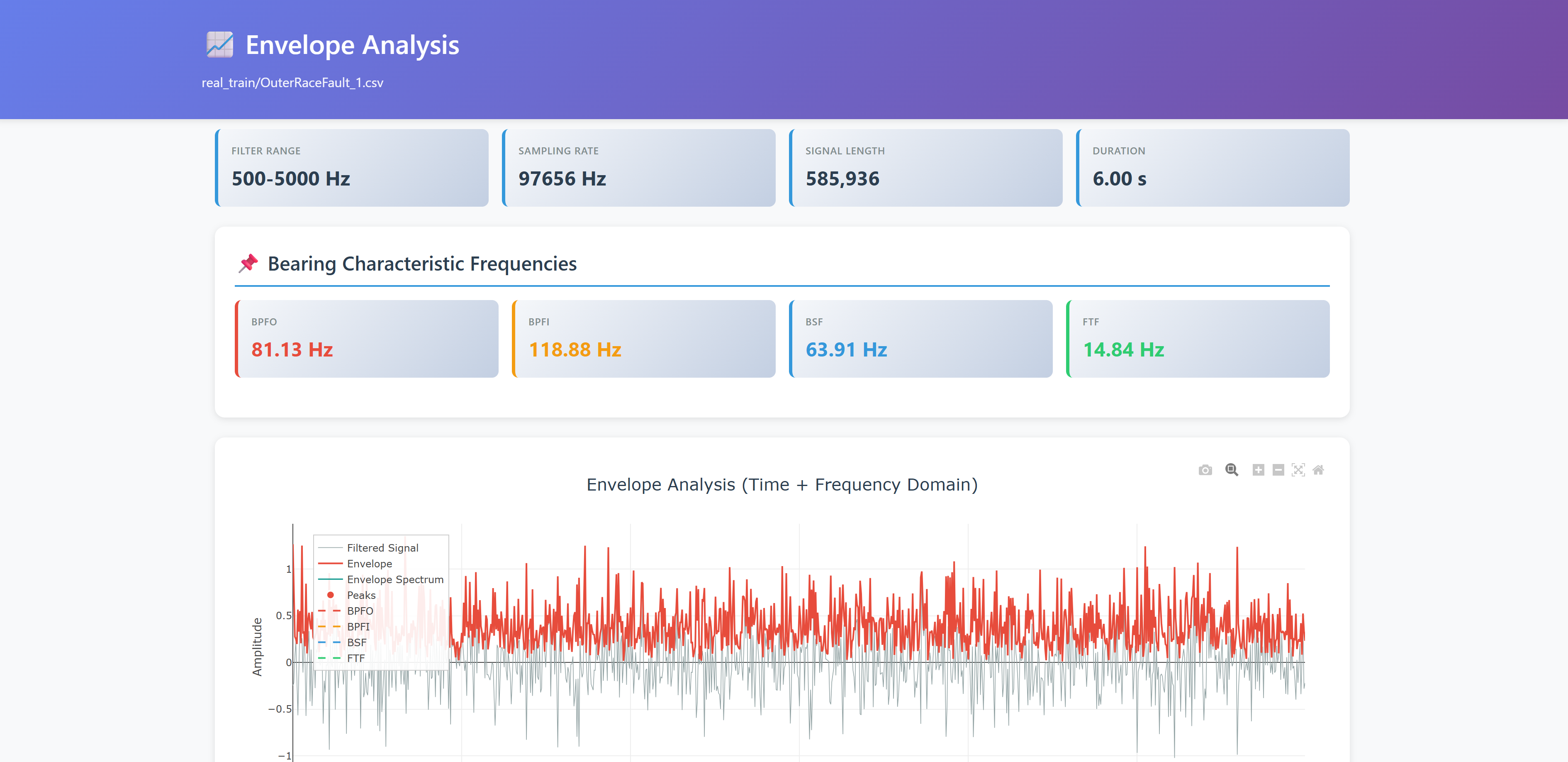
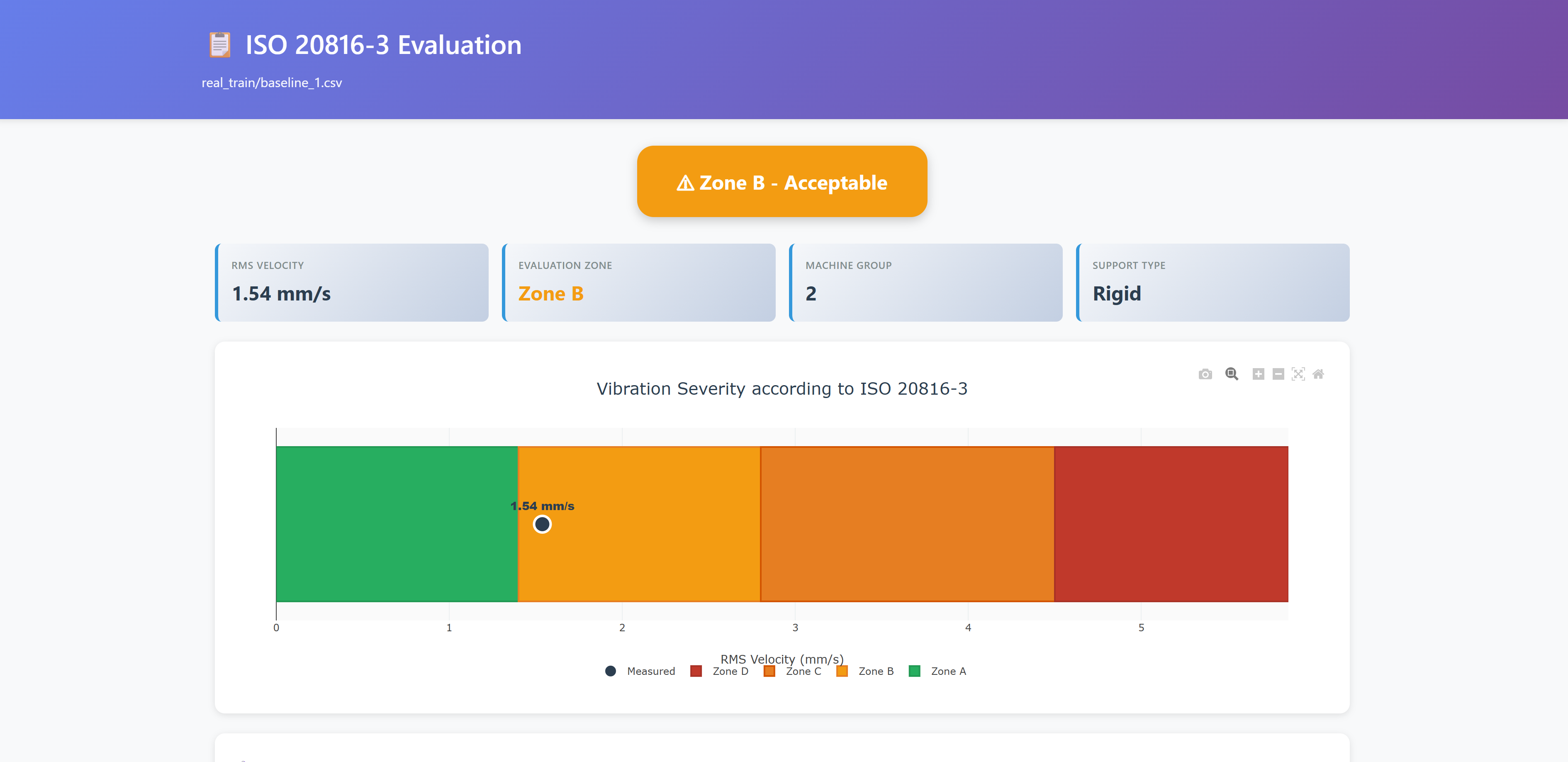
| Report Type | What it shows |
|---|---|
| Frequency spectrum | Peak detection, harmonic markers |
| Envelope analysis | Bearing fault frequency matching |
| Severity assessment | Vibration health zones (ISO 20816-3) |
| Word document | Full diagnostic narrative with embedded charts |
| PCA visualization | Multi-signal anomaly clustering |
| Feature comparison | Side-by-side signal feature analysis |
Sample Data Included
The project ships with 20 real bearing vibration signals from production machinery tests — ready to use out of the box.
- Training set: 2 healthy baselines + 12 fault signals (inner race, outer race)
- Test set: 1 healthy baseline + 5 fault signals
Try: "Load real_train/OuterRaceFault_1.csv and diagnose the bearing fault."
Full dataset documentation: data/README.md
Architecture
          YOU (natural language)
               │
               v
     LLM (Claude, GPT, Ollama...)
     understands intent, selects tools
               │
               v  ── Model Context Protocol ──
    ┌──────────────────────────────┐
    │    Predictive Maintenance    │
    │         MCP Server           │
    │                              │
    │  Signal Analysis    Reports  │
    │  Fault Detection    ML       │
    │  Severity Rating    RAG Docs │
    └──────────────────────────────┘
               │
               v
       YOUR DATA (stays local)
    signals · manuals · models
The codebase follows a modular architecture organized around the ISO 13374 Six-Block Diagnostic standard — signal acquisition, processing, diagnostics, prognostics, and decision support as separate sub-packages.
Detailed module structure
src/predictive_maintenance_mcp/
├── mcp_tools/                 # MCP endpoint registration (36 MCP endpoints)
│   ├── acquisition_tools.py   # Signal loading & management
│   ├── analysis_tools.py      # Spectral & statistical analysis
│   ├── diagnostics_tools.py   # Fault detection, ML, document search
│   ├── report_tools.py        # HTML/DOCX report generation
│   ├── prompts.py             # Guided diagnostic workflows
│   └── _utils.py              # Shared utilities
├── signal_acquisition/        # Multi-format loaders (CSV, MAT, WAV, NPY, Parquet)
├── signal_processing/         # Spectral analysis & feature extraction
├── diagnostics/               # Bearing/gear analysis, ISO standards
├── decision_support/          # Evidence-based diagnosis pipeline
├── prognostics/               # RUL estimation (linear, exponential, Kalman) & trend analysis
├── rag.py                     # Document indexing & search (FAISS/TF-IDF)
├── models.py                  # Pydantic data models
├── server.py                  # FastMCP server entry point
└── config.py                  # Configuration management
Standards implemented: ISO 13374 (diagnostic architecture), ISO 20816-3 (vibration severity classification), MIMOSA OSA-CBM (condition-based maintenance framework).
Key design choices:
- Privacy-first — raw vibration data never leaves your machine; only computed results flow to the LLM
- LLM-agnostic — works with Claude, ChatGPT, Microsoft Copilot Studio, or any MCP-compatible client. Use Ollama for fully air-gapped deployments
- Modular — use only the tools you need, extend with your own
Documentation
| Guide | For |
|---|---|
| Quickstart for Engineers | Get results fast, no coding required |
| Quickstart for Developers | Understand MCP, extend the server |
| Plugin README | Claude Code plugin installation and usage |
| HTTPS Deployment | Docker + HTTPS for enterprise environments |
| Ollama Guide | Use with local LLMs (fully air-gapped) |
| Architecture | ISO 13374 block mapping and module design |
| Examples | Complete diagnostic workflows |
| Installation | Detailed setup and troubleshooting |
| Contributing | How to contribute (all skill levels welcome) |
| Changelog | Version history |
Testing
86% test coverage across Windows, macOS, and Linux (Python 3.11 & 3.12).
pytest                                  # run all tests
pytest --cov=src --cov-report=html      # with coverage report
20+ test files covering signal analysis, fault detection, severity assessment, ML models, report generation, RAG search, and real bearing fault data validation.
Roadmap
- 36 MCP endpoints (33 tools, 3 prompts) with modular architecture and a single
signal_idhandle - Claude Code plugin (8 skills, 2 agents, 3 commands)
- 86% test coverage, CI/CD on 3 platforms
- Docker + SSE/HTTP transport for enterprise deployment
- Semantic document search (FAISS + TF-IDF)
- Customizable severity thresholds
- Remaining useful life (RUL) estimation from repeated measurements (linear, exponential, Kalman)
- Trend analysis and degradation onset detection
- Multi-signal trending and historical comparison
- Real-time streaming (MQTT/Kafka)
- Fleet dashboard for multi-asset monitoring
- CMMS integration (SAP, Maximo, Infor)
Ideas? Open a discussion or create an issue.
Are you using this?
I'd genuinely love to know. Whether you ran it on real machinery or just tried the sample data, drop a line in Discussions — one sentence about your machine or use case is enough. Real-world feedback directly shapes what gets built next.
Related
claude-stwinbox-diagnostics — Extends this project by connecting a physical edge sensor (STEVAL-STWINBX1) to Claude via MCP, with Claude Skills for guided condition monitoring. Same analysis engine, real hardware, operator-friendly reports.
Contributing
Contributions welcome from everyone — not just programmers. Domain experts, technical writers, and testers are equally valued. See CONTRIBUTING.md for paths tailored to your background.
Quick start: browse Issues for good first issue or help wanted labels.
Citation
@software{dimaggio_predictive_maintenance_mcp_2025,
  title   = {Predictive Maintenance MCP Server},
  author  = {Di Maggio, Luigi Gianpio},
  year    = {2025},
  version = {0.9.1},
  url     = {https://github.com/LGDiMaggio/predictive-maintenance-mcp},
  doi     = {10.5281/zenodo.17611542}
}
License
MIT — see LICENSE. Sample data is CC BY-NC-SA 4.0 (non-commercial); for commercial use, replace with your own machinery data.
Acknowledgments
FastMCP framework · Model Context Protocol by Anthropic · Sample data from MathWorks · Core development assisted by Claude
An open-source predictive maintenance AI agent and condition monitoring copilot — built to support reliability engineers and the developer community.
Установить Predictive Maintenance Server в Claude Desktop, Claude Code, Cursor
unyly install predictive-maintenance-mcp-serverСтавит в Claude Desktop, Claude Code, Cursor и VS Code — сам разбирается с npx, uvx и сборкой из исходников.
Впервые? Поставь CLI: curl -fsSL https://unyly.org/install | sh
Или настроить вручную
Выполни в терминале:
claude mcp add predictive-maintenance-mcp-server -- uvx predictive-maintenance-mcpFAQ
Predictive Maintenance Server MCP бесплатный?
Да, Predictive Maintenance Server MCP бесплатный — установка в пару кликов через Unyly без оплаты.
Нужен ли API-ключ для Predictive Maintenance Server?
Нет, Predictive Maintenance Server работает без API-ключей и переменных окружения.
Predictive Maintenance Server — hosted или self-hosted?
Self-hosted: сервер запускается локально на твоей машине командой из раздела установки.
Как установить Predictive Maintenance Server в Claude Desktop, Claude Code или Cursor?
Открой Predictive Maintenance Server на unyly.org, выбери вкладку своего клиента (Claude Desktop, Claude Code, Cursor) и нажми Install — конфиг сгенерируется автоматически, без правки JSON.
Похожие MCP
Fetch
Web content fetching and conversion for efficient LLM usage.
AWS KB Retrieval
Retrieval from AWS Knowledge Base using Bedrock Agent Runtime.
 автор: modelcontextprotocol
Spring AI MCP Server
Provides auto-configuration for setting up an MCP server in Spring Boot applications.
llm-analysis-assistant
A very streamlined mcp client that supports calling and monitoring stdio/sse/streamableHttp, and can also view request responses through the /logs page. It also
 автор: xuzexin-hz
Compare Predictive Maintenance Server with
Не уверен что выбрать?
Найди свой стек за 60 секунд
Автор?
Embed-бейдж для README
Похожее
Все в категории ai