
Production Grade Agentic System
БесплатноНе проверенA production-grade MCP server designed for multi-tenant, authenticated, and observable AI agent systems, enabling secure tool execution across heterogeneous dat

Описание
A production-grade MCP server designed for multi-tenant, authenticated, and observable AI agent systems, enabling secure tool execution across heterogeneous data sources.
README
🏛️ Production-Grade MCP Server + Agentic System
A reference implementation of an MCP server designed to actually ship
Multi-tenant · Authenticated · Observable · Rate-limited · Cached · Circuit-broken · Governed
Python 3.11+ MCP 2026 License: MIT Docker
📖 Full Step-by-Step Blog Walkthrough
This repository is the companion codebase for a long-form blog post that walks through every single component end to end, with every line of code explained in context. Start there if you want to understand the "why" behind the architecture before reading the code.
🔗 Building a Production-Grade MCP Server Architecture with Agentic System →
🎯 What This Is
Most MCP tutorials end with a @tool decorator that returns "hello world". That is fine for a demo. It is not what ships.
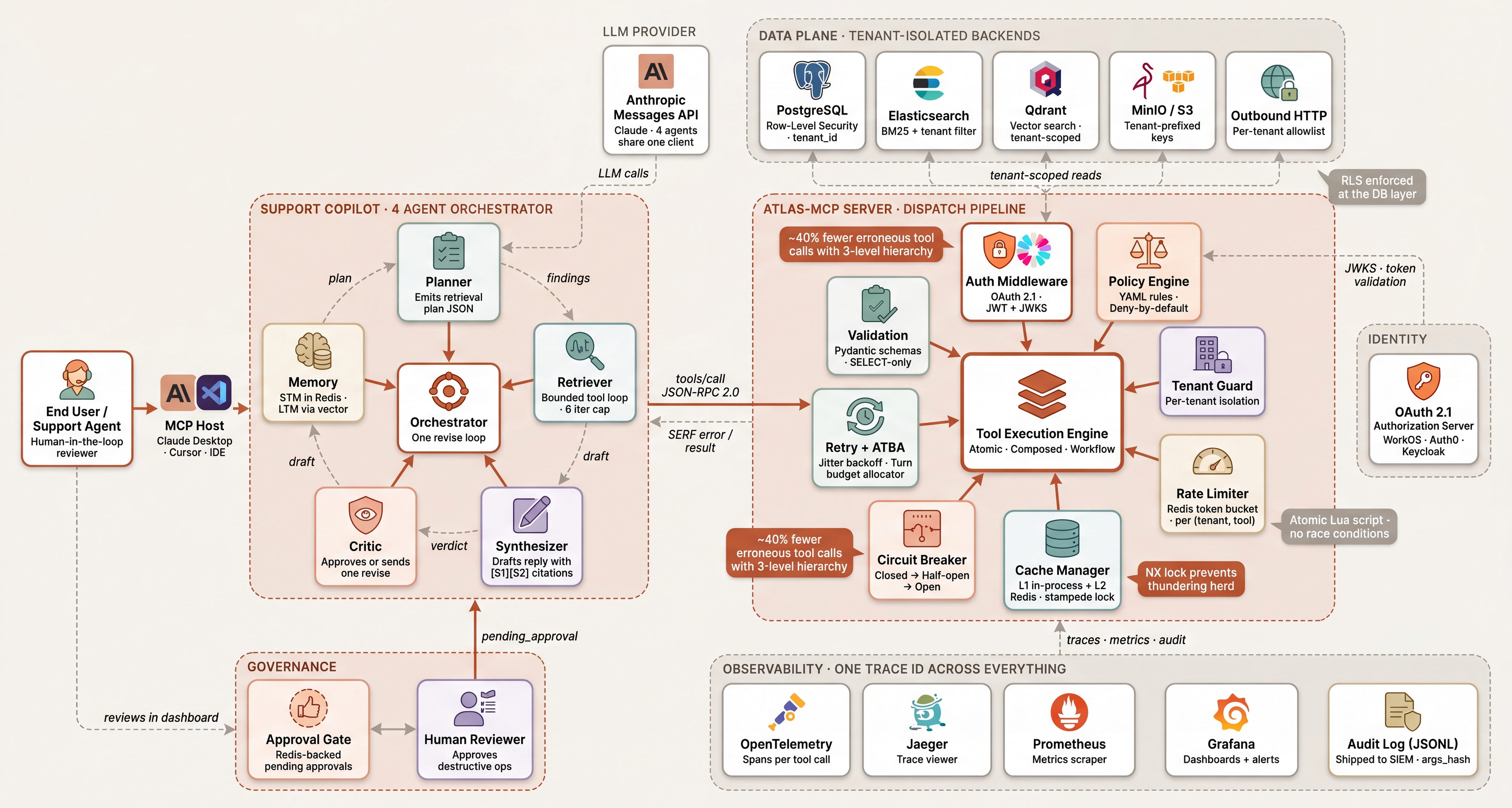
This repository is a reference implementation of an MCP server designed to run in production: multi-tenant, authenticated, observable, rate-limited, cached, circuit-broken, and governed. It exposes a company's heterogeneous data layer (Postgres, Elasticsearch, S3, vector DB) to AI agents as a single, secure tool surface, and ships with a four-agent support copilot (Planner → Retriever → Synthesizer → Critic) that uses it end to end.
The codebase is deliberately organised around twelve components that keep showing up on the 3 AM pager when teams skip them. Each one lives in its own module and can be read, replaced, or extended independently.
🏗️ Architecture Overview
The complete production-grade system: MCP server dispatch pipeline on the right, four-agent orchestrator on the left, data plane on top, observability on the bottom, identity and governance as crosscutting concerns.
🧩 The 12 Components
| # | Component | Lives in | What it gives you |
|---|---|---|---|
| 1 | 🚪 Transport & Session Layer | server.py |
stdio for local, Streamable HTTP for remote, horizontal-scale-friendly sessions |
| 2 | 🔐 Authentication Server | auth/oauth.py |
OAuth 2.1 + PKCE, short-lived JWTs, JWKS validation |
| 3 | ⚖️ Authorization & Policy Engine | auth/policy.py |
Tool-level RBAC, tenant-scoped ABAC, deny-by-default |
| 4 | 📚 Tool Registry & Discovery | tools/registry.py |
Dynamic toolsets, .well-known capability metadata |
| 5 | ✅ Input Validation Layer | validation/schemas.py |
Pydantic schemas, enum constraints, agent-adversarial input as default threat model |
| 6 | 🔧 Tool Execution Engine | tools/base.py |
Three-level hierarchy (atomic / composed / workflow) |
| 7 | 🔄 Circuit Breaker & Retry | reliability/ |
Closed → open → half-open, Adaptive Timeout Budget Allocation |
| 8 | 🚦 Rate Limiting & Quotas | ratelimit/limiter.py |
Redis token-bucket (Lua-atomic), per-tenant and per-tool |
| 9 | ⚡ Caching Layer | cache/manager.py |
Two-tier (L1 in-process, L2 Redis), stampede prevention |
| 10 | 🧱 Structured Error Framework | errors/framework.py |
Machine-readable errors with retryable and hint fields |
| 11 | 🔭 Observability Stack | observability/ |
OpenTelemetry traces, Prometheus metrics, audit logs |
| 12 | 🛡️ Governance & Multi-Tenancy | governance/ |
Tenant isolation, approval gates, outbound HTTP allowlisting |
📖 Diving Deeper, Section by Section
Each diagram below links back to the corresponding section in the blog, where every line of code is walked through in detail.
📦 Data Persistence Layer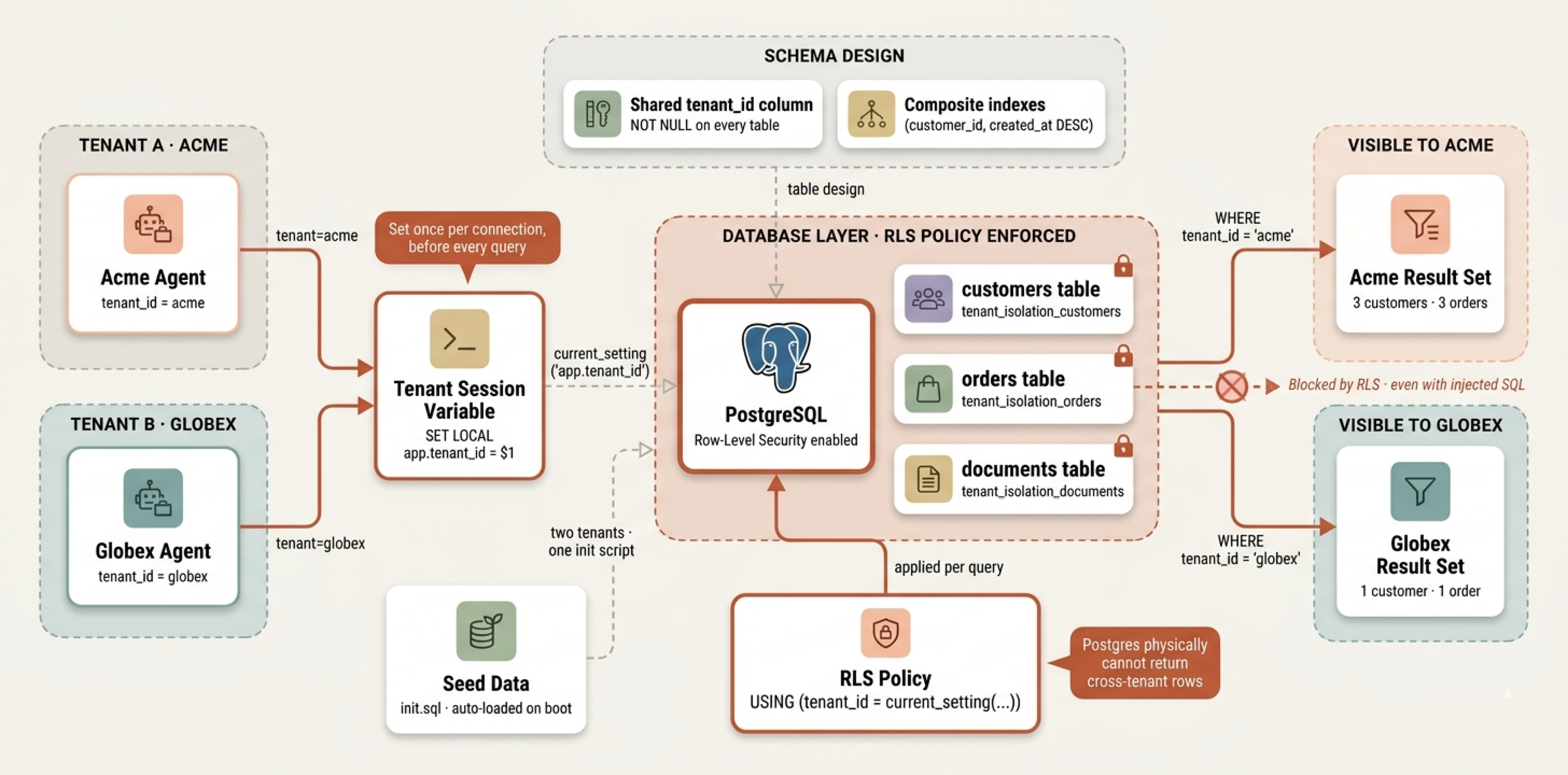 Postgres + Row-Level Security · Tenant isolation at the DB layer |
🚪 Transport & Session Layer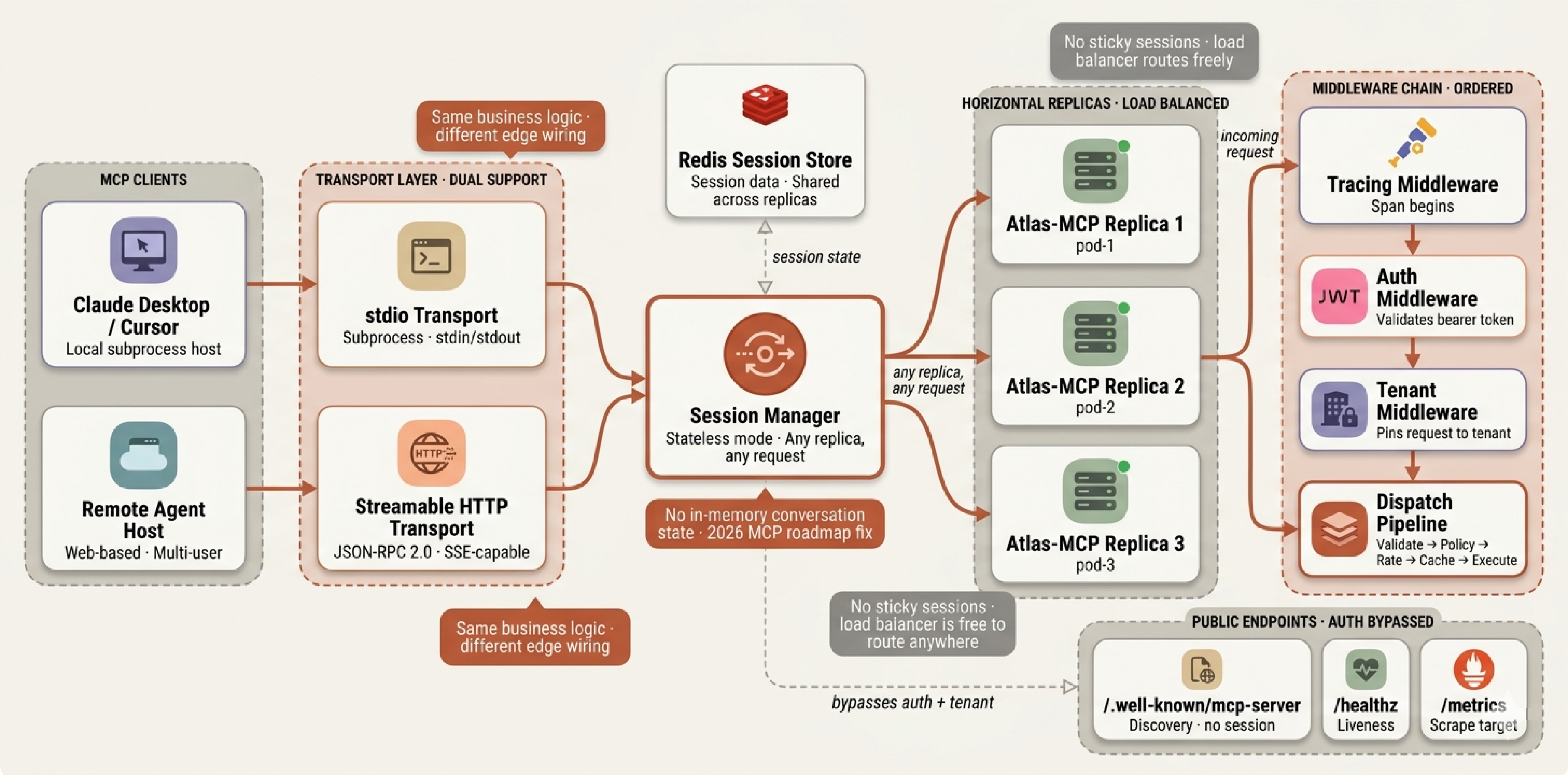 Dual transport · Stateless session · Middleware chain |
🔐 Authentication, Policy & Governance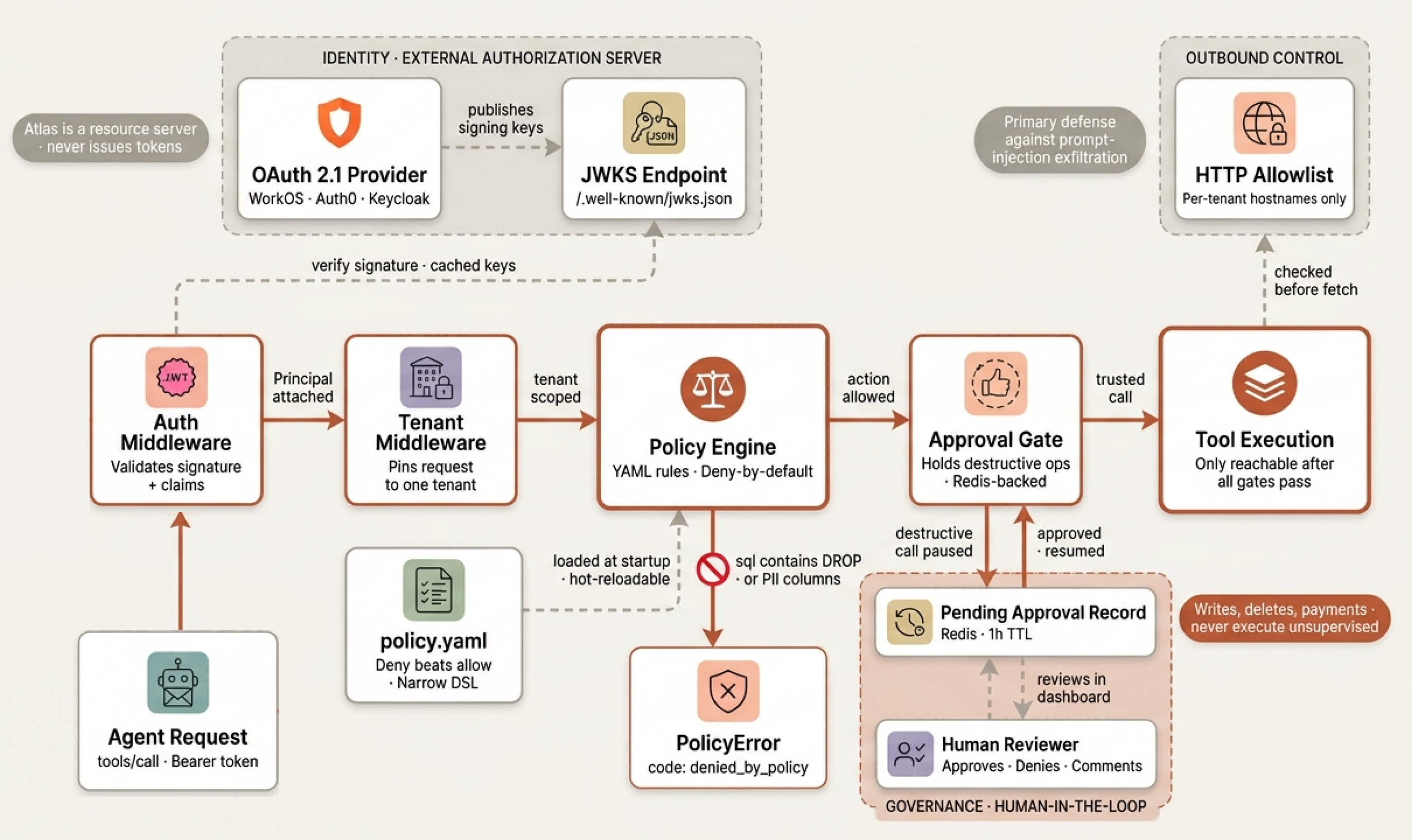 OAuth 2.1 · YAML policies · Human-in-the-loop approvals |
🔧 Tool Execution Engine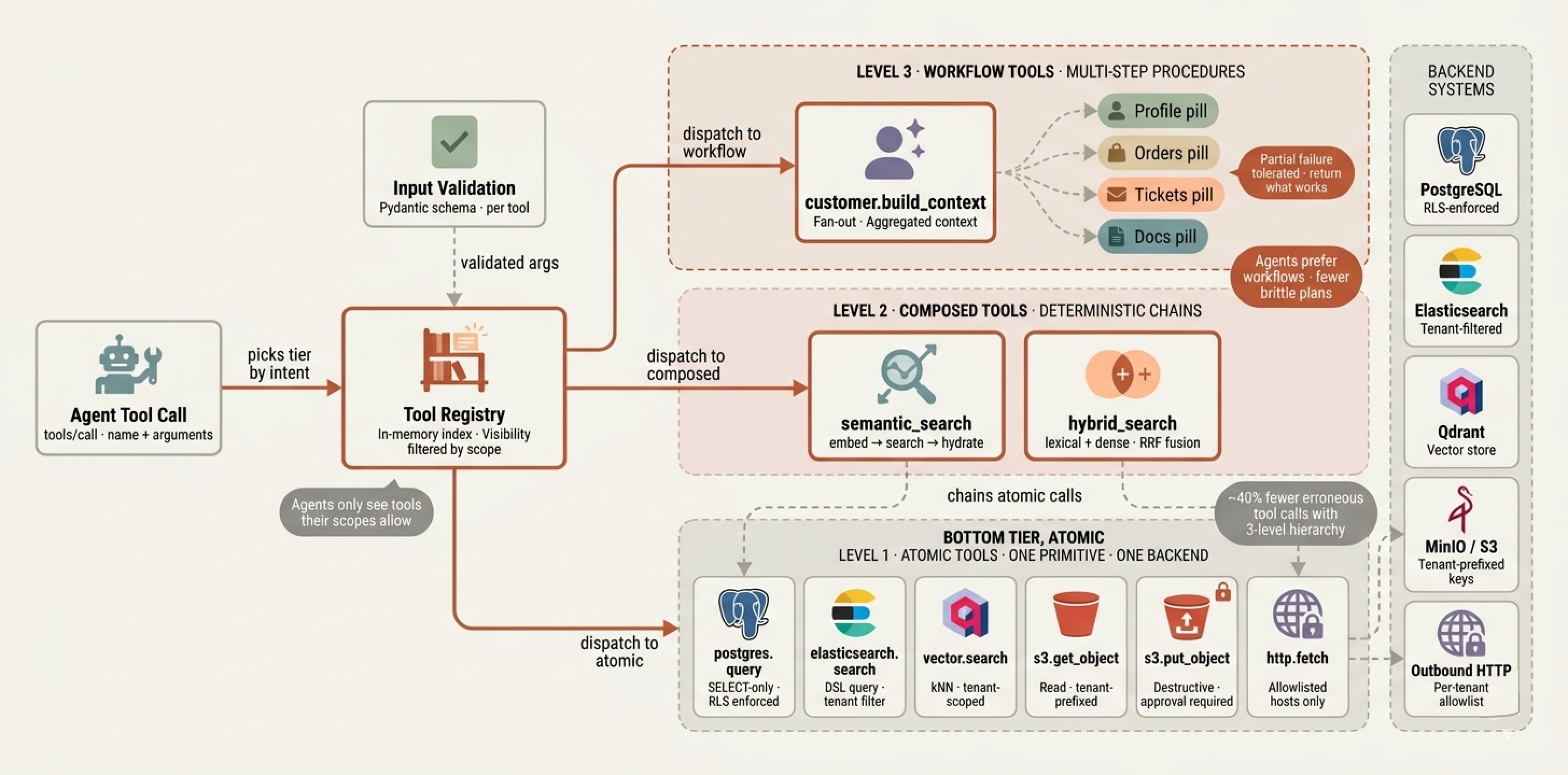 Three-level hierarchy · Atomic · Composed · Workflow |
🔄 Reliability Layer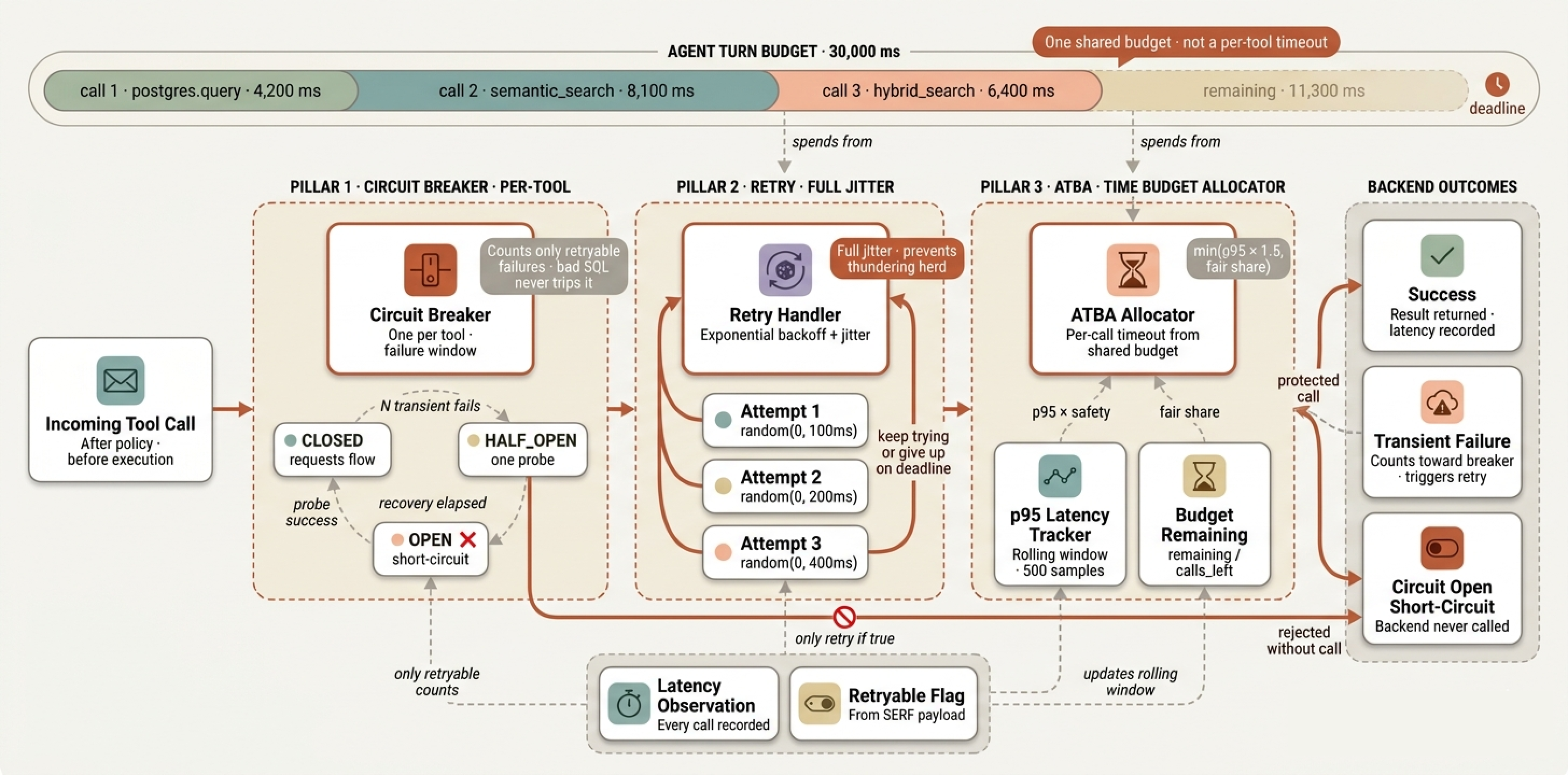 Circuit breakers · Retry with jitter · ATBA budget allocator |
⚡ Rate Limiting & Caching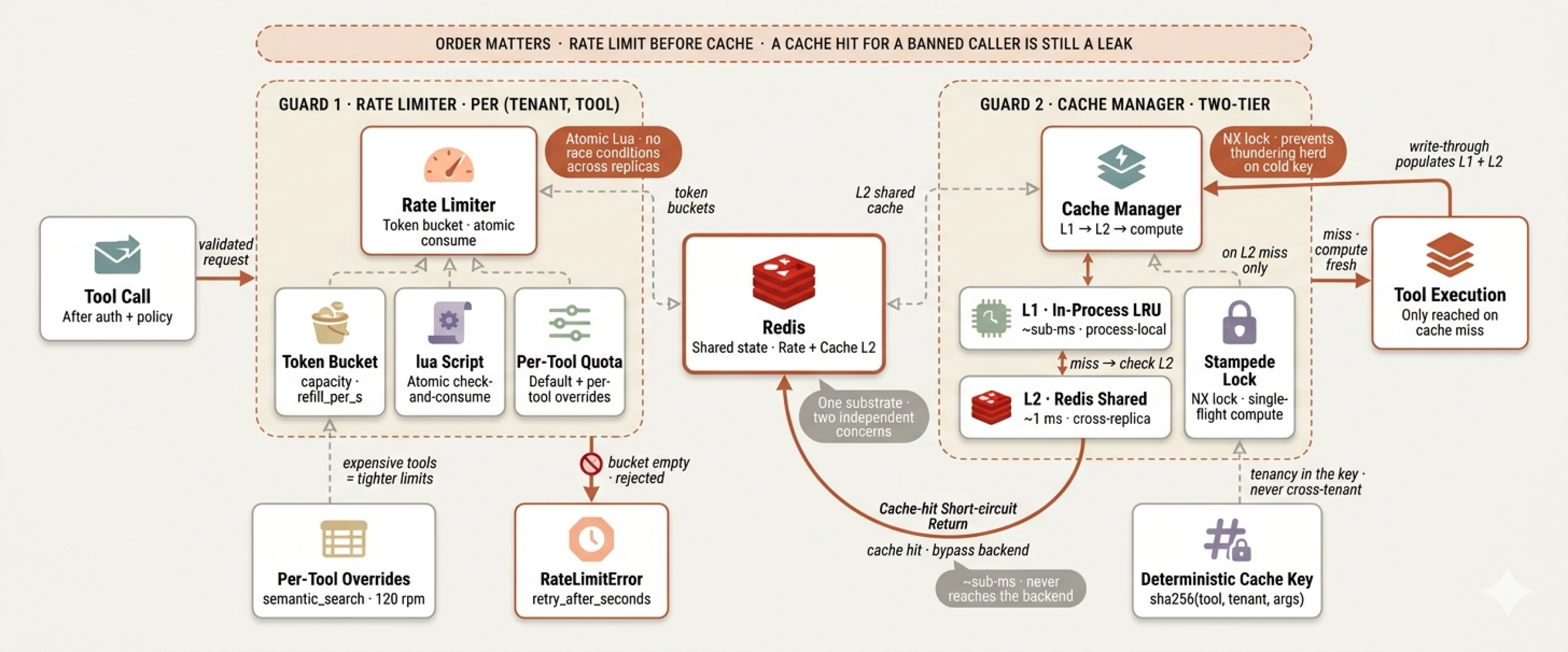 Redis token bucket · Two-tier cache · Stampede lock |
🔭 Observability Stack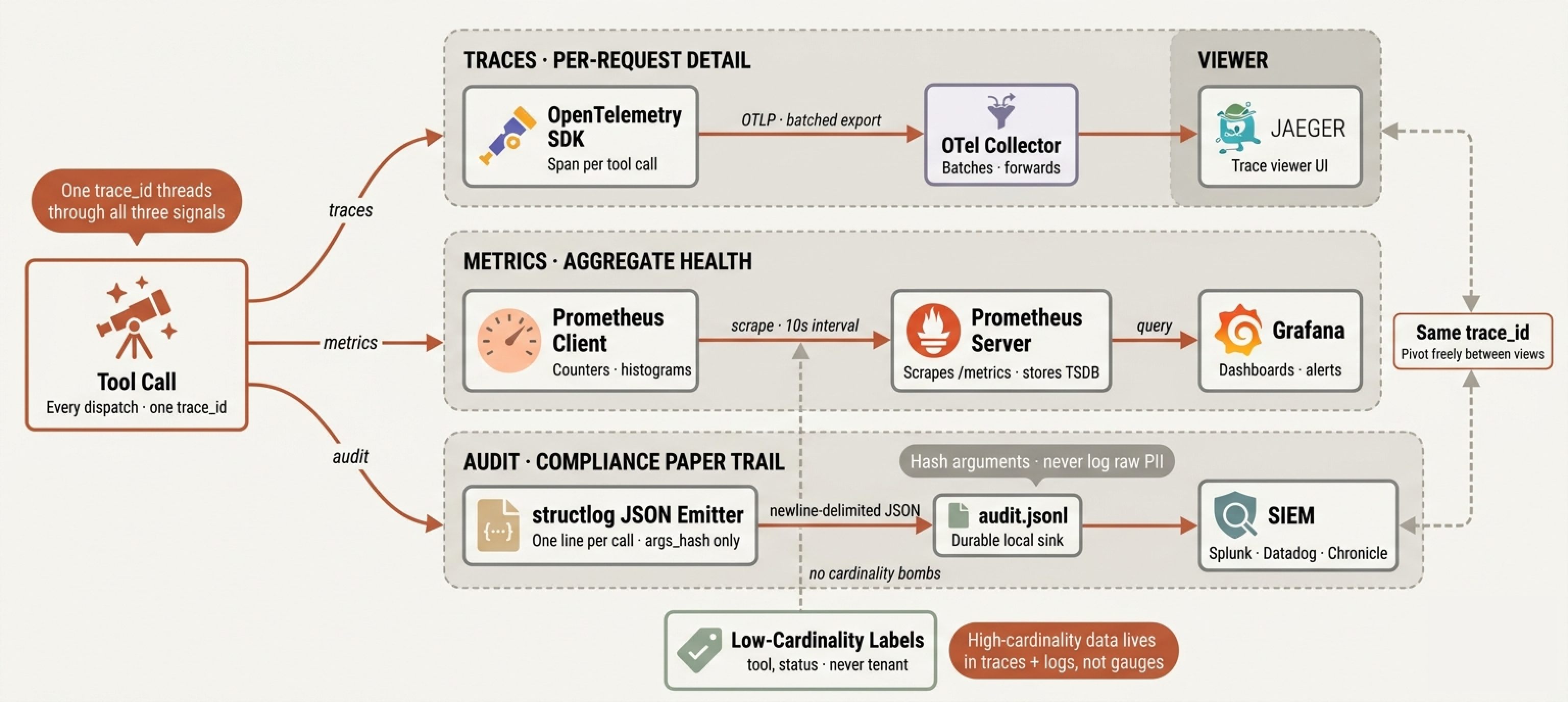 OpenTelemetry · Prometheus · Audit logs · One trace ID |
🤖 Multi-Agentic Architecture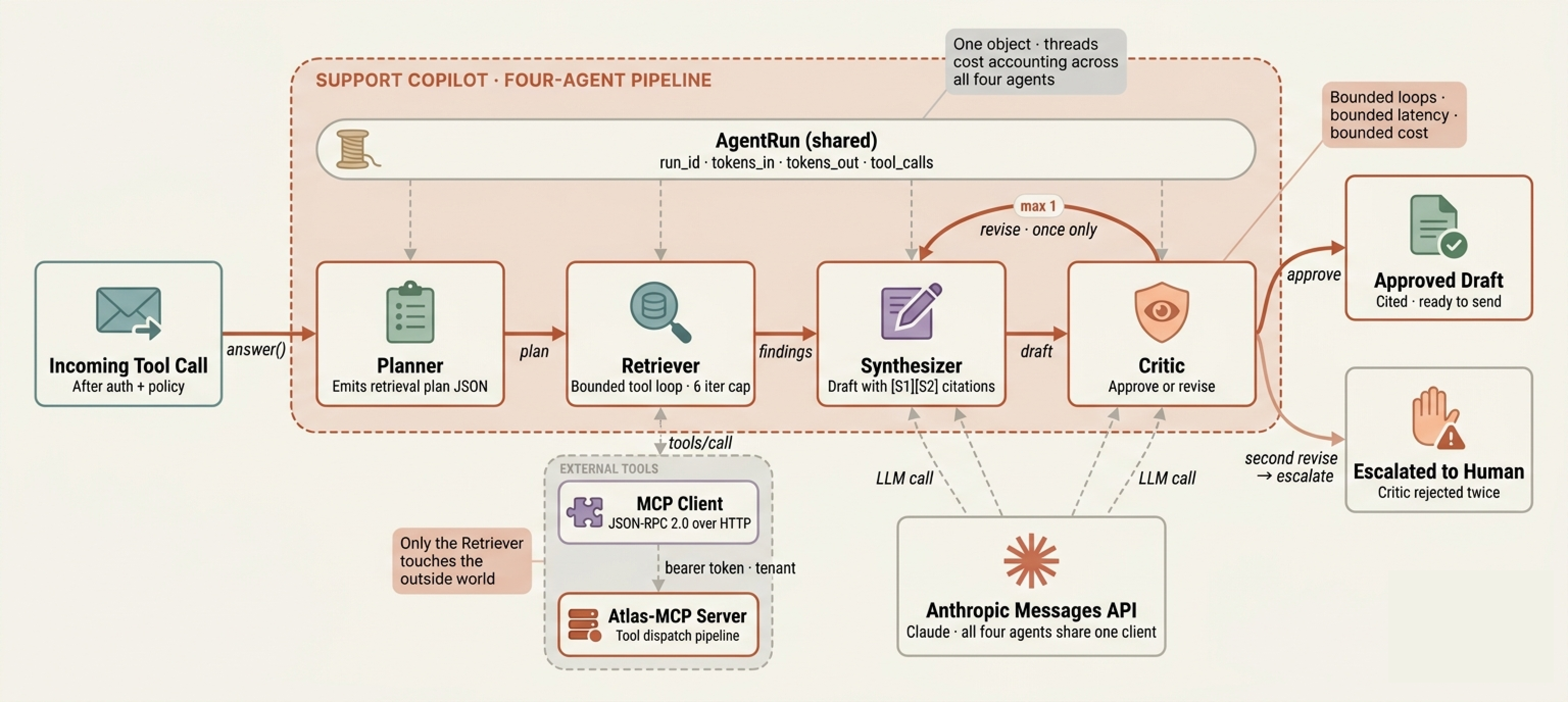 Four-agent design · Planner · Retriever · Synthesizer · Critic |
🎼 The Orchestrator Flow
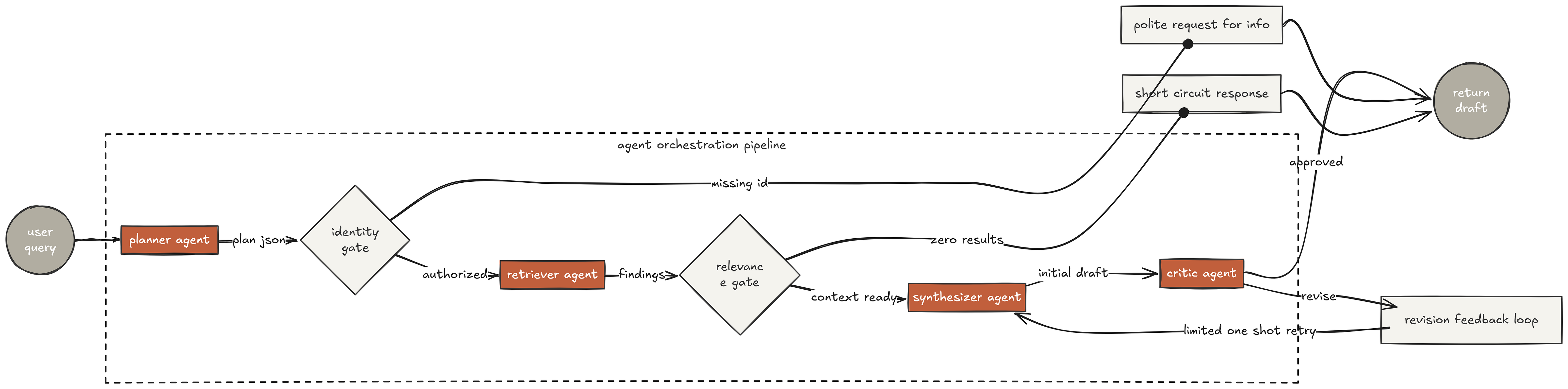
End-to-end agent orchestration with one bounded revise loop
🚀 Quick Start
Prerequisites
- Docker & Docker Compose
- Python 3.11+ (only for running the CLI locally)
- An Anthropic API key (for the agent layer)
1. Clone and Configure
git clone https://github.com/FareedKhan-dev/production-grade-mcp-agentic-system.git
cd production-grade-mcp-agentic-system
cp .env.example .env
Edit .env and set at minimum:
ANTHROPIC_API_KEY— for the agent layerATLAS_AUTH_JWKS_URL— your OAuth 2.1 provider's JWKS endpoint (or leave default for dev)
2. Bring Up the Stack
docker compose up -d
That brings up the full local environment:
| Service | URL | What it is |
|---|---|---|
| 🏛️ MCP Server | http://localhost:8080/mcp |
Streamable HTTP endpoint |
| 🔍 Discovery | http://localhost:8080/.well-known/mcp-server |
Unauthenticated capability metadata |
| 📊 Metrics | http://localhost:8080/metrics |
Prometheus scrape target |
| ❤️ Health | http://localhost:8080/healthz |
Liveness probe |
| 🔭 Jaeger | http://localhost:16686 |
Distributed tracing UI |
| 📈 Grafana | http://localhost:3000 |
Metrics dashboards (admin / admin) |
| 🗄️ MinIO Console | http://localhost:9001 |
S3-compatible storage UI |
3. Run the Support Copilot CLI
pip install -e .

export ATLAS_MCP_URL=http://localhost:8080
export ATLAS_MCP_TOKEN=dev-token
export ATLAS_TENANT=acme
export ANTHROPIC_API_KEY=sk-ant-...

atlas-copilot "Why was the refund on order o_9002 for CUST-1001 delayed?"
You will see the four agents run end-to-end, the final draft printed with [S1][S2] citations, and a full trace summary including token counts, tool calls, and the run_id that ties back to Jaeger.
4. Connect from Claude Desktop / Cursor
Add this to your MCP host config:
{
  "mcpServers": {
    "production-mcp": {
      "type": "http",
      "url": "http://localhost:8080/mcp",
      "headers": {
        "Authorization": "Bearer ${ATLAS_MCP_TOKEN}",
        "X-Tenant-Id": "acme"
      }
    }
  }
}
📂 Repository Structure
.
├── 📄 README.md
├── 🐳 docker-compose.yml          # Full local stack: app + data + observability
├── 🐳 Dockerfile                  # Two-stage build, non-root runtime
├── 📜 LICENSE
├── 📦 pyproject.toml              # Dependencies, dev tools, CLI entry points
├── ⚙️  .env.example                # Every setting documented by component
│
├── 🔧 config/                     # Runtime configuration (hot-reloadable)
│   ├── http_allowlist.yaml       # Per-tenant outbound HTTP allowlist
│   └── policy.yaml               # YAML-driven authorization policies
│
├── 🚢 deploy/                     # Deployment sidecar configs
│   ├── otel/config.yaml          # OpenTelemetry Collector pipeline
│   ├── prometheus/prometheus.yml # Prometheus scrape targets
│   └── sql/init.sql              # Schema + RLS policies + seed data
│
├── 📚 docs/                       # Deep-dive documentation
│   ├── AGENT_SYSTEM.md           # Multi-agent orchestrator internals
│   ├── ARCHITECTURE.md           # The 12 components in detail
│   └── DEPLOYMENT.md             # K8s, Cloudflare Workers, bare-metal
│
├── 🧠 src/atlas_mcp/              # Main application source
│   ├── config.py                 # Centralized typed settings
│   ├── server.py                 # ⚡ Component 1: Transport & dispatch
│   │
│   ├── 🤖 agents/                 # Four-agent support copilot
│   │   ├── planner.py            # Emits retrieval plan JSON
│   │   ├── retriever.py          # Bounded tool-calling loop
│   │   ├── synthesizer.py        # Drafts reply with citations
│   │   ├── critic.py             # Approves or sends one revise
│   │   ├── orchestrator.py       # Wires the four agents together
│   │   ├── mcp_client.py         # Thin JSON-RPC MCP client
│   │   ├── memory.py             # STM (Redis) + LTM (vector)
│   │   └── cli.py                # atlas-copilot CLI entry point
│   │
│   ├── 🔐 auth/                   # Components 2 + 3
│   │   ├── oauth.py              # JWT + JWKS validation
│   │   ├── middleware.py         # Bearer token extraction
│   │   └── policy.py             # YAML-driven policy engine
│   │
│   ├── 🛡️  governance/             # Component 12
│   │   ├── tenant.py             # Tenant pinning middleware
│   │   └── approval.py           # Human-in-the-loop gate
│   │
│   ├── 🔧 tools/                  # Components 4 + 6
│   │   ├── registry.py           # In-memory tool index + discovery
│   │   ├── base.py               # Tool abstract base + metadata
│   │   ├── atomic/               # Level 1: one backend each
│   │   ├── composed/             # Level 2: deterministic chains
│   │   └── workflow/             # Level 3: multi-step procedures
│   │
│   ├── 🔄 reliability/            # Component 7
│   │   ├── circuit_breaker.py    # 3-state machine per tool
│   │   ├── retry.py              # Exponential backoff + jitter
│   │   └── atba.py               # Adaptive Timeout Budget Allocation
│   │
│   ├── 🚦 ratelimit/              # Component 8
│   │   └── limiter.py            # Redis token bucket (Lua-atomic)
│   │
│   ├── ⚡ cache/                   # Component 9
│   │   └── manager.py            # L1 + L2 cache with stampede lock
│   │
│   ├── 🧱 errors/                 # Component 10
│   │   └── framework.py          # Structured Error Recovery (SERF)
│   │
│   ├── 🔭 observability/          # Component 11
│   │   ├── tracing.py            # OpenTelemetry spans
│   │   ├── metrics.py            # Prometheus instruments
│   │   └── audit.py              # Structured JSONL audit log
│   │
│   └── ✅ validation/             # Component 5
│       └── schemas.py            # Tool call envelope
│
└── 🧪 tests/                      # Narrow tests, load-bearing properties
    ├── test_circuit_breaker.py   # State machine transitions
    ├── test_errors.py            # SERF wire format + retry semantics
    └── test_policy.py            # Deny-beats-allow + default-deny
🎨 Tech Stack
| Layer | Technology |
|---|---|
| Language | Python 3.11+ |
| Web framework | Starlette + Uvicorn |
| MCP SDK | mcp>=1.2.0 |
| Auth | PyJWT + Authlib (OAuth 2.1 resource server) |
| Validation | Pydantic v2 + Pydantic Settings |
| Database | asyncpg (PostgreSQL 16 with RLS) |
| Search | Elasticsearch 8 (async client) |
| Vector DB | Qdrant |
| Object storage | aioboto3 (MinIO / S3) |
| Cache + queues | Redis 7 (redis[hiredis]) |
| Reliability | tenacity (retries) + custom breaker + custom ATBA |
| Tracing | OpenTelemetry SDK + OTLP exporter |
| Metrics | prometheus_client |
| Logging | structlog (JSON) |
| LLM | Anthropic Messages API (Claude) |
🧪 Testing
The test suite is deliberately narrow, covering the three load-bearing safety properties:
pip install -e ".[dev]"
pytest -v
test_circuit_breaker.py— state machine transitions, retryable vs deterministic error classificationtest_errors.py— SERF wire format, retry semantics, MCP-level error datatest_policy.py— default-deny, deny-beats-allow, glob matching, PII condition blocking
🛣️ Production Deployment
For running this in an actual production environment (managed Postgres, real OAuth provider, SIEM integration, Kubernetes), see docs/DEPLOYMENT.md.
Key swaps between local dev and production:
| Local (docker-compose) | Production |
|---|---|
| Dev JWT issuer | WorkOS AuthKit / Auth0 / Keycloak |
| MinIO | AWS S3 / GCS / Azure Blob |
| Local Postgres | AWS RDS / Cloud SQL / Supabase |
| Redis container | Upstash / ElastiCache / MemoryDB |
| Local OTel collector | Datadog / Honeycomb / Grafana Cloud |
| File-based audit log | Splunk / Chronicle / SIEM of choice |
📚 Documentation
- 📖 Blog Walkthrough — Building a Production-Grade MCP Server (recommended starting point)
- 🏗️ docs/ARCHITECTURE.md — The 12 components in depth
- 🤖 docs/AGENT_SYSTEM.md — Multi-agent orchestrator internals
- 🚢 docs/DEPLOYMENT.md — Production deployment options
📜 License
MIT. See LICENSE.
⭐ If this helped you, please consider starring the repo
Built with ☕ and a lot of 3 AM debugging
📖 Read the full blog walkthrough · 🐛 Report an issue · 💬 Start a discussion
from github.com/FareedKhan-dev/production-grade-mcp-agentic-system
Установить Production Grade Agentic System в Claude Desktop, Claude Code, Cursor
unyly install production-grade-mcp-agentic-systemСтавит в Claude Desktop, Claude Code, Cursor и VS Code — сам разбирается с npx, uvx и сборкой из исходников.
Впервые? Поставь CLI: curl -fsSL https://unyly.org/install | sh
Или настроить вручную
Выполни в терминале:
claude mcp add production-grade-mcp-agentic-system -- uvx atlas-mcpFAQ
Production Grade Agentic System MCP бесплатный?
Да, Production Grade Agentic System MCP бесплатный — установка в пару кликов через Unyly без оплаты.
Нужен ли API-ключ для Production Grade Agentic System?
Нет, Production Grade Agentic System работает без API-ключей и переменных окружения.
Production Grade Agentic System — hosted или self-hosted?
Self-hosted: сервер запускается локально на твоей машине командой из раздела установки.
Как установить Production Grade Agentic System в Claude Desktop, Claude Code или Cursor?
Открой Production Grade Agentic System на unyly.org, выбери вкладку своего клиента (Claude Desktop, Claude Code, Cursor) и нажми Install — конфиг сгенерируется автоматически, без правки JSON.
Похожие MCP
Fetch
Web content fetching and conversion for efficient LLM usage.
AWS KB Retrieval
Retrieval from AWS Knowledge Base using Bedrock Agent Runtime.
 автор: modelcontextprotocol
Spring AI MCP Server
Provides auto-configuration for setting up an MCP server in Spring Boot applications.
llm-analysis-assistant
A very streamlined mcp client that supports calling and monitoring stdio/sse/streamableHttp, and can also view request responses through the /logs page. It also
 автор: xuzexin-hz
Compare Production Grade Agentic System with
Не уверен что выбрать?
Найди свой стек за 60 секунд
Автор?
Embed-бейдж для README
Похожее
Все в категории ai