
Prolog Server
БесплатноНе проверенEnables LLMs to define Prolog facts and rules and execute queries via SWI-Prolog for logical reasoning.

Описание
Enables LLMs to define Prolog facts and rules and execute queries via SWI-Prolog for logical reasoning.
README
A Model Context Protocol (MCP) server that enables direct integration between Large Language Models and SWI-Prolog. This server allows LLMs to define Prolog facts and rules (clauses) and to execute Prolog queries and leverage logical reasoning capabilities.
Features
- Allow LLMs to add facts and rules (clauses) to SWI Prolog server
- Execute Prolog queries through MCP protocol
- Support for both HTTP and stdio transport
- Docker containerization support for the SWI Prolog server
- Implemented as python package for easy integration to agentic LLM applications
- Compatible with MCP Inspector for interactive testing and debugging
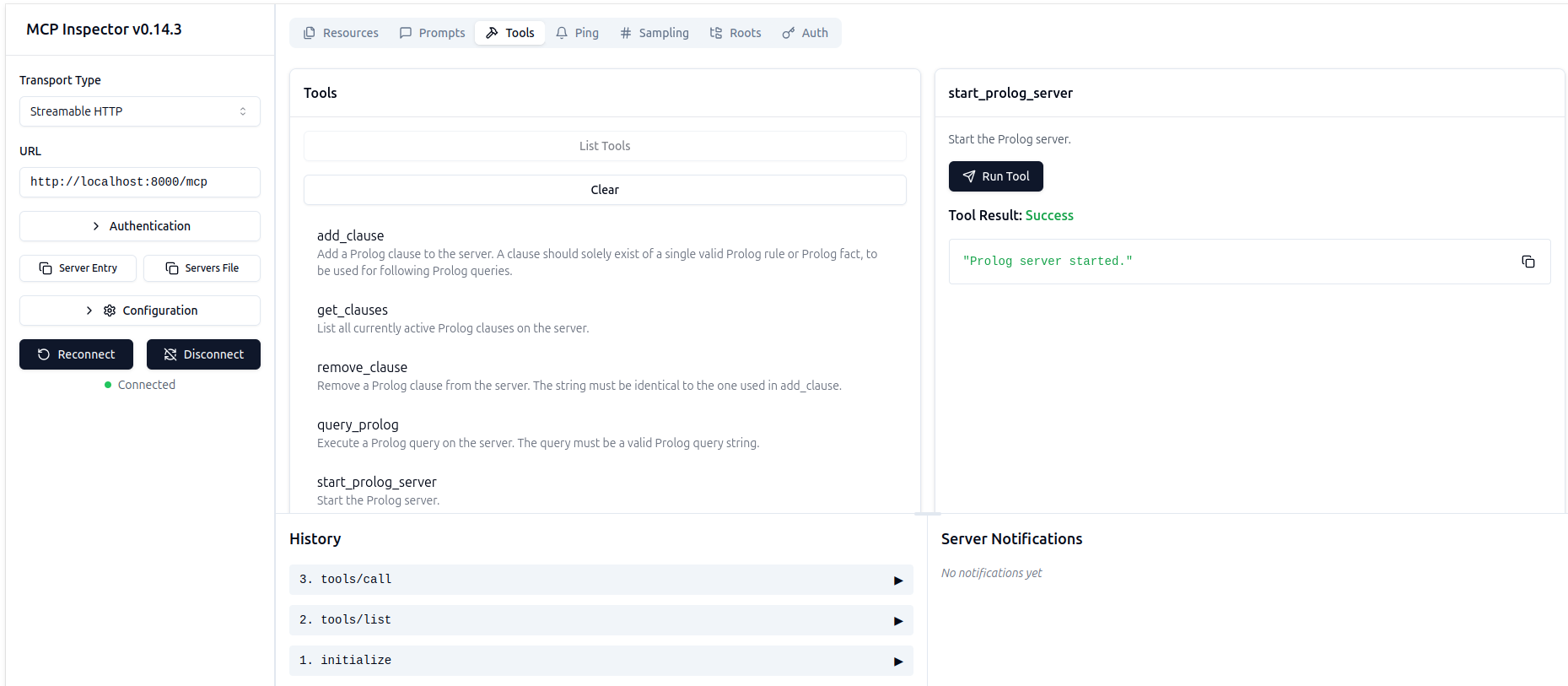 Prolog MCP Server running in MCP Inspector showing available tools and interface
Prerequisites
- Python 3.8 or higher
- Git (for installation from source)
- Docker
Installation on linux
- Make sure git, python-venv and docker are installed, i.e. Install git
sudo apt install git python3.12-venv docker-buildx
- Clone git repo
git clone https://github.com/wendelinism/prolog-mcp-server.git
Move into newly downloaded folder
cd prolog-mcp-server/
- Create local python environment
python3 -m venv .
Activate local python environment
source bin/activate
- Install python package prolog-mcp-server, and all it's python dependencies
pip install -e .
- Build prolog docker image (without this the MCP-server will have no prolog server to connect to)
docker buildx build -t prolog-docker-image -f docker/prolog.dockerfile .
In case your user does not have permission yet to interact with docker, add local user to docker group:
sudo usermod -aG docker $USER
To make this change effective, restart the terminal session with
exec su - $USER
then go back to the project folder. Now you should be able to build the docker image.
Installation on Windows and Mac
Should work on windows and Mac OS as well, but not tested yet.
Usage
Integration with Claude Desktop
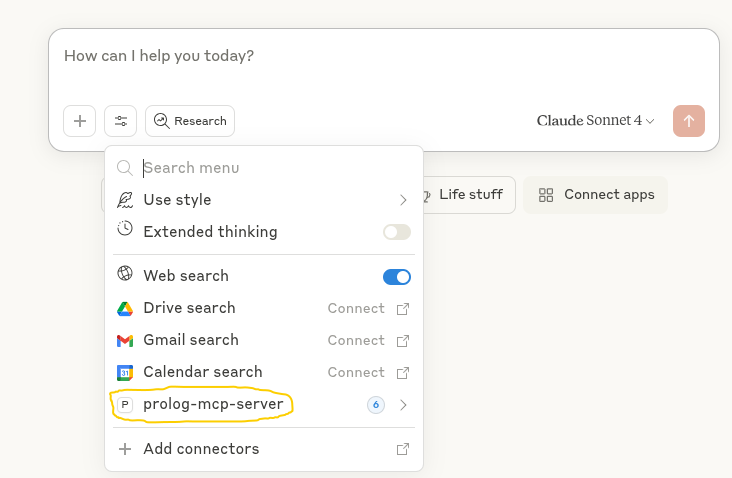 Claude Desktop with connector to Prolog-MCP-server
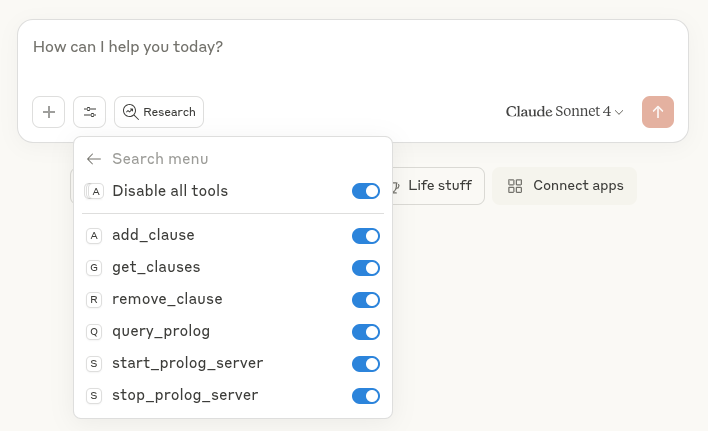 Claude Desktop can choose to use any of the tools shown for connected Prolog-MCP-server
If Claude Desktop is installed, the Prolog MCP server can be added to the Claude config, so that Claude can start a local instance of the server and run prolog code directly. Preconditions:
- Local clone of prolog-mcp-server repository (see above)
- Local python environment installed (see above)
- Docker prolog-docker-image built (see above)
Configuration
Add the following configuration to your claude_desktop_config.json file:
Linux/Mac: ~/.config/Claude/claude_desktop_config.json
Windows: %APPDATA%\Claude\claude_desktop_config.json
{
  "mcpServers": {
    "prolog-mcp-server": {
      "command": "/path/to/python-env/bin/python",
      "args": [
        "/path/to/prolog-mcp-server/src/prolog_mcp_server.py",
        "--transport=stdio"
      ],
      "env": {
        "PATH": "/path/to/python-env/bin:/usr/local/bin:/usr/bin:/bin"
      }
    }
  }
}
Note: Update both
/path/to/python-env/and/path/to/prolog-mcp-server/to match your actual installation paths.
Starting the Standalone Server with HTTP
For HTTP transport setup, see the the minimal example implemenation to start the standalone Prolg MCP server at HTTP transport implementation.
Examples for HTTP and stdio usage
Check the examples/ directory for:
- Demo Standalone Prolog MCP server using HTTP transport, detectable for MCP clients
- Demo MCP client implementation with Prolog MCP server invoked, using stdio transport, starting prolog, adding clauses, running query
To start standalone Prolog MCP server with http server:
python3 examples/demo_prolog_MCP-server-start_http.py
Test MCP-server with MCP inspector
To test a running MCP server with MCP inspector, first install npm:
sudo apt install npm -y
When MCP server is running with http transport, run in separate terminal:
fastmcp dev examples/demo_prolog_MCP-server-start_http.py
Follow link to MCP inspector with prefilled token. In the web interface make sure to adjust transport type ("Streamable HTTP") and URL ("http://localhost:8000/mcp") Hit connect, for test you should be able to go to "tools" now, and there "list tools"
Docker Support
A Dockerfile is provided in the docker/ directory for containerized deployment.
License
MIT License - see LICENSE file for details.
Contributing
Contributions are welcome. Feel free to submit issues and pull requests.
Credits
This MCP server relies on SWI-Prolog, an open-source Prolog implementation. All credits for the actual Prolog implementation go to the SWI-Prolog development team.
Установка Prolog Server
У этого сервера нет опубликованного пакета — он собирается из исходников. Открой репозиторий и следуй инструкции в README.
▸ github.com/wendelinism/prolog-mcp-serverFAQ
Prolog Server MCP бесплатный?
Да, Prolog Server MCP бесплатный — установка в пару кликов через Unyly без оплаты.
Нужен ли API-ключ для Prolog Server?
Нет, Prolog Server работает без API-ключей и переменных окружения.
Prolog Server — hosted или self-hosted?
Self-hosted: сервер запускается локально на твоей машине командой из раздела установки.
Как установить Prolog Server в Claude Desktop, Claude Code или Cursor?
Открой Prolog Server на unyly.org, выбери вкладку своего клиента (Claude Desktop, Claude Code, Cursor) и нажми Install — конфиг сгенерируется автоматически, без правки JSON.
Похожие MCP
GitHub
PRs, issues, code search, CI status
 автор: GitHub
Filesystem
Secure file operations with configurable access controls.
Memory
Knowledge graph-based persistent memory system.
Template MCP Server
A CLI tool to create a new Model Context Protocol server project with TypeScript support, dual transport options, and an extensible structure
 автор: mcpdotdirect
Compare Prolog Server with
Не уверен что выбрать?
Найди свой стек за 60 секунд
Автор?
Embed-бейдж для README
Похожее
Все в категории development