
Puch AI WhatsApp Integration
БесплатноНе проверенMCP server for integrating Puch AI with WhatsApp, enabling AI-powered messaging, product search, and web content fetching.

Описание
MCP server for integrating Puch AI with WhatsApp, enabling AI-powered messaging, product search, and web content fetching.
README
This repository contains the source code for the MCP (Multi-Capability Provider) Server, a powerful backend service designed to bridge Puch AI with external services like WhatsApp, web content fetching, and product searching. It acts as a tool hub, allowing the AI to perform complex tasks in the real world.
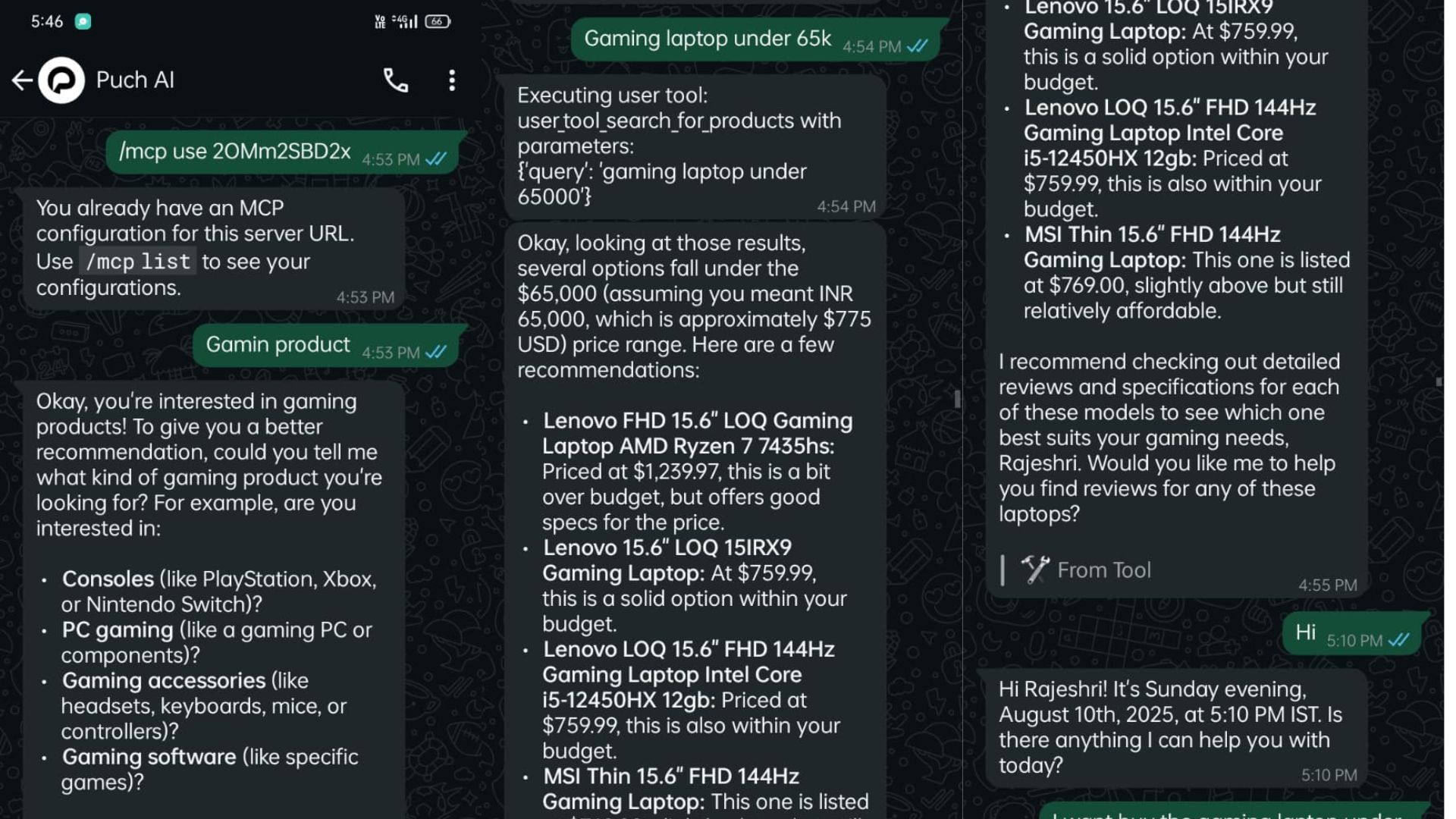
Image Result
Output 1
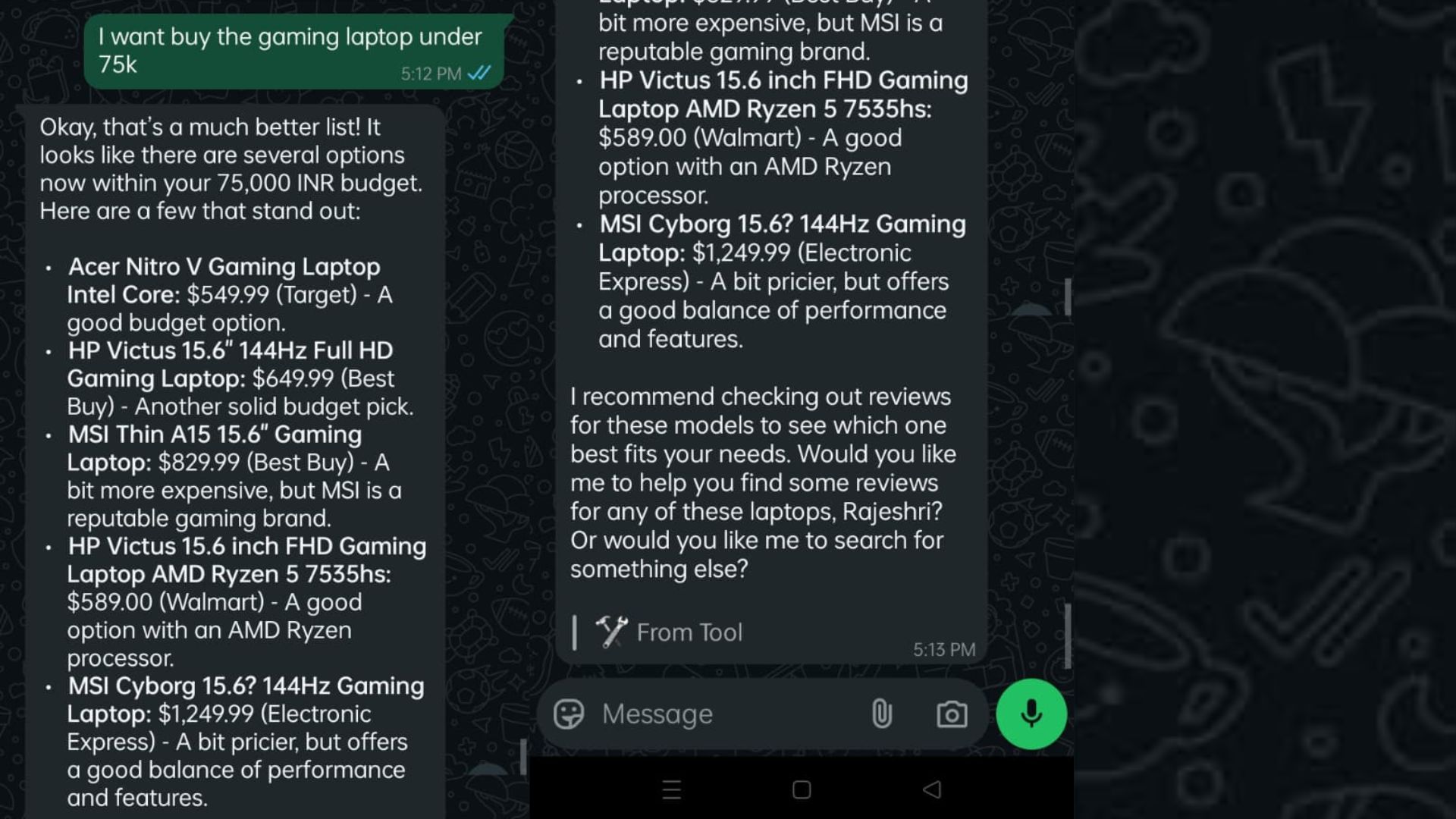
Output 2
✨ Overview
Puch AI is an intelligent assistant capable of automating tasks and retrieving information. This MCP server extends its capabilities by providing a secure, authenticated API endpoint that Puch AI can call to execute specific "tools."
This server enables Puch AI to:
- 🌐 Fetch Web Content: Scrape and process information from any URL on the internet.
- 🛒 Search for Products: Perform real-time product searches using Google Shopping to provide users with up-to-date recommendations.
- 📱 Integrate with WhatsApp: The server is architected to be the backbone of a full-fledged WhatsApp integration.
🏗️ How It Works
The server provides a single, powerful API endpoint that accepts requests to run a specific tool with given arguments. The process flow is as follows:
- Puch AI receives a user prompt (e.g., "Find me a good laptop for under $1000").
- Puch AI determines a tool is needed (e.g.,
search_for_products). - Puch AI sends a POST request to this MCP server's
/mcp/endpoint, specifying thetool_nameandarguments. - The MCP Server authenticates the request using the Bearer Token.
- The server executes the requested tool (e.g., calls the SerpApi for product results).
- The server formats and returns the result to Puch AI in a structured JSON format.
- Puch AI uses this information to formulate a natural language response for the user.
🔧 Installation & Setup
Follow these steps to get the MCP server running on your local machine.
Prerequisites
- Python 3.11+
- pip (Python package installer)
- Git
Step-by-Step Guide
Clone the Repository Open your terminal and clone the repository to your local machine.
git clone https://github.com/alok-ahirrao/Puch-AI-WhatsApp-Integration-MCP-Server.git
cd Puch-AI-WhatsApp-Integration-MCP-Server
Create a Virtual Environment (Recommended) It's best practice to create a virtual environment to manage project dependencies.
# For macOS/Linux
python3 -m venv venv
source venv/bin/activate

# For Windows
python -m venv venv
.\venv\Scripts\activate
Install Dependencies Install all the required Python packages from the
requirements.txtfile.pip install -r requirements.txtCreate and Configure the
.envFile Create a file named.envin the root directory of the project. This file will store your secret keys and configuration variables. Copy the following and replace the placeholder values.# Get your API key from https://serpapi.com/ SERPAPI_API_KEY=YOUR_SERPAPI_API_KEY # Your WhatsApp phone number (e.g., 919876543210) MY_NUMBER=YOUR_PHONE_NUMBER # A strong, secret token for authenticating API requests TOKEN=YOUR_SECURE_BEARER_TOKENRun the Server Start the FastAPI server using Uvicorn.
python main.pyThe server should now be running at
http://127.0.0.1:8085.
MCP Server Setup Instructions
Follow the instructions below to set up your MCP server and complete the application process.
Obtain an application key:
Use the provided starter code to spin up a local MCP server. After running
/apply <TWITTER/LINKEDIN REPLY URL>, you will get an application key.Create an MCP server:
Now you need to create an MCP server using the starter code given in this gist to submit your resume.
Connect Puch to your MCP server:
Use this command to connect Puch with your MCP server:
/mcp connect <SERVER URL (should be publicly accesible)>/mcp <AUTH TOKEN>Validate the auth token and phone number:
Puch will run a validation check against your Auth token (application key) and phone number. Validation requires both the key and your phone number, formatted as {country_code}{number} — without the + symbol. Example: 919876543210 for an Indian number.
Create a resume tool:
Feed your resume to Puch: Create a tool that sends your resume in a format fit for an LLM.
- Resume Tool Requirement: Your server must include a resume tool that:
- Accepts a local file (your resume).
- Converts it to markdown text
- Submits the data to the Puch AI MCP endpoint as a string.
- Resume Tool Requirement: Your server must include a resume tool that:
Set up an ngrok server:
To make your local server publicly accessible, you can use ngrok. Run the following command:
ngrok http 8085
🔑 Authentication
All requests to the /mcp/ endpoint must be authenticated using a Bearer Token. Include the token in the Authorization header of your request.
Authorization: Bearer YOUR_SECURE_BEARER_TOKEN
Replace YOUR_SECURE_BEARER_TOKEN with the value you set for TOKEN in your .env file. A request with a missing or invalid token will result in a 401 Unauthorized error.
🛠️ Available Tools
The server exposes its capabilities through a set of tools. You can invoke a tool by sending a POST request to the /mcp/ endpoint.
fetch
Fetches and parses the textual content of a given URL. This is useful for summarizing articles, extracting data, or reading documentation.
Parameters:
| Parameter | Type | Required | Default | Description |
|---|---|---|---|---|
url |
string | Yes | N/A | The full URL of the webpage to fetch. |
max_length |
integer | No | 5000 | The maximum number of characters to return. |
start_index |
integer | No | 0 | The character index from which to start extracting content. Useful for pagination. |
raw |
boolean | No | False | If true, returns raw HTML. If false, returns cleaned text content. |
Example Request (curl):
curl -X POST http://127.0.0.1:8085/mcp/ \
-H "Authorization: Bearer YOUR_SECURE_BEARER_TOKEN" \
-H "Content-Type: application/json" \
-d '{
    "tool_name": "fetch",
    "arguments": {
        "url": "https://en.wikipedia.org/wiki/Artificial_intelligence",
        "max_length": 250
    }
}'
Example Response:
{
  "content": "Artificial intelligence (AI) is the intelligence of machines or software, as opposed to the intelligence of living beings, primarily of humans. It is a field of computer science that develops and studies intelligent machines. Such machines may be called AIs."
}
search_for_products
Searches Google Shopping for products based on a query, using the SerpApi service.
Parameters:
| Parameter | Type | Required | Default | Description |
|---|---|---|---|---|
query |
string | Yes | N/A | A descriptive search query for the product. |
Example Request (curl):
curl -X POST http://127.0.0.1:8085/mcp/ \
-H "Authorization: Bearer YOUR_SECURE_BEARER_TOKEN" \
-H "Content-Type: application/json" \
-d '{
    "tool_name": "search_for_products",
    "arguments": {
        "query": "wireless noise cancelling headphones"
    }
}'
Example Response:
{
  "search_results": [
    {
      "position": 1,
      "title": "Sony WH-1000XM5 Wireless Noise-Canceling Over-the-Ear Headphones",
      "price": "$399.99",
      "extracted_price": 399.99,
      "link": "https://www.bestbuy.com/...",
      "source": "Best Buy",
      "rating": 4.7,
      "reviews": 1250,
      "thumbnail": "https://i5.walmartimages.com/..."
    },
    {
      "position": 2,
      "title": "Bose QuietComfort 45 headphones",
      "price": "$329.00",
      "extracted_price": 329,
      "link": "https://www.bose.com/...",
      "source": "Bose",
      "rating": 4.6,
      "reviews": 890,
      "thumbnail": "https://assets.bose.com/..."
    }
  ]
}
🗺️ Roadmap & Future Development
This server is designed for expansion. Future plans include:
- Full Two-Way WhatsApp Integration: Implement webhook endpoints to receive messages from users on WhatsApp and a mechanism to send replies back through the WhatsApp Business API.
- Support for More Tools: Add new tools for capabilities like:
- Sending emails.
- Managing calendar events.
- Interacting with other third-party APIs (e.g., Spotify, Google Maps).
- Interactive Messages: Utilize WhatsApp's interactive message components like buttons and lists for a richer user experience.
- Enhanced Error Handling: Provide more descriptive error messages to the calling AI.
🤝 Contributing
Contributions are what make the open-source community such an amazing place to learn, inspire, and create. Any contributions you make are greatly appreciated.
- Fork the Project
- Create your Feature Branch (
git checkout -b feature/AmazingFeature) - Commit your Changes (
git commit -m 'Add some AmazingFeature') - Push to the Branch (
git push origin feature/AmazingFeature) - Open a Pull Request
Please feel free to open an issue if you find a bug or have a suggestion.
📜 License
Copyright © 2025, Alok Ahirrao
Licensed under the Creative Commons Attribution-NonCommercial 4.0 International License. You may use or modify this project for personal or educational purposes only. Commercial usage requires explicit permission.
For inquiries, please contact [email protected].
from github.com/alok-ahirrao/Puch-AI-WhatsApp-Integration-MCP-Server
Установка Puch AI WhatsApp Integration
У этого сервера нет опубликованного пакета — он собирается из исходников. Открой репозиторий и следуй инструкции в README.
▸ github.com/alok-ahirrao/Puch-AI-WhatsApp-Integration-MCP-ServerFAQ
Puch AI WhatsApp Integration MCP бесплатный?
Да, Puch AI WhatsApp Integration MCP бесплатный — установка в пару кликов через Unyly без оплаты.
Нужен ли API-ключ для Puch AI WhatsApp Integration?
Нет, Puch AI WhatsApp Integration работает без API-ключей и переменных окружения.
Puch AI WhatsApp Integration — hosted или self-hosted?
Self-hosted: сервер запускается локально на твоей машине командой из раздела установки.
Как установить Puch AI WhatsApp Integration в Claude Desktop, Claude Code или Cursor?
Открой Puch AI WhatsApp Integration на unyly.org, выбери вкладку своего клиента (Claude Desktop, Claude Code, Cursor) и нажми Install — конфиг сгенерируется автоматически, без правки JSON.
Похожие MCP
Gmail
Read, send and search emails from Claude
 автор: Google
Slack
Send, search and summarize Slack messages
 автор: Slack
Runbear
No-code MCP client for team chat platforms, such as Slack, Microsoft Teams, and Discord.
Discord Server
A community discord server dedicated to MCP by [Frank Fiegel](https://github.com/punkpeye)
Compare Puch AI WhatsApp Integration with
Не уверен что выбрать?
Найди свой стек за 60 секунд
Автор?
Embed-бейдж для README
Похожее
Все в категории communication