
Rag
БесплатноНе проверенAn MCP knowledge server that enables saving and retrieving memory across sessions, with tools to ingest text, URLs, YouTube, and files, and perform semantic sea

Описание
An MCP knowledge server that enables saving and retrieving memory across sessions, with tools to ingest text, URLs, YouTube, and files, and perform semantic search.
README
Persistent memory for MCP clients, powered by retrieval-augmented generation.
RAG-MCP turns documents, notes, web pages, transcripts, and local files into a searchable knowledge layer that MCP-compatible clients can ingest, retrieve, and manage over time. It is designed for assistants that need memory beyond a single chat session.
Overview
RAG-MCP is an MCP server that provides a practical memory and retrieval layer for AI clients.
It supports:
- ingestion from raw text
- ingestion from URLs
- ingestion from YouTube transcripts
- ingestion from local files
- semantic retrieval with optional source metadata
- document listing, searching, deletion, and status inspection
- browser-based secure upload sessions for document ingestion
- Prometheus-compatible metrics for runtime visibility
At a high level, the system parses content, chunks it, embeds it, stores vectors in ChromaDB, stores metadata in SQLite, and exposes the entire workflow through MCP tools.
Why this exists
Most MCP clients are excellent at reasoning in the moment, but weak at remembering useful context across sessions.
RAG-MCP solves that by giving clients a persistent, queryable memory layer.
Use it when you want to:
- give an assistant long-term memory across conversations
- search documentation, notes, transcripts, or uploaded files semantically
- attach citations and source metadata to retrieval results
- keep knowledge isolated by namespace for teams, projects, or environments
- support both direct ingestion and user-friendly browser uploads
Core capabilities
Ingestion
Store knowledge from:
- Text via
ingest_text - Web pages via
ingest_url - YouTube transcripts via
ingest_youtube - Local files via
ingest_file - Browser upload sessions via
create_upload_session+ upload UI
Supported local file types:
.txt.md.markdown.pdf.docx.doc
Retrieval
Query stored knowledge using:
retrievefor compact semantic matchesretrieve_with_sourcesfor source-aware responses with document and chunk metadata
Document management
Manage the knowledge base with:
list_documentssearch_documentsdelete_documentget_ingestion_statuscheck_upload_status
Runtime features
- Streamable HTTP MCP transport at
/mcp - SSE MCP transport at
/sse//messages - Upload UI under
/upload - Metrics endpoint at
/metrics
Architecture-level mental model
Think of RAG-MCP as a dedicated memory service for MCP clients:
- Ingest content from text, files, URLs, or YouTube
- Parse and normalize the content into plain text
- Chunk the text into retrievable segments
- Embed the chunks into vector representations
- Store vectors in ChromaDB
- Store metadata in SQLite
- Query semantically and return either compact or citation-rich results
This makes the system practical for assistants that need to remember information across time without relying on chat history alone.
Quick start
Local development
python -m venv .venv
. .venv/bin/activate
pip install -e "[dev]"
cp .env.example .env
python -m rag_mcp.main
Verify the server:
curl -i http://127.0.0.1:8080/mcp
curl -i http://127.0.0.1:8080/sse
curl -i http://127.0.0.1:8080/metrics
Optional extras
Install optional parsing extras when needed:
pip install -e ".[pdf]"
pip install -e ".[docx]"
Docker usage
Run with Docker Compose
docker compose up --build -d
docker compose ps
Check the running service
curl -i http://127.0.0.1:8080/metrics
curl -i http://127.0.0.1:8080/mcp
Stop the stack
docker compose down
The Compose setup mounts persistent storage for:
- ChromaDB vectors
- SQLite metadata database
Configuration
Configuration is managed through environment variables and loaded by Settings.
Start by copying the sample file:
cp .env.example .env
Common settings
RAG_MCP_CHROMA_PATH=/data/chroma
RAG_MCP_METADATA_DB_PATH=/data/metadata.db
RAG_MCP_LOG_LEVEL=INFO
RAG_MCP_EMBEDDING_MODEL=all-MiniLM-L6-v2
RAG_MCP_METRICS_ENABLED=true
RAG_MCP_METRICS_PATH=/metrics
RAG_MCP_METRICS_REQUIRE_AUTH=false
RAG_MCP_UPLOAD_SESSION_SECRET=change-me-in-production
Important notes
RAG_MCP_UPLOAD_SESSION_SECRETshould always be set explicitly in real deployments.- If metrics auth is enabled, configure the metrics token as well.
- Chroma and SQLite paths should point to persistent storage in containerized environments.
Upload Documents (UI)
RAG-MCP includes a browser-based upload flow for cases where direct local file ingestion is not convenient.
The flow is:
- Call
create_upload_session - Open the returned secure upload URL in a browser
- Upload supported files
- Poll
check_upload_statusif needed
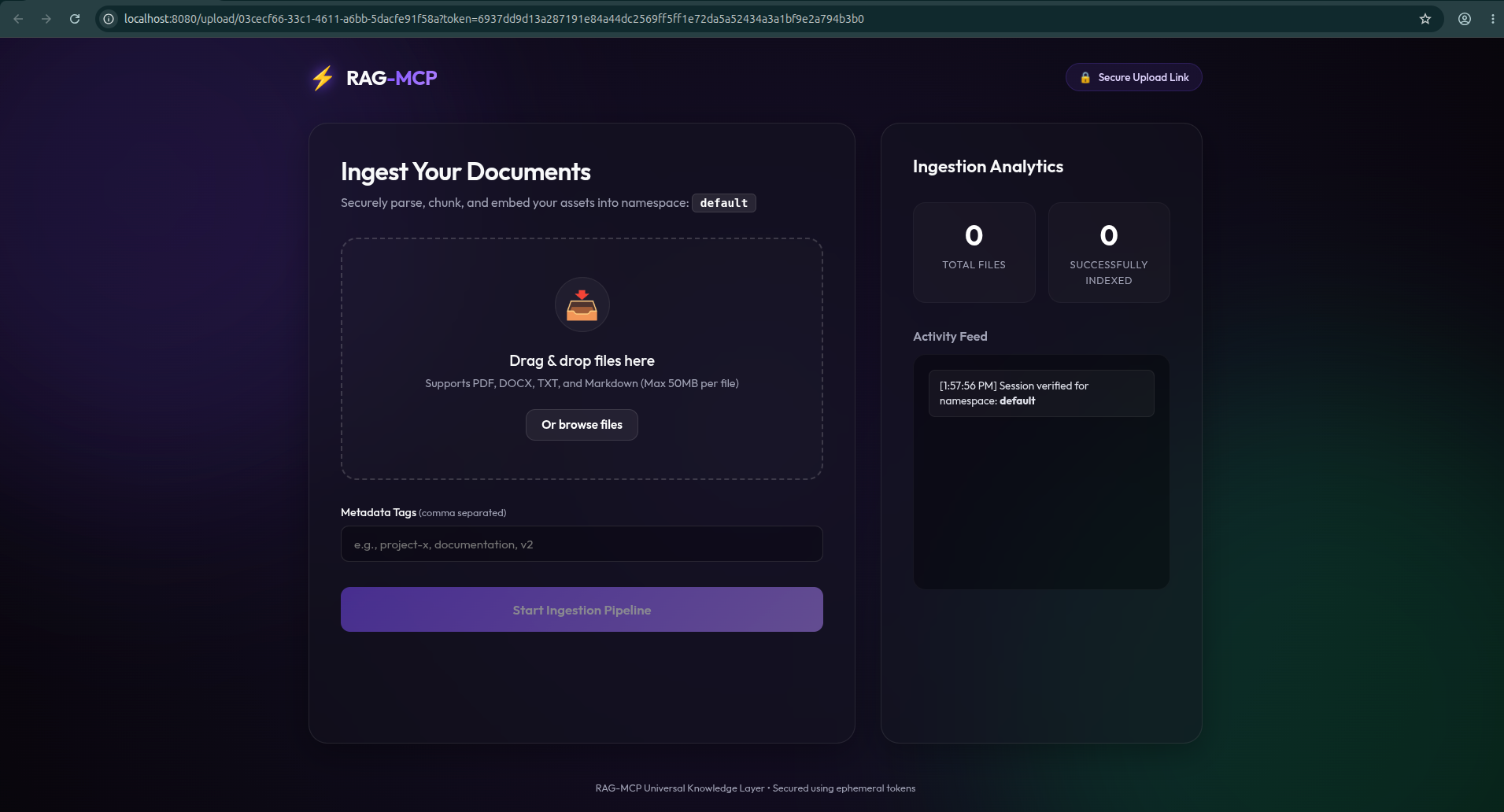
This is especially useful when:
- the MCP client cannot directly access a file path
- the user wants a friendlier document upload flow
- files need to be uploaded from another machine or browser session
Upload behavior
- invalid or expired session token returns an error
- unsupported files are rejected during parsing
- upload limits are enforced for file count and size
- indexed files are written into the target namespace
MCP tool usage patterns
1. Ingest text directly
{
  "name": "ingest_text",
  "arguments": {
    "title": "Team Notes",
    "namespace": "default",
    "text": "Release checklist: create tag, run tests, publish image"
  }
}
2. Ingest a web page
{
  "name": "ingest_url",
  "arguments": {
    "url": "https://example.com/docs",
    "namespace": "docs"
  }
}
3. Retrieve compact results
{
  "name": "retrieve",
  "arguments": {
    "query": "How does release publishing work?",
    "namespace": "default",
    "top_k": 5
  }
}
4. Retrieve with sources
{
  "name": "retrieve_with_sources",
  "arguments": {
    "query": "What are the deployment steps?",
    "namespace": "docs",
    "top_k": 5
  }
}
5. List stored documents
{
  "name": "list_documents",
  "arguments": {
    "namespace": "docs",
    "limit": 20
  }
}
6. Create an upload session
{
  "name": "create_upload_session",
  "arguments": {
    "namespace": "project-x"
  }
}
Recommended usage pattern
A common lifecycle looks like this:
- ingest into a namespace
- retrieve against the same namespace
- inspect with
list_documents - delete or re-ingest as documents change
Observability / metrics
The service exposes Prometheus-compatible metrics at /metrics.
Current instrumentation includes request-level visibility such as:
- total HTTP requests
- request latency histogram
- in-flight requests
- exception counters
- default Python/process metrics from the Prometheus client runtime
Example:
curl -i http://127.0.0.1:8080/metrics
This makes it straightforward to plug RAG-MCP into:
- Prometheus
- Grafana
- container monitoring dashboards
- local ops/debugging workflows
Security notes
RAG-MCP includes practical safeguards for production-style deployments:
- SSRF protection for URL ingestion
- signed upload session tokens with expiry
- upload file count and size limits
- optional metrics authentication and CIDR controls
- request rate limiting for sensitive paths like upload and metrics
Operational recommendations:
- set a strong
RAG_MCP_UPLOAD_SESSION_SECRET - keep metrics private or authenticated in shared environments
- use persistent storage for
/data - run behind a reverse proxy when exposing publicly
Troubleshooting
Upload UI says static files are missing
If the upload page does not render correctly, rebuild and restart after updating the image:
docker compose build
docker compose up -d --force-recreate
/metrics returns 503
If metrics auth is enabled without the required token configuration, the endpoint can fail closed. Check your .env values.
/mcp returns a redirect
That is expected. The server supports transport-specific behavior and may redirect to the canonical mounted route.
URL ingestion fails
Private IPs, loopback targets, metadata endpoints, and blocked schemes are intentionally rejected by SSRF validation.
Retrieval returns empty results
Check these in order:
- confirm ingestion completed successfully
- confirm you are querying the correct namespace
- broaden the query wording
- increase
top_k - verify the document exists with
list_documents
Repository structure
Useful entry points:
- README.md
- docs/guide/system-architecture.md
- docs/guide/quick-setup.md
- docs/guide/how-to-guide.md
- src/rag_mcp/config.py
- src/rag_mcp/main.py
- docker-compose.yml
- Dockerfile
Contributing
Contributions are welcome.
A solid contribution workflow is:
python -m venv .venv
. .venv/bin/activate
pip install -e "[dev]"
pytest
Before opening a PR:
- keep changes focused
- verify the local server still starts
- run tests
- update docs when behavior changes
License
MIT — see LICENSE.
Установить Rag в Claude Desktop, Claude Code, Cursor
unyly install rag-mcpСтавит в Claude Desktop, Claude Code, Cursor и VS Code — сам разбирается с npx, uvx и сборкой из исходников.
Впервые? Поставь CLI: curl -fsSL https://unyly.org/install | sh
Или настроить вручную
Выполни в терминале:
claude mcp add rag-mcp -- uvx rag-mcpFAQ
Rag MCP бесплатный?
Да, Rag MCP бесплатный — установка в пару кликов через Unyly без оплаты.
Нужен ли API-ключ для Rag?
Нет, Rag работает без API-ключей и переменных окружения.
Rag — hosted или self-hosted?
Self-hosted: сервер запускается локально на твоей машине командой из раздела установки.
Как установить Rag в Claude Desktop, Claude Code или Cursor?
Открой Rag на unyly.org, выбери вкладку своего клиента (Claude Desktop, Claude Code, Cursor) и нажми Install — конфиг сгенерируется автоматически, без правки JSON.
Похожие MCP
Omni Video
An MCP server that transforms LLM-enabled IDEs into professional video editors by pre-processing footage into text proxies, generating motion graphics via HTML/
 автор: buildwithtaza
ARA
Generate images, video and audio from any AI agent — one connector.
 автор: ARA
YouTube
Transcripts, channel stats, search
 автор: YouTube
EverArt
AI image generation using various models.
 автор: modelcontextprotocol
Compare Rag with
Не уверен что выбрать?
Найди свой стек за 60 секунд
Автор?
Embed-бейдж для README
Похожее
Все в категории media