
Rango
БесплатноНе проверенRango — Chameleon Ultra AI Copilot: MCP server + agent skills + offline dump analyzer on top of the official Chameleon Ultra CLI (Kimi Code plugin; adapters for

Описание
Rango — Chameleon Ultra AI Copilot: MCP server + agent skills + offline dump analyzer on top of the official Chameleon Ultra CLI (Kimi Code plugin; adapters for Claude Code, Codex, OpenCode)
README
Rango
Chameleon Ultra AI Copilot — read, crack, dump, analyze, emulate and clone RFID cards through natural language, with safety gates and a host-side card library.
CI License: MIT Python ≥ 3.10 MCP Harnesses
Prerequisites · Quick start · Other harnesses · MCP tools · Coverage · Development
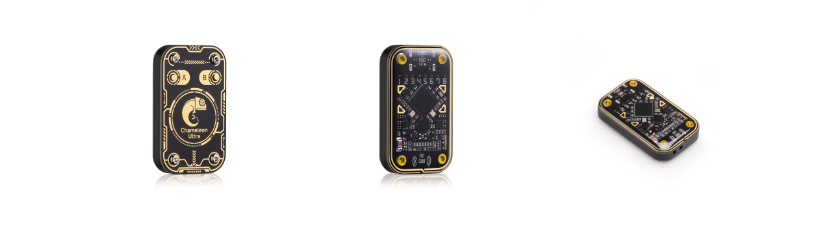
Chameleon Ultra — image © RfidResearchGroup
Rango turns a Chameleon Ultra into an agent-driven RFID copilot. It is only the AI layer: the official Chameleon Ultra CLI is not vendored into this repo — clone it separately; Rango locates and drives it in-process (see Prerequisites).
Two ways to use it:
- Kimi Code plugin (best experience) — an MCP server + skill + analysis subagent; the Kimi Code agent operates the device for you.
- Standalone AI shell — an enhanced REPL around the stock CLI where
?talks to an LLM (Moonshot/Kimi API or any OpenAI-compatible endpoint).
Architecture
flowchart LR
    U(["You — natural language"]) --> A["Agent harness<br/>Kimi Code · Claude Code · Codex · OpenCode"]
    SK["SKILL.md<br/>workflows · safety gates · coaching"] -. guides .-> A
    A -->|"MCP over stdio"| M["chameleon MCP server<br/>16 tools · one persistent serial owner"]
    M --> S["ai_shell<br/>bridge · ops · library · dictionaries · analyze"]
    S --> C["official Chameleon Ultra CLI<br/>fetched · unmodified · not vendored"]
    C -->|"USB serial"| D(["Chameleon Ultra"])
Prerequisites
git clone https://github.com/fedroraddict/rango rango && cd rango

scripts/install-cli.sh   # fetches the stock upstream CLI into ../ChameleonUltra
                         # (git clone, with a codeload tarball fallback when
                         #  github.com is unreachable)
uv sync
scripts/setup-plugin.sh  # writes plugin/.rango-root so the MCP launcher still
                         # finds this repo after /plugins install copies plugin/
The installer is idempotent and prints what it did. If you keep the upstream checkout
somewhere else, pass the path (scripts/install-cli.sh /path/to/ChameleonUltra) and set
export CHAMELEON_SOFTWARE=/path/to/ChameleonUltra/software.
Requires Python ≥ 3.10, uv, and the device on a data-capable USB-C cable.
Quick start
# Standalone AI shell (stock CLI commands pass through; '? ...' asks the AI)
cd rango && uv run python -m ai_shell
#   needs MOONSHOT_API_KEY (or another OpenAI-compatible endpoint in
#   ~/.chameleon_ai/config.toml) for AI features; plain CLI works without it

# Kimi Code plugin
#   in Kimi Code: /plugins install <this-repo>/plugin   then  /reload
Use from Codex, Claude Code, OpenCode
The MCP server is a standard stdio server — not Kimi-only. Per-harness config snippets
and install notes live in adapters/: Claude Code (.mcp.json /
claude mcp add + drop-in skill and agent), Codex CLI ([mcp_servers.chameleon] +
skill with stripped frontmatter), OpenCode (opencode.json + converted agent file).
MCP tools (16)
| Tool | Purpose |
|---|---|
chameleon_run |
Execute any official CLI command. Read-only runs directly; writes/attacks require confirm_dangerous=true after user approval |
chameleon_state |
One-call snapshot: firmware, battery, active slot, per-slot summary — the pre-flight check |
chameleon_help / chameleon_catalog |
Exact syntax of one command / the full command tree |
card_list / card_add / card_show / card_remove |
Host card library (~/.chameleon_ai/cards/) — unlimited named dumps, independent of the 8 device slots |
card_load |
Composite: library card → free device slot, verified order (type → eload → block0 → enable → nick), auto free-slot pick |
card_analyze |
Offline dump analysis (raw .bin or Flipper .nfc): access-bits decode, key audit with known-system fingerprints, value blocks, MAD/NDEF, card-type ID |
dict_list / dict_seed_default / dict_create / dict_merge / dict_import / dict_show |
Mifare key dictionaries (~/.chameleon_ai/dicts/); dict_show feeds keys positionally to hf mf fchk |
What the copilot layer adds
- Pre-flight ritual — workflows start with
chameleon_state; gated steps are announced first. - Detection coaching — failed scans trigger placement guidance, HF/LF alternation, app cross-check — not silent retry loops.
- Key-recovery decision tree — default dictionary → targeted dictionary built from a web search of the card system's known keys →
hf mf autopwn→ manual PRNG attacks (darkside / nested / senested / hardnested, with expected durations) → last resort: mfkey32v2 reader-side recovery (hf mf elog --decrypt). - Library-first model (mirrors the CU GUI's Saved Cards): dumps get user-chosen names in the library; slots are working memory.
- Slot discipline — list first, prefer free slots, ask before overwriting, always name, always enable (
(disabled)slots don't emulate), persist withhw slot store. - Collaboration modes — copilot (confirm each gated step) or autopilot (approve a stated workflow once).
hw dfu,hw factory_reset, and physical-card writes always get their own confirmation. - Offline analysis subagent (
card-analyst) for deep dump inspection.
Card coverage
| Band | Families |
|---|---|
| HF | Mifare Classic (full attack suite) · Ultralight/NTAG (incl. ulcg backdoor, UL-C authnonce) · DESFire (hf des chk) · SEOS · EMV payment · generic ISO14443-A sniff/auth-trace |
| LF | EM410x · EM4x05 · HID Prox · ioProx · PAC/Stanley · Viking · Jablotron · IDTECK · T5577 writing · raw lf sniff + offline analysis for unknown families |
Known quirks (verified on hardware)
hf mf fchk --dicis a no-op stub in some upstream builds — pass keys positionally (dict_showexists for this).- Serial desync (frame-error flood / connect timeout) happens if the process holding the port is killed mid-connection — unplug/replug the device;
hw disconnectbefore reloading the plugin. - A slot that starts as
(disabled)undefmust behw slot enabled after loading or it won't emulate. - The CLI tokenizes with a plain whitespace split — never quote arguments (
hw slot nick ... -n bike, not-n "bike", or the quotes become part of the nick) and keep paths space-free.
Development
cd rango
uv run ruff check ai_shell/ plugin/mcp/          # lint
uv run python -m ai_shell.selfcheck            # cited commands exist in the real CLI tree,
                                               # gate semantics, simulated /plugins install boot
uv run python -m ai_shell.test_analyze         # dump-analyzer regression tests
CI runs the same three gates on every push and PR (see .github/workflows/ci.yml).
Layout: ai_shell/ wrapper library · plugin/ Kimi Code plugin
(see plugin/README.md) · scripts/ upstream-CLI installer + plugin
setup · adapters/ other-harness configs (see adapters/README.md)
· AGENTS.md contributor/agent notes.
Credits
Everything device-side — the Chameleon Ultra firmware and the official CLI that Rango
drives — comes from
RfidResearchGroup/ChameleonUltra,
© its authors (see its AUTHORS.md). Rango is only the AI copilot layer on top: it
contains no upstream code, and the CLI is fetched by scripts/install-cli.sh and used
unmodified.
Also standing on:
- the Proxmark3 community — known-key
and MAD AID conventions (
mad.jsoncan be dropped into~/.chameleon_ai/dicts/); - NXP's MF1S50YYX datasheet — the access-bits and value-block decode tables in
ai_shell/analyze.pyfollow it; - the Model Context Protocol — the interface every supported agent harness speaks;
- Kimi Code — the plugin format and the default LLM endpoint for the standalone shell.
License & responsible use
Rango itself is MIT. The upstream Chameleon Ultra CLI is a separate project under GPL-3.0 — fetched, not vendored — so its license governs the CLI, not this repo. Operate only on cards and devices you own or are explicitly authorized to test.
Установить Rango в Claude Desktop, Claude Code, Cursor
unyly install rangoСтавит в Claude Desktop, Claude Code, Cursor и VS Code — сам разбирается с npx, uvx и сборкой из исходников.
Впервые? Поставь CLI: curl -fsSL https://unyly.org/install | sh
Или настроить вручную
Выполни в терминале:
claude mcp add rango -- uvx rangoПошаговые гайды: как установить Rango
FAQ
Rango MCP бесплатный?
Да, Rango MCP бесплатный — установка в пару кликов через Unyly без оплаты.
Нужен ли API-ключ для Rango?
Нет, Rango работает без API-ключей и переменных окружения.
Rango — hosted или self-hosted?
Self-hosted: сервер запускается локально на твоей машине командой из раздела установки.
Как установить Rango в Claude Desktop, Claude Code или Cursor?
Открой Rango на unyly.org, выбери вкладку своего клиента (Claude Desktop, Claude Code, Cursor) и нажми Install — конфиг сгенерируется автоматически, без правки JSON.
Похожие MCP
GitHub
PRs, issues, code search, CI status
 автор: GitHub
Filesystem
Secure file operations with configurable access controls.
Memory
Knowledge graph-based persistent memory system.
Template MCP Server
A CLI tool to create a new Model Context Protocol server project with TypeScript support, dual transport options, and an extensible structure
 автор: mcpdotdirect
Amap Maps Mcp Server
MCP server for using the AMap Maps API
 автор: duxiaohui
Supabase
Database, auth and storage
 автор: Supabase
Everything
Reference / test server with prompts, resources, and tools.
Git
Tools to read, search, and manipulate Git repositories.
Sequential Thinking
Dynamic and reflective problem-solving through thought sequences.
Time
Time and timezone conversion capabilities.
Compare Rango with
Не уверен что выбрать?
Найди свой стек за 60 секунд
Автор?
Embed-бейдж для README
Похожее
Все в категории development