loading…
/ru
Весь каталог
App Data With
App Actions With
Reading Agent State With
React Native
БесплатноAdd an in-app AI support agent to React Native apps that understands UI, navigates screens, fills forms, and escalates to humans.
Описание
Add an in-app AI support agent to React Native apps that understands UI, navigates screens, fills forms, and escalates to humans.
README
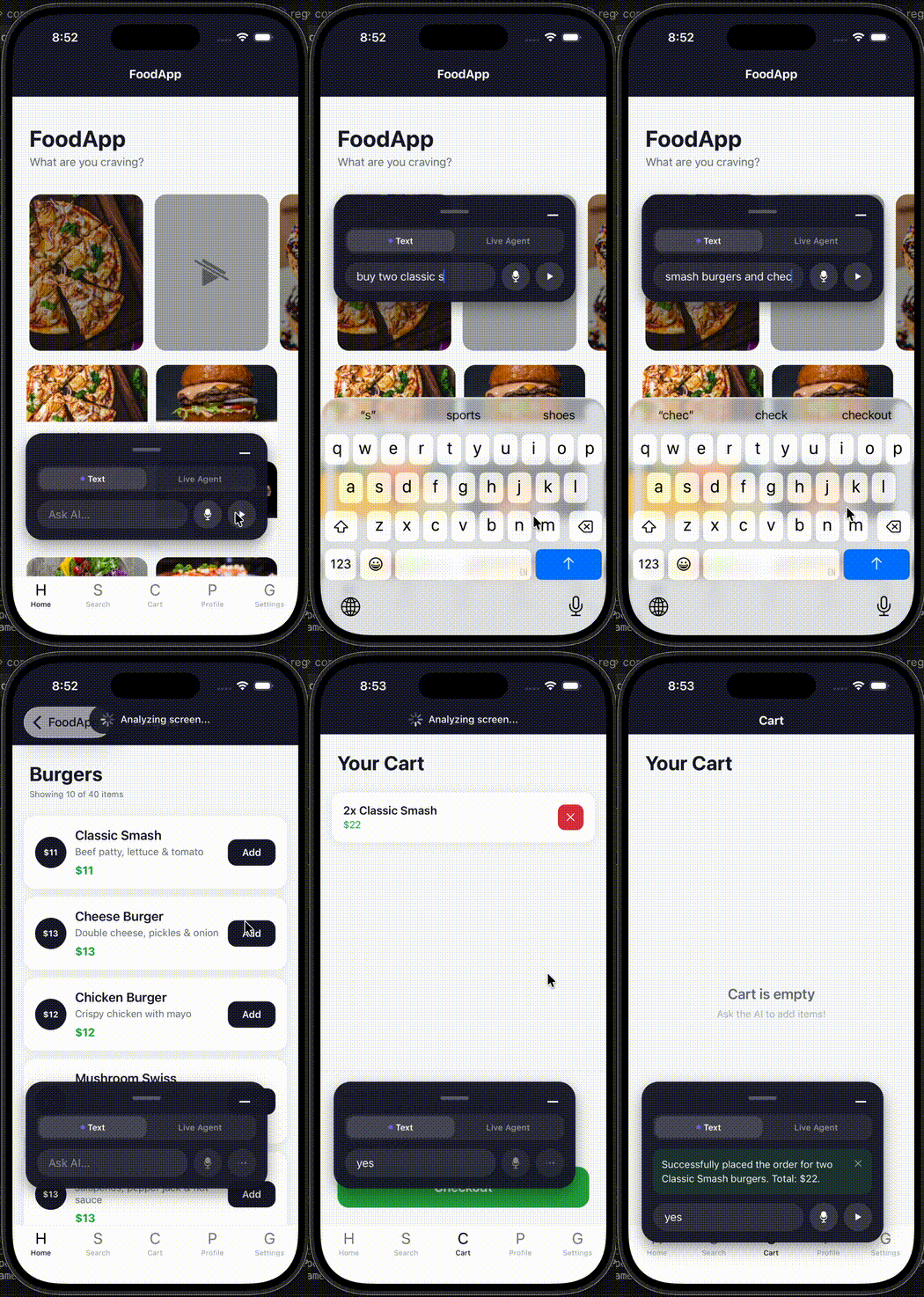
An in-app AI assistant for React Native that reads your app's UI automatically — no wrappers required. It can guide users, perform approved actions, answer questions using your knowledge base, and hand off to human support.
npm version React Native License Security Roadmap Changelog
Contents
- How It Works
- Quick Start
- Platform Setup
- Optional Dependencies
- Screen Map
- Provider Options
- Core Concepts
- Guardrails
- Support Mode
- Common Recipes
- TypeScript
- More Docs
- Requirements
- Troubleshooting
- Security
- Roadmap
- Changelog
- License
How It Works
Twomilia uses React Fiber tree traversal to find every interactive element on the current screen at runtime — no component wrappers, no prop drilling, no code changes to your existing screens.
User message → Agent Runtime → Fiber tree snapshot → LLM → Tool call → UI action / answer
                                      ↑
                          Optional: screen map + knowledge base
The <AIAgent> component sits at your app root. When the user sends a message:
- The runtime walks the live React Fiber tree to discover interactive elements (buttons, inputs, pickers, etc.) and their accessibility labels.
- It builds a structured screen snapshot and sends it to the LLM along with your instructions, knowledge base, and registered data sources.
- The LLM calls tools (
tap,type,scroll,navigate,query_knowledge, your custom actions, etc.). - The runtime executes each tool call, respects guardrails, and streams results back to the chat UI.
The assistant sees exactly what is mounted — nothing more, nothing less. Use aiIgnore on sensitive elements to hide them from the snapshot, or transformScreenContent to mask values before the LLM call.
Quick Start
1. Install
npm install @twomilia/react-native
2. Wrap Your App
React Navigation
import { NavigationContainer, useNavigationContainerRef } from '@react-navigation/native';
import { AIAgent } from '@twomilia/react-native';

export default function App() {
  const navRef = useNavigationContainerRef();

  return (
    <AIAgent
      analyticsKey="twomilia_pub_xxxxxxxx"
      navRef={navRef}
    >
      <NavigationContainer ref={navRef}>
        {/* your screens */}
      </NavigationContainer>
    </AIAgent>
  );
}
Expo Router
import { Slot, useNavigationContainerRef } from 'expo-router';
import { AIAgent } from '@twomilia/react-native';

export default function RootLayout() {
  const navRef = useNavigationContainerRef();

  return (
    <AIAgent
      analyticsKey="twomilia_pub_xxxxxxxx"
      navRef={navRef}
    >
      <Slot />
    </AIAgent>
  );
}
3. Run a Native Build
The SDK uses native modules. You cannot test it in Expo Go.
# Expo
npx expo run:ios
npx expo run:android

# React Native CLI
npx react-native run-ios
npx react-native run-android
That's it — a floating chat button appears in your app.
Platform Setup
iOS
After adding the package, run CocoaPods:
npx pod-install
# or
cd ios && pod install
Android
No extra steps. The SDK ships its own AndroidManifest.xml with required permissions.
Expo Managed Workflow
Expo managed workflow is not supported because the SDK requires native modules. Use a development build or prebuild:
npx expo prebuild
npx expo run:ios   # or run:android
Architecture Support
The SDK supports both the Old Architecture (Paper) and the New Architecture (Fabric). No extra config is needed — the correct native code is selected automatically at build time based on your app's architecture setting.
Optional Dependencies
These packages are technically optional — the SDK won't crash without them — but they are important for a complete experience. For full functionality, install all of them.
| Package | Needed for |
|---|---|
react-native-screens |
Better navigation support in navigation-heavy apps |
@react-native-async-storage/async-storage |
Persisting user consent across sessions |
react-native-audio-api |
Voice input (microphone capture) |
expo-speech-recognition |
Voice input on Expo |
expo-image-picker |
Image attachments in chat |
# Install all optional features
npm install react-native-screens @react-native-async-storage/async-storage
npm install react-native-audio-api expo-speech-recognition expo-image-picker

# iOS pods after adding native deps
npx pod-install
Screen Map
A screen map gives the AI knowledge of all your screens, their content, and navigation chains — so it can route users to the right place even without them being there first.
The SDK works without it using the live Fiber tree alone, but generating a screen map is strongly recommended. It significantly improves navigation accuracy and reduces the number of LLM calls needed to find the right screen, leading to faster and cheaper agent interactions.
Generate Once
npx react-native-ai-agent generate-map
This creates ai-screen-map.json in your project root. Commit it to source control.
Auto-Generate on Metro Start
// metro.config.js
const { getDefaultConfig } = require('expo/metro-config');

require('@twomilia/react-native/generate-map').autoGenerate(__dirname);

module.exports = getDefaultConfig(__dirname);
Pass It to AIAgent
import screenMap from './ai-screen-map.json';

<AIAgent screenMap={screenMap} navRef={navRef}>
  {children}
</AIAgent>
Provider Options
Twomilia Cloud (recommended for production)
analyticsKey routes AI calls through the Twomilia hosted proxy. It also enables analytics, the knowledge base dashboard, support ticket inbox, and conversation history — without exposing an API key in your app bundle.
<AIAgent analyticsKey="twomilia_pub_xxxxxxxx" navRef={navRef}>
  {children}
</AIAgent>
Get your key at twomilia.com.
Your Own Backend Proxy (production without Twomilia Cloud)
Route requests through your server. Your server adds the real API key before forwarding to Gemini or OpenAI.
<AIAgent
  provider="openai"
  proxyUrl="https://api.example.com/twomilia/chat"
  proxyHeaders={{ Authorization: `Bearer ${sessionToken}` }}
  navRef={navRef}
>
  {children}
</AIAgent>
For voice mode, you can use a separate WebSocket endpoint:
<AIAgent
  proxyUrl="https://api.example.com/twomilia/chat"
  voiceProxyUrl="wss://api.example.com/twomilia/voice"
  voiceProxyHeaders={{ Authorization: `Bearer ${sessionToken}` }}
  navRef={navRef}
>
  {children}
</AIAgent>
Direct API Key (local prototyping only)
<AIAgent provider="gemini" apiKey="YOUR_DEV_ONLY_KEY" navRef={navRef}>
  {children}
</AIAgent>
⚠️ Never ship an API key in your production app bundle. Use a proxy or
analyticsKeyfor production.
Core Concepts
Interaction Modes
Control how much autonomy the AI has:
| Mode | What it does |
|---|---|
companion |
Read-only. The AI reads the screen and guides the user in plain language. Cannot tap, type, scroll, or navigate. |
copilot |
Default. Performs approved actions. Asks once before starting a flow, executes steps silently, then asks before irreversible commits. |
autopilot |
Full autonomy. All actions execute without confirmation. Use only for trusted, low-risk automation flows. |
<AIAgent interactionMode="companion" analyticsKey="twomilia_pub_xxxxxxxx">
  {children}
</AIAgent>
Companion mode is the safest choice when trust matters more than automation. The assistant can read the screen, answer questions, look up knowledge and app data, and escalate to a human — but it cannot operate the app on the user's behalf.
App Data With useData
Register async data sources the AI can query directly instead of guessing from what's visible on screen. Use this for order status, product catalogs, account data, recommendations, or any backend API.
import { useData } from '@twomilia/react-native';

function OrdersScreen() {
  useData(
    'orders',
    'Read the signed-in customer orders and delivery status',
    {
      orderId: 'Order identifier',
      status: 'Current delivery status',
      eta: 'Estimated arrival time',
    },
    async ({ query }) => searchOrders(query)
  );

  return <OrdersList />;
}
App Actions With useAction
Register safe app-owned operations the AI can call by name. Use this for actions that are better expressed in code than by tapping UI — applying coupons, filtering results, clearing a cart, toggling a setting.
import { useAction } from '@twomilia/react-native';

function CartScreen() {
  useAction(
    'apply_coupon',
    'Apply a coupon code to the current cart',
    {
      code: { type: 'string', description: 'Coupon code', required: true },
    },
    async ({ code }) => applyCoupon(String(code))
  );

  return <CartView />;
}
The handler is always kept fresh via an internal ref — no stale closure bugs, even when it captures mutable state.
Reading Agent State With useAI
Access the agent from any component inside the <AIAgent> tree:
import { useAI } from '@twomilia/react-native';

function MyScreen() {
  const { send, isLoading, status, messages, clearMessages, cancel } = useAI();

  return (
    <Button
      title="Check my order"
      onPress={() => send('What is the status of my latest order?')}
    />
  );
}
Temporarily disable UI control for a specific screen without changing the root config:
const { send } = useAI({ enableUIControl: false });
Knowledge Base
Give the AI domain knowledge it can query during a conversation:
<AIAgent
  knowledgeBase={[
    {
      id: 'returns',
      title: 'Return policy',
      content: 'Customers can request returns within 30 days of delivery.',
    },
    {
      id: 'shipping',
      title: 'Shipping times',
      content: 'Standard shipping takes 3–5 business days.',
    },
  ]}
>
  {children}
</AIAgent>
You can also pass a custom retriever function or configure project-level knowledge in the Twomilia dashboard (when using analyticsKey).
AI Zones
AIZone is a declarative boundary that grants the AI permission to modify a specific subtree — highlighting elements, injecting hint cards, or simplifying a complex view for the user.
import { AIZone } from '@twomilia/react-native';

function CheckoutScreen() {
  return (
    <AIZone
      id="checkout-form"
      allowHighlight
      allowInjectHint
      allowSimplify
    >
      <PaymentForm />
    </AIZone>
  );
}
Without an AIZone, the AI can still read and interact with elements — zones just add richer intervention capabilities like card injection and simplification.
Guardrails
Guardrails are enforced by the runtime, not by the LLM alone.
Consent (Apple Guideline 5.1.2(i))
By default, the SDK shows a consent dialog before the first AI interaction. No screen data is sent to the AI provider until the user explicitly agrees.
// Persist consent across sessions (uses AsyncStorage)
<AIAgent consent={{ required: true, persist: true }}>
  {children}
</AIAgent>

// Opt out — only appropriate when you have your own consent flow
<AIAgent consent={{ required: false }}>
  {children}
</AIAgent>
Action Safety
Semantic guardrails classify each action as allow, ask, or block based on risk level. Active by default in copilot mode.
<AIAgent
  interactionMode="copilot"
  actionSafety={{
    classifier: 'default',
    unknownActionDecision: 'ask',
    approvalReuse: 'risk-boundary',
    onDecision: (decision) => {
      console.log(decision.capability, decision.risk, decision.decision);
    },
  }}
>
  {children}
</AIAgent>
Element-Level Controls
Add these props directly to any component:
// Block the AI from interacting with this element
<TextInput aiIgnore />

// Force a confirmation before the AI interacts with this element
<Button aiConfirm title="Delete account" onPress={deleteAccount} />
Content Masking
Mask sensitive values before the LLM ever sees them:
<AIAgent
  transformScreenContent={(content) =>
    content.replace(/\b\d{4}[\s-]?\d{4}[\s-]?\d{4}[\s-]?\d{4}\b/g, '[CARD REDACTED]')
  }
>
  {children}
</AIAgent>
Read the full safety model in docs/guardrails.md.
Support Mode
Support mode transforms the AI into a customer support assistant with a greeting, quick replies, self-service help, escalation to humans, and CSAT collection.
<AIAgent
  analyticsKey="twomilia_pub_xxxxxxxx"
  userContext={{ userId: user.id, email: user.email, name: user.name }}
  supportMode={{
    enabled: true,

    // Greeting shown when the chat opens
    greeting: {
      message: 'Hi! 👋 How can I help you today?',
      agentName: 'Nora',
    },

    // Quick reply buttons below the greeting
    quickReplies: [
      { label: 'Track my order', icon: '📦' },
      { label: 'Return an item', icon: '↩️' },
      { label: 'Talk to a human', icon: '💬' },
    ],

    // Self-service help (zero LLM cost for common questions)
    quickActions: {
      enabled: true,
      topics: [
        {
          id: 'orders',
          label: 'Orders',
          icon: '📦',
          articles: [
            {
              question: 'How do I track my order?',
              answer: 'Go to Orders → tap your order → tap Track.',
            },
          ],
        },
      ],
    },

    // Escalation to human support
    escalation: {
      provider: 'mobileai',  // or 'custom' with onEscalate callback
    },

    // CSAT survey after conversation
    csat: {
      enabled: true,
      surveyType: 'csat',
      ratingType: 'emoji',
      onSubmit: (rating) => console.log('CSAT:', rating.score),
    },

    // Topics that always go to a human — no AI attempt
    autoEscalateTopics: ['account deletion', 'legal request', 'billing dispute'],

    // AI persona
    persona: {
      agentName: 'Nora',
      preset: 'warm-concise',
    },
  }}
>
  {children}
</AIAgent>
When analyticsKey is set and escalation.provider is 'mobileai', tickets appear in the Twomilia dashboard inbox and human replies are streamed back into the chat in real time via WebSocket.
Offline Notifications
Pass a push token so users get notified when a human replies:
<AIAgent
  analyticsKey="twomilia_pub_xxxxxxxx"
  pushToken={expoPushToken}
  pushTokenType="expo"  // 'fcm' | 'expo' | 'apns'
>
  {children}
</AIAgent>
Common Recipes
Custom Chat UI
Hide the built-in chat bar and drive the assistant from your own UI.
import { AIAgent, useAI } from '@twomilia/react-native';

function MyAssistantInput() {
  const { send, isLoading, status, messages, cancel } = useAI();

  return (
    <MyCustomChatUI
      messages={messages}
      isLoading={isLoading}
      status={status}
      onSend={send}
      onCancel={cancel}
    />
  );
}

<AIAgent showChatBar={false} analyticsKey="twomilia_pub_xxxxxxxx">
  <MyAssistantInput />
  {children}
</AIAgent>
Proactive Help
Trigger a help hint automatically when the SDK detects user hesitation:
<AIAgent
  proactiveHelp={{
    enabled: true,
    idleThresholdMs: 8000,       // Trigger after 8s of inactivity
    message: 'Need help? I can guide you through checkout.',
  }}
  analyticsKey="twomilia_pub_xxxxxxxx"
>
  {children}
</AIAgent>
Guided Onboarding
Walk new users through structured setup steps proactively on first launch:
<AIAgent
  onboarding={{
    enabled: true,
    triggerOnce: true,
    steps: [
      { screen: 'Profile', message: 'Let's set up your profile first.' },
      { screen: 'Preferences', message: 'Now pick what matters to you.' },
    ],
  }}
  analyticsKey="twomilia_pub_xxxxxxxx"
>
  {children}
</AIAgent>
Custom Support Prompt
Build support instructions programmatically instead of the supportMode config:
import { AIAgent, buildSupportPrompt } from '@twomilia/react-native';

<AIAgent
  analyticsKey="twomilia_pub_xxxxxxxx"
  instructions={{
    system: buildSupportPrompt({
      enabled: true,
      persona: { agentName: 'Nora', preset: 'warm-concise' },
      autoEscalateTopics: ['account deletion', 'legal request'],
    }),
  }}
  userContext={{ userId: user.id, email: user.email }}
  navRef={navRef}
>
  {children}
</AIAgent>
MCP Bridge
Connect local or remote Model Context Protocol tools:
<AIAgent
  mcpServerUrl="ws://localhost:3101"
  analyticsKey="twomilia_pub_xxxxxxxx"
>
  {children}
</AIAgent>
See mcp-server/README.md for setup.
Budget Caps
Prevent runaway token costs per user request:
<AIAgent
  maxTokenBudget={8000}   // stop if prompt + completion exceeds 8k tokens
  maxCostUSD={0.05}       // stop if estimated cost exceeds $0.05
  analyticsKey="twomilia_pub_xxxxxxxx"
>
  {children}
</AIAgent>
TypeScript
All types are exported from the package root. Import them directly:
import type {
  // Agent core
  AIMessage,
  AgentMode,
  InteractionMode,
  ExecutionResult,
  TokenUsage,
  ConversationSummary,

  // Screen / element
  ScreenMap,
  ScreenMapEntry,
  DehydratedScreen,
  InteractiveElement,

  // Knowledge base
  KnowledgeEntry,
  KnowledgeRetriever,
  KnowledgeBaseConfig,

  // Action safety
  ActionSafetyConfig,
  ActionSafetyDecision,
  ActionSafetyRisk,

  // Tools
  ToolDefinition,
  ActionDefinition,

  // Rich UI
  BlockDefinition,
  ChatBarTheme,
  RichUITheme,
  RichUIThemeOverride,

  // Support
  SupportModeConfig,
  EscalationConfig,
  EscalationContext,
  CSATConfig,
  CSATRating,
  SupportTicket,
  QuickActionsConfig,
  HelpTopic,
  HelpArticle,

  // Provider
  AIProviderName,
} from '@twomilia/react-native';
More Docs
- API Reference: All
AIAgentprops, hook signatures, and type definitions. - Guardrails: Approval flow, semantic safety, masking, overrides, and tracing.
- Rich UI: Structured blocks,
RichContentRenderer,AIZone, themes, and block handlers. - Production: Proxy setup, support tickets, analytics, consent, and security notes.
- Wireframe Capture: Visual telemetry snapshots.
- MCP Bridge: Connect local or remote Model Context Protocol tools.
- AI Emulator Testing: Test app flows through an AI-driven emulator harness.
Requirements
| Requirement | Version |
|---|---|
| React Native | >=0.73.0 |
| React | >=18.0.0 |
| iOS | Native build (not Expo Go) |
| Android | Native build (not Expo Go) |
| Expo | Development build or prebuild |
Troubleshooting
The chat button doesn't appear.
Make sure <AIAgent> is the outermost component in your tree, wrapping the navigation container and all screens. Check that you're running a native build, not Expo Go.
The assistant cannot navigate.
Pass navRef (from useNavigationContainerRef()), generate a screen map, and verify that route names in the map match your navigation setup exactly.
The assistant does not see a control.
Add an accessibilityLabel to the element. Make sure it is mounted (not conditionally hidden) when the user sends the message. Avoid wrapping important controls in components that strip host props.
A sensitive control is visible to the assistant.
Add aiIgnore to the element, or mask its value with transformScreenContent.
The runtime asks more than expected.
Check actionSafety.onDecision logs. Low confidence, unknown capability, changed scope, and high-impact risk boundaries intentionally ask rather than silently acting. Tune approvalReuse or override specific capabilities via actionSafety.overrideDecision.
The consent dialog keeps appearing.
Pass consent={{ required: true, persist: true }} to persist consent using AsyncStorage. Make sure @react-native-async-storage/async-storage is installed and linked.
Voice mode does not start.
Confirm microphone permissions are granted (react-native-audio-api or expo-speech-recognition require them). Install the voice dependencies and run a fresh native build. On iOS, add NSMicrophoneUsageDescription to Info.plist.
Analytics are not appearing in the dashboard.
Verify analyticsKey starts with twomilia_pub_. Check that the device has internet access. Enable debug={true} and look for TelemetryService log lines.
MCP bridge is not connecting.
Confirm the MCP server is running and the mcpServerUrl is reachable from the device (use your machine's local IP address on a physical device, not localhost).
Build fails with codegen errors (New Architecture).
Run npx react-native build-android --mode debug or npx pod-install to trigger codegen. Make sure @twomilia/react-native is listed in your app's package.json, not just a workspace dependency.
License
See LICENSE.
Установить React Native в Claude Desktop, Claude Code, Cursor
Выполни в терминале:
claude mcp add react-native -- npx -y @mobileai/react-nativeFAQ
React Native MCP бесплатный?
Да, React Native MCP бесплатный — установка в один клик через Unyly без оплаты.
Нужен ли API-ключ для React Native?
Нет, React Native работает без API-ключей и переменных окружения.
React Native — hosted или self-hosted?
Self-hosted: сервер запускается локально на твоей машине командой из раздела установки.
Как установить React Native в Claude Desktop, Claude Code или Cursor?
Открой React Native на unyly.org, выбери вкладку своего клиента (Claude Desktop, Claude Code, Cursor) и нажми Install — конфиг сгенерируется автоматически, без правки JSON.


