

Описание
An MCP Server for interacting with Reaper projects.
README
This is an MCP server that connects Reaper projects to an MCP client like Claude Desktop, enabling you to ask questions about your projects and get comprehensive audio analysis for mixing feedback.
Tools
Project Discovery & Parsing
find_reaper_projects: Finds all Reaper projects in the directory you specified in the config.parse_reaper_project: Parses a Reaper project file (.RPP) and returns detailed information including tempo, tracks, FX chains, and audio items.
These tools work in tandem. When you ask Claude a question about a specific Reaper project, it will use the find_reaper_projects tool to find the project, then use the parse_reaper_project tool to parse the project and answer your question.
Installed FX Discovery
list_installed_fx(plugin_type=None, search_query=None): Lists all installed FX/plugins available in Reaper.Parameters:
plugin_type(optional): Filter by plugin type (VST2, VST3, AU, JS, CLAP)search_query(optional): Search plugins by name, manufacturer, or type
Returns: List of installed plugins including:
- Plugin name
- Plugin type (VST2, VST3, AU, JS, CLAP)
- File path
- Manufacturer (when available)
Example Questions:
- "What synth plugins do I have installed?"
- "Show me all my Waves plugins"
- "I'm looking for a warbly synth. What options do I have from my already installed plugins?"
- "List all my VST3 plugins"
- "Do I have any reverb plugins?"
- "What iZotope plugins do I have?"
- "Show me all my Audio Unit plugins"
Note: This tool scans your Reaper plugin cache files. If you recently installed new plugins and haven't scanned them in Reaper yet, they won't appear in the results. Make sure to open Reaper and let it scan for new plugins first.
Audio Analysis
analyze_audio_files(project_path, track_filter=None): Analyzes all audio files in a Reaper project for mixing feedback.Parameters:
project_path(required): Path to the .RPP project filetrack_filter(optional): Filter tracks by name (e.g., "Vocal" to analyze only vocal tracks)
Returns: Comprehensive audio analysis including:
- Level Analysis: Peak levels, RMS, clipping detection
- Frequency Analysis: Spectral content, energy distribution across frequency bands
- Stereo Imaging: Stereo width, phase coherence, mono compatibility
- Dynamic Range & Loudness: LUFS (loudness standards), true peak, crest factor
Example Questions:
- "Analyze all audio in my Rock Song project"
- "Check the vocal tracks for clipping"
- "Is my mix too loud for streaming platforms?"
- "Are there any phase issues in my drum tracks?"
Warning Thresholds:
- Peak > -0.3 dBFS: Risk of clipping
- Clipping detected: Digital distortion present
- Excessive low frequency energy (> -6 dB): Muddy mix
- Phase coherence < 0.5: Phase cancellation issues
- LUFS > -8: Too loud for streaming (Spotify target: -14 LUFS)
- Crest factor < 6 dB: Possibly over-compressed
To see all data structures parsed from projects, check out the src/reaper_mcp_server/reaper_dataclasses.py file.
Setup
Install Dependencies
uv venv
source .venv/bin/activate

uv pip install .
Configure Claude Desktop
- Follow the instructions to configure Claude Desktop for use with a custom MCP server
- Find the sample config in
setup/claude_desktop_config.json - Update the following paths in the config:
- Your
uvinstallation path - Your Reaper project directory
- This server's directory
- Your
Launch and Configure
- Open Claude Desktop
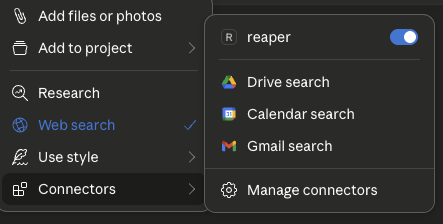
- Click the '+' icon on the chat box
- Click on 'Connectors' and you should see the 'reaper' connector enabled
Ask Away!
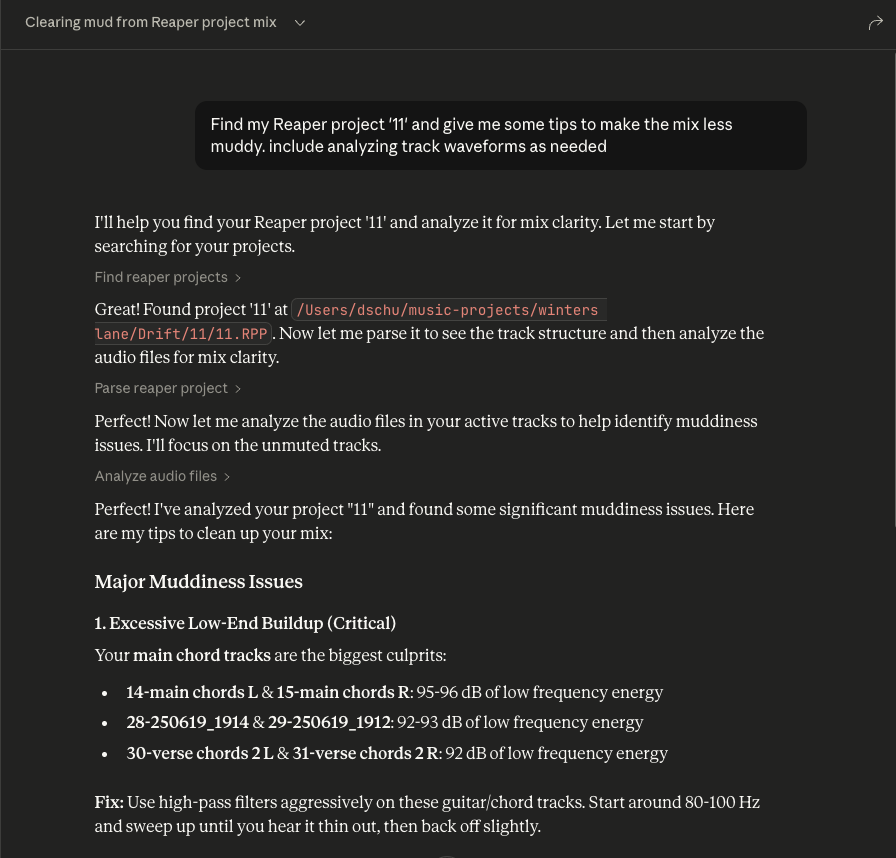
- Ask questions about your Reaper project
- Always include the name of the specific Reaper project you're asking about
- You can expand the tool boxes to see the raw project data being passed to Claude
Установка Reaper
У этого сервера нет опубликованного пакета — он собирается из исходников. Открой репозиторий и следуй инструкции в README.
▸ github.com/dschuler36/reaper-mcp-serverFAQ
Reaper MCP бесплатный?
Да, Reaper MCP бесплатный — установка в пару кликов через Unyly без оплаты.
Нужен ли API-ключ для Reaper?
Нет, Reaper работает без API-ключей и переменных окружения.
Reaper — hosted или self-hosted?
Self-hosted: сервер запускается локально на твоей машине командой из раздела установки.
Как установить Reaper в Claude Desktop, Claude Code или Cursor?
Открой Reaper на unyly.org, выбери вкладку своего клиента (Claude Desktop, Claude Code, Cursor) и нажми Install — конфиг сгенерируется автоматически, без правки JSON.
Похожие MCP
GitHub
PRs, issues, code search, CI status
 автор: GitHub
Filesystem
Secure file operations with configurable access controls.
Memory
Knowledge graph-based persistent memory system.
Template MCP Server
A CLI tool to create a new Model Context Protocol server project with TypeScript support, dual transport options, and an extensible structure
 автор: mcpdotdirect
Compare Reaper with
Не уверен что выбрать?
Найди свой стек за 60 секунд
Автор?
Embed-бейдж для README
Похожее
Все в категории development