
Rest2mcp
БесплатноНе проверенExposes any REST API as MCP tools, enabling AI agents to discover and call existing HTTP endpoints without modifying the original API.

Описание
Exposes any REST API as MCP tools, enabling AI agents to discover and call existing HTTP endpoints without modifying the original API.
README
Most organizations already have REST APIs. They power internal dashboards, connect microservices, expose data to mobile apps. They work. But now you want an AI agent to use those same services, and agents don't speak REST. They speak MCP. Do you rewrite everything? No. You build a thin adapter layer that translates between the two protocols, and your existing API stays untouched.
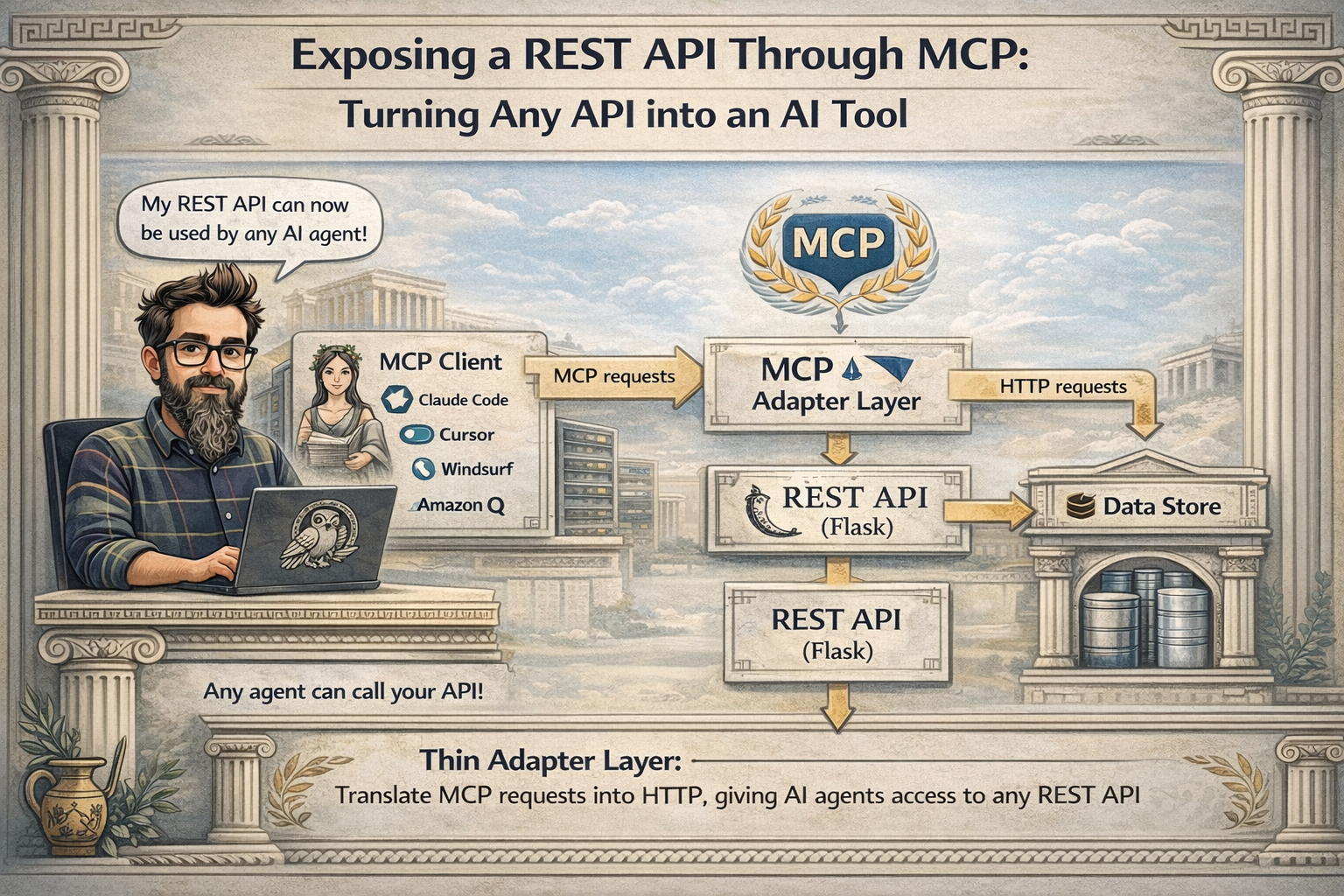
That's exactly what this project does. We take a standard Flask REST API and wrap it with an MCP server using FastMCP. Any MCP-compatible client, Claude Code, Cursor, Windsurf, can discover and call the API endpoints as tools, without knowing there's a REST layer underneath.
graph LR
    Client["MCP Client<br/>(Claude Code / Cursor)"] --> MCP["MCP Server<br/>(FastMCP)"]
    MCP --> HTTP["HTTP requests"]
    HTTP --> API["REST API<br/>(Flask)"]
    API --> Store["Data Store"]
The REST API
The API is a standard Flask application with CRUD endpoints for managing notes. Nothing special here, just the kind of REST service you'd find in any organization:
notes_bp = Blueprint("notes", __name__)


@notes_bp.route("/api/notes", methods=["GET"])
def list_notes():
    return jsonify(get_all_notes())


@notes_bp.route("/api/notes/<int:note_id>", methods=["GET"])
def read_note(note_id: int):
    note = get_note(note_id)
    if note is None:
        return jsonify({"error": "Note not found"}), 404
    return jsonify(note)


@notes_bp.route("/api/notes", methods=["POST"])
def add_note():
    data = request.get_json()
    if not data or "title" not in data:
        return jsonify({"error": "title is required"}), 400
    note = create_note(title=data["title"], body=data.get("body", ""))
    return jsonify(note), 201


@notes_bp.route("/api/notes/<int:note_id>", methods=["PUT"])
def edit_note(note_id: int):
    data = request.get_json()
    note = update_note(note_id, title=data.get("title"), body=data.get("body"))
    if note is None:
        return jsonify({"error": "Note not found"}), 404
    return jsonify(note)


@notes_bp.route("/api/notes/<int:note_id>", methods=["DELETE"])
def remove_note(note_id: int):
    if delete_note(note_id):
        return jsonify({"status": "deleted"})
    return jsonify({"error": "Note not found"}), 404
Five endpoints: list, get, create, update, delete. The data store is an in-memory dictionary for simplicity, but in a real scenario this would be your existing database, your internal service, your legacy system. The point is that the REST API already exists and works. We don't want to change it.
The MCP server
This is the core of the project. The MCP server uses FastMCP to expose each REST endpoint as an MCP tool. It uses requests to call the Flask API over HTTP:
import requests
from mcp.server.fastmcp import FastMCP

from settings import API_BASE_URL

mcp = FastMCP(name="notes-api")

BASE = API_BASE_URL


@mcp.tool()
def list_notes() -> str:
    """List all notes stored in the system.

    Returns a JSON array of note objects, each containing:
    id, title, body, and created_at fields.
    """
    response = requests.get(f"{BASE}/api/notes")
    return response.text


@mcp.tool()
def get_note(note_id: int) -> str:
    """Get a single note by its ID.

    Returns the note object with id, title, body, and created_at fields.
    Returns an error if the note is not found.
    """
    response = requests.get(f"{BASE}/api/notes/{note_id}")
    return response.text


@mcp.tool()
def create_note(title: str, body: str = "") -> str:
    """Create a new note.

    Args:
        title: The title of the note (required).
        body: The body content of the note (optional, defaults to empty string).

    Returns the created note object with its assigned id.
    """
    response = requests.post(
        f"{BASE}/api/notes",
        json={"title": title, "body": body},
    )
    return response.text


@mcp.tool()
def update_note(note_id: int, title: str = "", body: str = "") -> str:
    """Update an existing note by its ID.

    Args:
        note_id: The ID of the note to update.
        title: New title for the note (optional, send empty string to keep current).
        body: New body for the note (optional, send empty string to keep current).

    Returns the updated note object, or an error if not found.
    """
    payload = {}
    if title:
        payload["title"] = title
    if body:
        payload["body"] = body
    response = requests.put(
        f"{BASE}/api/notes/{note_id}",
        json=payload,
    )
    return response.text


@mcp.tool()
def delete_note(note_id: int) -> str:
    """Delete a note by its ID.

    Args:
        note_id: The ID of the note to delete.

    Returns a status confirmation or an error if the note is not found.
    """
    response = requests.delete(f"{BASE}/api/notes/{note_id}")
    return response.text


if __name__ == "__main__":
    mcp.run()
Each @mcp.tool() maps to one REST endpoint. The decorator extracts parameter types from the function signature to build the JSON schema that MCP clients use to understand what parameters to send. The docstring becomes the tool description that the AI agent reads to decide when and how to call each tool. When you run python src/server/main.py, it starts listening on stdio for MCP requests.
The pattern is straightforward: receive the MCP call, translate it into an HTTP request, forward it to the REST API, and return the response. The MCP server knows nothing about the business logic. The REST API knows nothing about MCP. Each side does its job.
The adapter pattern
This is the Adapter Pattern applied at the protocol level. The MCP server adapts the REST interface into the MCP protocol. The REST API doesn't need to change. The MCP client doesn't need to know it's talking to a REST service. The adapter handles the translation:
sequenceDiagram
    participant Client as MCP Client
    participant Server as MCP Server
    participant API as REST API
    Client->>Server: call create_note(title, body)
    Server->>API: POST /api/notes {title, body}
    API-->>Server: 201 {id, title, body, created_at}
    Server-->>Client: JSON response
The MCP client calls create_note("Meeting notes", "Discussed Q3 roadmap"). The MCP server translates this into a POST /api/notes with a JSON body. The Flask API processes it, creates the note, and returns the result. The MCP server passes the response back to the client. The agent sees a tool that creates notes. It doesn't know or care that there's an HTTP call in between.
Configuration
To use the MCP server from Claude Code, create a .mcp.json file in your project root:
{
  "mcpServers": {
    "notes-api": {
      "command": "/path/to/venv/bin/python",
      "args": ["/path/to/src/server/main.py"]
    }
  }
}
Claude Code reads this file, launches the MCP server as a subprocess, performs the MCP handshake, and discovers the five tools automatically. The same server works with Cursor, Windsurf, VS Code with Copilot, or any other MCP-compatible client, just point it to the same Python script.
Running it
First, install dependencies:
poetry install
Start the Flask API in one terminal:
make api
You can verify it works with curl:
curl -X POST http://127.0.0.1:5000/api/notes \
  -H "Content-Type: application/json" \
  -d '{"title": "First note", "body": "Hello from REST"}'

curl http://127.0.0.1:5000/api/notes
With the API running and .mcp.json in place, open Claude Code in the project directory. It discovers the notes-api MCP server and makes all five tools available. You can ask things like "Create a note about the deployment we did today" or "List all my notes" and the agent calls the MCP tools, which call your REST API, automatically.
Taking it further
This POC uses a simple notes API, but the same pattern works with any existing REST service. Your internal APIs, third-party integrations, legacy systems, anything with HTTP endpoints can be wrapped with a thin MCP layer. The REST API stays unchanged, the MCP server handles the translation, and suddenly your existing services become tools that any AI agent can use.
You could also add authentication headers in the MCP server (forwarding API keys or tokens to the REST API), error handling with retry logic, or caching for read-heavy endpoints. The adapter layer is the right place for these cross-cutting concerns.
And that's all. With a thin MCP adapter on top of any REST API, your existing services become tools that any AI agent can discover and use. The REST API stays unchanged, the MCP server handles the protocol translation, and the standard connects them. Build the adapter once, use it from any MCP client.
Full code in my github account.
Установка Rest2mcp
У этого сервера нет опубликованного пакета — он собирается из исходников. Открой репозиторий и следуй инструкции в README.
▸ github.com/gonzalo123/rest2mcpFAQ
Rest2mcp MCP бесплатный?
Да, Rest2mcp MCP бесплатный — установка в пару кликов через Unyly без оплаты.
Нужен ли API-ключ для Rest2mcp?
Нет, Rest2mcp работает без API-ключей и переменных окружения.
Rest2mcp — hosted или self-hosted?
Доступен hosted-вариант: Unyly запускает сервер в облаке, локальная установка не обязательна.
Как установить Rest2mcp в Claude Desktop, Claude Code или Cursor?
Открой Rest2mcp на unyly.org, выбери вкладку своего клиента (Claude Desktop, Claude Code, Cursor) и нажми Install — конфиг сгенерируется автоматически, без правки JSON.
Похожие MCP
Fetch
Web content fetching and conversion for efficient LLM usage.
AWS KB Retrieval
Retrieval from AWS Knowledge Base using Bedrock Agent Runtime.
 автор: modelcontextprotocol
Spring AI MCP Server
Provides auto-configuration for setting up an MCP server in Spring Boot applications.
llm-analysis-assistant
A very streamlined mcp client that supports calling and monitoring stdio/sse/streamableHttp, and can also view request responses through the /logs page. It also
 автор: xuzexin-hz
Compare Rest2mcp with
Не уверен что выбрать?
Найди свой стек за 60 секунд
Автор?
Embed-бейдж для README
Похожее
Все в категории ai