
Reuse
БесплатноНе проверенMCP server, CLI, and web UI for sharing reusable patterns across your projects. Multi-provider analysis (Anthropic / OpenAI / Gemini / Ollama) clusters patterns

Описание
MCP server, CLI, and web UI for sharing reusable patterns across your projects. Multi-provider analysis (Anthropic / OpenAI / Gemini / Ollama) clusters patterns by capability into a two-level theme tree.
README
A personal codebase registry that lets AI assistants reference patterns across your projects.
Register your projects with descriptions, tags, and notable patterns. Any MCP-compatible AI assistant can then search your registry, read code from referenced projects, and adapt patterns for your current work.
The AI reads your code to understand the approach, then uses its own judgment in the current context. Sometimes it replicates the pattern, sometimes it adapts it, sometimes it says "I see how you did it there, but here's a better fit for this project." It never blindly copies.
Setup with AI (Recommended)
The easiest way to set up Reuse is to point your AI assistant at this repo and let it help you.
Claude Code:
Clone https://github.com/stonekey908/reuse and set it up for me.
Install dependencies, build it, link it globally, and add the MCP
server to my global Claude config.
Cursor / Windsurf / any MCP-compatible editor:
Clone https://github.com/stonekey908/reuse, install and build it,
then configure it as an MCP server in my editor settings.
The AI will handle cloning, building, and wiring up the MCP config for your specific environment. Once set up, you can immediately start registering projects and asking the AI to reference them.
Screenshots
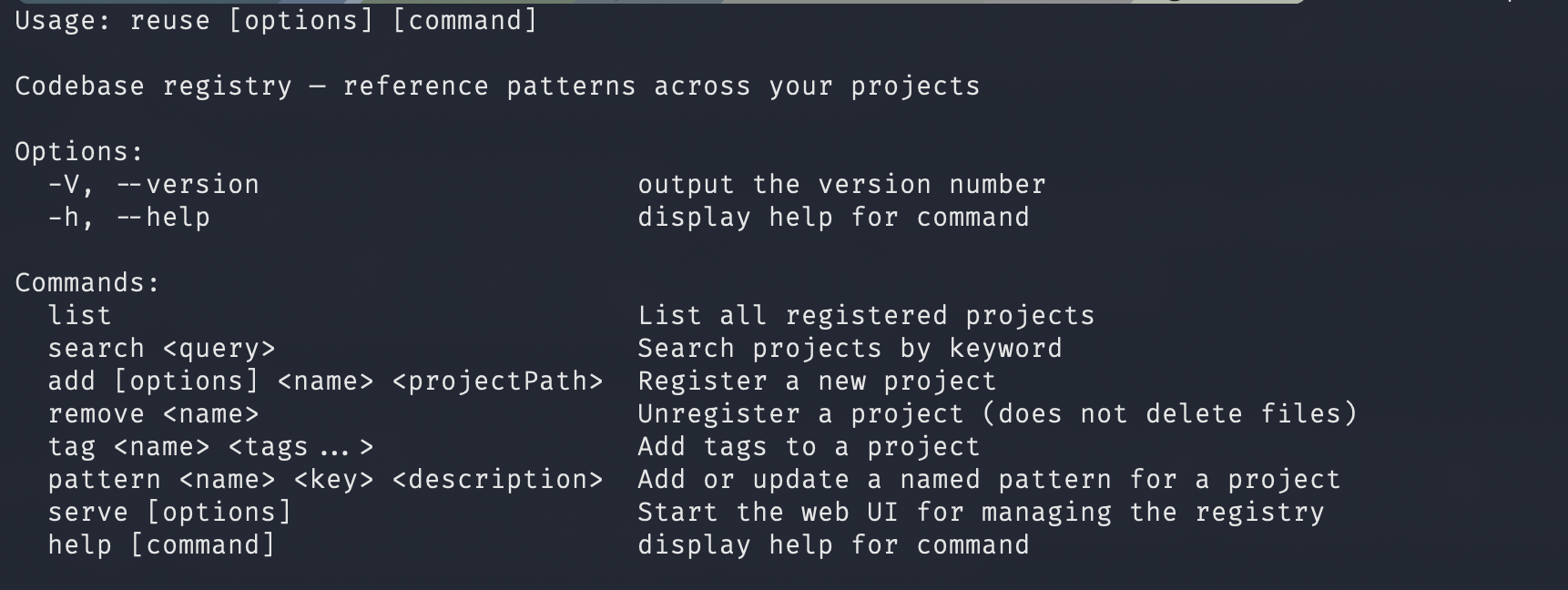
CLI — One command to see everything Reuse can do
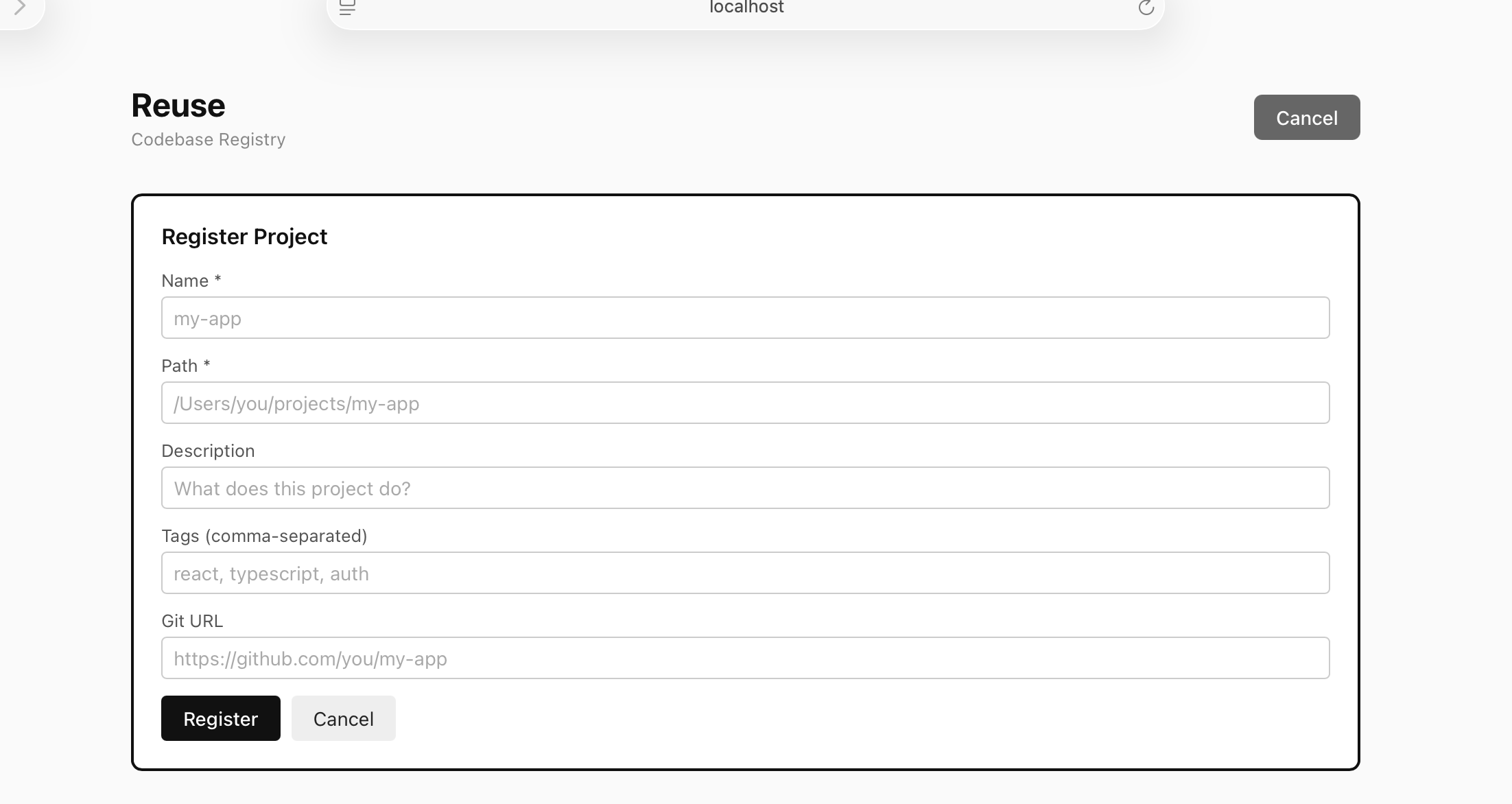
Register a project through the web UI
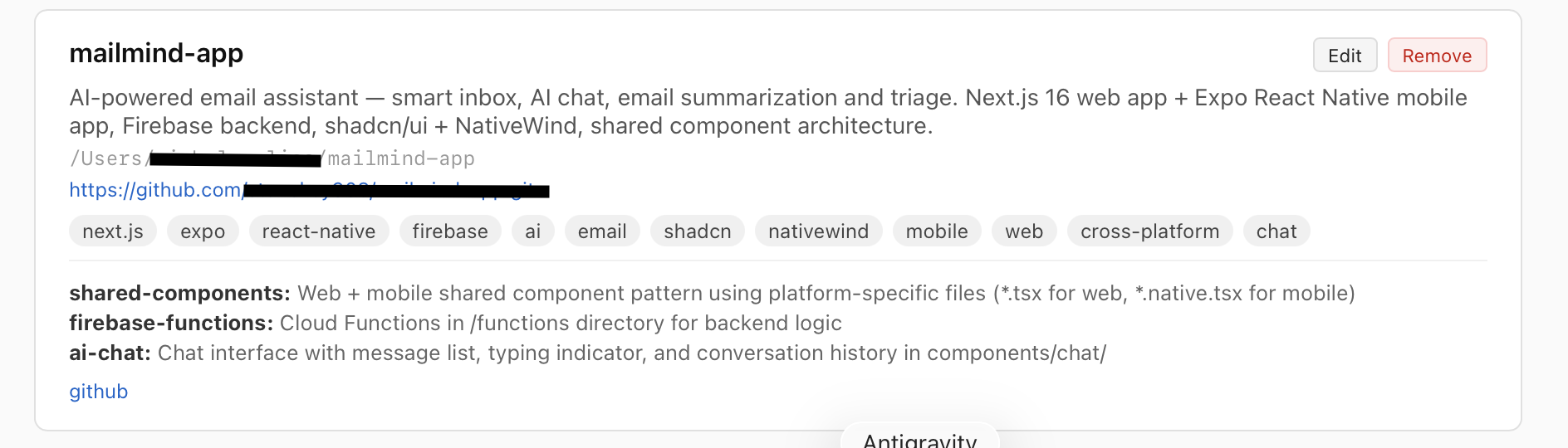
Rich project detail view with tags, patterns, and links
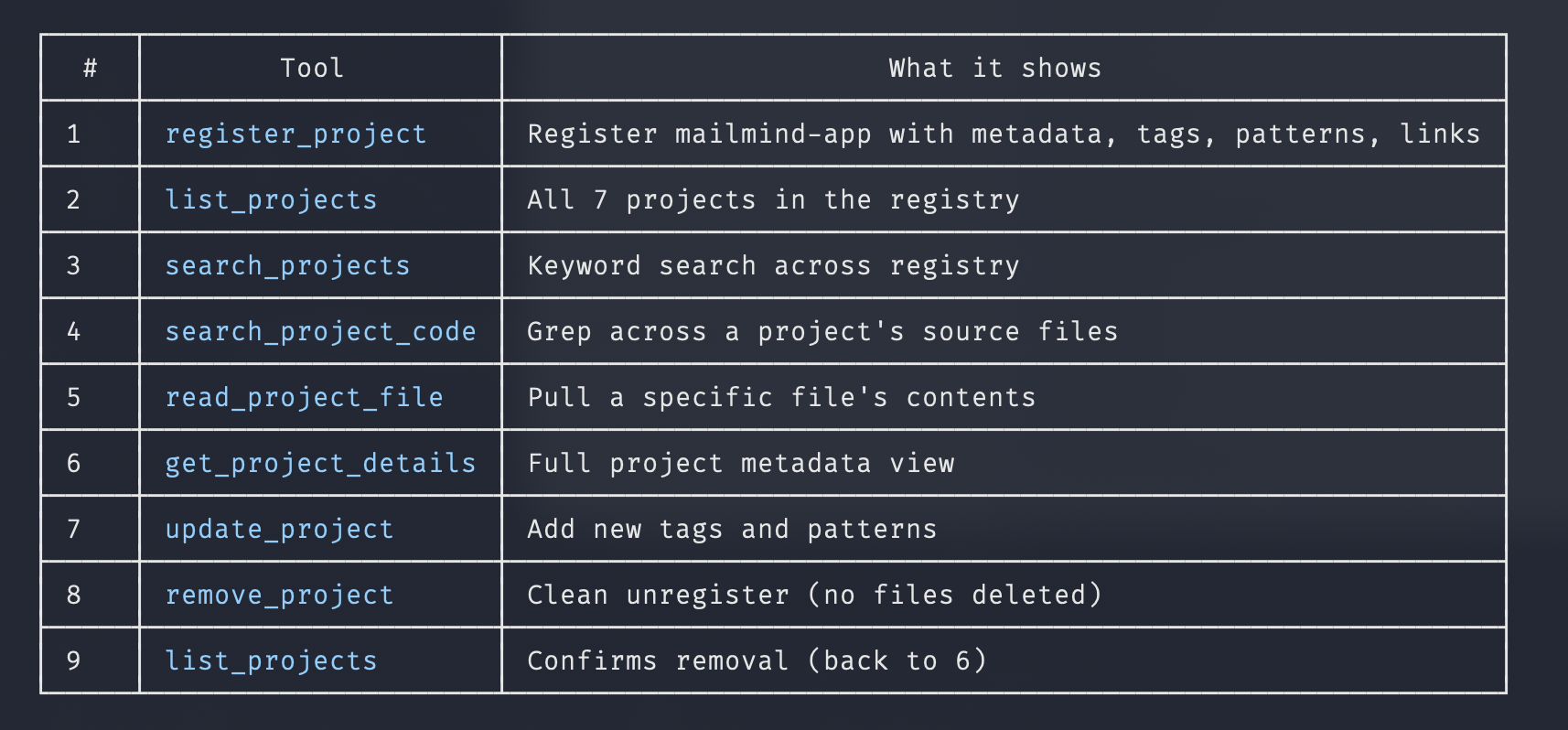
Full MCP tool suite — 9 tools your AI assistant can call
MCP in action — updating and querying project metadata

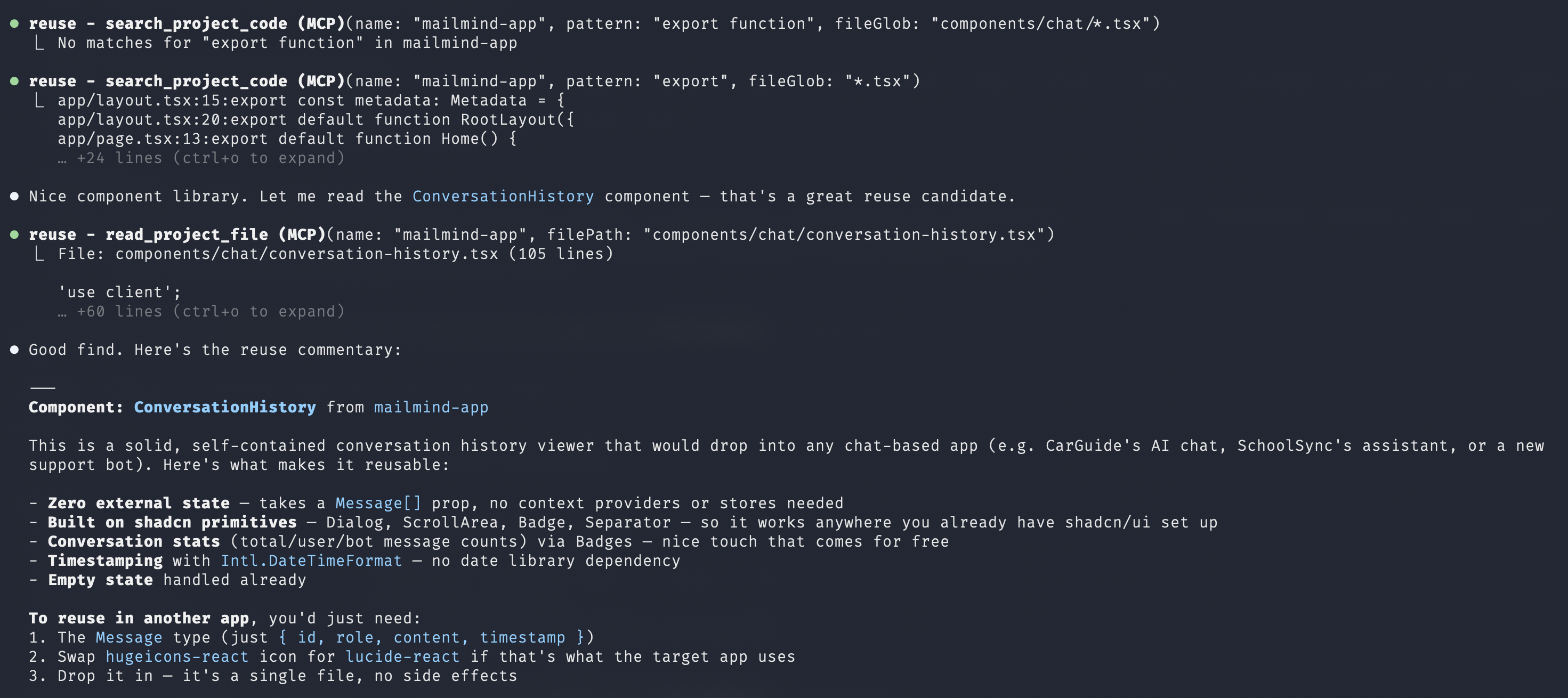
AI-assisted code search and reuse commentary
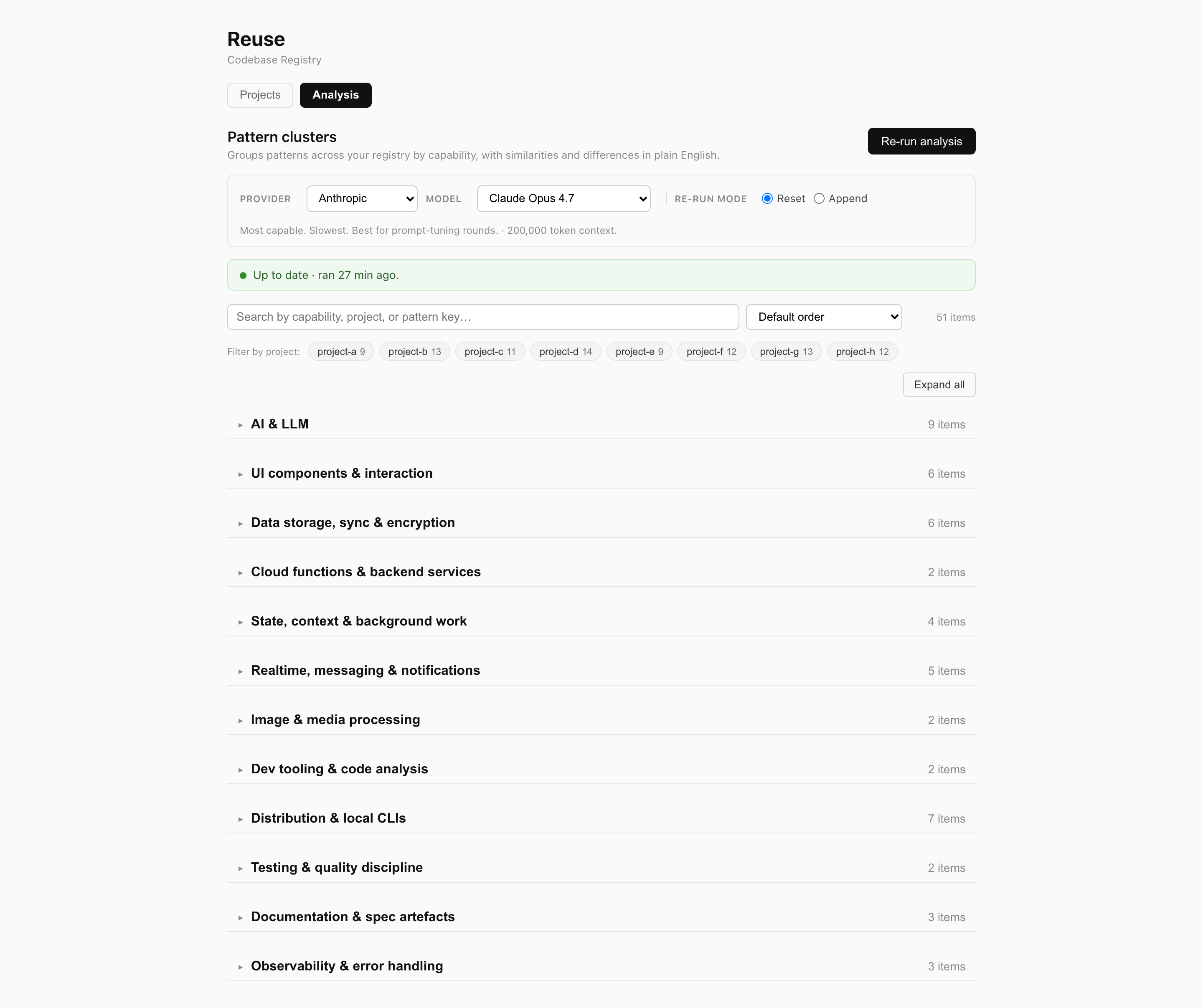
Analysis tab — two-level theme tree, collapsible per section
Manual Setup
Prerequisites
- Node.js 18+ (
node --versionto check) - npm (
npm --versionto check) - Git (
git --versionto check)
1. Clone and build
git clone https://github.com/stonekey908/reuse.git
cd reuse
npm install
npm run build        # Builds TypeScript server + Vite frontend
2. Link the CLI globally
npm link
This makes the reuse command available in your terminal from any directory.
Verify it works:
reuse --help
You should see the list of commands (list, search, add, remove, tag, pattern, serve).
3. Configure the MCP server
The MCP server is what lets AI assistants talk to Reuse. Configuration depends on your client.
Claude Code (CLI / Desktop App)
Add to ~/.claude.json under the top-level mcpServers key:
{
  "mcpServers": {
    "reuse": {
      "command": "node",
      "args": ["/FULL/PATH/TO/reuse/dist/mcp/stdio.js"]
    }
  }
}
Replace /FULL/PATH/TO/reuse with the actual path where you cloned the repo (e.g., /Users/yourname/reuse).
Restart Claude Code for the MCP server to load.
Claude Desktop
Add to your Claude Desktop config (Settings > Developer > Edit Config):
{
  "mcpServers": {
    "reuse": {
      "command": "node",
      "args": ["/FULL/PATH/TO/reuse/dist/mcp/stdio.js"]
    }
  }
}
Restart Claude Desktop.
Cursor
Add to .cursor/mcp.json in your home directory or project:
{
  "mcpServers": {
    "reuse": {
      "command": "node",
      "args": ["/FULL/PATH/TO/reuse/dist/mcp/stdio.js"]
    }
  }
}
Windsurf
Add to your Windsurf MCP settings:
{
  "mcpServers": {
    "reuse": {
      "command": "node",
      "args": ["/FULL/PATH/TO/reuse/dist/mcp/stdio.js"]
    }
  }
}
Any other MCP-compatible client
Reuse uses stdio transport — the standard MCP protocol over stdin/stdout. Any client that supports MCP stdio servers can connect. The command is:
node /FULL/PATH/TO/reuse/dist/mcp/stdio.js
No environment variables or API keys required.
4. Verify it works
In your AI assistant, try:
"List my reuse projects"
If the MCP is connected, the AI will call list_projects and show your registry (empty at first).
Registering Projects
Three ways to add projects — use whichever fits your workflow.
Via AI (natural language)
Once the MCP is connected, just tell the AI:
"Register my-app from ~/projects/my-app. It's a React dashboard with real-time WebSocket data and JWT auth."
The AI will call register_project with the path, description, and tags it infers. It can also auto-detect the git remote.
"Find that wine app in my Documents and register it"
The AI will use find_local_project to locate the directory, then register it.
Automatic pattern extraction
When a project is registered without patterns, Reuse proactively nudges the AI toward extract_patterns — a tool that scouts the project (README, package.json, directory tree, representative source files, and user-facing screens) and returns a structured scouting report. The AI reads a handful of the suggested files, identifies 6–12 distinctive patterns, and saves them with update_project.
"Add ~/projects/graph-engine to reuse"
Under the hood:
1. register_project({ name: "graph-engine", projectPath: "~/projects/graph-engine" })
   → Registered. Nudge: "No patterns supplied — call extract_patterns next."

2. extract_patterns({ name: "graph-engine" })
   → Scouting report: README excerpt, deps, tree, suggestedFilesToRead,
     userFacingScreens (route entry points), 9-step instructions.

3. read_project_file x3–6 on the most interesting files.

4. update_project({ name: "graph-engine", patterns: { ... } })
   → 6–12 named kebab-case patterns with capability tags + file evidence.
The scout deliberately surfaces both file-named signals (large meaningful modules in lib/, services/, hooks/, agents/, context/) AND capability anchors (every screen the user can navigate to). The 9-step instructions teach the AI to do a capability-walk — for every screen, ask "what reusable mechanism makes this work?" — so cross-file flows (image-pick → compress → multimodal-CF-proxy) get named even when no single file shouts "image-upload pipeline." A built-in NOT-A-PATTERN filter excludes design docs, HTML mockups, and PRDs.
Structured pattern shape
Patterns can be saved as plain strings or as structured objects. The structured shape lets the analysis pipeline cluster across projects by capability:
{
  "patterns": {
    "chunked-upload-with-retry": {
      "description": "Splits files into 2MB chunks, retries failed chunks 3 times with backoff. /src/upload/chunked.ts.",
      "capability": "chunked-upload-with-retry",
      "abstractionLevel": "feature",
      "domain": "frontend-web",
      "fileEvidence": ["/src/upload/chunked.ts"]
    }
  }
}
capability— kebab-case slug for the reusable idea (two projects with the same capability cluster together)abstractionLevel—primitive|feature|discipline|architecture|specdomain—frontend-mobile|frontend-web|frontend-desktop|backend-api|ai-integration|design-system|dev-tooling|distribution|infra-system|docs-content|build-tooling|testing-disciplinefileEvidence— exact file paths so the description stays grounded
A bare string description still works for back-compat — the registry auto-upgrades on read.
Via CLI
# Basic registration
reuse add my-app ~/projects/my-app

# With metadata
reuse add my-app ~/projects/my-app \
  -d "React dashboard with real-time data" \
  -t "react,typescript,websockets,auth"

# Add patterns after registration
reuse pattern my-app auth "JWT with refresh tokens and role-based access"
reuse pattern my-app real-time "WebSocket-based live data feeds with reconnection"

# Add tags
reuse tag my-app nextjs supabase

# Search
reuse search auth
reuse search websocket
Via Web UI
reuse serve
# Open http://localhost:3210
Click "+ Add Project" to register, or click "Edit" on any project to update all fields including path, git URL, patterns, and links. Changes are instant — the same ~/.reuse/registry.json is used by all three interfaces.
Using Reuse
Once projects are registered, you use Reuse by talking to your AI assistant naturally:
| What you say | What the AI does |
|---|---|
| "I want file upload like my photos app" | Searches projects for "upload", reads the relevant code, adapts the pattern |
| "Show me how project-a handles encryption" | Gets project details, searches for encryption code, reads the files |
| "Build auth like project-b but for a mobile app" | Reads the auth pattern from project-b, adapts it for React Native |
| "What projects use Supabase?" | Searches tags for "supabase", lists matching projects |
| "Register that wine app from my Documents" | Finds the folder, detects git remote, registers it |
The AI maintains full autonomy. It reads your code to understand the approach, then decides how to apply it. It might:
- Replicate the pattern closely if the stack matches
- Adapt it significantly for a different framework
- Say "I see the approach but there's a better way for this use case"
MCP Tools Reference
Read tools (for referencing code)
| Tool | Parameters | Description |
|---|---|---|
list_projects |
— | Browse all registered projects with descriptions, tags, and pattern names |
search_projects |
query |
Search by keyword across names, descriptions, tags, and patterns |
get_project_details |
name |
Full details for a project including file structure overview |
search_project_code |
name, pattern, fileGlob? |
Search source code within a project (case-insensitive, regex supported) |
read_project_file |
name, filePath, startLine?, endLine? |
Read a file or specific line range (large files return first 500 lines with pagination) |
Write tools (for managing the registry)
| Tool | Parameters | Description |
|---|---|---|
register_project |
name, projectPath, description?, tags?, patterns?, git?, links? |
Register a new project (auto-detects git remote). Patterns accept either string descriptions or structured objects with capability/abstractionLevel/domain/fileEvidence tags. If no patterns are supplied, the response nudges the AI to run extract_patterns next. |
extract_patterns |
name |
Scout a registered project for reusable patterns. Returns a structured report (README excerpt, package.json, directory tree, scored suggestedFilesToRead, userFacingScreens, 9-step capability-walk instructions) for the AI to identify 6–12 distinctive patterns. |
update_project |
name, description?, tags?, patterns?, git?, links? |
Update any metadata field. Patterns merge (existing keys overwritten). String patterns preserve any existing tags on the key (description-only update); structured patterns replace tags wholesale. |
remove_project |
name |
Unregister a project (does NOT delete files) |
find_local_project |
name, searchIn? |
Search filesystem for a project folder by name |
CLI Reference
| Command | Description |
|---|---|
reuse list |
List all registered projects with metadata |
reuse search <query> |
Search projects by keyword |
reuse add <name> <path> |
Register a project (-d description, -t tags, -g git URL) |
reuse remove <name> |
Unregister a project (no files deleted) |
reuse tag <name> <tags...> |
Add tags to a project |
reuse pattern <name> <key> <desc> |
Add or update a named pattern |
reuse serve [-p port] |
Start the web UI (default port 3210) |
Web UI
Run reuse serve and open http://localhost:3210.
- View all registered projects at a glance
- Add new projects with the form
- Edit any field — path, description, tags, git URL, patterns, links
- Remove projects
- The Analysis tab clusters patterns across the whole registry into a two-level tree — top-level theme (AI & LLM, UI components, Data storage, Realtime, Image & media, Dev tooling, Distribution & CLI, Testing, Docs & spec, Observability, …) → cluster or standalone → pattern members. Sections are collapsible per-theme with an Expand all / Collapse all toggle, and a staleness banner lights up when projects change after the cached run
- All changes write to the same registry file used by the CLI and MCP
Analysis & Evals
Reuse clusters patterns across all your registered projects by capability and surfaces consolidation opportunities. The analysis runs against any configured provider (Anthropic / OpenAI / Gemini / Ollama) — set ANTHROPIC_API_KEY, OPENAI_API_KEY, GOOGLE_API_KEY, or OLLAMA_BASE_URL in .env.local and pick a provider/model in the web UI. Results are cached to the registry and re-run when patterns change.
# Analysis
reuse analyze              # cached if fresh, otherwise runs against the default provider
reuse analyze --refresh    # force a re-run
The web UI exposes the same analysis through a provider/model picker, with a Stop button, live elapsed timer, and a staleness banner that lights up when projects change after the cached run.
Two-level theme grouping
Analysis output is organised as a tree, not a flat list:
- Theme (top level) — one of 12 canonical functional areas plus Other:
ai-llm,ui-components,data-storage-sync,cloud-backend,state-background,realtime-messaging,image-media,dev-tooling,distribution-cli,testing-quality,docs-spec,observability-errors. Themes describe functional capability (what the code does); they're a different axis from the per-patterndomainfield which describes implementation layer (where the code lives). - Capability cluster or standalone (second level) — human-readable cluster names like "Document upload", "Reusable modal shell", "Multi-provider AI routing".
- Pattern members — the actual entries from your projects.
Each theme is a collapsible section in the web UI with an item count. Use the Expand all / Collapse all toggle to flip every section in one click.
The theme list was empirically grounded by analysing a real 92-pattern multi-app registry and cross-referenced against awesome-nodejs (~50 cats), awesome-react (~22), the CNCF Cloud Native Landscape (6 layers), and full-stack tech-stack categorisations. 12 themes turned out to be the sweet spot — fine enough that "where would I look for image processing?" has an obvious answer, coarse enough that the page doesn't degenerate into a flat scroll.
Built-in evals
Reuse ships three independent eval harnesses that measure different parts of the pipeline. They're independent — the scout eval is purely about how well the MCP populates the registry; the analysis evals are about how well the clustering reads the populated registry.
| Eval | What it measures | Run |
|---|---|---|
| E0 — scout | Does the MCP scout (extract_patterns) give the AI enough signal to name the right patterns? Coverage of hand-curated ground-truth capabilities, precision of proposals, design-doc noise rate. |
node scripts/scout-eval.mjs |
| E1 — analysis snapshot | Layer 1 — does the analysis pipeline produce a cluster set close to a known-good fixture? | reuse eval |
| E2 — analysis quality (LLM judge) | Layer 2 — Opus 4.7 grades the clustering on coherence, similarity quality, difference quality, consolidation usefulness, granularity. Writes a markdown report to eval-results/. |
reuse eval --quality |
Scout eval (E0) is the newest addition. It runs Opus 4.7 against four ground-truth projects, asks it to extract patterns from the scout report alone (no file reads), and judges the proposals against hand-written capability lists. The current target gates at 100% / 98% / 0% (coverage / precision / design-doc-noise) — useful for catching regressions in scout heuristics or SCOUT_INSTRUCTIONS tuning.
=== SUMMARY ===
project         coverage   precision  noise      proposed/gt
project-a       100%       100%       0%         12/8
project-b       100%       92%        0%         12/10
project-c       100%       100%       0%         12/9
project-d       100%       100%       0%         14/10
average         100%       98%
See docs/EVALS.md for the rubric, how to read judge reports, and the prompt-tuning workflow.
How It Works
You register:
  "project-a" → path, description, tags, notable patterns, git, links

AI receives prompt:
  "I want file upload like my photos app"

AI calls Reuse MCP tools:
  1. search_projects("file upload") → finds photos-app
  2. get_project_details("photos-app") → sees the upload pattern description
  3. search_project_code("photos-app", "upload") → finds relevant source files
  4. read_project_file("photos-app", "src/Upload/index.tsx") → reads the actual code
  5. Adapts the approach for the current project's stack and context
And during registration:
You register a new project:
  "Add ~/projects/graph-engine to reuse"

AI calls Reuse MCP tools:
  1. register_project(...) → registered, nudged to extract patterns
  2. extract_patterns("graph-engine") → scouting report with suggested files
  3. read_project_file x3–6 on the key files
  4. update_project({ name, patterns: {...} }) → 5–8 named patterns saved
The AI can also use your other tools alongside Reuse. If a project has a Linear link, the AI can check Linear for related tickets. If it has a Notion link, it can pull docs. Reuse is the index — your other tools provide the depth.
Registry Format
Projects are stored in ~/.reuse/registry.json:
{
  "projects": {
    "project-a": {
      "path": "/Users/you/project-a",
      "description": "Mobile messaging app",
      "tags": ["react-native", "expo", "firebase", "encryption"],
      "patterns": {
        "e2e-encryption": {
          "description": "E2E encryption using libsodium for messages and attachments. /lib/crypto.ts.",
          "capability": "encrypted-local-storage",
          "abstractionLevel": "primitive",
          "domain": "frontend-mobile",
          "fileEvidence": ["/lib/crypto.ts", "/lib/storage.ts"]
        },
        "file-upload": "Chunked upload with progress tracking, retry, and compression"
      },
      "git": "https://github.com/you/project-a",
      "links": {
        "linear": "https://linear.app/team/project/project-a",
        "figma": "https://figma.com/file/abc123"
      }
    }
  }
}
The two pattern shapes (string and structured object) coexist. Tagged patterns cluster across projects by capability; bare strings still work for back-compat.
You can edit this file directly if you prefer — it's just JSON.
Security
- Scoped access — the MCP server can only read files from explicitly registered projects, never arbitrary paths
- Path traversal blocked — resolved paths must stay within the project directory
- Smart pagination — large files (>500 lines) return the first 500 lines with
startLine/endLinesupport for reading specific sections - Read-only project files — the registry is read/write, but your actual project code is read-only
- No network — Reuse never phones home, calls APIs, or sends data anywhere. It's entirely local.
- No credentials — no API keys, tokens, or accounts needed
Troubleshooting
MCP server not connecting:
- Check the path in your MCP config points to the actual
dist/mcp/stdio.jsfile - Make sure you ran
npm run build(ornpm run build:server) after cloning - Restart your AI client after changing the MCP config
reuse command not found:
- Run
npm linkfrom the reuse directory - Or use
node /path/to/reuse/dist/cli/index.jsdirectly
reuse serve fails with invalid choice: 'serve':
- Debian/Ubuntu (and WSL) ship a
reusepackage (the SPDX license tool) at/usr/bin/reusethat shadows this CLI. Check withwhich -a reuse. - Quickest fix — add an alias to
~/.bashrc(or~/.zshrc):alias reuse='node /FULL/PATH/TO/reuse/dist/cli/index.js' - Or run the CLI directly:
node /FULL/PATH/TO/reuse/dist/cli/index.js serve - Or uninstall the SPDX tool if you don't use it:
sudo apt remove reuse
Search returning no results:
- Reuse searches with a built-in Node.js grep (no external tools required)
- If ripgrep (
rg) is installed at/opt/homebrew/bin/rgor/usr/local/bin/rg, it will use that instead for better performance - Check the project path is correct:
reuse list
Web UI won't start:
- Make sure you built the frontend:
npx vite build(from the reuse directory) - Check nothing else is using port 3210:
reuse serve -p 3211
License
MIT
Установка Reuse
У этого сервера нет опубликованного пакета — он собирается из исходников. Открой репозиторий и следуй инструкции в README.
▸ github.com/stonekey908/reuseFAQ
Reuse MCP бесплатный?
Да, Reuse MCP бесплатный — установка в пару кликов через Unyly без оплаты.
Нужен ли API-ключ для Reuse?
Нет, Reuse работает без API-ключей и переменных окружения.
Reuse — hosted или self-hosted?
Self-hosted: сервер запускается локально на твоей машине командой из раздела установки.
Как установить Reuse в Claude Desktop, Claude Code или Cursor?
Открой Reuse на unyly.org, выбери вкладку своего клиента (Claude Desktop, Claude Code, Cursor) и нажми Install — конфиг сгенерируется автоматически, без правки JSON.
Похожие MCP
GitHub
PRs, issues, code search, CI status
 автор: GitHub
Filesystem
Secure file operations with configurable access controls.
Memory
Knowledge graph-based persistent memory system.
Template MCP Server
A CLI tool to create a new Model Context Protocol server project with TypeScript support, dual transport options, and an extensible structure
 автор: mcpdotdirect
Compare Reuse with
Не уверен что выбрать?
Найди свой стек за 60 секунд
Автор?
Embed-бейдж для README
Похожее
Все в категории development