
RisalDash
БесплатноНе проверенBeautiful real-time web dashboards for ESP32 / ESP8266 in a few lines of C++ — a modern ESP UI & ESPUI alternative. Offline-first AP + captive portal, WebSocket

Описание
Beautiful real-time web dashboards for ESP32 / ESP8266 in a few lines of C++ — a modern ESP UI & ESPUI alternative. Offline-first AP + captive portal, WebSocket, 26 widgets, i18n (EN/RU/AR), and AI control via MCP.
README


Beautiful real-time web dashboards for ESP32 / ESP8266 — in a few lines of C++.
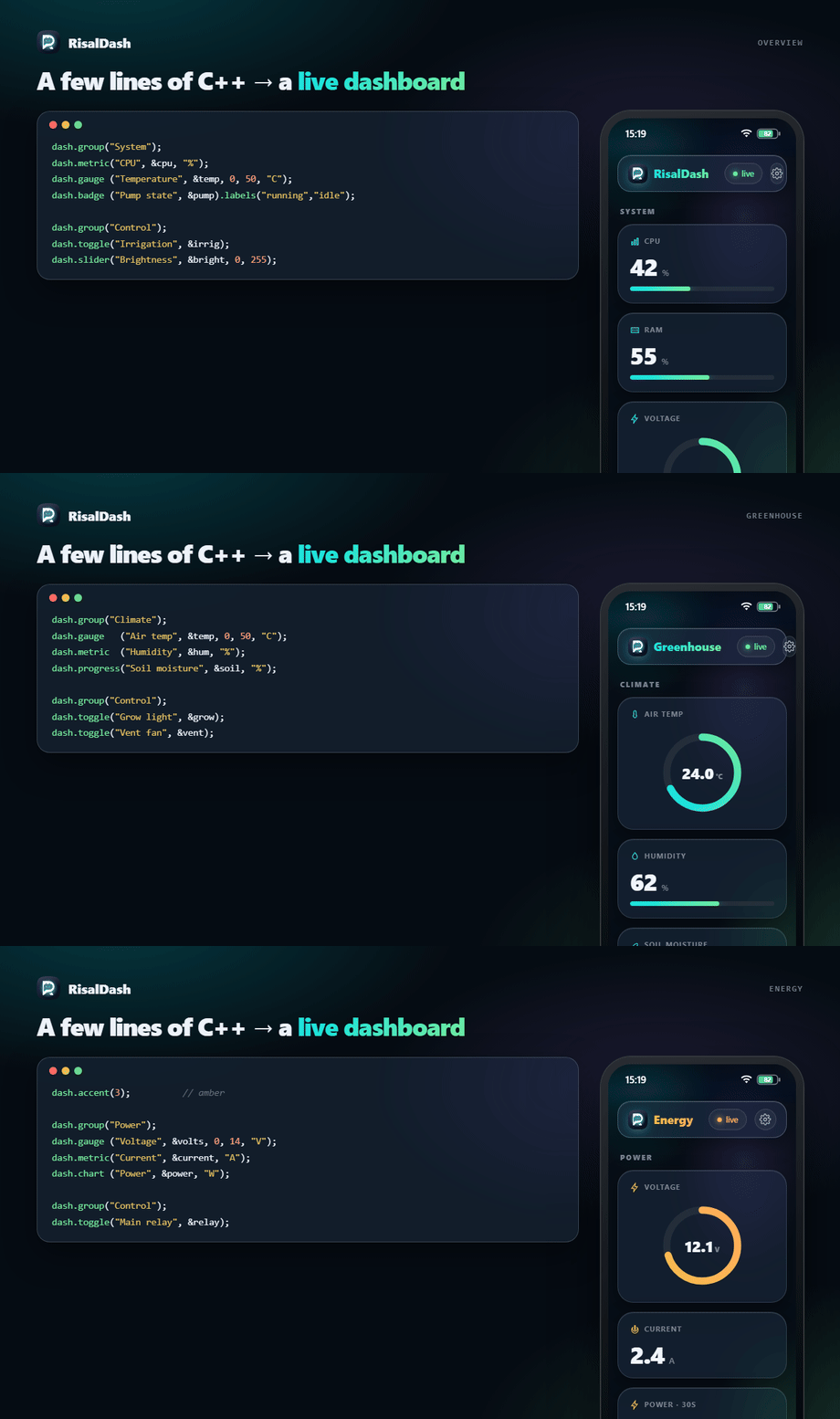
Describe widgets; RisalDash generates the HTML, CSS, JS and the WebSocket protocol for you. The dashboard is served by the device itself in an OKLCH "liquid glass" style (translucent cards, iOS-like status bar, a Settings gear for language/theme/accent, swipe-up multi-page layouts), updates live over WebSocket, and works offline-first — including a captive portal for first-boot Wi-Fi setup. Zero front-end code.
🌐 dash.risal.io · MIT · ESP32 + ESP8266
#include <RisalUI.h>
RisalUI dash("Greenhouse");

float temp = 24.3, volts = 12.1; int bright = 128; bool pump = false;

void setup() {
  dash.gauge ("Voltage", &volts, 0, 14, "V");
  dash.chart ("Temperature", &temp, "C");
  dash.slider("Brightness", &bright, 0, 255, [](int v){ analogWrite(LED_PIN, v); });
  dash.toggle("Pump", &pump, [](bool on){ digitalWrite(PUMP_PIN, on); });
  dash.begin();        // saved Wi-Fi → connect; first boot → captive setup portal
}

void loop() {
  temp = readTemp(); volts = readVolts();
  dash.update();       // pushes changed values to the browser
}
Why RisalDash
- Zero-Waste UI — the linker (
--gc-sections) strips widget types you don't use (0 bytes). A type you do use adds its own C++ + CSS + JS once (~1.3–3.4 KB, measured on ESP32). - Offline-first first boot —
begin()raises a Wi-Fi access point with a captive portal; the user picks a network and the credentials are saved to NVS. No internet, no app, no CDN (system fonts, everything served from flash). - Real-time — values are pushed over WebSocket only when they change; controls send commands back to your callbacks.
- Widgets for everything — 36 controls: displays, inputs, layout (tabs/groups), map, terminal, 3D cube, robot face…, plus one-line sensor presets for 71 sensors.
- Multi-page + native chrome —
dash.layout()splits the UI into pages switched by a swipe-up sheet of icon tiles; an iOS-style status bar (clock, Wi-Fi, battery) sits on top. - Settings on the device — a gear in the appbar opens Language / Theme / Accent, applied
live and remembered per browser.
dash.lang("en"|"ru"|"ar")sets the default; Arabic flips to RTL. - Integrations — REST, Prometheus
/metrics, optional MQTT, OTA firmware update, and MCP so an AI agent can read sensors and drive controls (every widget becomes a tool). - Brand-consistent — the same OKLCH design system as the app and dash.risal.io.
Before / After
A browser UI for an ESP usually means hand-writing HTML + CSS + JS and a WebSocket protocol — easily 100+ lines for a couple of gauges. RisalDash is just the declaration.
Before — raw ESPAsyncWebServer (abridged; the real thing is longer)
server.on("/", HTTP_GET, [](AsyncWebServerRequest* r) {
  r->send(200, "text/html", R"HTML(
    <div id="t">--</div><label><input type="checkbox" id="p"> Pump</label>
    <script>
      let ws; (function c(){ ws = new WebSocket('ws://'+location.host+'/ws');
        ws.onmessage = e => { const s = JSON.parse(e.data); t.textContent = s.temp; p.checked = s.pump; };
        ws.onclose = () => setTimeout(c, 800); })();
      p.onchange = () => ws.send(JSON.stringify({ pump: p.checked }));
    </script>
    <style>/* gauge SVG, layout, theme, fonts, mobile… */</style>
  )HTML");
});
ws.onEvent([](/*…*/ AwsEventType ty, uint8_t* d, size_t n) {
  if (ty == WS_EVT_DATA) { /* parse JSON, find the key, apply to your var, call your callback */ }
});
void loop() {
  if (millis() - last > 250) {                       // throttle by hand
    String j = "{"; j += "\"temp\":" + String(temp) + ",\"pump\":" + (pump ? "true" : "false") + "}";
    ws.textAll(j); last = millis();                  // build + broadcast JSON by hand
  }
  // …now repeat all of this for every new widget, plus the CSS and the protocol.
}
After — RisalDash:
dash.gauge ("Temperature", &temp, 0, 50, "C");
dash.toggle("Pump", &pump, [](bool on){ digitalWrite(PUMP, on); });
dash.begin();                                        // + offline captive portal, i18n, OTA, MCP…
Install
Arduino IDE — Library Manager → search "RisalDash".
PlatformIO — platformio.ini:
lib_deps =
    RisalDash
    esp32async/ESPAsyncWebServer
    esp32async/AsyncTCP        ; ESP32
  ; esp32async/ESPAsyncTCP    ; ESP8266
ESP-IDF (Arduino as a component) — from the Component Registry:
idf.py add-dependency "shaxzodahmedov/risaldash"
Wi-Fi: first boot vs. fixed credentials
dash.begin();                          // saved creds → STA; otherwise captive setup portal
dash.begin("ssid", "password");        // connect to this network (falls back to the portal)
dash.beginAP("Greenhouse", "12345678");// plain dashboard over its own access point
dash.apName("Greenhouse-Setup");       // name of the captive-portal AP (optional)
On first boot the device appears as a RisalDash-Setup Wi-Fi. Connect to it — the setup page
opens automatically (captive portal). Pick your network, enter the password; the device reboots
and serves the dashboard on your Wi-Fi.
Widgets
All widgets bind to a variable by pointer and update live.
| Method | Binds | Notes |
|---|---|---|
metric(name, &float, unit) |
float* |
big number + bar; .decimals(n), .zone(warn, bad) |
gauge(name, &float, min, max, unit) |
float* |
circular gauge |
chart(name, &float, unit) |
float* |
live sparkline (30-point history) |
stat(name, &float, unit) |
float* |
read-only number; .decimals(n) |
progress(name, &int, unit) |
int* |
0–100 % bar |
badge(name, &int) |
int* |
0/1/2 → ok/warn/bad; .labels(a, b, c) |
led(name, &bool) |
bool* |
on/off indicator |
toggle(name, &bool, cb) |
bool* |
switch → cb(bool) |
slider(name, &int, min, max, cb) |
int* |
range → cb(int) |
button(name, label, cb) |
— | momentary action → cb() |
number(name, &int, min, max, step, cb) |
int* |
stepper |
select(name, "a,b,c", &int, cb) |
int* |
dropdown → index |
radio(name, "a,b,c", &int, cb) |
int* |
segmented → index |
text / password / time / color(name, &String, cb) |
String* |
text & native inputs |
date(name, &String, cb) |
String* |
custom calendar popover (no native input) |
label(name, &String) · log(name, lines) |
String* |
read-only text / event log |
image(name, &String) · ai(name, &String) |
String* |
image URL / assistant note |
table(title).row(label, &float, unit, dec) |
float* |
key/value rows |
Layout: group(title), separator(title), tab(title) (switchable panels).
Sizes: every widget sits on an iOS-style cell grid and has a sensible default footprint.
Override it with .size(RSIZE_S) (1 cell, compact), .size(RSIZE_M) (full width) or
.size(RSIZE_L) (full width + double height) — e.g. dash.metric("CPU", &cpu, "%").size(RSIZE_L);.
Works on single widgets and on sensor presets: dash.sensor("bme280", …).size(RSIZE_L).
Icons: .icon(RICON_THERMOMETER) puts an IoT glyph in the card header. Built-in set:
thermometer, water, flash, bulb, power, gauge, home, wifi, clock, signal, leaf, motion —
or pass any 24×24 SVG path. Only the icons you use are linked into flash.
Pages, status bar & appearance
Split the dashboard into pages — each dash.layout() starts one; the widgets after it
belong to that page, and a swipe-up sheet of icon tiles (or the bottom handle) switches pages:
dash.layout("Overview", RICON_HOME);
dash.metric("CPU", &cpu, "%");
dash.layout("Climate", RICON_THERMOMETER);
dash.slider("Target", &target, 16, 30);
Every page carries an iOS-style status bar (clock, Wi-Fi, battery) and an appbar Settings gear (Language / Theme / Accent, remembered per browser). Set the defaults from the sketch:
dash.timezone(180);          // status-bar clock & portal default, minutes from UTC (+03:00)
dash.accent(2);              // 0 Aqua · 1 Blue · 2 Violet · 3 Amber · 4 Rose
dash.theme(RisalUI::DARK);   // DARK (default) | LIGHT | AUTO
Sensor presets
One line drops the right widgets, units and ranges for a known sensor:
dash.sensor("bme280", &temp, &hum, &pres);  // gauge °C + metric % + chart hPa
dash.sensor("ina219", &volts, &cur, &pwr);  // V / A / W
71 presets built in — bme280, bmp280, dht11, dht22, sht3x, ds18b20, bh1750,
scd40, ina219, acs712, pzem004t, hcsr04, vl53l0x, mq2, mq135, soil, ld2410,
ld2450, mpu6050, bno055, neo-m10, max30102, hx711, sen55, inmp441 and many more
(see the catalog). The widget is chosen by the quantity, not
the sensor model.
Fake sensors — build with no hardware
Prototype and debug the whole dashboard with nothing plugged in. #include <RisalFake.h> gives
you realistic drifting readings — a slow trend + wobble + a little noise, not a flat sine — so the
UI looks live while you iterate on layout and logic.
#include <RisalFake.h>
RisalFakeEnv env;                 // temperature / humidity / pressure / soil / air quality

void setup() { env.begin(); /* ...declare widgets bound to temp/hum/... ... */ }
void loop() {
  env.update();
  temp = env.temperature();       // °C   — later: aht.readTemperature()
  hum  = env.humidity();          // %
  pres = env.pressure();          // hPa
  dash.update();
}
Need one value of any other quantity? RisalFake(center, amp, noise):
RisalFake volts(12.4, 0.3, 0.05);   // 12.4 V, ±0.3 drift, a little jitter
voltage = volts.read();
When the real sensor arrives, swap the reads for your driver's — same variable names, the rest of the sketch is unchanged. Opt-in and Zero-Waste: nothing is compiled unless you include it. Works on ESP8266 and ESP32. The ESP32-C6-LCD-1.47 example ships with it.
Live weather — no API key
#include <RisalWeather.h> pulls the current conditions from Open-Meteo (free, no key) and turns
a city name into coordinates for you. Both calls block on an HTTPS request, so run them from a
background FreeRTOS task — never loop(). ESP32-only (TLS); a graceful no-op elsewhere.
#include <RisalWeather.h>
RisalWeather wx;
float wxTemp; int wxCode; String city = "Tashkent";

// …inside a FreeRTOS task, off loop():
wx.geocode(city);                 // city name -> lat/lon (auto-detected)
if (wx.poll()) {                  // fetch current weather for that location
  wxTemp = wx.temperature();      // °C
  wxCode = wx.code();             // WMO code -> RisalWeather::codeText()
}
Bind the city to a text field and it re-geocodes whenever the user types a new one; the
dash.weather("Sky", &wxCode) widget shows a matching sky icon next to a dash.stat("Outside", &wxTemp, "C"). The ESP32-C6-LCD-1.47 example wires the task, a persisted City field and an
LCD slide end-to-end.
Languages
dash.lang("ar"); // default: "en" | "ru" | "ar" — "ar" switches to RTL
The appbar Settings gear lets the user switch language (EN / RU / AR) live too. Only the languages you reference are compiled in (Zero-Waste); widget titles stay yours, the library chrome is translated.
Integrations & control
dash.enableMCP("risal_pat_token");   // GET /api/mcp/manifest → AI tools (see tools/risal-mcp-bridge)
dash.enableOTA();                    // /update page + "Update firmware" button in Settings (OTA)
dash.mqtt("broker.local", 1883, "greenhouse");  // needs -D RISAL_ENABLE_MQTT + PubSubClient
dash.enableHomeAssistant("greenhouse");          // Home Assistant MQTT auto-discovery (after mqtt())
| Endpoint | Purpose |
|---|---|
GET /api/state |
full state as JSON |
GET /api/set?key=value |
set a control |
GET /metrics |
Prometheus exposition |
GET /api/mcp/manifest?token= |
widgets as MCP tools (token-guarded) |
GET/POST /update |
OTA firmware upload (when enableOTA()) |
MCP — enableMCP(token) exposes GET /api/mcp/manifest, turning every widget into an AI
tool (read sensors, drive controls). The companion
risal-dash-mcp bridge connects a device to
Claude Desktop / Claude Code. 📝 Walkthrough: Control your ESP32 from an AI agent.
OTA — enableOTA() serves /update and adds an "Update firmware" button to the Settings
modal, so you flash a new .bin from the browser — no USB. It's opt-in on purpose: OTA needs a
partition with a second app slot (Arduino's default "4MB with spiffs" and the ESP8266 4MB layouts
have one; huge_app / single-app schemes do not), and /update lets anyone on the LAN flash the
device — so turn it on for a trusted network. Every dashboard also has a built-in Reset Wi-Fi
button in Settings (forgetWiFi() → back to the setup portal).
Home Assistant — after mqtt(), enableHomeAssistant() publishes MQTT discovery configs so
HA auto-creates entities (sensors, switches, numbers, binary sensors, buttons), all grouped under
one device. No YAML.
How it compares
RisalDash isn't the only way to put a UI on an ESP — and the others are good tools. They optimize for different things; here's an honest read of where each fits.
| RisalDash | ESPUI | ESP-DASH | Blynk | |
|---|---|---|---|---|
| Hosting | on-device, self-hosted | on-device, self-hosted | on-device, self-hosted | cloud (Blynk.Cloud) |
| Runs fully offline | ✅ AP, no internet | ✅ AP mode | ✅ local only | needs the cloud ¹ |
| License / cost | MIT, free | MIT, free | Lite MIT · Pro paid | freemium (free: 5 devices) ² |
| Wi-Fi provisioning | ✅ captive portal + NVS | do it yourself | do it yourself | via the app |
| Widgets / presets | 36 controls + 71 sensor presets | focused set (slider, switch, graph, pad…) | cards + charts · more in Pro | rich app widgets ² |
| Multi-language + RTL | ✅ EN / RU / UZ / AR, RTL | — | — | app locales |
| AI / MCP control | ✅ every widget is an MCP tool | — | — | HTTP API · automations |
| Build with no hardware | ✅ built-in fake sensors | — | — | — |
| Mobile app | responsive web UI | web UI | web UI | ✅ native iOS / Android |
| Cloud fleet & alerts | — (single device, LAN) | — | — | ✅ fleet, OTA, notifications |
¹ Blynk 2.0 is cloud-first; a legacy self-hosted server exists but is community-maintained. ² Blynk's free plan allows up to 5 devices / 1 user; more needs a paid plan.
Choose Blynk for a polished mobile app, push notifications and cloud fleet management, if depending on a hosted service is fine. Choose ESP-DASH for a fast, clean on-device dashboard (its Pro tier adds tabs and premium widgets). Choose ESPUI for a simple, proven, minimal UI. RisalDash leans into self-hosted + offline-first with a broad built-in widget/sensor set, i18n/RTL, AI (MCP) control and hardware-free prototyping — all MIT.
Sources: s00500/ESPUI · ayushsharma82/ESP-DASH, espdash.pro · blynk.io/pricing, docs.blynk.io limits. Facts checked 2026-07; correct anything that has since changed via a PR.
Examples
- Minimal — a few widgets over an access point.
- FirstBoot — captive-portal Wi-Fi provisioning (signal levels, timezone), then your network.
- WifiSetup — the full provisioning circle, incl.
dash.forgetWiFi()back to the portal. - Layouts — multi-page dashboard with the swipe-up page switcher +
accent()/timezone(). - Tabs — switchable tab panels, with cards pinned above them.
- AllWidgets — every widget type across five pages, from gauges to the robot face, map, 3D cube, terminal and thermal heatmap.
- WidgetSizes — the cell grid: the same reading at
RSIZE_S/RSIZE_M/RSIZE_L, compact gauges, and a sensor preset resized as a group. - FakeSensors — the whole
<RisalFake.h>toolbox: drifting values, the day/night greenhouse, GPS route playback, a fake BLE scan and record-&-replay — no hardware attached. - SensorTemplates —
dash.sensor("bme280", …)presets, tuned with.chart()/.size(). - LiveWeather — real conditions for any city from Open-Meteo (no key), fetched in a background
task; the web City field re-geocodes as you type.
<RisalWeather.h>, ESP32-only for live data. - UiKit — the interface skeleton: pages, groups, separators, sizes, icons,
.gear(), chrome. - Multilingual —
dash.translate(): the whole UI (your titles included) switches EN/RU/UZ/AR. - ESP32-C6-LCD-1.47 — the big showcase: web dashboard + a 13-slide LCD carousel, real BLE
scan, live weather, robot eyes; split into
display.h/led.h/i18n.h/sensors.h/weather.h/ble.hso the sketch stays readable. - ESP32-S3-DualCore — a heavy worker on core 0 while the dashboard stays smooth on core 1.
- Wemos-D1-Mini — all-real-hardware ESP8266 showcase: onboard LED, A0, live heap/RSSI.
Footprint
RisalDash is Zero-Waste: a widget type you never call is stripped by the linker, so it costs nothing. Measured on ESP32 (Arduino core 3.3) — flash added by the first use of each type (its C++ + CSS + JS), over an empty RisalDash dashboard:
| Widget | + flash | Widget | + flash | Widget | + flash |
|---|---|---|---|---|---|
led |
~1.8 KB | metric |
~2.4 KB | slider |
~2.9 KB |
heatmap |
~1.8 KB | cube |
~2.4 KB | terminal |
~3.2 KB |
log |
~1.9 KB | text |
~2.4 KB | face |
~3.3 KB |
image |
~1.9 KB | number |
~2.5 KB | table |
~3.3 KB |
badge |
~2.0 KB | toggle |
~2.6 KB | chart |
~3.5 KB |
ai |
~2.0 KB | map |
~2.7 KB | gauge |
~4.3 KB |
select |
~4.6 KB |
Extra instances of a type you already use are a few bytes each. Unused types: 0 bytes — that's the point.
Roadmap
Richer charts (multi-series / area / bar), more sensor presets, CSS/JS minify + gzip-in-PROGMEM, Home Assistant auto-discovery, and a Wokwi simulation link. See dash.risal.io.
License
MIT © ZiyaraGo Technologies. Brand: Risal.
Установка RisalDash
У этого сервера нет опубликованного пакета — он собирается из исходников. Открой репозиторий и следуй инструкции в README.
▸ github.com/ziyarago/RisalDashFAQ
RisalDash MCP бесплатный?
Да, RisalDash MCP бесплатный — установка в пару кликов через Unyly без оплаты.
Нужен ли API-ключ для RisalDash?
Нет, RisalDash работает без API-ключей и переменных окружения.
RisalDash — hosted или self-hosted?
Self-hosted: сервер запускается локально на твоей машине командой из раздела установки.
Как установить RisalDash в Claude Desktop, Claude Code или Cursor?
Открой RisalDash на unyly.org, выбери вкладку своего клиента (Claude Desktop, Claude Code, Cursor) и нажми Install — конфиг сгенерируется автоматически, без правки JSON.
Похожие MCP
LibreOffice Tools
Enables AI agents to read, write, and edit Office documents via LibreOffice with token-efficient design. Supports multiple formats including DOCX, XLSX, PPTX, a
 автор: passerbyflutter
dannote/figma-use
Full Figma control: create shapes, text, components, set styles, auto-layout, variables, export. 80+ tools.
 автор: dannote
Logo.dev
Search and retrieve company logos by brand or domain. Customize size, format, and theme to match your design needs. Accelerate design, prototyping, and content
 автор: NOVA-3951
Design Inspiration Server
Searches top design platforms like Dribbble and Behance to provide UI inspiration, color palettes, and layout patterns via the Serper API. It allows users to re
 автор: YonasValentin
Compare RisalDash with
Не уверен что выбрать?
Найди свой стек за 60 секунд
Автор?
Embed-бейдж для README
Похожее
Все в категории design