
Robot Framework Server
БесплатноНе проверенA local MCP server that parses Robot Framework output.xml files, scores and groups failures, and exposes structured triage data to Claude Desktop and Claude Cod

Описание
A local MCP server that parses Robot Framework output.xml files, scores and groups failures, and exposes structured triage data to Claude Desktop and Claude Code.
README




A local Python MCP server for analysing Robot Framework output.xml results and exposing structured failure data to Claude Desktop and Claude Code.
Why?
Large Robot Framework suites often produce hundreds of failures across dozens of areas.
Instead of manually reading output.xml files, this MCP server:
- groups failures by shared root cause
- prioritises by business impact and severity tags
- escalates API/server errors automatically (5xx → 92, 4xx → 87, 403 → 80)
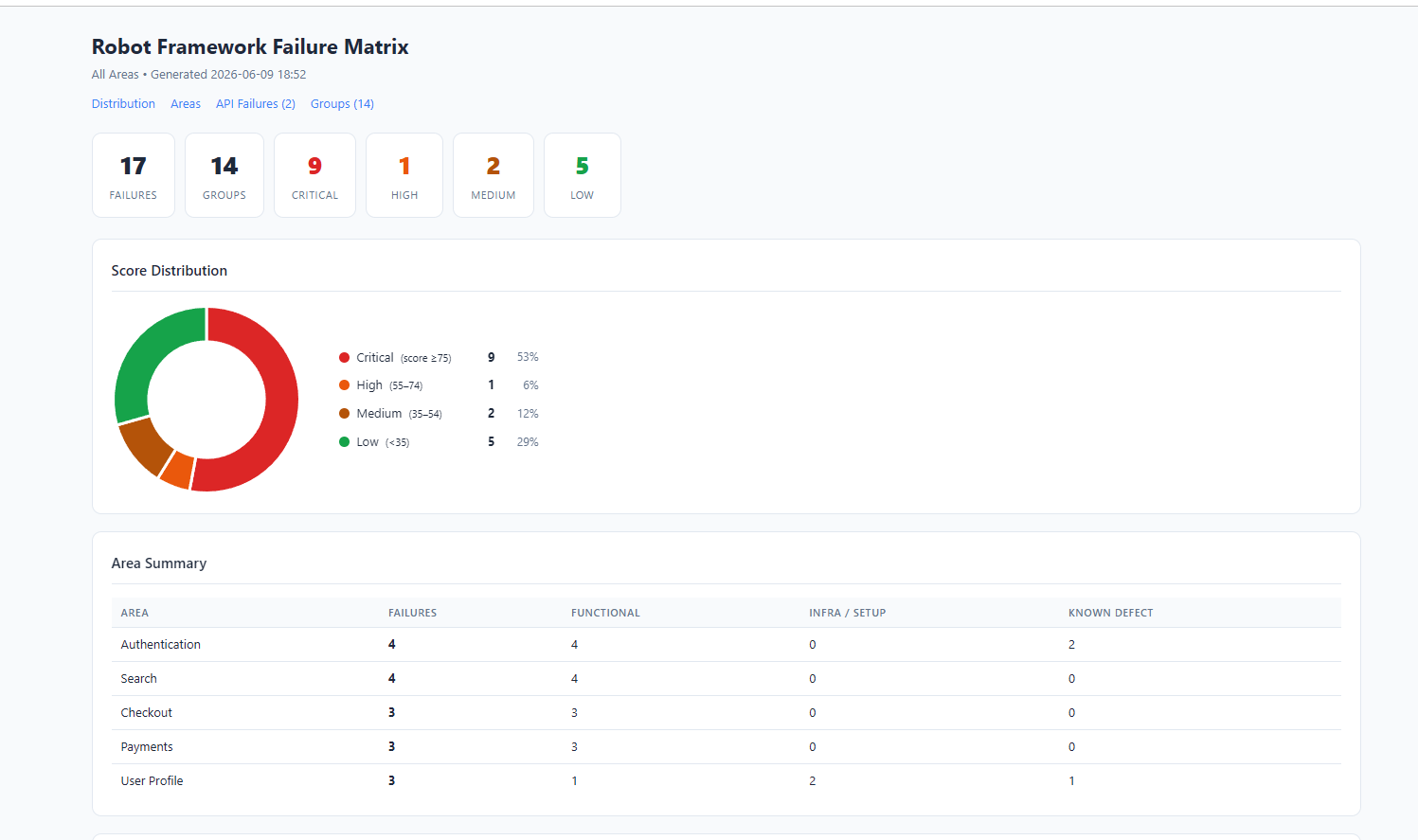
- generates interactive HTML reports with score-distribution charts
- provides Claude with full keyword traces for rapid debugging
The result: a triage session that takes minutes instead of hours.
Quick Start
# 1. Install
pip install -r requirements.txt
pip install mcp

# 2. Start the server
python -m uvicorn robot_mcp_server.http_server:app --host 127.0.0.1 --port 8000

# 3. In Claude — ingest your results, then triage
ingest_results(results_dir="/path/to/results")
generate_failure_matrix(output_path="/path/to/report.html")
get_triage_queue()
API docs available at http://127.0.0.1:8000/docs once the server is running.
Demo
Interactive HTML Report
Why not just inspect output.xml manually?
| Manual review | Robot Framework MCP Server |
|---|---|
| Hundreds of unranked failures | Ranked triage queue — highest impact first |
| Manual root-cause grouping | Automatic fingerprint clustering |
| Raw XML | Interactive HTML with doughnut chart |
| Ctrl+F through log files | SQL queries against a structured database |
| Status code only | Actual API error message extracted from response body |
| Separate tool per task | Single MCP interface for Claude Desktop and Claude Code |
Features
| Feature | Status |
|---|---|
| Root cause grouping via fingerprinting | ✅ |
| Failure scoring (0–100, multidimensional) | ✅ |
| API error escalation + message extraction | ✅ |
| Interactive HTML reports | ✅ |
| Claude Desktop support | ✅ |
| Claude Code support | ✅ |
| SQLite persistence | ✅ |
| Idempotent ingestion | ✅ |
| Ad-hoc SQL querying | ✅ |
| Per-test keyword trace for debug context | ✅ |
Installation
python -m pip install -r requirements.txt
pip install mcp
Connecting to Claude Desktop
Add to %APPDATA%\Claude\claude_desktop_config.json:
{
  "mcpServers": {
    "robot-framework-failure-review": {
      "command": "python",
      "args": ["C:\\path\\to\\robot-framework-mcp-server\\examples\\mcp_stdio_wrapper.py"],
      "env": {
        "BASE_URL": "http://127.0.0.1:8000"
      }
    }
  }
}
Then restart Claude Desktop. The server appears under the + → Connectors menu.
Connecting to Claude Code
The .claude/settings.json in this repo configures the MCP server automatically for Claude Code when working in this directory.
Documentation
- Architecture and design decisions
- Configuration — results layout, database initialisation, area categories
- MCP tools reference and typical workflow
- Failure scoring rubric
- SQL query examples
Tests
pytest
Установка Robot Framework Server
У этого сервера нет опубликованного пакета — он собирается из исходников. Открой репозиторий и следуй инструкции в README.
▸ github.com/Matthew-M-King/robot-framework-mcp-serverFAQ
Robot Framework Server MCP бесплатный?
Да, Robot Framework Server MCP бесплатный — установка в пару кликов через Unyly без оплаты.
Нужен ли API-ключ для Robot Framework Server?
Нет, Robot Framework Server работает без API-ключей и переменных окружения.
Robot Framework Server — hosted или self-hosted?
Self-hosted: сервер запускается локально на твоей машине командой из раздела установки.
Как установить Robot Framework Server в Claude Desktop, Claude Code или Cursor?
Открой Robot Framework Server на unyly.org, выбери вкладку своего клиента (Claude Desktop, Claude Code, Cursor) и нажми Install — конфиг сгенерируется автоматически, без правки JSON.
Похожие MCP
GitHub
PRs, issues, code search, CI status
 автор: GitHub
Filesystem
Secure file operations with configurable access controls.
Memory
Knowledge graph-based persistent memory system.
Template MCP Server
A CLI tool to create a new Model Context Protocol server project with TypeScript support, dual transport options, and an extensible structure
 автор: mcpdotdirect
Compare Robot Framework Server with
Не уверен что выбрать?
Найди свой стек за 60 секунд
Автор?
Embed-бейдж для README
Похожее
Все в категории development