
Roll20 DM Assistant
БесплатноНе проверенAI-assisted Dungeon Master toolkit for running live D&D 5e combat and prepping maps on Roll20.

Описание
AI-assisted Dungeon Master toolkit for running live D&D 5e combat and prepping maps on Roll20.
README
AI-assisted D&D 5e session management for Roll20 + D&D Beyond. Three components:
roll20-dmMCP server — live combat assistant over HTTP: HP tracking, conditions, initiative, dice, narration, turn hooks, AoE targeting, zones, tactical AI advisor, DDB character/monster reads.roll20-dm-mapsMCP server — map prep pipeline (stdio): upload battlemaps, auto-place dynamic lighting walls via Claude Vision, token creation.- Voice HUD (
voice-hud/) — transparent Electron overlay: push-to-talk → Whisper STT → Claude agent → live tabletop. The DM speaks; the gem acts.
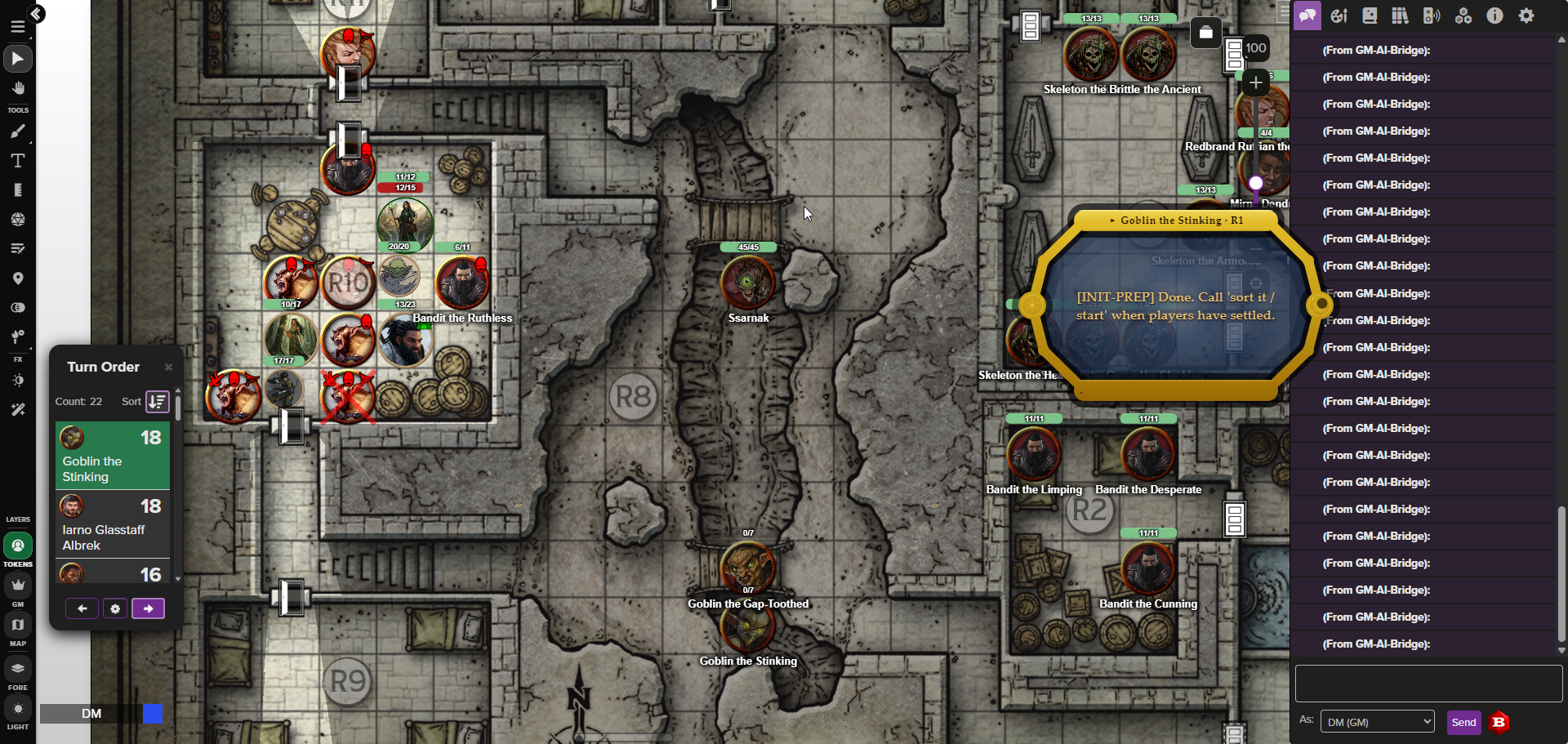
The push-to-talk scrying gem overlaying a live Roll20 fight — the gold tray surfaces the current combatant's tactics; the turn order sits at left. More shots in the Voice HUD section.
Architecture
flowchart TD
    HUD["Voice HUD (Electron)<br/>PTT → Whisper STT → Claude agent"]
    CC["Claude Code<br/>map prep · /combat · /round"]
    SRV["roll20-dm MCP server<br/>HTTP · bearer auth"]
    MAPS["roll20-dm-maps<br/>stdio"]
    RT["RT transport<br/>Firebase RTDB · ~50ms"]
    PW["Playwright fallback<br/>types !ai-relay into chat"]
    MOD["ai-relay.js<br/>Roll20 Mod sandbox"]
    R20["Roll20 objects<br/>tokens · walls · turn order"]
    DDB["D&D Beyond<br/>browserless · read-only"]

    HUD -->|MCP| SRV
    CC -->|MCP| SRV
    CC -->|MCP| MAPS
    SRV --> RT
    SRV -. fallback .-> PW
    MAPS --> RT
    RT --> MOD
    PW --> MOD
    MOD --> R20
    SRV --> DDB
Detailed text view
┌─────────────────────────────────────────────────────┐
│  Voice HUD (Electron)                               │
│  PTT → Whisper STT → Claude Haiku agent             │
│  transparent gem overlay, always on top             │
└────────────────────┬────────────────────────────────┘
                     │ HTTP MCP (bearer auth, port 39200)
┌────────────────────▼────────────────────────────────┐
│  roll20-dm MCP server (HTTP, src/index-http.ts)     │
│                                                     │
│  ┌── RT transport (set ROLL20_TRANSPORT=rt) ──┐     │
│  │  Firebase RTDB: direct reads (~50ms warm)  │     │
│  │  + relays !ai-relay commands (reads AND    │     │
│  │  writes) to the Mod, reads result back.    │     │
│  │  signInWithCustomToken harvested once,      │     │
│  │  cached to data/roll20-rt-token.json        │     │
│  └────────────────────────────────────────────┘     │
│                                                     │
│  ┌── Mod relay FALLBACK (Playwright) ─────────┐     │
│  │  used only if RT is unavailable:           │     │
│  │  !ai-relay {JSON} typed into Roll20 chat   │     │
│  │  ← result via MutationObserver             │     │
│  └────────────────────────────────────────────┘     │
│  (the Roll20 Mod sandbox executes every action,     │
│   createObj/.set, regardless of which transport)    │
│                                                     │
│  ┌── D&D Beyond (browserless) ────────────────┐     │
│  │  CobaltSession cookie → JWT (ttl 300s)     │     │
│  │  character-service / monster-service       │     │
│  │  plain fetch, no browser needed            │     │
│  └────────────────────────────────────────────┘     │
└─────────────────────────────────────────────────────┘

Claude Code (separate MCP client, same server)
  └── map prep, session setup, /combat, /round skills
Transport layers
| Layer | Read latency | Write latency | When used |
|---|---|---|---|
| RT (Firebase RTDB) | ~50ms warm | ~50ms warm | When ROLL20_TRANSPORT=rt — reads AND writes: direct RTDB reads + !ai-relay command relay to the Mod |
| Mod relay (Playwright) | 3–4s | 3–4s | Used when RT is unset, and as the fallback for any action if RT is unavailable (auth/timeout/circuit-open) |
| DDB REST | ~200ms | — | Character sheets, monster stats, campaign roster (read-only) |
The browser window opens for the initial RT token harvest (and DDB cookie harvest) and as the relay fallback when RT is down. It sits minimized otherwise and pops to the foreground when a manual login is needed.
Setup
cp .env.example .env
# Required: ANTHROPIC_API_KEY, ROLL20_EMAIL, ROLL20_PASSWORD
# Optional: DDB_COBALT (skip DDB browser harvest), ROLL20_MCP_TOKEN (auto-generated if absent),
#           ROLL20_TRANSPORT (set "rt" to enable the Firebase RTDB transport; unset = Playwright path),
#           DDB_TRANSPORT (defaults to "rt"; set "browser" for the legacy DDB path)

npm install
npx playwright install chromium
npm run build
First run
npm run serve # starts roll20-dm HTTP server on port 39200
On first run with no ROLL20_MCP_TOKEN in .env, the server auto-generates a token, writes it to .env, and updates .mcp.json with the bearer header. Restart Claude Code once to pick up the new header.
.mcp.json is gitignored — it contains the live bearer token and is regenerated automatically.
MCP server registration
Servers are defined in .mcp.json (gitignored, auto-managed):
| Key | Transport | Entry point | Use when |
|---|---|---|---|
roll20-dm |
HTTP (port 39200) | src/index-http.ts (npm run serve) |
Live session or Voice HUD |
roll20-dm-maps |
stdio | dist/index-maps.js |
Map prep between sessions |
Deploy the Roll20 Mod script
- Open your Roll20 campaign → Settings → API Scripts
- Create a new script, paste
mod-scripts/ai-relay.js - Save — active immediately, no restart needed
The relay receives !ai-relay {JSON} commands and whispers results back as hidden divs read by a MutationObserver in the Playwright session.
Voice HUD
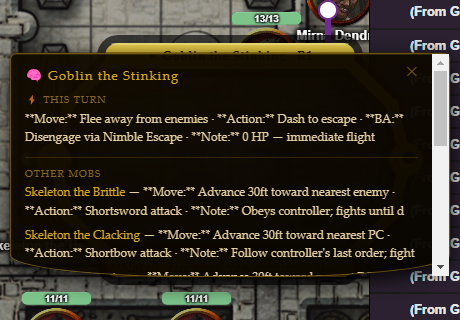
The scrying gem — a transparent cushion-cut crystal overlay that floats above Roll20 in the corner of the screen.
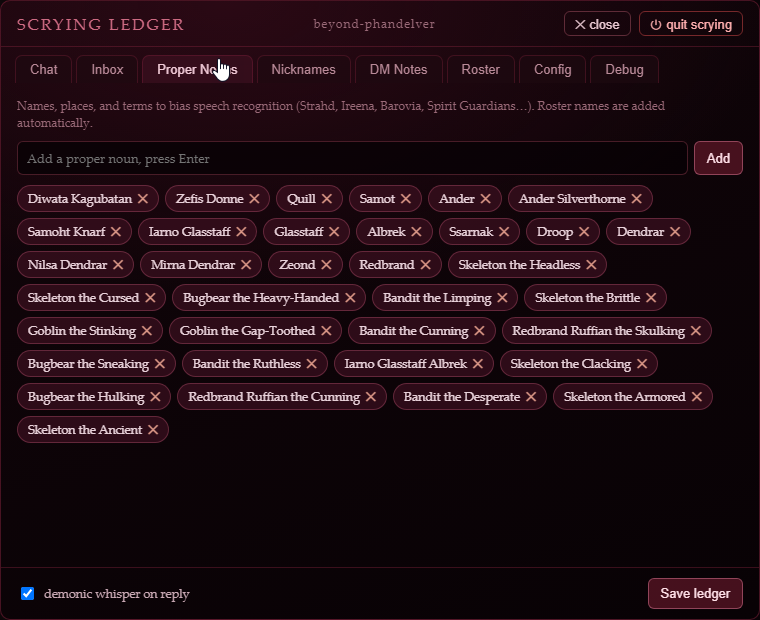
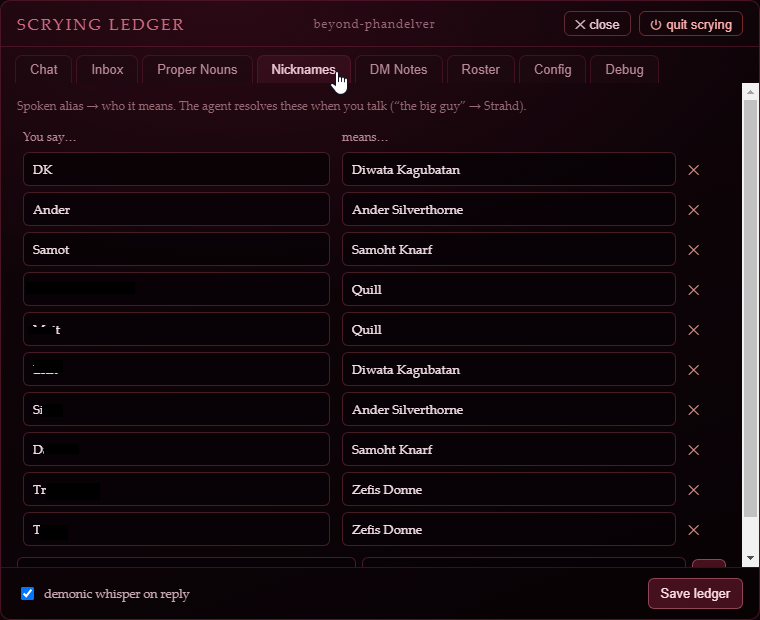
| Tactic tray | Proper-noun vocab | Nickname aliases |
|---|---|---|
 |
 |
 |
cd voice-hud
npm install
npm run start          # builds + launches Electron
Controls:
- Hold Right Ctrl → speak → release to send (configurable via
DMW_PTT_KEY) - Right Shift to confirm a proposed write action
- Esc to cancel
- Click the ✥ handle to drag the gem
- Click the ✦ icon to open the Scrying Ledger (full panel with Chat, Config, Debug tabs)
Agent: cloud Anthropic (Claude Haiku) only by default. Local Ollama is mothballed and off — it's hidden unless you set DMW_ENABLE_LOCAL_LLM=1, which surfaces the cloud/local brain buttons in the Chat tab (selection then persists across restarts). With the flag unset there is no visible toggle and the provider is forced to cloud.
STT: bundled whisper.cpp resident server (whisper-server + ggml-base.en.bin) — runs on CPU out of the box, no Python. GPU is a drop-in cuBLAS/Vulkan binary swap via DMW_WHISPER_BIN. The old Python faster-whisper sidecar is mothballed behind DMW_STT_ENGINE=faster-whisper. A global base vocabulary of common D&D terms (initiative, saving throw, the abilities/skills/conditions/damage types, dice) plus per-campaign character names, nicknames, and vocab are injected as initial_prompt for every transcription, updated after each agent turn. The base set lives in voice-hud/src/baseVocab.ts (separate from per-campaign vocab) — extend it without touching code via a JSON array at <DMW_DATA_DIR>/base-vocab.json.
STT correction (voice-hud/src/correction.ts): a deterministic post-STT pass that fixes Whisper's residue against the same glossary, in microseconds. Three ordered, toggleable passes — (1) notation ("two dee six" → 2d6, "nat twenty" → nat 20), (2) literal map (exact swaps like "dee see" → DC), (3) fuzzy + phonetic: Double Metaphone is the primary gate, fuzzy ratio secondary, with a common-word guard so real English is left alone (cave↛save). Despaced multi-word spans match single-word names, so a split name like "hair gone" → Haregon. Built for precision — a missed correction is cheap; a wrong one corrupts the parse, so stubborn names go in the literal map.
Config: all runtime knobs (PTT key, STT model, MCP URL, provider, etc.) are exposed in the Scrying Ledger Config tab and persisted to voice-hud/.env.
Debug: the Scrying Ledger Debug tab streams the main process console.error log live, with 500-entry history.
Campaign context
data/campaign-context.json is the shared source of truth for per-campaign vocab, nickname aliases, and DM notes. Both the MCP server tools (add_vocab, add_nickname, set_campaign_notes) and the Voice HUD wizard panel read and write this file. The agent can extend it at any time via tool calls.
Claude Code skills
.claude/commands/ contains slash commands for live sessions:
/combat— session startup: switch campaign, list tokens, enable turn hook, roll NPC initiative, arm player inbox loop, plan all tactics/round— parse DM narration → propose action list (HP changes, conditions, narration) → execute on confirmation
Tactical Advisor
plan_tactics / plan_all_tactics generates per-monster turn plans scaled to creature Intelligence and Wisdom. Called automatically at combat start and at the top of each round (both from the /combat skill and the Voice HUD agent).
| Tier | Int/Wis avg | Model (thinking budget) | Cascade | Behavior |
|---|---|---|---|---|
| 0 Feral | ≤5 | Haiku | none | Pure instinct |
| 1 Dim | ≤8 | Haiku | none | Basic predatory logic |
| 2 Average | ≤11 | Sonnet | none | Reads the battlefield |
| 3 Sharp | ≤15 | Sonnet (3k) | none | Coordinates with allies |
| 4 Brilliant | ≤20 | Sonnet (8k) | medium: Haiku → Sonnet | Short + medium-term planning |
| 5 Mastermind | 21+ | Opus (16k) | full: Haiku → Sonnet → Opus | Full 3-stage strategic cascade |
(Tiers 0–3 run a single model; tiers 4–5 run a multi-model cascade — the "Model" column is the final/long-term stage. See TIER_CONFIGS in src/tools/tactics.ts.)
Plans are whispered GM-only and surfaced again automatically when the initiative tracker reaches each mob's turn.
Key design decisions
RT transport carries reads and writes. The Firebase RTDB token is harvested once via browser (intercepting signInWithCustomToken), cached to data/roll20-rt-token.json, and reused. Reads come straight off RTDB; writes (and Mod-served reads) are relayed as !ai-relay commands over RTDB to the Mod, which executes them and writes the result back. The Playwright chat path is a fallback used only when RT is unavailable (a shared per-command nonce + the Mod's PROCESSED_NONCES LRU make the rt→browser fallback idempotent even for mutations).
D&D Beyond is fully browserless. CobaltSession cookie is harvested once and cached to data/ddb-cobalt.json. Every DDB read thereafter is a plain HTTPS fetch via character-service or monster-service — no Chromium involved.
D&D Beyond is read-only. HP and conditions are tracked on Roll20 tokens. DDB is polled for character state (HP, conditions, stats) but never written to.
PC initiative is read-only. roll_initiative always uses npcOnly=true. Players set their own initiative; the Mod never touches PC entries.
Player initiatives are preserved, not wiped. A raw wholesale setTurnOrder would replace the entire order (erasing players), so the initiative paths avoid it: roll_initiative writes via an atomic mergeTurnOrder (read-merge-write in one tick), and clearFirst=true strips only NPC entries (clearNpcFirst) — player-controlled entries and round markers are always kept. update_turn_order upserts a single entry the same way. The only wholesale wipe is clear_turn_order (explicit, between encounters); setTurnOrder is also reachable via batch_exec if you pass it deliberately. So a player's rolled/assigned initiative survives rolling and adjusting — it's erased only when you clear it.
AoE emanations use token auras; fixed areas use zones. Spirit Guardians, Aura of Protection, etc. → set_token_props aura1_radius. Fireball, Web, Cloudkill → create_zone on the map layer.
Duplicate token epithets. Tokens sharing a name get epithets at initiative roll time (Wolf the Scarred, Wolf the Gaunt) — assigned from creature-type word banks, stored in the token name.
Tactical data cached in gmnotes. Monster ability scores and action text are written to gmnotes on first plan under TACDATA:. Subsequent plans skip the DDB lookup — survives MCP server restarts.
Shared campaign context. data/campaign-context.json is written by the MCP server tools, the Voice HUD wizard, and the agent's add_vocab/add_nickname calls — one file, no sync needed.
Установка Roll20 DM Assistant
У этого сервера нет опубликованного пакета — он собирается из исходников. Открой репозиторий и следуй инструкции в README.
▸ github.com/eschatus/roll20-dm-mcpFAQ
Roll20 DM Assistant MCP бесплатный?
Да, Roll20 DM Assistant MCP бесплатный — установка в пару кликов через Unyly без оплаты.
Нужен ли API-ключ для Roll20 DM Assistant?
Нет, Roll20 DM Assistant работает без API-ключей и переменных окружения.
Roll20 DM Assistant — hosted или self-hosted?
Self-hosted: сервер запускается локально на твоей машине командой из раздела установки.
Как установить Roll20 DM Assistant в Claude Desktop, Claude Code или Cursor?
Открой Roll20 DM Assistant на unyly.org, выбери вкладку своего клиента (Claude Desktop, Claude Code, Cursor) и нажми Install — конфиг сгенерируется автоматически, без правки JSON.
Похожие MCP
Fetch
Web content fetching and conversion for efficient LLM usage.
AWS KB Retrieval
Retrieval from AWS Knowledge Base using Bedrock Agent Runtime.
 автор: modelcontextprotocol
Spring AI MCP Server
Provides auto-configuration for setting up an MCP server in Spring Boot applications.
llm-analysis-assistant
A very streamlined mcp client that supports calling and monitoring stdio/sse/streamableHttp, and can also view request responses through the /logs page. It also
 автор: xuzexin-hz
Compare Roll20 DM Assistant with
Не уверен что выбрать?
Найди свой стек за 60 секунд
Автор?
Embed-бейдж для README
Похожее
Все в категории ai