
Roshan Fahm
БесплатноНе проверенMCP server wrapping Roshan AI's Fahm Persian language service, enabling chat, translation, summarization, and more for Persian text.

Описание
MCP server wrapping Roshan AI's Fahm Persian language service, enabling chat, translation, summarization, and more for Persian text.
README


roshan-fahm-mcp
A self-hostable Model Context Protocol (MCP) server for Roshan AI's Fahm (فهم) Persian language service.
Chat over documents · Translation · Summarization · Text generation · Text correction · Document classification · Information extraction
roshan-fahm-mcp wraps the HTTP API of Fahm (فهم) — Roshan AI's native
Persian language-understanding service — and exposes every one of its endpoints
as MCP tools. Point any MCP client (Claude, an IDE, an agent framework) at it and
give your model first-class Persian chat-over-documents, translation,
summarization, generation, correction, classification, and document Q&A.
It is self-hostable and multi-instance: one process can route to several
self-hosted Fahm deployments (per tenant / data-center / environment) selected
per call via an instance argument. Authentication (SSO via POST /auth/glogin/
→ a Bearer access_token, cached and auto-refreshed on 401) is handled for
you, and secrets are never logged or returned.
This is an independent, community-maintained integration. It is not an official Roshan AI product. See LICENSE.
Contents
- What it wraps (endpoints)
- Tool reference
- Architecture
- Install
- Configuration
- Connect an MCP client
- Self-hosting, multi-instance & scaling
- Deployment
- Testing & CI
- License
What it wraps (endpoints)
Fahm uses SSO/Bearer auth: a username/password is exchanged for an
access_token via POST /auth/glogin/; the token is then sent as
Authorization: Bearer <access_token> on every request (you may also supply a
static token directly). The client does this transparently, caches the token in
memory, and re-logs-in once on a 401.
The host root is https://fahm.roshan-ai.ir; service endpoints live under
/api/... and login under /auth/glogin/.
| # | Fahm endpoint | Persian | What it does | MCP tool(s) |
|---|---|---|---|---|
| 1 | POST /auth/glogin/ |
ورود | Exchange username/password for a Bearer access_token. |
handled inside the client |
| 2 | POST /api/chat/ |
گفتگو | Chat with the LLM, optionally grounded on documents/media; supports history, deep research and search_mode (e.g. alefba). |
fahm_chat |
| 3 | GET /api/chat/list/ |
فهرست گفتگوها | List chats / service history, or fetch one chat's history by id. |
fahm_list_chats |
| 4 | POST /api/translation/ |
ترجمه | Translate text or Alefba documents into Persian (fa) or English (en); source language auto-detected. |
fahm_translate_text, fahm_translate_documents, fahm_translate |
| 5 | POST /api/summarization/ |
خلاصهسازی | Summarize text or documents — prose (word, متنی) or bullet list (bullet, فهرستوار). Sent as multipart/form-data. |
fahm_summarize, fahm_summarize_document |
| 6 | POST /api/letter/ |
تولید متن | Generate a piece of text (e.g. a letter) from a topic/instruction. | fahm_generate_letter |
| 7 | POST /api/text-correction/ |
ویرایش متن | Correct/edit text following a free-form instruction. | fahm_correct_text |
| 8 | POST /api/classification/ |
دستهبندی اطلاعات | Classify several Alefba documents into one of a supplied set of labels. | fahm_classify |
| 9 | POST /api/information-extraction/ |
استخراج اطلاعات | Answer a list of questions against each of several Alefba documents. | fahm_extract_information |
| 10 | GET /api/healthcheck |
سلامت ایپیآی | Liveness/readiness probe ({status, message, service, version}). |
healthcheck |
Alefba document URLs. Several tools accept
document_urlspointing at Roshan's Alefba system. The URL is the part of the panel image URL betweenpage_image/and@page(e.g.http://alefba.roshan-ai.ir/media/files/.../sample_persian_1.pdf).
Tool reference
Every tool accepts an optional instance: str | None = None (omit to use the
default instance). On bad input or an API error, tools return a structured
{"error": ..., "message": ...} payload instead of raising.
| Tool | Endpoint · method | Key parameters | Returns |
|---|---|---|---|
fahm_chat |
/api/chat/ · POST |
query, history, stream, document_urls[], media_urls[], deep_research, search_mode |
response, chat_id, service_history_id |
fahm_list_chats |
/api/chat/list/ · GET |
id? (a chat id for history) |
count, next, previous, services[]{id,name,type,created_at,updated_at} |
fahm_translate_text |
/api/translation/ · POST |
content, to (fa|en) |
result, info{in_token,out_token,language,document_url}, content, chat_id |
fahm_translate_documents |
/api/translation/ · POST |
document_urls[], to (fa|en) |
result, info{…,document_url[]}, chat_id |
fahm_translate |
/api/translation/ · POST |
content or document_urls[], to |
(ergonomic wrapper) same as above |
fahm_summarize |
/api/summarization/ · POST |
content or document_urls[], type (word|bullet) |
result, info{in_token,out_token,type,document_url}, content, chat_id |
fahm_summarize_document |
/api/summarization/ · POST |
document_urls[], type (word|bullet) |
(ergonomic wrapper) same as above |
fahm_generate_letter |
/api/letter/ · POST |
content (topic) |
result, content, chat_id |
fahm_correct_text |
/api/text-correction/ · POST |
text, description |
result, chat_id |
fahm_classify |
/api/classification/ · POST |
document_urls[], tags[] ({title,description}) |
results[]{tags[]}, info, content[], chat_id |
fahm_extract_information |
/api/information-extraction/ · POST |
document_urls[], questions[] ({title,text,type}) |
questions[], answers[][], info, chat_id |
healthcheck |
/api/healthcheck · GET |
instance |
ok, instance, base_url, response|message |
list_instances |
(local) | — | default_instance, instances[]{name,base_url,has_credentials} (never secrets) |
roshan_fahm_docs |
(local) | topic? |
Built-in docs for the service and tools, with links to https://docs.roshan-ai.ir |
Explore everything offline with:
python examples/inspect_server.py
Architecture
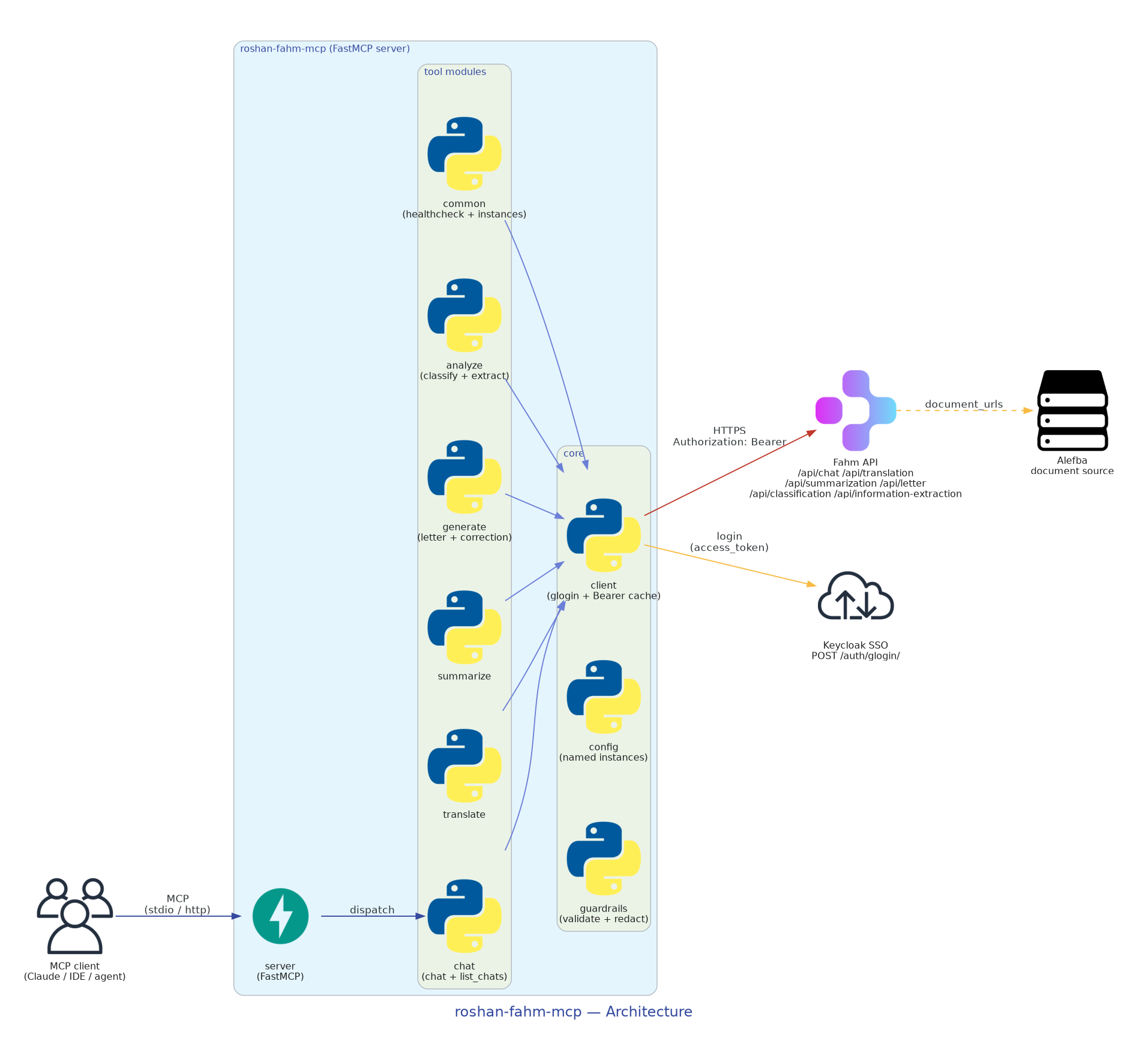
How a client request reaches Fahm through the server's tool modules and HTTP client — including the Keycloak SSO login and the Alefba document source:
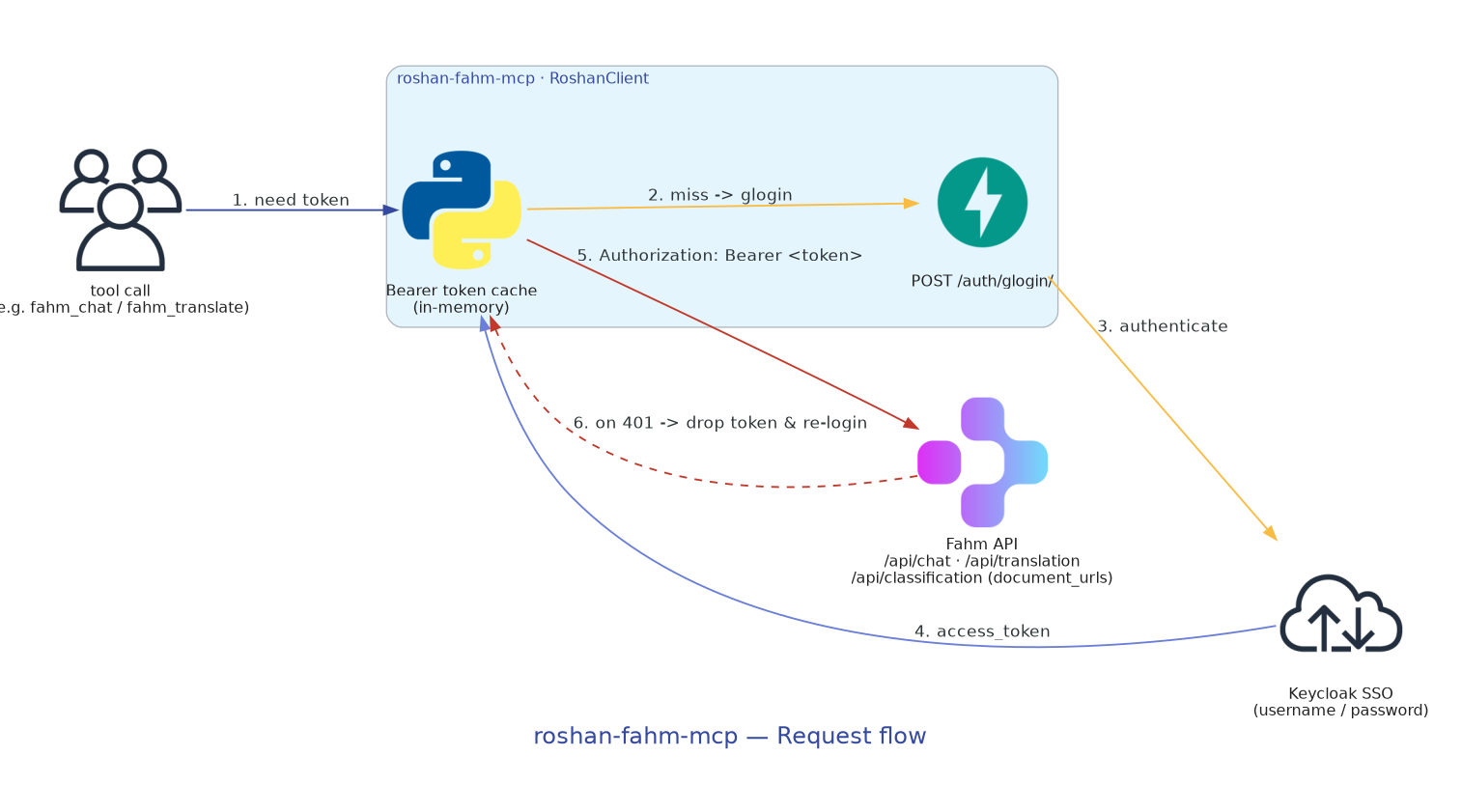
The authentication flow — SSO login at /auth/glogin/, in-memory Bearer token
cache, authenticated /api/... calls, and re-login on 401:
Regenerate the diagrams with make diagrams (or
python assets/diagrams/generate_diagrams.py). It rasterizes the official Fahm
icon with cairosvg and renders with Graphviz dot.
Install
Requires Python 3.10+.
git clone <this-repo> && cd roshan-fahm-mcp
python3 -m venv .venv && source .venv/bin/activate
pip install -e ".[dev]"              # runtime + test/lint extras
# (optional, for regenerating diagrams)
pip install diagrams cairosvg        # also needs Graphviz `dot` on PATH
Or with Docker:
docker build -t roshan-fahm-mcp .
docker run --rm -p 8000:8000 \
  -e ROSHAN_FAHM_USERNAME=your-user \
  -e ROSHAN_FAHM_PASSWORD=your-pass \
  roshan-fahm-mcp
A docker-compose.yml with two instances and an
.env.example (referenced via env_file) are provided too:
cp .env.example .env   # fill in credentials
docker compose up
Configuration
Configuration is entirely environment-driven. There are two styles. base_url
is always the host root (the client appends /api/... and /auth/glogin/).
Shorthand (single default instance)
The quickest way to configure the default instance:
| Variable | Description |
|---|---|
ROSHAN_FAHM_BASE_URL |
Fahm host root (default https://fahm.roshan-ai.ir). |
ROSHAN_FAHM_USERNAME |
Username for POST /auth/glogin/. |
ROSHAN_FAHM_PASSWORD |
Password for POST /auth/glogin/. |
ROSHAN_FAHM_TOKEN |
Static Bearer access token (use instead of username/password). |
export ROSHAN_FAHM_USERNAME=alice
export ROSHAN_FAHM_PASSWORD=s3cr3t
Nested (many named instances)
For multiple self-hosted deployments, use the ROSHAN_FAHM__ namespace with
__ as the nesting delimiter:
| Variable | Description |
|---|---|
ROSHAN_FAHM__DEFAULT_INSTANCE |
Instance used when a call omits instance (default default). |
ROSHAN_FAHM__LOG_LEVEL |
DEBUG / INFO / WARNING / ERROR (default INFO). |
ROSHAN_FAHM__INSTANCES__<NAME>__BASE_URL |
Fahm host root for <NAME>. |
ROSHAN_FAHM__INSTANCES__<NAME>__USERNAME |
Login username for <NAME> (SSO /auth/glogin/). |
ROSHAN_FAHM__INSTANCES__<NAME>__PASSWORD |
Login password for <NAME> (SSO /auth/glogin/). |
ROSHAN_FAHM__INSTANCES__<NAME>__TOKEN |
Static Bearer token for <NAME> (instead of username/password). |
ROSHAN_FAHM__INSTANCES__<NAME>__VERIFY_SSL |
false to skip TLS verification (self-signed dev hosts). |
ROSHAN_FAHM__INSTANCES__<NAME>__TIMEOUT |
Per-request timeout in seconds (default 60). |
# Tenant A logs in with credentials; on-prem uses a static token over a
# self-signed cert.
export ROSHAN_FAHM__INSTANCES__TENANTA__BASE_URL=https://fahm.tenant-a.internal
export ROSHAN_FAHM__INSTANCES__TENANTA__USERNAME=alice
export ROSHAN_FAHM__INSTANCES__TENANTA__PASSWORD=s3cr3t
export ROSHAN_FAHM__INSTANCES__ONPREM__BASE_URL=https://fahm.on-prem.local
export ROSHAN_FAHM__INSTANCES__ONPREM__TOKEN=xxxxxxxx
export ROSHAN_FAHM__INSTANCES__ONPREM__VERIFY_SSL=false
export ROSHAN_FAHM__DEFAULT_INSTANCE=tenanta
See .env.example for a complete, ready-to-copy file (default +
onprem instances + global settings). If both styles are present, nested config
wins for a given instance. The list_instances tool shows what is configured
(names and base URLs only).
Connect an MCP client
stdio (local)
Run the server over stdio and register it with your client. Example client configuration:
{
  "mcpServers": {
    "roshan-fahm": {
      "command": "python",
      "args": ["-m", "roshan_fahm_mcp"],
      "env": {
        "ROSHAN_FAHM_BASE_URL": "https://fahm.roshan-ai.ir",
        "ROSHAN_FAHM_USERNAME": "alice",
        "ROSHAN_FAHM_PASSWORD": "s3cr3t"
      }
    }
  }
}
If you installed the package, the console script roshan-fahm-mcp works as the
command too.
HTTP (networked)
python -m roshan_fahm_mcp --transport streamable-http --host 0.0.0.0 --port 8000
Then point your client at http://<host>:8000. The sse transport is also
available (--transport sse).
Self-hosting, multi-instance & scaling
A single process can route to many self-hosted Fahm deployments, chosen per call
via instance, each with its own credentials:
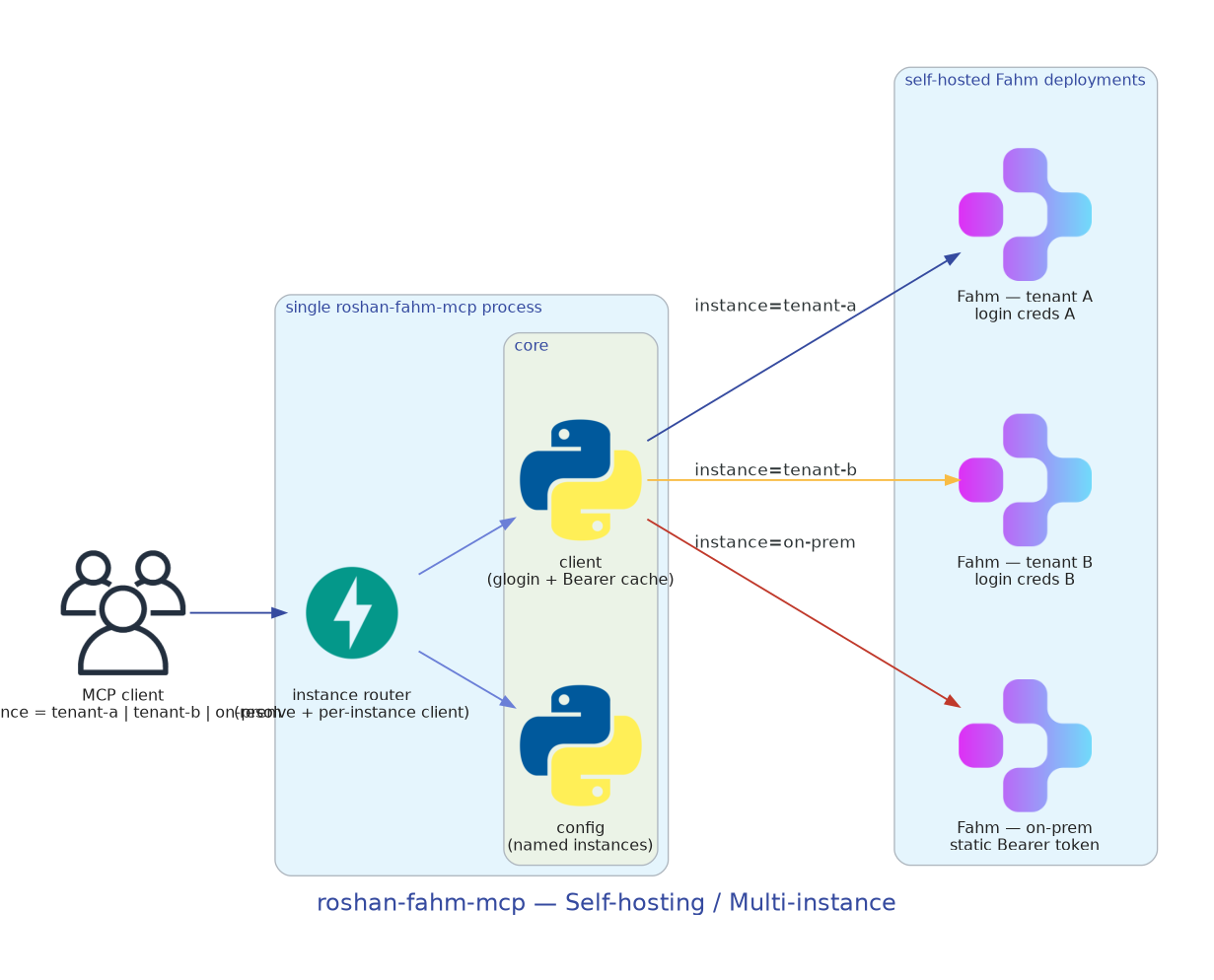
- Self-hosting. Set each instance's
BASE_URLto your own Fahm deployment's host root. UseVERIFY_SSL=falsefor self-signed certificates in development. - Multi-instance. Configure as many
ROSHAN_FAHM__INSTANCES__<NAME>__*blocks as you need; every tool takes aninstanceargument to pick one. Omit it to useROSHAN_FAHM__DEFAULT_INSTANCE. - Scaling. The process is stateless except for an in-memory Bearer token
cache per instance, so it scales horizontally — run multiple replicas behind a
load balancer. Each replica logs in independently and refreshes on
401. A HorizontalPodAutoscaler is included for Kubernetes. - Security. Tokens and passwords are never logged and are redacted from
error messages;
list_instancesnever returns secrets.
Deployment
Production-ready manifests live in deploy/:
- Helm chart —
deploy/helm/roshan-fahm-mcp - Kubernetes manifests (kustomize) —
deploy/kubernetes - Terraform module —
deploy/terraform
Each carries the instance credentials (username / password / token) in a
Kubernetes Secret and the non-secret config (base URL, verify_ssl) in a
ConfigMap. See deploy/README.md for step-by-step
instructions, including multi-instance configuration, ingress, and autoscaling.
Testing & CI
The unit suite is fully offline — all HTTP (including the /auth/glogin/
exchange) is mocked with respx:
python scripts/smoke_test.py        # offline tool sanity check
python -m pytest -q                 # unit tests
ruff check src tests                # lint
CI (GitHub Actions) runs lint + smoke test + pytest across Python 3.10/3.11/3.12
on every push and pull request, builds the Docker image (pushing to GHCR off
non-PR events), and on a v* tag builds the sdist/wheel and attaches them to the
GitHub Release. Dependabot keeps pip and github-actions dependencies current.
Optional live tests run against a real Fahm deployment when you opt in:
export ROSHAN_FAHM_BASE_URL=https://fahm.roshan-ai.ir
export ROSHAN_FAHM_USERNAME=... ROSHAN_FAHM_PASSWORD=...
export ROSHAN_FAHM_LIVE=1
pytest tests/live -q
License
MIT. "Roshan", "Fahm" (فهم) and related names/logos belong to their respective owners; this project only integrates with their API. Comply with Roshan AI's terms of service when using their service through this server.

Установка Roshan Fahm
У этого сервера нет опубликованного пакета — он собирается из исходников. Открой репозиторий и следуй инструкции в README.
▸ github.com/dwin-gharibi/roshan-fahm-mcpFAQ
Roshan Fahm MCP бесплатный?
Да, Roshan Fahm MCP бесплатный — установка в пару кликов через Unyly без оплаты.
Нужен ли API-ключ для Roshan Fahm?
Нет, Roshan Fahm работает без API-ключей и переменных окружения.
Roshan Fahm — hosted или self-hosted?
Доступен hosted-вариант: Unyly запускает сервер в облаке, локальная установка не обязательна.
Как установить Roshan Fahm в Claude Desktop, Claude Code или Cursor?
Открой Roshan Fahm на unyly.org, выбери вкладку своего клиента (Claude Desktop, Claude Code, Cursor) и нажми Install — конфиг сгенерируется автоматически, без правки JSON.
Похожие MCP
Gmail
Read, send and search emails from Claude
 автор: Google
Slack
Send, search and summarize Slack messages
 автор: Slack
Runbear
No-code MCP client for team chat platforms, such as Slack, Microsoft Teams, and Discord.
Discord Server
A community discord server dedicated to MCP by [Frank Fiegel](https://github.com/punkpeye)
Compare Roshan Fahm with
Не уверен что выбрать?
Найди свой стек за 60 секунд
Автор?
Embed-бейдж для README
Похожее
Все в категории communication