
Rsd
БесплатноНе проверенRSD MCP server that retrieve data from multiple data sources.

Описание
RSD MCP server that retrieve data from multiple data sources.
README
RSD MCP server that retrieve data from multiple data sources.
Model Context Protocol (MCP) Server
What is MCP?
The Model Context Protocol (MCP) is an open standard developed by Anthropic that defines how AI models communicate with external tools, data sources, and services. It acts as a universal connector — similar to how USB-C standardizes device connections — allowing AI agents to discover and invoke capabilities exposed by any MCP-compliant server.
How It Works
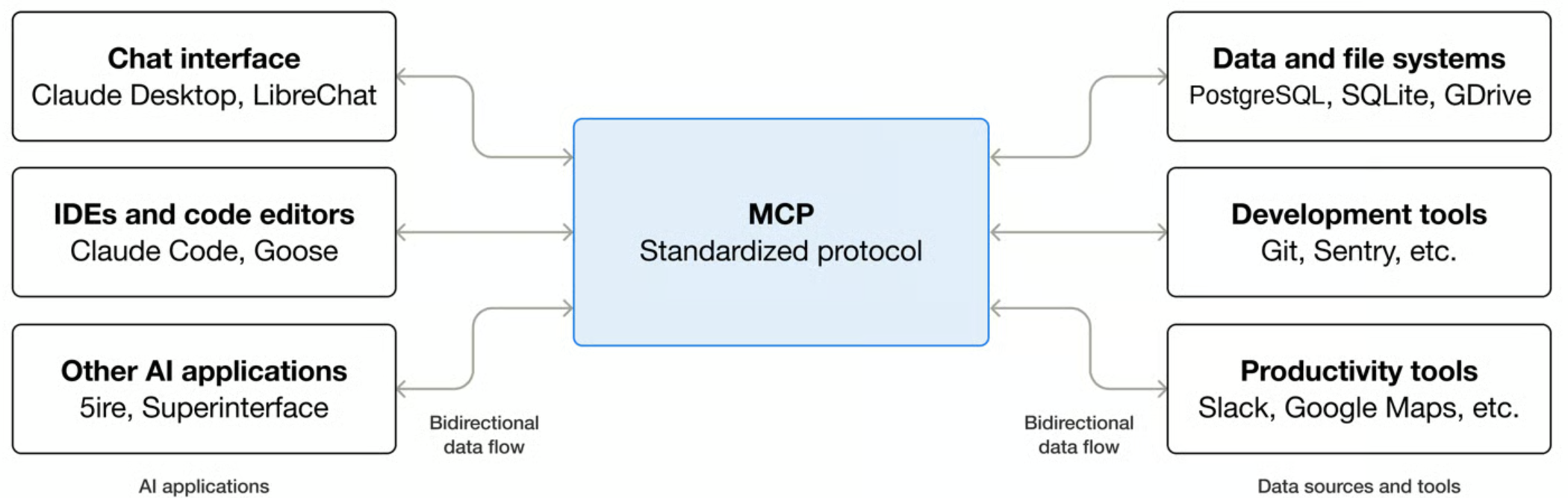
MCP Features
MCP Server
Primitives
An MCP server exposes three types of primitives:
| Primitive | Explanation | Example | Who controls it |
|---|---|---|---|
| Tools | Functions that your LLM can actively call, and decides when to use them based on user requests. Tools can write to databases, call external APIs, modify files, or trigger other logic. | Search, send email, query DB | Model |
| Resources | Passive data sources that provide read-only access to information for context, such as file contents, database schemas, or API documentation. | Files, API responses, Read calendars | Application |
| Prompts | Pre-built instruction templates that tell the model to work with specific tools and resources. | Summaries, translate, draft an email | User |
Transports
MCP supports multiple transport types:
| Transport | Use Case |
|---|---|
| Stdio | Local processes, CLI tools |
| Streamable HTTP | Remote/hosted servers (recommended) |
MCP Client
| Feature | Explanation | Example |
|---|---|---|
| Elicitation | Elicitation enables servers to request specific information from users during interactions, providing a structured way for servers to gather information on demand. | User's preferences e.g preferred contact number, confirmation before booking |
| Roots | Roots allow clients to specify which directories servers should focus on, communicating intended scope through a coordination mechanism. | Access to specific file directory e.g. specific sharepoint folder |
| Sampling | Sampling allows servers to request LLM completions through the client, enabling an agentic workflow. This approach puts the client in complete control of user permissions and security measures. | Send list of schools to an LLM to choose best school |
API Reference
POST /mcp
Body: JSON-RPC 2.0 object.
Supported methods:
| Method | Description |
|---|---|
initialize |
Start session, negotiate protocol |
initialized |
Client acknowledgement |
ping |
Heartbeat |
tools/list |
List scope-filtered tools |
tools/call |
Execute a tool |
roots/list |
List available roots |
sampling/createMessage |
Request LLM completion from client |
elicitation/create |
Request user input from client |
Getting Started
Prerequisites
- .NET 10 SDK
- Node.js (for MCP Inspector)
Configuration
Add the following to your secrets.json (User secrets) and update with relevant information:
{
  "AzureSearch:Endpoint": "https://<your-resource>.search.windows.net",
  "AzureSearch:ApiKey": "[API-Key]",
  "AzureSearch:Indexes:Ofsted": "[Ofsted Index]",
  "AzureSearch:Indexes:Establishment": "[Establishment Index]"
}
Run the Server
dotnet run
The MCP endpoint will be available at:
http://localhost:7146/mcp
Testing with MCP Inspector
MCP Inspector is a browser-based developer tool for testing and debugging your MCP server — think of it as Postman for MCP.
Launch the Inspector
npx @modelcontextprotocol/inspector
Connect to Your Server
- Open the URL printed in the terminal (token is pre-filled):
http://localhost:6274/?MCP_PROXY_AUTH_TOKEN=<token>
- Set Transport Type →
Streamable HTTP - Set URL →
http://localhost:7146/mcp - Click Connect
You can now browse tools, invoke them with parameters, and inspect raw JSON responses.
Connecting to an AI Client
Resources
Установка Rsd
У этого сервера нет опубликованного пакета — он собирается из исходников. Открой репозиторий и следуй инструкции в README.
▸ github.com/DFE-Digital/rsd-mcp-serverFAQ
Rsd MCP бесплатный?
Да, Rsd MCP бесплатный — установка в пару кликов через Unyly без оплаты.
Нужен ли API-ключ для Rsd?
Нет, Rsd работает без API-ключей и переменных окружения.
Rsd — hosted или self-hosted?
Self-hosted: сервер запускается локально на твоей машине командой из раздела установки.
Как установить Rsd в Claude Desktop, Claude Code или Cursor?
Открой Rsd на unyly.org, выбери вкладку своего клиента (Claude Desktop, Claude Code, Cursor) и нажми Install — конфиг сгенерируется автоматически, без правки JSON.
Похожие MCP
GitHub
PRs, issues, code search, CI status
 автор: GitHub
Filesystem
Secure file operations with configurable access controls.
Memory
Knowledge graph-based persistent memory system.
Template MCP Server
A CLI tool to create a new Model Context Protocol server project with TypeScript support, dual transport options, and an extensible structure
 автор: mcpdotdirect
Amap Maps Mcp Server
MCP server for using the AMap Maps API
 автор: duxiaohui
Supabase
Database, auth and storage
 автор: Supabase
Everything
Reference / test server with prompts, resources, and tools.
Git
Tools to read, search, and manipulate Git repositories.
Sequential Thinking
Dynamic and reflective problem-solving through thought sequences.
Time
Time and timezone conversion capabilities.
Compare Rsd with
Не уверен что выбрать?
Найди свой стек за 60 секунд
Автор?
Embed-бейдж для README
Похожее
Все в категории development