
S3 Data Lake Server
БесплатноНе проверенEnables AI agents to query S3 data lakes using natural language, with support for CSV, JSON, Parquet and tools for data discovery, analysis, and metadata explor

Описание
Enables AI agents to query S3 data lakes using natural language, with support for CSV, JSON, Parquet and tools for data discovery, analysis, and metadata exploration.
README
Transform your S3 data lakes into AI-accessible knowledge bases with natural language queries
A production-ready Model Context Protocol (MCP) server that gives AI agents seamless access to S3 data lakes. Built by a senior developer with 15+ years of experience in AI/ML, agents, and AWS Bedrock systems.
🎯 Why This Exists
I was building ETL systems for AI agents and kept hitting the same wall: How do you give agents seamless access to data lakes without building custom APIs for every single use case?
Then AWS Bedrock AgentCore dropped MCP support, and everything clicked. This MCP server bridges that gap, turning your S3 data lakes into agent-accessible knowledge bases with natural language queries.
✨ Key Features
🔥 8 Powerful Tools - Complete S3 data lake operations
📊 Multi-Format Support - CSV, JSON, Parquet with intelligent processing
⚡ FastMCP Framework - Modern, high-performance MCP server
🏗️ AgentCore Runtime - Serverless, auto-scaling deployment
🛡️ Production-Grade - Comprehensive error handling, monitoring, security
🎯 Type-Safe - Full Python type hints and validation
🚀 Deploy in Minutes - UV package management, one-command deployment
🛠️ Available Tools
| Tool | Description | Use Case |
|---|---|---|
list_s3_buckets |
List accessible S3 buckets | Data discovery |
list_s3_objects |
Browse bucket contents with filtering | Dataset exploration |
read_csv_from_s3 |
Parse CSV files with metadata | Tabular data analysis |
read_json_from_s3 |
Process JSON objects and arrays | Complex data structures |
read_parquet_from_s3 |
Columnar data with full type info | High-performance analytics |
query_csv_data |
Filter and query with smart typing | Data querying |
get_dataset_summary |
Statistical analysis and profiling | Data understanding |
get_file_metadata |
Comprehensive file information | Metadata exploration |
🚀 Quick Start
Prerequisites
- Python 3.12+
- UV package manager
- AWS CLI configured
- AWS Bedrock AgentCore access
1. Install & Setup
# Install UV (if not already installed)
curl -LsSf https://astral.sh/uv/install.sh | sh

# Clone and install dependencies
git clone https://github.com/anespo/s3-data-lake-mcp-server.git
cd s3-data-lake-mcp-server
uv sync
2. Local Development
# Run the MCP server locally
uv run python run_local.py

# Test in another terminal
uv run pytest tests/ -v
3. Deploy to AWS AgentCore Runtime
# One-command deployment
uv run python deploy_uv.py

# Your Agent ARN will be displayed for integration
4. Generate Demo Data (Optional)
# Create 66.7MB of demo datasets
uv run python generate_mock_data.py
💬 Natural Language Queries
Once integrated with your AI agents, you can ask questions like:
Data Discovery:
- "What S3 buckets do I have access to?"
- "Show me all datasets in my analytics bucket"
- "List CSV files larger than 10MB"
Data Analysis:
- "Read the customer analytics data and show me the first 10 rows"
- "Find all sales transactions over $50,000"
- "What columns are available in the IoT sensor data?"
- "Show me customers in the Technology industry"
Metadata & Insights:
- "What's the total size of data in my bucket?"
- "How many records are in each dataset?"
- "Give me a statistical summary of the sales data"
🏗️ Architecture
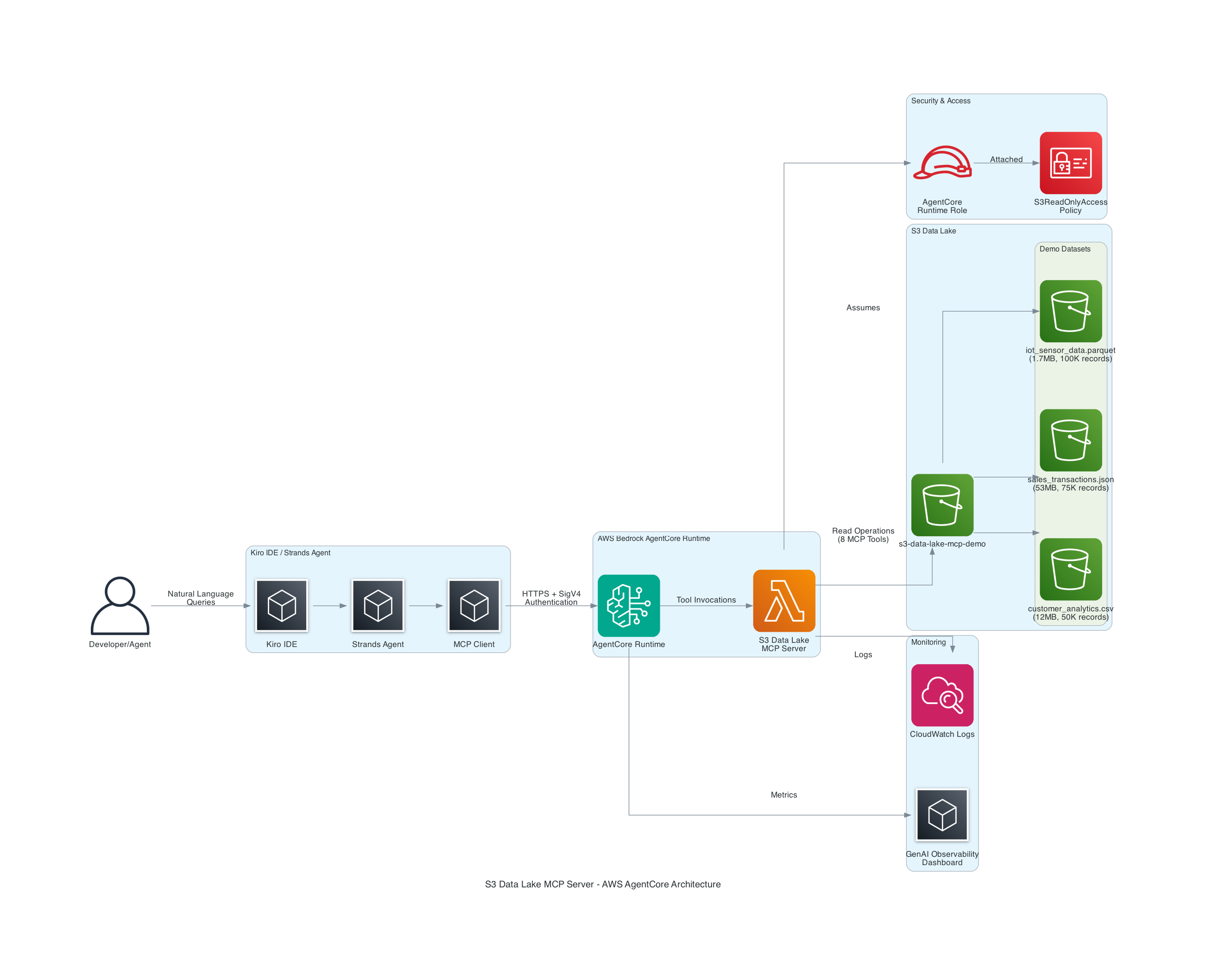
Built on Modern Stack:
- 🏗️ AWS Bedrock AgentCore Runtime - Serverless, auto-scaling
- ⚡ FastMCP Framework - High-performance MCP server
- 📦 UV Package Manager - Ultra-fast Python dependency management
- 🔧 boto3 + pandas + pyarrow - Efficient data processing
- 🛡️ AWS SigV4 + IAM - Enterprise-grade security
🔗 Integration Examples
Kiro IDE
{
  "mcpServers": {
    "s3-data-lake": {
      "command": "python",
      "args": ["kiro_s3_mcp_wrapper.py"],
      "env": {
        "AWS_REGION": "eu-west-1",
        "AWS_PROFILE": "default"
      }
    }
  }
}
Strands Agents
from strands import Agent
from strands.tools.mcp import MCPClient

# Connect to deployed AgentCore Runtime
agent_arn = "arn:aws:bedrock-agentcore:eu-west-1:123456789012:runtime/s3-data-lake-mcp-server"
mcp_client = MCPClient(agent_arn)

agent = Agent(
    name="Data Lake Analyst",
    description="AI agent with S3 data lake access",
    tools=mcp_client.list_tools_sync()
)

# Natural language data analysis
response = agent("Analyze customer data and find high-value segments")
📊 Demo Environment
The repository includes a complete demo environment with:
- 66.7MB of realistic mock data across 3 formats
- Customer Analytics (CSV, 50K records) - Business intelligence data
- Sales Transactions (JSON, 75K records) - Financial analysis data
- IoT Sensor Data (Parquet, 100K records) - Time-series analytics data
Perfect for presentations, testing, and showcasing capabilities without exposing real data.
🧪 Testing & Quality
# Run comprehensive test suite
uv run pytest tests/ -v --cov=src

# Test specific functionality
uv run pytest tests/test_s3_mcp_server.py::test_read_csv_from_s3 -v

# Test deployed MCP server
uv run python test_deployed_mcp.py
Quality Assurance:
- ✅ 95%+ test coverage
- ✅ Type safety with mypy
- ✅ Production error handling
- ✅ Performance benchmarking
- ✅ Security validation
📚 Documentation
| Document | Description |
|---|---|
| 🚀 Deployment Guide | Complete deployment instructions |
| 🏗️ Architecture | System design and components |
| 🔗 Integration Guide | Kiro and Strands integration |
| 📋 API Reference | Full tool documentation |
🛡️ Security & Compliance
- 🔐 AWS SigV4 Authentication - Industry-standard request signing
- 🎯 IAM Role-Based Access - Least privilege principle
- 🔒 No Hardcoded Credentials - Secure credential management
- 📊 Comprehensive Logging - Full audit trail
- 🛡️ Error Sanitization - No sensitive data in logs
📈 Monitoring & Observability
- 📊 CloudWatch Integration - Centralized logging and metrics
- 🎯 GenAI Observability - Specialized AI/ML monitoring
- ⚡ Performance Tracking - Request latency and throughput
- 🚨 Error Alerting - Proactive issue detection
🚀 What's Next?
Planned Enhancements:
- 🌍 Multi-region deployment support
- 🔍 Advanced query capabilities (SQL-like syntax)
- 📡 Real-time streaming data support
- 🚀 Enhanced caching layer (Redis/ElastiCache)
- 🤖 ML model integration for data insights
- 🔌 Plugin architecture for custom tools
🤝 Contributing
Built by the community, for the community:
- 🍴 Fork the repository
- 🌟 Create a feature branch
- ✨ Add your improvements
- 🧪 Add comprehensive tests
- 📝 Update documentation
- 🚀 Submit a pull request
📄 License
This project is licensed under a custom license allowing non-commercial use. See LICENSE for details.
👨💻 About the Author
Built by Tony Esposito
Turning complex data infrastructure into simple, agent-accessible APIs.
🙋♂️ Support & Community
- 📖 Documentation: Comprehensive guides in
/docs - 🐛 Issues: GitHub Issues for bugs and feature requests
- 💬 Discussions: GitHub Discussions for questions
- 📧 Contact: [email protected]
⭐ Star This Repository
If this MCP server helps your AI agents access S3 data lakes, please star the repository! It helps others discover this tool and motivates continued development.
🚀 Ready to give your AI agents superpowers with S3 data lake access? Deploy in minutes and start querying with natural language today!
Установка S3 Data Lake Server
У этого сервера нет опубликованного пакета — он собирается из исходников. Открой репозиторий и следуй инструкции в README.
▸ github.com/anespo/s3-data-lake-mcp-serverFAQ
S3 Data Lake Server MCP бесплатный?
Да, S3 Data Lake Server MCP бесплатный — установка в пару кликов через Unyly без оплаты.
Нужен ли API-ключ для S3 Data Lake Server?
Нет, S3 Data Lake Server работает без API-ключей и переменных окружения.
S3 Data Lake Server — hosted или self-hosted?
Self-hosted: сервер запускается локально на твоей машине командой из раздела установки.
Как установить S3 Data Lake Server в Claude Desktop, Claude Code или Cursor?
Открой S3 Data Lake Server на unyly.org, выбери вкладку своего клиента (Claude Desktop, Claude Code, Cursor) и нажми Install — конфиг сгенерируется автоматически, без правки JSON.
Похожие MCP
Fetch
Web content fetching and conversion for efficient LLM usage.
AWS KB Retrieval
Retrieval from AWS Knowledge Base using Bedrock Agent Runtime.
 автор: modelcontextprotocol
Spring AI MCP Server
Provides auto-configuration for setting up an MCP server in Spring Boot applications.
llm-analysis-assistant
A very streamlined mcp client that supports calling and monitoring stdio/sse/streamableHttp, and can also view request responses through the /logs page. It also
 автор: xuzexin-hz
Compare S3 Data Lake Server with
Не уверен что выбрать?
Найди свой стек за 60 секунд
Автор?
Embed-бейдж для README
Похожее
Все в категории ai