
Sales Dashboard
БесплатноНе проверенEnables interactive sales data exploration within Claude through a dynamic dashboard with filterable charts and tables.

Описание
Enables interactive sales data exploration within Claude through a dynamic dashboard with filterable charts and tables.
README

A polished, clickable sales-analytics dashboard that renders inline inside
Claude (Cowork and regular chat) via the MCP Apps extension (SEP-1865, the
ui:// resource pattern), served by a small Python server. Pick a date range,
click a region, or pick a product and the charts and table re-query live data and
re-render — a real app, not a screenshot.
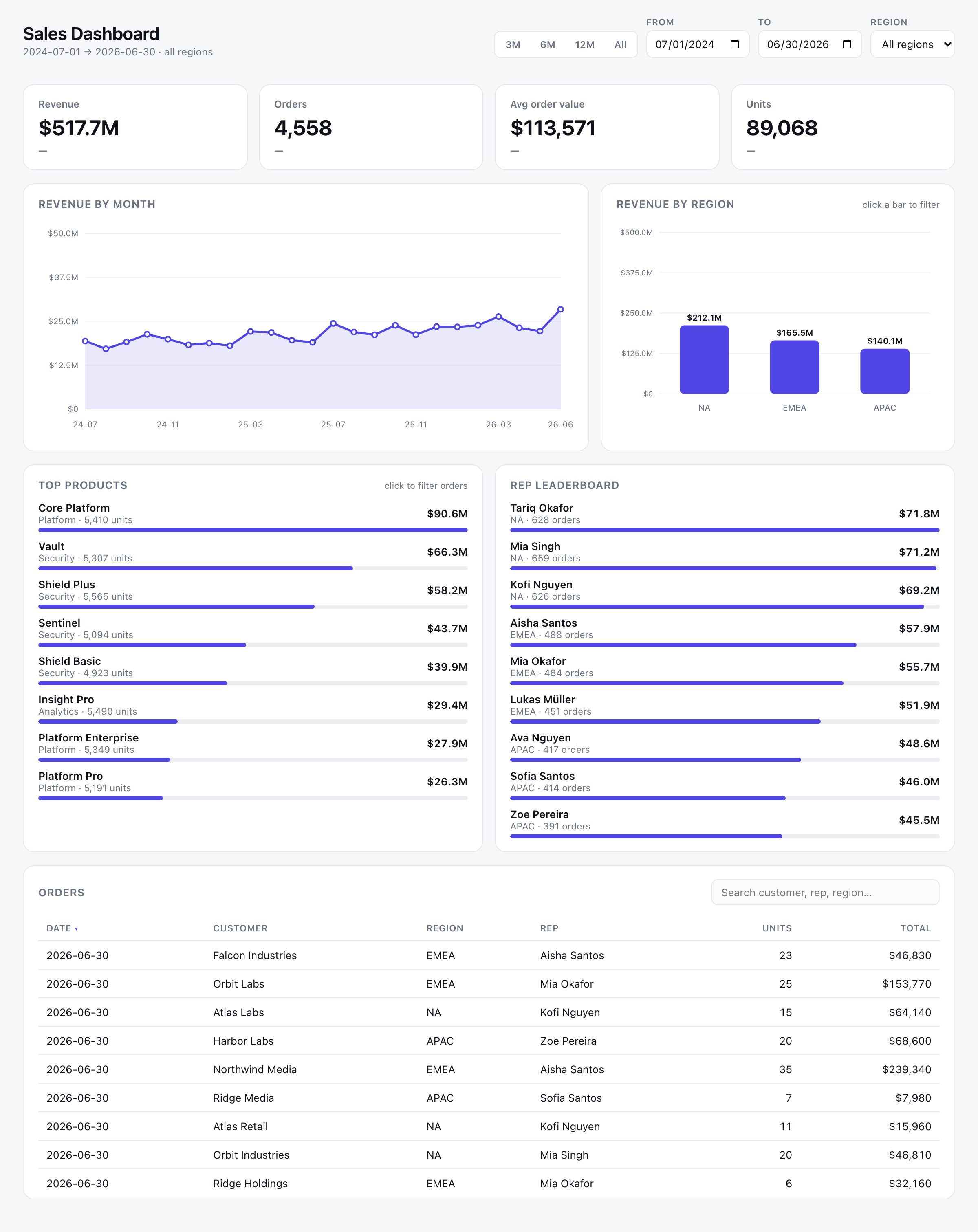
- Server: FastMCP (native MCP Apps), streamable-HTTP.
- Data: stdlib
sqlite3, seeded deterministically (~4,500 orders / 24 months). - UI: one self-contained HTML doc — inline CSS/JS, inline-SVG charts (no CDN).
- Reach: a built-in Cloudflare tunnel exposes your laptop over HTTPS so Claude can reach it.
Quickstart (≈60 seconds)
You need uv and
cloudflared
(brew install cloudflared on macOS). Then:
uv sync                      # create the venv + install (pinned)
uv run mcp-apps seed         # build db/sales.db (deterministic; safe to re-run)
uv run mcp-apps serve        # start server + open a public HTTPS tunnel
serve prints a banner — copy the URL:
==================================================================
  CONNECTOR URL — paste into Claude → Add custom connector:
      https://<random-words>.trycloudflare.com/mcp
==================================================================
Then in Claude: Settings → Connectors → Add custom connector, paste that URL
(including the trailing /mcp), enable it, and ask:
"Open the sales dashboard."
Leave serve running; press Ctrl-C to stop the server and tunnel together.
servealways opens a tunnel. Ifcloudflaredisn't installed it stops immediately with an install hint — Claude runs in the cloud and can't reachlocalhost, so a public HTTPS URL is required.
The
*.trycloudflare.comURL is new every run. For a stable URL on a domain you own, see Stable URL.
Add it to Claude
- Settings → Connectors → Add custom connector.
- Name it (e.g. Sales Dashboard) and paste the HTTPS URL from
serve, including/mcp. Save. - Enable it for the surface you'll use (Cowork and/or chat), then ask Claude to open the dashboard.
[!IMPORTANT] Reconnect after every server restart. The server keeps an in-memory session; restarting
servedrops it and Claude shows "Session not found." Toggle the connector off/on (or remove/re-add it) after each restart. This also makes Claude pick up UI changes.
Use it
- "Open the sales dashboard." · "Open the sales dashboard for APAC." (pre-filtered)
- Click a region bar → the whole dashboard filters to it.
- 3M / 6M / 12M / All presets or the date pickers → time range updates.
- Click a top product → the orders table filters via a live
list_orderscall. - Search / click column headers to filter and sort; click a chip × to clear.
Each click is a live MCP tool call. Open the host devtools console to watch
[mcp-app] ⇒ host traffic with a matching POST /mcp in the server terminal.
How it works
Claude (host)  ──MCP over HTTPS──▶  Cloudflare tunnel  ──▶  FastMCP server  ──▶  SQLite
     │  renders ui:// resource                                    │
     └── sandboxed iframe ◀── postMessage (JSON-RPC) ─────────────┘
- Data tools (
get_sales_summary,sales_by_month,sales_by_region,top_products,sales_by_rep,list_orders) run SQL and return typed JSON.get_dashboard_databundles everything so a filter change is one round-trip. - The app is one tool,
open_sales_dashboard, linked to the UI resourceui://sales/dashboard-<hash>via_meta.ui.resourceUri. The server inlines HTML/CSS/JS into one document and embeds default data so it paints instantly. - Interactivity flows over the SEP-1865
postMessagebridge: the iframe does theui/initializehandshake, reports its size, and calls the data tools on each filter change.
Built against MCP Apps spec 2026-01-26, verified on FastMCP 3.4.2.
Customize / re-skin
Everything tweakable lives in the CONFIG block at the top of
src/sales_dashboard/config.py: theme colours,
date range & volume, regions, product catalogue & price bands, currency, server
host/port. After changing data settings, re-run uv run mcp-apps seed, then
restart serve and reconnect the connector.
Develop & test
uv run pytest                       # full suite (unit + in-memory integration)
uv run ruff check .                 # lint
uv run mypy src                     # type-check
# coverage gate (the suite keeps ≥90%):
uv run pytest --cov=src/sales_dashboard --cov-report=term-missing --cov-fail-under=90
Tests need no running server — integration tests drive the server in-memory
via fastmcp.Client. For a bare local server (e.g. to poke at it with the MCP
Inspector), run uv run server.py and point
npx @modelcontextprotocol/inspector at http://localhost:8000/mcp (Streamable
HTTP). Editing src/sales_dashboard/ui/* changes the content hash in the ui://
URI automatically — restart serve and reconnect so Claude fetches the new URI.
Stable URL (named tunnel)
One-time (opens a browser to log in):
cloudflared tunnel login
cloudflared tunnel create mcp-demo
cloudflared tunnel route dns mcp-demo mcp-demo.example.com
Then: uv run mcp-apps serve --named mcp-demo.example.com → stable connector URL
https://mcp-demo.example.com/mcp.
Troubleshooting
| Symptom | Cause & fix |
|---|---|
serve exits: "cloudflared was not found" |
Install cloudflared (see Quickstart). The tunnel is required. |
| "Session not found" (-32600) | Server was restarted; Claude holds a stale session. Reconnect the connector. |
| App card "Unable to reach …", no iframe | UI-resource validation. _meta.ui is an object and the mimeType is text/html;profile=mcp-app (correct here). Re-add the connector; check curl https://…/mcp returns MCP JSON. |
| Iframe mounts but spins forever | The view must send ui/notifications/size-changed; this build does. |
| Renders but not interactive | An always-on overlay can eat clicks. This build hides overlays via [hidden]{display:none!important}. |
| UI edits don't show up | Claude cached the old resource. The URI auto-busts on change — restart + reconnect. |
Note on exposure:
servepublishes your local server on a public HTTPS URL with no authentication — anyone with the URL can call the tools. The data is synthetic and the quick-tunnel URL is ephemeral, but don't point this at real data without adding auth.
Project layout
server.py                    bare local server (dev / MCP Inspector)
seed.py                      builds the SQLite DB
src/sales_dashboard/
  config.py                  ⭐ CONFIG block — theme / date range / volume / regions
  db.py                      sqlite helpers (injectable path)
  queries.py                 one SQL function per tool
  seed.py                    deterministic data generator
  server.py                  FastMCP: tools + ui:// resource; assembles the HTML
  cli.py                     `mcp-apps` CLI: seed + serve (tunnel)
  ui/                        dashboard.html / .css / bridge.js / charts.js / app.js
tests/
  unit/                      config, db, seed, queries, validation, ui-assembly, cli
  integration/               tools + app resource (in-memory FastMCP client)
docs/                        design specs, plans, screenshot
Pinned versions
| Package | Version | Package | Version | |
|---|---|---|---|---|
| Python | 3.11+ | pydantic | 2.13.4 | |
| fastmcp | 3.4.2 | starlette | 1.3.1 | |
| mcp | 1.27.2 | uvicorn | 0.49.0 |
MCP Apps is young and moving fast; this targets spec 2026-01-26. The bridge.js
postMessage layer is isolated in one file so it can be adapted if a host's
behaviour changes.
Built by dac.digital · MIT licensed.
Установка Sales Dashboard
У этого сервера нет опубликованного пакета — он собирается из исходников. Открой репозиторий и следуй инструкции в README.
▸ github.com/DACdigital/MCP-App-DemoFAQ
Sales Dashboard MCP бесплатный?
Да, Sales Dashboard MCP бесплатный — установка в пару кликов через Unyly без оплаты.
Нужен ли API-ключ для Sales Dashboard?
Нет, Sales Dashboard работает без API-ключей и переменных окружения.
Sales Dashboard — hosted или self-hosted?
Self-hosted: сервер запускается локально на твоей машине командой из раздела установки.
Как установить Sales Dashboard в Claude Desktop, Claude Code или Cursor?
Открой Sales Dashboard на unyly.org, выбери вкладку своего клиента (Claude Desktop, Claude Code, Cursor) и нажми Install — конфиг сгенерируется автоматически, без правки JSON.
Похожие MCP
Fetch
Web content fetching and conversion for efficient LLM usage.
AWS KB Retrieval
Retrieval from AWS Knowledge Base using Bedrock Agent Runtime.
 автор: modelcontextprotocol
Spring AI MCP Server
Provides auto-configuration for setting up an MCP server in Spring Boot applications.
llm-analysis-assistant
A very streamlined mcp client that supports calling and monitoring stdio/sse/streamableHttp, and can also view request responses through the /logs page. It also
 автор: xuzexin-hz
Compare Sales Dashboard with
Не уверен что выбрать?
Найди свой стек за 60 секунд
Автор?
Embed-бейдж для README
Похожее
Все в категории ai