
Salome
БесплатноНе проверенMCP server for SALOME that enables agents to create and manipulate CAD geometries and meshes, including primitive creation, boolean operations, and mesh generat

Описание
MCP server for SALOME that enables agents to create and manipulate CAD geometries and meshes, including primitive creation, boolean operations, and mesh generation with Netgen.
README
SALOME Model Context Protocol for agentic use
Overview
This repository provides three components:
- SALOME GUI plugin to start/stop the local bridge port.
- SALOME-side bridge (
salome_bridge.py) that executes GEOM/SMESH operations. - MCP server (
salome-mcp) that agent clients connect to.
Requirements
- SALOME 9.x
- Python 3.10+
- uv
Setup
1) Install Python dependencies
cd /path/to/salome-mcp
uv sync
2) Install SALOME plugin files
mkdir -p ~/.config/salome/Plugins   # or wherever your plugins folder is located
cp salome_plugin/*.py salome_bridge.py ~/.config/salome/Plugins/
Configure MCP Client
It is recommended that you set up the MCP server inside a particular project instead of globally.
Claude Code CLI (from inside your project root)
claude mcp add --scope project salome -- uv run --directory /path/to/salome-mcp salome-mcp
Codex CLI (from inside your project root)
mkdir -p .codex && cat > .codex/config.toml <<'EOF'
[mcp_servers.salome]
command = "uv"
args = ["run", "--directory", "/path/to/salome-mcp", "salome-mcp"]
EOF
Custom Host and Port
By default, the bridge uses localhost:1234. You can set your custom host/port in the SALOME GUI bridge settings, then simply prompt your agent to connect to that.
Usage
- Start SALOME and start:
Tools -> PLugins -> MCP Bridge -> Start (default) - Open your agent and prompt it to "ping salome". The agent should be able to use
check_salome_statusand return success - The agent should now be able to make tool calls based on your prompts. Check samples
- End session with
MCP Bridge -> Stop
Tool Coverage
These are the tool calls that can be used by your agent. You probably don't need to know this
General
ping_salome,check_salome_status,get_study_info,get_scene_summary,list_study_objects: Session and study status/overview
Geometry (GEOM)
create_box,create_cylinder,create_sphere,create_naca4_airfoil: Primitive creationtranslate_object,rotate_object,copy_object,duplicate_object,rename_object,delete_object: Transforms and object lifecycleboolean_operation,fuse_objects,cut_objects,common_objects: Boolean operations (fuse,cut,common)create_group,create_groups,create_surface_group,create_volume_group: Group creationmake_partition,explode_shape,import_geometry,export_geometry,get_object_info,list_subshapes: Partition, explode, I/O, and inspection
Mesh (SMESH)
import_mesh,export_mesh: Mesh I/Ocreate_mesh: Standard mesh setup with hypothesescreate_mesh_with_hypotheses: Explicit algorithm + detailed hypotheses meshingcompute_mesh,get_mesh_info: Mesh compute and statistics
Advanced
execute_salome_code(raw Python code)
[!WARNING]
execute_salome_codeexecutes arbitrary Python inside SALOME. Keep bridge access local and trusted.
Samples
Prompt 1
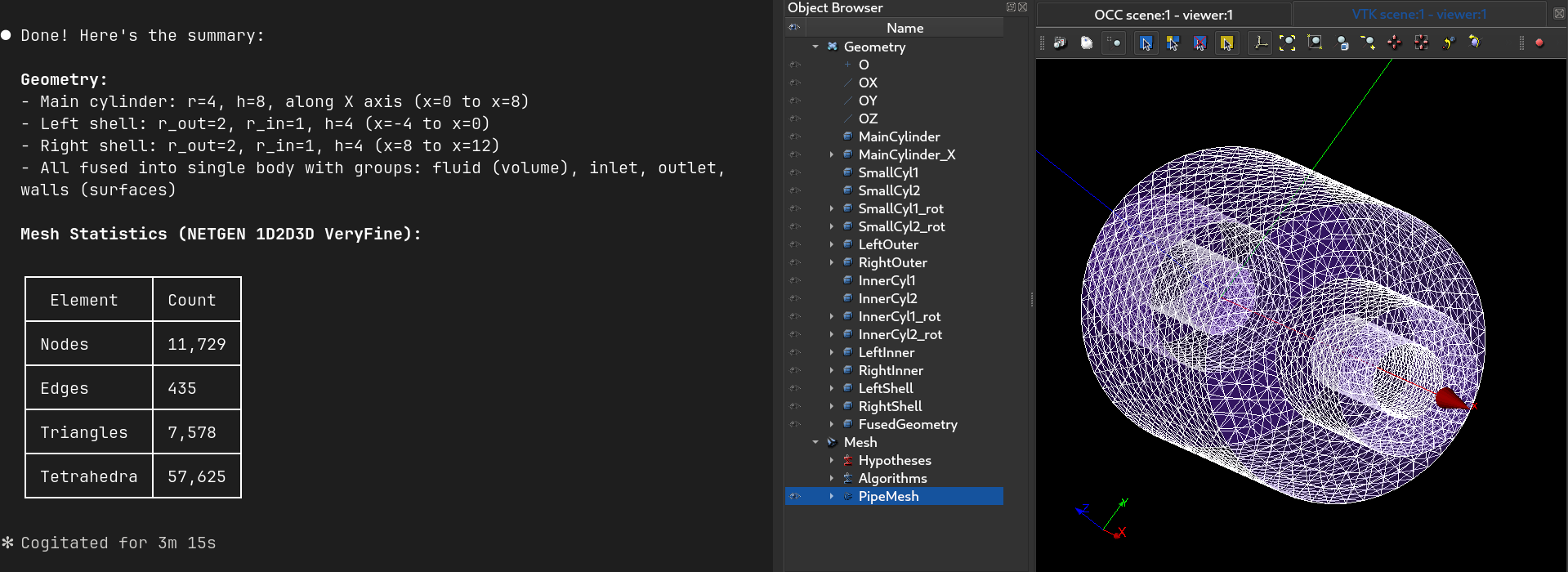
lets do these step by step: 1. make a cylinder r = 4 h =8 and place it along x axis 2. make two more cylinders of r = 2 and h = 4 3. place these cylinders on either of the circular ends 4. carve a cylinder out of these smaller ones to make two shells of rout = 2 and rin = 1 5. fuse all 6. create the single vol group 7. make surface groups inlet outlet and walls 8. make a mesh with netgen 1d 2d 3d very fine mesh. 9. compute mesh and report its stats
Prompt 2
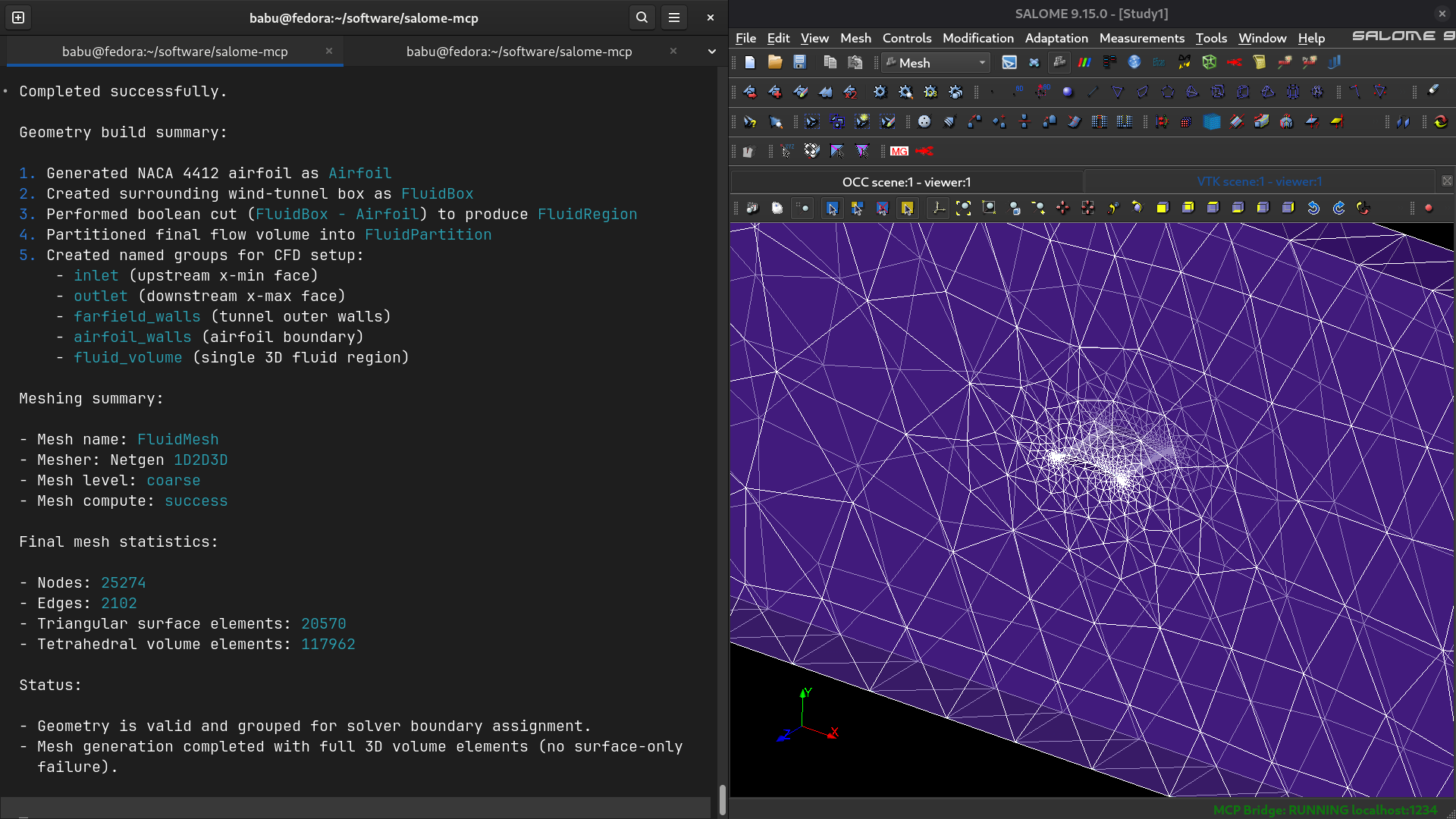
1.make a naca 4412 airfoil 2. create a fluid box region around it for wind tunnel testing 3. cut the region for the air 4. make a partition and name all surface and vol groups 5. generate a netgen 1d2d3d coarse mesh 6. report mesh stats
Установка Salome
У этого сервера нет опубликованного пакета — он собирается из исходников. Открой репозиторий и следуй инструкции в README.
▸ github.com/gnshb/salome-mcpFAQ
Salome MCP бесплатный?
Да, Salome MCP бесплатный — установка в пару кликов через Unyly без оплаты.
Нужен ли API-ключ для Salome?
Нет, Salome работает без API-ключей и переменных окружения.
Salome — hosted или self-hosted?
Self-hosted: сервер запускается локально на твоей машине командой из раздела установки.
Как установить Salome в Claude Desktop, Claude Code или Cursor?
Открой Salome на unyly.org, выбери вкладку своего клиента (Claude Desktop, Claude Code, Cursor) и нажми Install — конфиг сгенерируется автоматически, без правки JSON.
Похожие MCP
GitHub
PRs, issues, code search, CI status
 автор: GitHub
Filesystem
Secure file operations with configurable access controls.
Memory
Knowledge graph-based persistent memory system.
Template MCP Server
A CLI tool to create a new Model Context Protocol server project with TypeScript support, dual transport options, and an extensible structure
 автор: mcpdotdirect
Compare Salome with
Не уверен что выбрать?
Найди свой стек за 60 секунд
Автор?
Embed-бейдж для README
Похожее
Все в категории development