
Sample Agentcore Mcp Apps
БесплатноНе проверенDeploy an MCP server with MCP Apps (interactive HTML widgets) on Amazon Bedrock AgentCore Runtime, connected to AI hosts like ChatGPT and Claude — demonstrated

Описание
Deploy an MCP server with MCP Apps (interactive HTML widgets) on Amazon Bedrock AgentCore Runtime, connected to AI hosts like ChatGPT and Claude — demonstrated with a Unicorn Rentals sample.
README
Enterprises building AI-powered experiences need a way to expose their backend services as interactive, conversational tools — without rewriting APIs or coupling to a single AI host. This project demonstrates how to do that using MCP Apps — an extension to the Model Context Protocol that lets MCP servers deliver interactive HTML user interfaces rendered directly inside AI hosts like ChatGPT, Claude, and VS Code Copilot — deployed on Amazon Bedrock AgentCore Runtime.
The sample implements Unicorn Rentals — a conversational rental service with rich interactive widgets rendered inline. Because MCP Apps are host-agnostic, the same server works across any supporting client. Customers can:
- List unicorns — Browse the full fleet with details like name, speed, color, availability and hourly rate
- Book a unicorn — Reserve a unicorn at its hourly rate and receive a booking confirmation
- View active rental — Monitor the current booking status and elapsed time
- Return a unicorn — End the rental and receive an automatic duration-based invoice
Disclaimer: This sample is provided for demonstration purposes and is not intended for production use without further security hardening, testing, and review appropriate to your environment.
This sample shows how to deploy an MCP (Model Context Protocol) server with MCP Apps on Amazon Bedrock AgentCore Runtime, fronted by Amazon Bedrock AgentCore Gateway, and connect it to AI hosts (ChatGPT, Claude, etc.) with rich interactive widget UI.
Tech Stack
- MCP Server: Node.js 22 / TypeScript
- Business Logic: Python Lambda (DynamoDB access)
- Gateway: Amazon Bedrock AgentCore Gateway (MCP protocol, No Auth inbound)
- Infrastructure: AWS CDK (TypeScript)
- Runtime: Amazon Bedrock AgentCore Runtime (NODEJS_22)
Demo
The full list unicorns flow — from a natural-language request to the rendered widget:
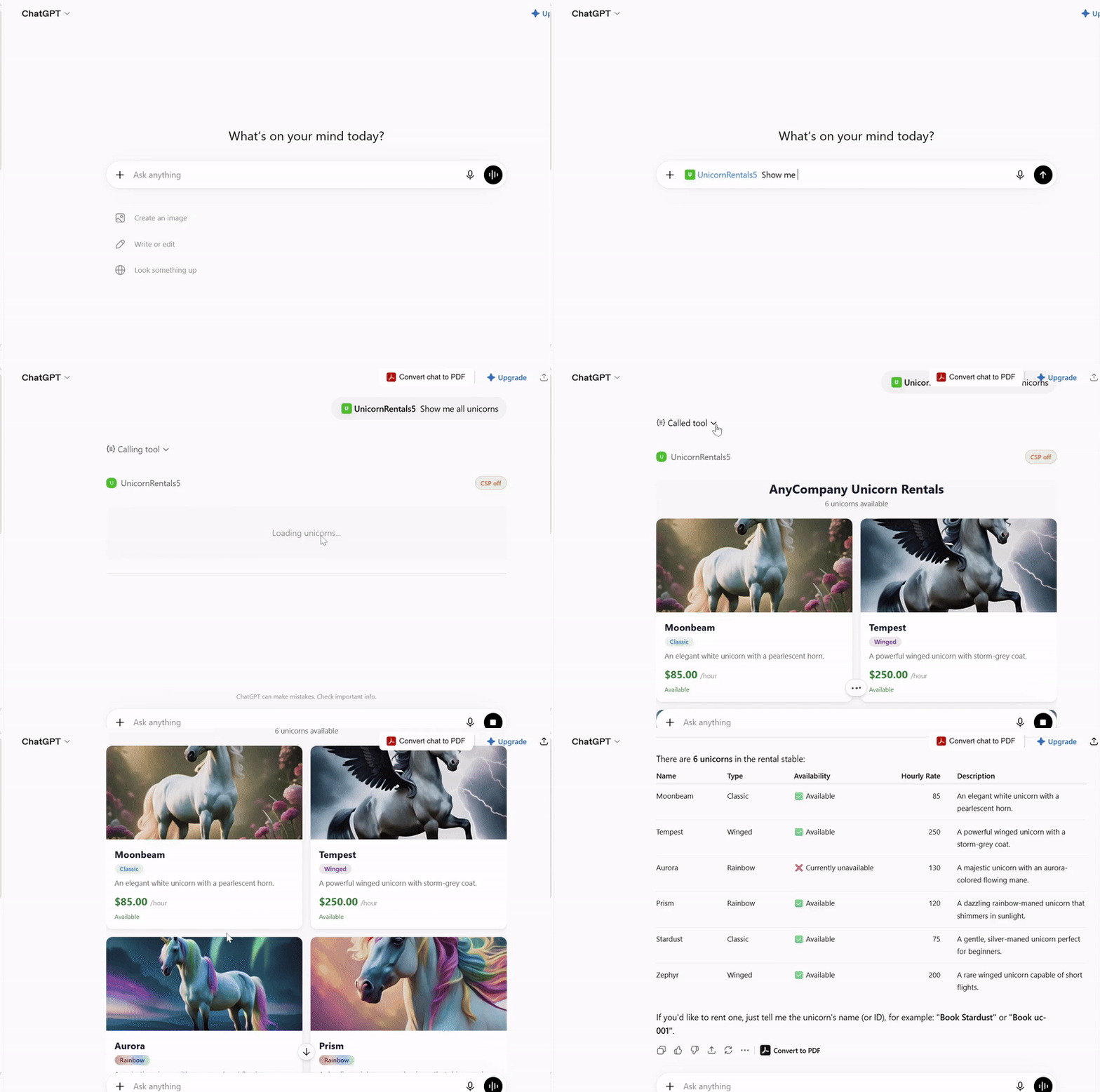
Individual actions:
| Action | Screenshot |
|---|---|
| List Unicorns: |  |
| Book Unicorns: |  |
| Show bookings: |  |
| Return unicorn: |  |
You will be able to interact with the app with requests like:
- List all unicorns
- I would like to book Stardust unicorn
- Show me my unicorn bookings
- I would like to return my unicorn
Architecture
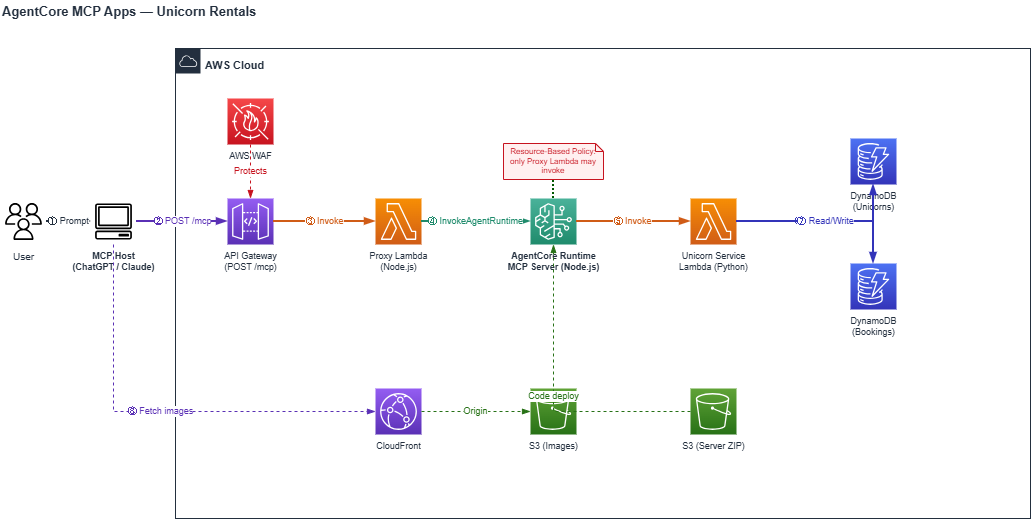
How it works:
| Component | Purpose |
|---|---|
| AgentCore Gateway | Public MCP endpoint for AI hosts — aggregates MCP targets, handles tool discovery, and enforces WAF rules |
| AgentCore Runtime (MCP Server) | Managed runtime hosting the MCP server (Node.js 22) — handles MCP protocol, tool definitions, structured output, widget resources, and delegates business operations to the service Lambda |
| Unicorn Rental Service (Python) | Lambda function that implements business logic (list, book, view, return unicorns) with DynamoDB access |
| DynamoDB | Stores unicorn inventory and booking records |
| S3 + CloudFront | Serves unicorn images referenced by widgets |
How It Works
Registration (Connecting the MCP App to an AI Host)
- You provide the App details to the AI host (ChatGPT, Claude, etc.), including the MCP Server URL — the AgentCore Gateway endpoint.
- The AI host sends MCP
tools/listandresources/listrequests to the Gateway URL to discover available capabilities. - AgentCore Gateway forwards the requests to the AgentCore Runtime via the configured MCP Server target (authenticated with IAM SigV4).
- AgentCore Runtime (MCP Server) receives the requests. The MCP App hosted on it defines MCP tools (e.g.,
list_unicorns,book_unicorn) and MCP resources (e.g., widget HTML templates). It responds with the full list of tools and resources. - The AI host receives the tool and resource definitions and may cache them for future use, enabling tool invocation and widget rendering in subsequent interactions.
Request Flow (Tool Calls)
- The MCP host (ChatGPT, Claude, etc.) sends an MCP JSON-RPC request (e.g.,
tools/callwithlist_unicorns) to the AgentCore Gateway URL. - AgentCore Gateway receives the request. The associated WAF Web ACL evaluates the request against IP allowlist rules, rate limiting, and managed rule sets. Blocked requests are rejected before reaching any target.
- AgentCore Gateway forwards the MCP request to the AgentCore Runtime via the configured MCP Server target, authenticating with IAM (SigV4).
- AgentCore Runtime (MCP Server) receives the MCP request and invokes the Unicorn Service Lambda.
- Unicorn Service Lambda executes the business logic against DynamoDB and returns the results.
- AgentCore Runtime (MCP Server) wraps the response in MCP structured output with widget resource references and returns it through the Gateway to the host.
Resource Flow (Widget Rendering)
- If the tool has an associated resource URI (for example, ui://widget/unicorn-list), the AI host initiates this phase. Tools without an associated widget such as view_bookings and return_unicorn, return text-only content and skip this phase entirely.
- The host sends an MCP resources/read request for that URI.
- The request reaches the MCP App through the AgentCore Gateway.
- The MCP App resolves the resource URI and returns the self-contained HTML of the widget. AI host might cache this data for better performance.
- The host renders the HTML in a sandboxed iframe, injecting the structured data from the tool response via the MCP Apps lifecycle.
- The widget fetches the images needed from Amazon CloudFront which uses Amazon S3 as the origin.
Deployment
Prerequisites
- AWS account with Amazon Bedrock AgentCore enabled. AgentCore is only available in certain regions —
us-west-2is a safe default - AWS CLI v2 configured (
aws configure). Use a recent build: thebedrock-agentcorecommands used for troubleshooting were added in later v2 releases - Node.js 22+ (for MCP server and AWS CDK)
- AWS CDK CLI:
npm install -g aws-cdk(or rely on the bundlednpx cdk)
Deploy in one command
./deploy.sh
That's it. The script runs preflight checks (tooling, credentials, region support), builds the artifacts, installs CDK dependencies, bootstraps CDK if needed, and deploys the stack.
Deployment typically takes 10–20 minutes, occasionally up to an hour. Everything except the CloudFront distribution is usually done within the first 5 minutes; CloudFront then takes as long as it takes to propagate, and the CLI looks stalled at roughly 43/49 resources while it does. That wait is normal — as long as cdk deploy has not reported an error, leave it running.
When it finishes, note the GatewayResourceUrl output: that is the MCP Server URL you paste into your AI host.
Useful variations:
./deploy.sh --require-approval never       # skip the IAM approval prompt
./deploy.sh -c projectName=my-unicorns     # override the default 'unicorn-mcp' project name
Verify your deployment
The Gateway sits behind AWS WAF with a default-deny policy that only allows the ChatGPT and Claude egress ranges (see Security). A useful consequence is that the endpoint is not publicly reachable — but it also means you cannot call your own endpoint after deploying: every request returns HTTP 403.
To smoke-test it anyway:
./verify.sh
This temporarily adds your public IP to the WAF allowlist, runs initialize → tools/list → tools/call list_unicorns against the live endpoint, prints a pass/fail summary, then removes your IP again (including if a check fails or you interrupt it).
If you want to keep poking at the endpoint yourself — for example with MCP Inspector — use ./verify.sh --keep-ip and remember to remove the entry afterwards.
Note on tool names: through the Gateway, tools are exposed as
<target>___<tool>(for exampleunicorn-mcp-runtime-target___list_unicorns), and the Gateway also injects its ownx_amz_bedrock_agentcore_searchtool. AI hosts handle this for you; it only matters if you are calling the MCP API directly.
Manual steps (if you prefer to run each stage yourself)
Step 1: Build All Artifacts
The build script packages the MCP Server for AgentCore Runtime:
./build.sh --clean
This script:
- Installs MCP server dependencies (clean install via
--cleanflag for reproducible builds) - Bundles widget HTML files with Vite using
vite-plugin-singlefile(inlines the MCP Apps SDK so widgets work on any host without external CDN dependencies) - Bundles the Node.js server with esbuild into a single
main.js - Packages everything into
build/mcp-server-deployment.zip
The --clean flag removes node_modules and package-lock.json before installing, ensuring a reproducible build. Omit it for faster local iteration when dependencies haven't changed.
The build output is pure JavaScript — no native modules — so it runs on ARM64 AgentCore Runtime regardless of the build host architecture.
Step 2: Install CDK Dependencies
cd infrastructure/cdk
npm install
Step 3: Bootstrap CDK (first time only)
If this is the first time deploying CDK in your AWS account/region, you need to bootstrap:
npx cdk bootstrap
Step 4: Synthesize the CloudFormation Template
Verify the stack synthesizes without errors:
npx cdk synth
You can optionally pass a custom project name via context:
npx cdk synth -c projectName=unicorn-rentals
The default project name is unicorn-mcp.
Step 5: Deploy
npx cdk deploy
What gets deployed
CDK will:
- Create the S3 deployment bucket and upload the MCP server zip
- Create DynamoDB tables and seed them with unicorn data
- Deploy the Unicorn Service Lambda with DynamoDB permissions
- Create the IAM role for AgentCore with S3 read and Lambda invoke permissions
- Create the AgentCore Runtime (MCP Server) pointing to the service Lambda
- Deploy the AgentCore Gateway with No Auth inbound and MCP Server target (IAM outbound auth)
- Associate the WAF Web ACL with the Gateway (IP allowlist + managed rules)
- Apply a resource-based policy restricting runtime invocation to the Gateway only
Note the outputs printed after deployment — you'll need the GatewayResourceUrl to connect an MCP host.
Connect to an MCP Host
After deployment, connect the Gateway endpoint to your preferred host:
- ChatGPT — ChatGPT Setup Guide
- Claude — Claude Setup Guide
Both guides cover configuration steps, demo prompts, and troubleshooting. You'll need the GatewayResourceUrl from the CDK output.
Security
This project implements multiple layers of security to protect the MCP endpoint and backend services:
1. WAF IP Allowlisting (AgentCore Gateway)
AWS WAF is associated with the AgentCore Gateway with a default-deny policy. Only requests originating from allowlisted IP ranges are permitted through. The deployed stack includes outbound IP ranges for both ChatGPT (OpenAI outbound IPs) and Claude (Anthropic outbound IPs). To connect additional MCP hosts or for testing the MCP server directly using tools like MCP Inspector, add their outbound IP ranges to the WAF IP set.
2. WAF Managed Rules (Common Attack Protection)
- AWS Managed Rules Common Rule Set — Blocks requests matching common attack patterns
- AWS Managed Rules Known Bad Inputs — Blocks requests with payloads known to be associated with exploitation
- Rate Limiting — Blocks IPs exceeding 1,000 requests per 5-minute window
3. IAM Authentication (Gateway to Runtime)
The AgentCore Gateway authenticates to the AgentCore Runtime using IAM (SigV4 signing). The Gateway's execution role is granted bedrock-agentcore:InvokeAgentRuntime permission on the runtime ARN.
4. Resource-Based Policy (AgentCore Runtime)
A resource-based access policy is attached directly to the AgentCore Runtime. It explicitly allows only the AgentCore Gateway's execution role to invoke the runtime, and denies all other principals. This ensures the runtime cannot be accessed directly, bypassing the Gateway and its WAF protections.
Cleanup
The deployed stack has standing costs even when idle — the WAF Web ACL, the CloudFront distribution and the AgentCore Runtime all bill while they exist. Tear everything down when you are finished:
cd infrastructure/cdk
npx cdk destroy
Deletion takes a few minutes, again mostly waiting on CloudFront. The DynamoDB tables and S3 buckets are configured to delete with the stack, so nothing is left behind.
Установка Sample Agentcore Mcp Apps
У этого сервера нет опубликованного пакета — он собирается из исходников. Открой репозиторий и следуй инструкции в README.
▸ github.com/aws-samples/sample-agentcore-mcp-appsFAQ
Sample Agentcore Mcp Apps MCP бесплатный?
Да, Sample Agentcore Mcp Apps MCP бесплатный — установка в пару кликов через Unyly без оплаты.
Нужен ли API-ключ для Sample Agentcore Mcp Apps?
Нет, Sample Agentcore Mcp Apps работает без API-ключей и переменных окружения.
Sample Agentcore Mcp Apps — hosted или self-hosted?
Self-hosted: сервер запускается локально на твоей машине командой из раздела установки.
Как установить Sample Agentcore Mcp Apps в Claude Desktop, Claude Code или Cursor?
Открой Sample Agentcore Mcp Apps на unyly.org, выбери вкладку своего клиента (Claude Desktop, Claude Code, Cursor) и нажми Install — конфиг сгенерируется автоматически, без правки JSON.
Похожие MCP
Opencode Omniroute Plugin
OpenCode plugin for the OmniRoute AI Gateway. Drives dynamic model discovery, /connect auth flow, and multi-instance OmniRoute providers via the official @openc
 автор: GitHub Actions
Roblox Studio
Enables AI coding tools to control Roblox Studio for workspace exploration, instance manipulation, and script management. It provides tools for playtesting, sce
 автор: paralov
Antigravity Drawio
MCP server that enables AI assistants to create, parse, render, and validate Draw.io diagrams programmatically.
 автор: S-SUJAN-S
Fetch
Web content fetching and conversion for efficient LLM usage.
AWS KB Retrieval
Retrieval from AWS Knowledge Base using Bedrock Agent Runtime.
 автор: modelcontextprotocol
Spring AI MCP Server
Provides auto-configuration for setting up an MCP server in Spring Boot applications.
llm-analysis-assistant
A very streamlined mcp client that supports calling and monitoring stdio/sse/streamableHttp, and can also view request responses through the /logs page. It also
 автор: xuzexin-hz
MCP-Agent
A simple, composable framework to build agents using Model Context Protocol by [LastMile AI](https://www.lastmileai.dev)
 автор: lastmile-ai
Spring AI MCP Client
Provides auto-configuration for MCP client functionality in Spring Boot applications.
mcp.natoma.ai
A Hosted MCP Platform to discover, install, manage and deploy MCP servers by [Natoma Labs](https://www.natoma.ai)
Compare Sample Agentcore Mcp Apps with
Не уверен что выбрать?
Найди свой стек за 60 секунд
Автор?
Embed-бейдж для README
Похожее
Все в категории ai