
Sample Context Aware Ai With Bedrock Mcp Server And Kiro
БесплатноНе проверенSample Context Aware Ai With Bedrock Mcp Server And Kiro — Model Context Protocol server

Описание
Sample Context Aware Ai With Bedrock Mcp Server And Kiro — Model Context Protocol server
README
Build context-aware development assistants that let developers query organizational knowledge — ADRs, API specs, security guidelines, coding standards — directly from Kiro IDE or Kiro CLI, without leaving their editor.
Uses the official awslabs.bedrock-kb-retrieval-mcp-server for Kiro integration, plus a LangChain alternative demonstrating how to swap orchestration layers with minimal code changes.
Architecture
Bedrock KB MCP Server
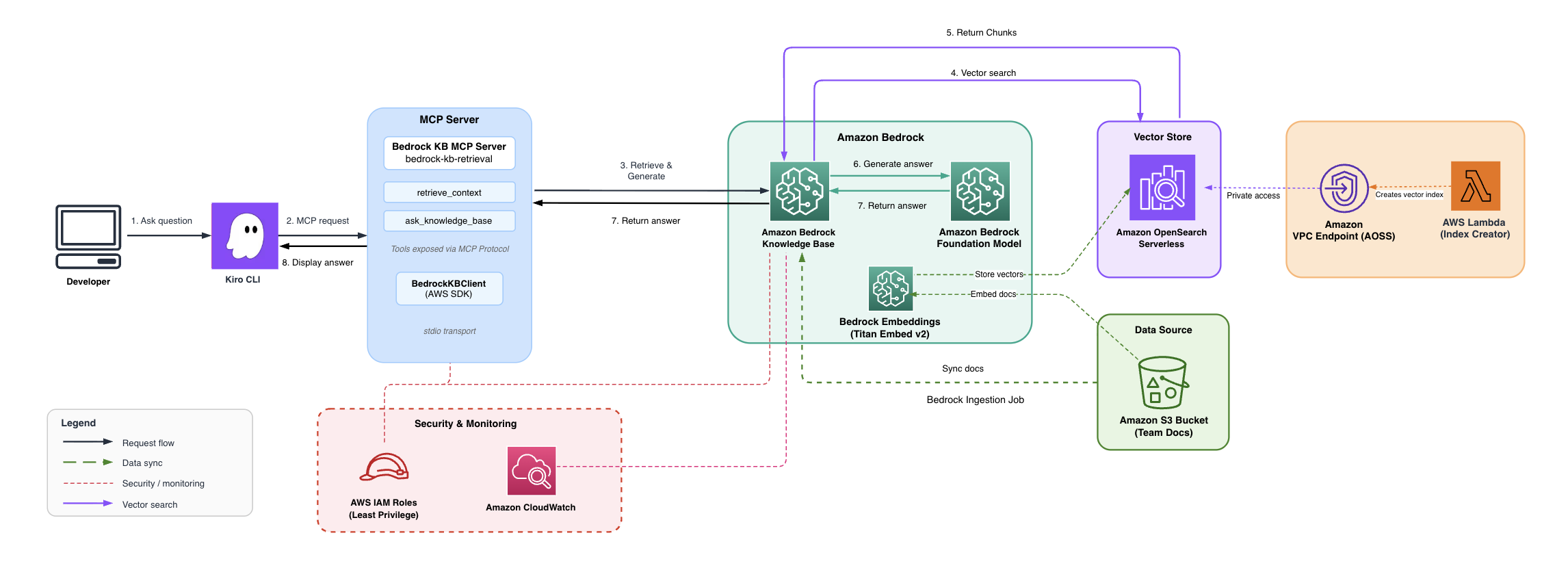
A developer asks a question in Kiro. Kiro spawns the official Amazon Bedrock Knowledge Base MCP server via uvx. The server discovers Knowledge Bases tagged with mcp-multirag-kb=true, queries them using the Retrieve API, and returns relevant passages with citations. Under the hood, Amazon Bedrock Knowledge Bases embeds the query with Amazon Titan Text Embeddings v2, searches Amazon OpenSearch Serverless for matching chunks, and returns ranked results.
LangChain Alternative
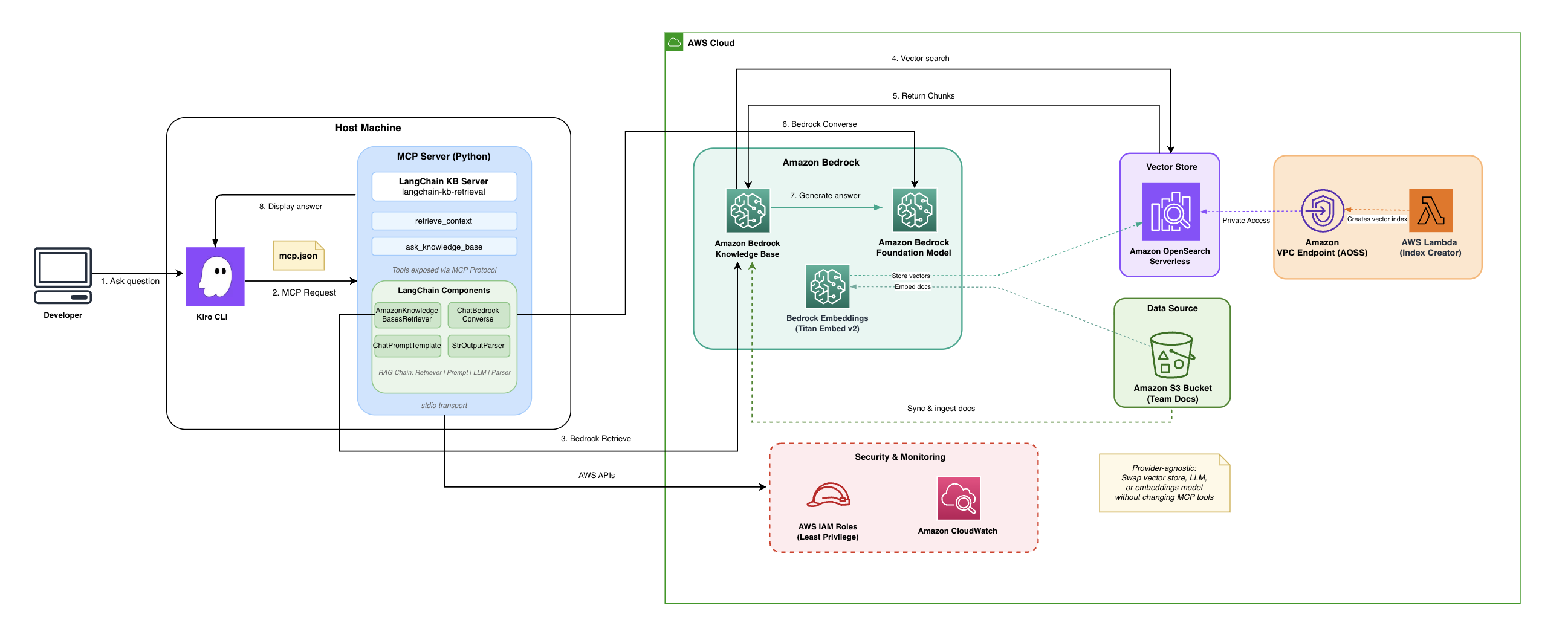
The LangChain server replaces the official MCP server with a custom Python implementation. It uses LangChain's LCEL chain (AmazonKnowledgeBasesRetriever → ChatPromptTemplate → ChatBedrock Converse → StrOutputParser) to orchestrate retrieval and answer generation. The key advantage is provider portability — swap the vector store, LLM, or embeddings model without changing the MCP tools exposed to Kiro.
Project Structure
├── .kiro/settings/mcp.json              # Kiro MCP config (both servers)
├── kiro-bedrock-kb-mcp/
│   ├── infrastructure/                  # AWS CDK stack (VPC, S3, OpenSearch, Bedrock KB, IAM, CloudWatch)
│   │   ├── bin/app.ts                   # CDK app entry point
│   │   └── lib/
│   │       ├── bedrock-kb-stack.ts      # Core infrastructure
│   │       └── monitoring-stack.ts      # CloudWatch dashboard and alarms
│   ├── langchain-alternative/           # Custom MCP server — Python (LangChain)
│   │   ├── mcp_server.py               # MCP tools with LangChain orchestration
│   │   ├── kb_retriever.py             # LCEL chain: Retriever → Prompt → LLM → Parse
│   │   ├── metrics.py                  # CloudWatch metrics emitter
│   │   └── run_server.sh              # Wrapper script (resolves venv paths dynamically)
│   ├── sample-knowledge-base/           # Example team docs (uploaded to S3)
│   ├── scripts/                         # Automated setup and sync scripts
│   ├── TESTING-GUIDE.md                 # Detailed testing guide for both servers
│   └── COMPARISON.md                    # Official vs LangChain server comparison
└── README.md                            # This file
What Gets Created in Your AWS Account
| Resource | Purpose |
|---|---|
| VPC + private subnets | Network isolation for OpenSearch |
| OpenSearch Serverless collection | Vector store for document embeddings |
| S3 bucket | Stores your knowledge base documents |
| Bedrock Knowledge Base | Orchestrates embedding + retrieval |
| IAM roles | Least-privilege access for all services |
| CloudWatch dashboard | Monitoring (latency, errors, query volume) |
Complete Setup Guide
Phase 1: Install Prerequisites
# Node.js 18+ (required for CDK)
brew install node

# AWS CLI v2
brew install awscli

# AWS CDK
npm install -g aws-cdk

# uv/uvx (runs the official MCP server)
brew install uv

# jq (JSON processor, used by scripts)
brew install jq

# Python 3.11+ (required for LangChain alternative)
brew install [email protected]

# Kiro IDE — download from https://kiro.dev/downloads/
Verify everything:
node -v          # Should be 18+
aws --version    # Should be v2
cdk --version    # Should be 2.x
uvx --version    # Should print version
jq --version     # Should print version
python3 --version # Should be 3.11+
Phase 2: Clone the Repository
git clone <repo_url>
Phase 3: Configure AWS Credentials
Create an IAM user in the AWS Console with these managed policies:
AmazonBedrockFullAccessAmazonS3FullAccessAmazonOpenSearchServiceFullAccessCloudWatchFullAccessIAMFullAccessAWSCloudFormationFullAccessAmazonVPCFullAccessAWSLambda_FullAccess
Create access keys for CLI access, then configure:
aws configure
# Enter: Access Key ID, Secret Access Key, Region: us-east-1, Output: json

# Verify
aws sts get-caller-identity
Phase 4: Enable Bedrock Model Access (AWS Console — one-time)
- Go to Amazon Bedrock Console → Model access
- Request access to:
- Amazon Titan Text Embeddings v2 (required — used for document embedding)
- Anthropic Claude 3.5 Haiku (required for LangChain alternative)
- Wait until status shows "Access granted"
Phase 5: Deploy Infrastructure
cd kiro-bedrock-kb-mcp
chmod +x scripts/setup.sh
./scripts/setup.sh
This takes ~10–15 minutes. It will:
- Install CDK dependencies
- Bundle the Lambda for OpenSearch index creation
- Bootstrap CDK in your account/region
- Deploy VPC, OpenSearch Serverless, S3, Bedrock Knowledge Base, IAM roles, CloudWatch dashboard
- Upload sample documents to S3
- Trigger document ingestion (~2–3 minutes)
Note: The script may hang at "Verifying MCP server availability" — press Ctrl+C to skip. That step is just a verification and doesn't affect the deployment.
Save the output — you'll need the Knowledge Base ID from the deployment outputs.
Phase 6: Verify Document Ingestion
KB_ID=$(jq -r '.KiroBedrockKBStack.KnowledgeBaseId' cdk-outputs.json)
DS_ID=$(jq -r '.KiroBedrockKBStack.DataSourceId' cdk-outputs.json)

aws bedrock-agent list-ingestion-jobs \
  --knowledge-base-id "$KB_ID" \
  --data-source-id "$DS_ID" \
  --region us-east-1 \
  --query 'ingestionJobSummaries[0].status' \
  --output text
Should return COMPLETE. If it says IN_PROGRESS, wait a minute and try again.
Phase 7: Test the Official MCP Server in Kiro
The .kiro/settings/mcp.json is pre-configured for the official server — no changes needed.
- Open the project folder in Kiro
- Restart Kiro (Cmd+Q on macOS, then relaunch) to pick up the MCP config
- Ask in Kiro chat:
- "What's our circuit breaker pattern?"
- "What authentication does the Orders API require?"
- "What are our coding standards for error handling?"
The official server connects automatically and returns results from your Knowledge Base.
Phase 8: Set Up the LangChain Alternative (Optional)
The LangChain server adds RAG capabilities — synthesized answers with citations, confidence filtering, and provider portability.
# 1. Create Python venv and install dependencies
cd kiro-bedrock-kb-mcp/langchain-alternative
python3 -m venv .venv
source .venv/bin/activate
pip install -r requirements.txt

# 2. Make the wrapper script executable
chmod +x run_server.sh

# 3. Get your Knowledge Base ID
cd ..
KB_ID=$(jq -r '.KiroBedrockKBStack.KnowledgeBaseId' cdk-outputs.json)
echo "Your Knowledge Base ID: $KB_ID"
Phase 9: Update MCP Config with Your Knowledge Base ID
Edit .kiro/settings/mcp.json and replace the placeholder in the bedrock-kb-langchain section:
"KNOWLEDGE_BASE_ID": "<YOUR_KNOWLEDGE_BASE_ID>"
Change <YOUR_KNOWLEDGE_BASE_ID> to the KB ID from the previous step.
Phase 10: Test Both MCP Servers
- Restart Kiro (Cmd+Q, relaunch)
- Check MCP logs to confirm both servers show "Successfully connected"
- Test with these prompts:
| Prompt | What it tests |
|---|---|
| "What's our circuit breaker pattern?" | Official server — raw document retrieval |
| "List the types of documents in our knowledge base" | LangChain — list_knowledge_sources |
| "How should I implement error handling in our TypeScript services?" | LangChain — ask_knowledge_base (RAG) |
| "Query both MCP servers about our deployment rollback procedure" | Both servers side by side |
See TESTING-GUIDE.md for the full testing guide and COMPARISON.md for a detailed comparison of both servers.
Adding Your Own Documents
- Add markdown, text, or PDF files to
kiro-bedrock-kb-mcp/sample-knowledge-base/ - Sync and re-ingest:
cd kiro-bedrock-kb-mcp
chmod +x scripts/sync-knowledge-base.sh
./scripts/sync-knowledge-base.sh
Kiro CLI Usage
The .kiro/settings/mcp.json config works for both the Kiro IDE and Kiro CLI — no separate configuration needed.
# Interactive session
kiro-cli chat

# Headless query (requires KIRO_API_KEY — Kiro Pro/Pro+/Power subscription)
export KIRO_API_KEY="your-api-key"
kiro-cli chat --no-interactive --trust-tools=read \
  "What's our circuit breaker pattern?"
Monitoring
The CDK stack deploys a CloudWatch dashboard named Kiro-BedrockKB-Integration with:
- Query volume and P99 retrieval latency
- Error count and empty result rate
- Alarm status (latency > 5s, errors > 10/5min)
Access it from the CDK output DashboardURL, or find it in the Amazon CloudWatch console.
Cleanup
cd kiro-bedrock-kb-mcp/infrastructure
npx cdk destroy --all
This removes all AWS resources including the VPC, OpenSearch collection, S3 buckets, Knowledge Base, IAM roles, and CloudWatch dashboard.
Important: OpenSearch Serverless costs ~$20–30/day while running. Don't forget to clean up when done.
Troubleshooting
| Problem | Fix |
|---|---|
ENOENT error for LangChain server |
Run Phase 8 — create the .venv and chmod +x run_server.sh |
security token invalid |
Refresh AWS credentials with aws configure and restart Kiro |
ResourceNotFoundException: model marked as Legacy |
Update MODEL_ID in mcp.json to a current inference profile |
| Official server doesn't find any KBs | Verify the KB has the tag mcp-multirag-kb=true in the Bedrock console |
Ingestion stuck on IN_PROGRESS |
Wait 5 minutes. If still stuck, check the Bedrock console for errors |
| Setup script hangs at "Verifying MCP server" | Press Ctrl+C — it's just a verification step |
No relevant documents found |
Run ./scripts/sync-knowledge-base.sh to re-ingest documents |
Contributing
See CONTRIBUTING.md for guidelines on reporting bugs, suggesting features, and submitting pull requests.
License
MIT-0
from github.com/aws-samples/sample-context-aware-ai-with-bedrock-mcp-server-and-kiro
Установка Sample Context Aware Ai With Bedrock Mcp Server And Kiro
У этого сервера нет опубликованного пакета — он собирается из исходников. Открой репозиторий и следуй инструкции в README.
▸ github.com/aws-samples/sample-context-aware-ai-with-bedrock-mcp-server-and-kiroFAQ
Sample Context Aware Ai With Bedrock Mcp Server And Kiro MCP бесплатный?
Да, Sample Context Aware Ai With Bedrock Mcp Server And Kiro MCP бесплатный — установка в пару кликов через Unyly без оплаты.
Нужен ли API-ключ для Sample Context Aware Ai With Bedrock Mcp Server And Kiro?
Нет, Sample Context Aware Ai With Bedrock Mcp Server And Kiro работает без API-ключей и переменных окружения.
Sample Context Aware Ai With Bedrock Mcp Server And Kiro — hosted или self-hosted?
Self-hosted: сервер запускается локально на твоей машине командой из раздела установки.
Как установить Sample Context Aware Ai With Bedrock Mcp Server And Kiro в Claude Desktop, Claude Code или Cursor?
Открой Sample Context Aware Ai With Bedrock Mcp Server And Kiro на unyly.org, выбери вкладку своего клиента (Claude Desktop, Claude Code, Cursor) и нажми Install — конфиг сгенерируется автоматически, без правки JSON.
Похожие MCP
Fetch
Web content fetching and conversion for efficient LLM usage.
Roblox Studio
Enables AI coding tools to control Roblox Studio for workspace exploration, instance manipulation, and script management. It provides tools for playtesting, sce
 автор: paralov
Opencode Omniroute Plugin
OpenCode plugin for the OmniRoute AI Gateway. Drives dynamic model discovery, /connect auth flow, and multi-instance OmniRoute providers via the official @openc
 автор: GitHub Actions
AWS KB Retrieval
Retrieval from AWS Knowledge Base using Bedrock Agent Runtime.
 автор: modelcontextprotocol
Spring AI MCP Server
Provides auto-configuration for setting up an MCP server in Spring Boot applications.
llm-analysis-assistant
A very streamlined mcp client that supports calling and monitoring stdio/sse/streamableHttp, and can also view request responses through the /logs page. It also
 автор: xuzexin-hz
MCP-Agent
A simple, composable framework to build agents using Model Context Protocol by [LastMile AI](https://www.lastmileai.dev)
 автор: lastmile-ai
Spring AI MCP Client
Provides auto-configuration for MCP client functionality in Spring Boot applications.
mcp.natoma.ai
A Hosted MCP Platform to discover, install, manage and deploy MCP servers by [Natoma Labs](https://www.natoma.ai)
MCPHub
Website to list high quality MCP servers and reviews by real users. Also provide online chatbot for popular LLM models with MCP server support.
Compare Sample Context Aware Ai With Bedrock Mcp Server And Kiro with
Не уверен что выбрать?
Найди свой стек за 60 секунд
Автор?
Embed-бейдж для README
Похожее
Все в категории ai