
Sample For Bedrock Integration With Database
БесплатноНе проверенSample For Bedrock Integration With Database — Model Context Protocol server

Описание
Sample For Bedrock Integration With Database — Model Context Protocol server
README
This sample demonstrates the integration of AWS Bedrock's Conversational AI capabilities with relational databases through the Model Context Protocol (MCP) Server architecture. The sample leverages Bedrock's Converse API to enable natural language interactions with databases in query-only mode, while the MCP Server handles the complexities of database operations and security protocols.
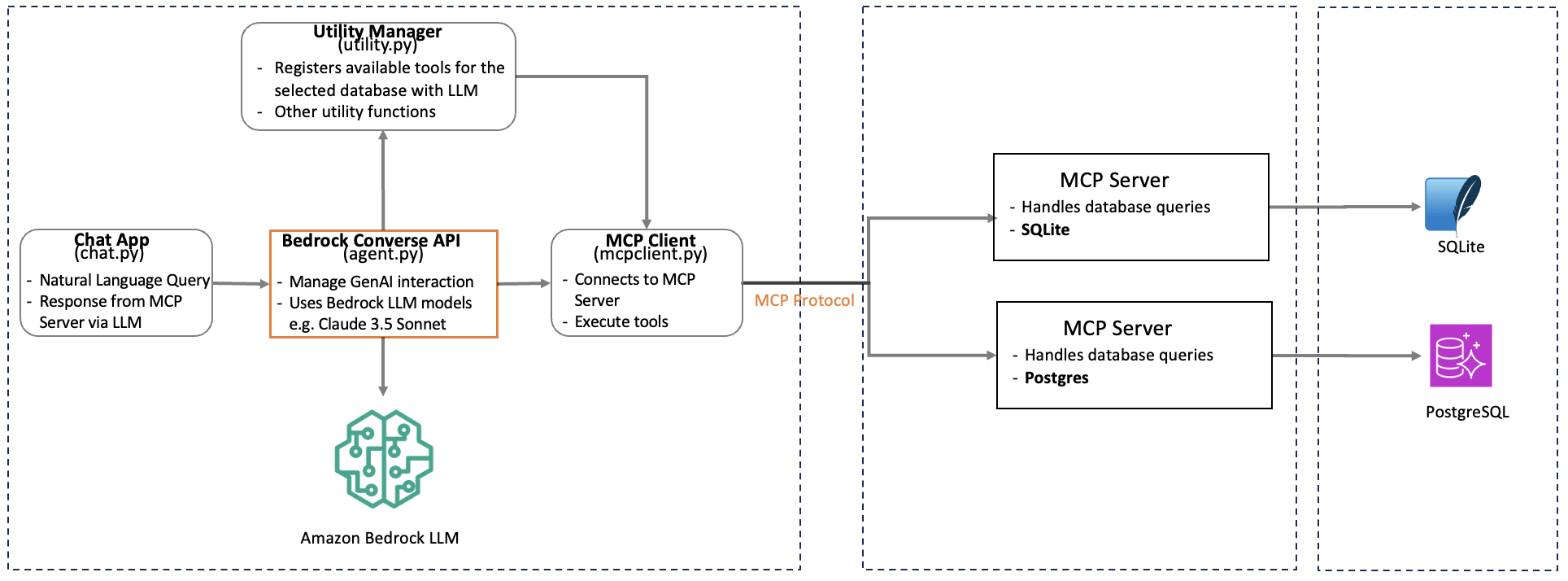
The architecture serves as a reference implementation for developers looking to incorporate Generative AI capabilities into their database applications. While the sample focuses on RDS PostgreSQL & SQLite the pattern can be readily adapted for other database systems that support MCP Server integration.
This sample demonstrates:
- Integration of RDS PostgreSQL and SQLite with AWS Bedrock's Foundational Models using Model Context Protocol (MCP)
- Bedrock Converse API integration with MCP Server
- Natural language querying of databases (read-only) using Bedrock foundation models
- Secure and efficient database operations through MCP Server
- Adding GenAI capabilities to existing applications
- Foundation for cross-database GenAI solution
AWS Components
List of AWS resources used in this sample
- Bedrock Converse API: enables real-time, conversational experiences by managing context, memory, and state across multiple interactions with foundation models (FMs). Link
- Bedrock Model: Anthropic Claude Sonnet 3.5 or other LLMs available within Bedrock. Link
- Bedrock Guardrails: Implement safeguards customized to your application requirements and responsible AI policies. Link
- RDS Postgres: Used for querying the database. Link
Prerequisite
- An AWS account with AWS Identity and Access Management (IAM) permissions to create an RDS PostgreSQL database
- Access to Bedrock LLMs
- User with read-only access to RDS Postgress
- Python installed with the Boto3 library
- An IDE like Visual Studio Code
- SQLite database on the local system
- Download the AWS RDS root certificate from here
- Optionally setup Bedrock Guardrails to stop DDL queries at the LLM level. This would ensure that no DDL operations are executed in the database even if you have database user allows DDL operation.
Clone the repo
git clone https://github.com/aws-samples/sample-for-bedrock-integration-with-database-mcp-server
Step 1
Setup your development environment using say VS Code IDE.
Ensure you have Node.js installed (v10.13.0 or later)
Install AWS CDK
npm install -g aws-cdk
Configure AWS CLI with your credentials and use region where Bedrock is available
aws configure
Manually create a virtual environment on MacOS and Linux:
python3 -m venv .venv
Activate your virtual environment
source .venv/bin/activate
Once the virtual environment is activated, you can install the required dependencies.
pip install -r requirements.txt
Install the PostgreSQL MCP server using npm:
npm install -g @modelcontextprotocol/server-postgres

pip install mcp psycopg2-binary
Bedrock Access
The user must have access to Bedrock model being used for the sample. This sample isassuming the following setup
- Region: This is setup in agent.py from your AWS session
- LLM: us.anthropic.claude-3-5-sonnet-20240620-v1:0 #Using cross-region inference in mcpmain.py. In case, cross-region not required, please use the LLM endpoint instead.
Step 2: RDS Postgres Setup and Access
Create and setup RDS
Change dbconfig.ini file with the following information
- db_user = "xxx"
- db_password = "xxx" //This has been removed from the file for security reason. Make sure to add this back
- db_host = "xxx.us-east-1.rds.amazonaws.com"
- db_port = "5432"
- db_name = "xxx"
- ssl_cert_path = "/xxx/global-bundle.pem" //location of the .pem file
Step 3: Run the application and query your configured database using natural language
Run with appropriate database type option. If no database type provided, chat session will assume SQLite as the default database and will create a database within src/data folder with the name mymcpdb.db. You can point to your existing SQLite database by modifying this file
cd src

python3 chat.py --db-type [sqlite / postgres]
Ask questions like: (the database user has the permission to perform those actions in the database)
- List all products that are available in products table
- List of products which cost above 50.00
Cost of running this sample
The following services will incur costs based on the usages and uptime. Please delete/disable access to this resources as needed at the end.
- RDS Postgres database (https://aws.amazon.com/rds/postgresql/pricing/)
- Bedrok Claude Model invoke API
- Bedrock Guardrail
Additional information
Sample RDS Postgres tables and data for testing. This is just for quick test.
The database user configured must have enough privilege to perform those operations. As this samples works only for read-only instructions, these operations have to be excuted outside of this samples using a database tool
CREATE TABLE users ( id SERIAL PRIMARY KEY, name VARCHAR(255) NOT NULL, email VARCHAR(255) UNIQUE NOT NULL, created_at TIMESTAMP WITH TIME ZONE DEFAULT CURRENT_TIMESTAMP );
INSERT INTO users (name, email) VALUES ('John Doe', '[email protected]'), ('Jane Smith', '[email protected]'), ('Bob Wilson', '[email protected]'), ('Alice Johnson', '[email protected]'), ('Tom Brown', '[email protected]');
CREATE TABLE products ( product_id SERIAL PRIMARY KEY, name VARCHAR(255) NOT NULL, price DECIMAL(10,2) NOT NULL );
INSERT INTO products (name, price) VALUES ('Amazon Echo Dot (5th Gen)', 49.99), ('Kindle Paperwhite 8GB', 139.99), ('Fire TV Stick 4K', 49.99), ('Ring Video Doorbell', 99.99), ('Amazon Smart Plug', 24.99);
from github.com/aws-samples/sample-for-bedrock-integration-with-database-mcp-server
Установка Sample For Bedrock Integration With Database
У этого сервера нет опубликованного пакета — он собирается из исходников. Открой репозиторий и следуй инструкции в README.
▸ github.com/aws-samples/sample-for-bedrock-integration-with-database-mcp-serverFAQ
Sample For Bedrock Integration With Database MCP бесплатный?
Да, Sample For Bedrock Integration With Database MCP бесплатный — установка в пару кликов через Unyly без оплаты.
Нужен ли API-ключ для Sample For Bedrock Integration With Database?
Нет, Sample For Bedrock Integration With Database работает без API-ключей и переменных окружения.
Sample For Bedrock Integration With Database — hosted или self-hosted?
Self-hosted: сервер запускается локально на твоей машине командой из раздела установки.
Как установить Sample For Bedrock Integration With Database в Claude Desktop, Claude Code или Cursor?
Открой Sample For Bedrock Integration With Database на unyly.org, выбери вкладку своего клиента (Claude Desktop, Claude Code, Cursor) и нажми Install — конфиг сгенерируется автоматически, без правки JSON.
Похожие MCP
Postgres
Query your database in natural language
 автор: Anthropic
wenb1n-dev/SmartDB_MCP
Connect to multiple databases at once (MySQL, PostgreSQL, SQL Server, MariaDB, Dameng, Oracle) for operations, health analysis and SQL optimization.
 автор: wenb1n-dev
Postgres Server
This server enables interaction with PostgreSQL databases through the Model Context Protocol, optimized for the AWS Bedrock AgentCore Runtime. It provides tools
 автор: madhurprash
PostgreSQL
Read-only database access with schema inspection.
автор: modelcontextprotocolRedis
Interact with Redis key-value stores.
автор: modelcontextprotocolSQLite
Database interaction and business intelligence capabilities.
автор: modelcontextprotocolmxcp
Open-source framework for building enterprise-grade MCP servers using just YAML, SQL, and Python, with built-in auth, monitoring, ETL and policy enforcement.
 автор: raw-labs
julien040/anyquery
Query apps with SQL from a single local-first binary; also connects to PostgreSQL, MySQL and SQLite-compatible databases.
 автор: julien040
drakonkat/wizzy-mcp-tmdb
Search and retrieve movie, TV show and person information from The Movie Database (TMDB) API.
 автор: drakonkat
longevity-genie/opengenes-mcp
Query the OpenGenes database for aging and longevity research.
 автор: longevity-genie
Compare Sample For Bedrock Integration With Database with
Не уверен что выбрать?
Найди свой стек за 60 секунд
Автор?
Embed-бейдж для README
Похожее
Все в категории data