
SBB Open Data Server
БесплатноНе проверенAn MCP server for Swiss Federal Railways (SBB) open data, enabling AI models to query real-time disruptions, passenger frequencies, station details, and more wi

Описание
An MCP server for Swiss Federal Railways (SBB) open data, enabling AI models to query real-time disruptions, passenger frequencies, station details, and more without an API key.
README
🇨🇭 Part of the Swiss Public Data MCP Portfolio
PyPI
License: MIT
Python 3.11+
MCP
Data Source

MCP server connecting AI models to Swiss Federal Railways (SBB) open data – passenger frequency, live rail disruptions, infrastructure & real-estate projects, train counts, platform data, rolling stock and station search from data.sbb.ch. No API key required.
Demo
Overview
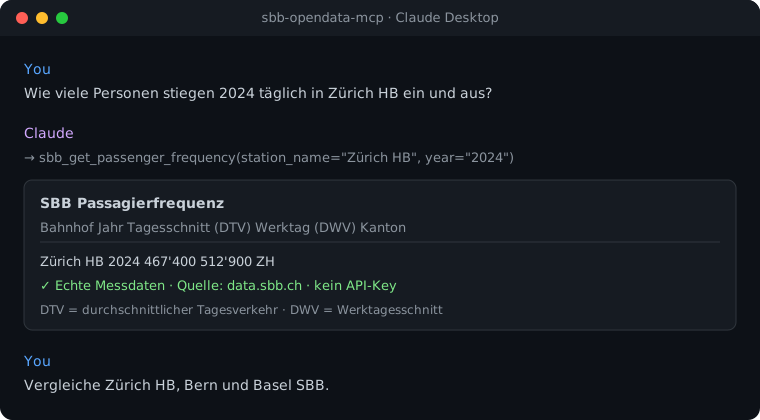
sbb-opendata-mcp gives AI assistants like Claude direct access to public SBB data – no copy-pasting or manual API calls. A question like "How many passengers passed through Zürich HB every day in 2024?" is answered with real measured data.
The SBB Open Data portal speaks the OpenDataSoft REST API (v2.1). This server
translates it into clean Markdown and JSON for the AI model, and adds MCP
structuredContent alongside the human-readable text so programmatic clients can
consume the underlying records without re-parsing. The server is model-agnostic
and works with any MCP-compatible client.
Anchor demo query: "Compare Zürich HB, Bern and Basel SBB by passenger frequency and platform capacity." → More use cases by audience →
Features
- 📊 Passenger frequency – boardings/alightings by station and year (daily averages)
- 🚨 Live rail disruptions – traffic messages, updated every 5 minutes
- 🏗️ Infrastructure projects – station and line construction
- 🏢 Real-estate projects – SBB property development (daily updates)
- 🚆 Trains per segment – train counts per route (SBB, BLS, SOB …)
- 🛤️ Platform data – length, type, area, step-free access
- 🚃 Rolling stock – capacity and year built
- 🔁 Station comparison – up to 10 stations across multiple datasets
- 🔍 Stop search – Swiss DiDok register (all of Switzerland)
- 📦 Dataset catalogue – list all ~89 SBB open datasets
- 🔑 No API key – all data is public and free to use
- ☁️ Dual transport – stdio for Claude Desktop, Streamable HTTP for cloud deployment
Prerequisites
- Python 3.11+
- No API key — all data comes from the public data.sbb.ch portal
Install uv (recommended):
curl -LsSf https://astral.sh/uv/install.sh | sh
Installation
From PyPI:
pip install sbb-opendata-mcp
Or with uvx (no permanent installation):
uvx sbb-opendata-mcp
For local development, install from a clone in editable mode:
git clone https://github.com/malkreide/sbb-opendata-mcp.git
cd sbb-opendata-mcp
pip install -e ".[dev]"
Quickstart
# Start the server (stdio mode for Claude Desktop)
sbb-opendata-mcp
Try it immediately in Claude Desktop:
"How many people boarded at Zürich HB daily in 2024?" "Are there any current disruptions on the Swiss rail network?"
Configuration
Environment Variables
The server needs no configuration to run over stdio. The variables below tune the optional Streamable HTTP transport, logging and observability.
| Variable | Effect | Default |
|---|---|---|
MCP_HOST |
Bind host for the HTTP transport. Keep 127.0.0.1 locally; only bind 0.0.0.0 inside a controlled container/cloud environment. |
127.0.0.1 |
MCP_PORT |
Port for the HTTP transport. | 8000 |
MCP_ALLOWED_HOSTS |
Comma-separated host allow-list for DNS-rebinding protection (e.g. your-app.onrender.com,your-app.onrender.com:*). |
localhost only |
MCP_ALLOWED_ORIGINS |
Comma-separated browser-origin allow-list (e.g. https://your-app.onrender.com). |
(none) |
LOG_LEVEL |
Log verbosity (DEBUG/INFO/WARNING/…). |
INFO |
LOG_FORMAT |
json for structured logs; anything else for human-readable text. Always written to stderr. |
text |
🔒 DNS-rebinding / Origin protection is always on; localhost is allow-listed so local HTTP development works out of the box. Logs go to stderr — stdout is reserved for the stdio JSON-RPC channel.
Claude Desktop Configuration
{
  "mcpServers": {
    "sbb-opendata": {
      "command": "uvx",
      "args": ["sbb-opendata-mcp"]
    }
  }
}
Config file locations:
- macOS:
~/Library/Application Support/Claude/claude_desktop_config.json - Windows:
%APPDATA%\Claude\claude_desktop_config.json
Restart Claude Desktop — the server is downloaded automatically on first use.
Other MCP Clients
Works with Cursor, Windsurf, VS Code + Continue, LibreChat, Cline and self-hosted
models via mcp-proxy — same configuration as above.
Cloud Deployment (Streamable HTTP)
For use via claude.ai in the browser or remote servers (e.g. Render.com). The cloud transport is Streamable HTTP (endpoint /mcp).
Docker (recommended):
# Build + run with explicit resource limits (see docker-compose.yml)
docker compose up --build
# → http://127.0.0.1:8000/mcp
The image is a multi-stage build running as a non-root user; docker-compose.yml
adds read_only, no-new-privileges and memory/CPU/PID limits.
Manual / Render.com:
pip install -e .

# Bind publicly (behind a rate-limiting reverse proxy) and configure
# DNS-rebinding / Origin protection for your hostname:
export MCP_HOST=0.0.0.0
export MCP_ALLOWED_HOSTS="your-app.onrender.com,your-app.onrender.com:*"
export MCP_ALLOWED_ORIGINS="https://your-app.onrender.com"
python -m sbb_opendata_mcp.server --http --port 8000
⚠️ Binding: In a network transport the server binds to
127.0.0.1by default so a locally started server is not exposed to your whole network. SetMCP_HOST=0.0.0.0only in a container/cloud environment where binding to all interfaces is intended (the Docker image does this for you), and place the server behind a reverse proxy that enforces rate limiting (and authentication, if the endpoint should not be public). See SECURITY.md.
Available Tools
| Tool | Description | Data Update |
|---|---|---|
sbb_get_passenger_frequency |
Boardings/alightings by station and year (daily avg.) | Annual |
sbb_get_rail_disruptions |
Live rail traffic messages | Every 5 min. |
sbb_get_real_estate_projects |
SBB real estate development projects | Daily |
sbb_get_trains_per_segment |
Train counts per route segment (SBB, BLS, SOB …) | Annual |
sbb_get_platform_data |
Platform data (length, type, area) | Ongoing |
sbb_get_rolling_stock |
Rolling stock (capacity, year built) | Ongoing |
sbb_compare_stations |
Compare up to 10 stations (multi-dataset) | – |
sbb_search_stations |
Search stops (Swiss DiDok register, all CH) | Ongoing |
sbb_list_datasets |
List all ~89 SBB open datasets | – |
All tools support response_format: "markdown" (human-readable) and "json"
(machine-readable), plus pagination. Every tool also returns MCP structuredContent
(the underlying records/metadata) alongside the rendered text, and declares its shape
as outputSchema. Error results carry isError: true and
{error, upstream_unavailable} instead.
Example Use Cases
| Query | Tool |
|---|---|
| "How many people boarded at Zürich HB daily in 2024?" | sbb_get_passenger_frequency |
| "Are there any current disruptions on the Swiss rail network?" | sbb_get_rail_disruptions |
| "Compare Zürich HB, Bern and Basel SBB" | sbb_compare_stations |
| "Which SBB real-estate construction projects are running?" | sbb_get_real_estate_projects |
| "How many trains run yearly on the Zürich–Winterthur route?" | sbb_get_trains_per_segment |
| "Which stops exist in Wädenswil?" | sbb_search_stations |
Architecture
┌─────────────────┐     ┌───────────────────────────┐     ┌──────────────────────────┐
│   Claude / AI   │────▶│   SBB Open Data MCP       │────▶│       data.sbb.ch        │
│   (MCP Host)    │◀────│   (MCP Server)            │◀────│                          │
└─────────────────┘     │                           │     │  OpenDataSoft REST v2.1  │
                        │  9 Tools                  │     │  (public, no API key)    │
                        │  Stdio | Streamable HTTP  │     │                          │
                        │                           │     │  passagierfrequenz       │
                        │  Shared httpx client      │     │  rail-traffic-information │
                        │  (pooled, lifespan-managed)│    │  construction-projects   │
                        │  ODSQL escaping + Pydantic │     │  perron · rollmaterial   │
                        │  validation               │     │  zugzahlen · dienststellen│
                        └───────────────────────────┘     └──────────────────────────┘
Project Structure
sbb-opendata-mcp/
├── src/sbb_opendata_mcp/
│   ├── __init__.py
│   └── server.py                   # FastMCP server, all 10 tool definitions
├── tests/
│   └── test_server.py              # Unit + live API smoke tests
├── audits/                         # MCP best-practice audit evidence
├── docs/assets/demo.svg            # README demo asset
├── .github/workflows/ci.yml        # GitHub Actions (Python 3.11/3.12/3.13)
├── Dockerfile                      # Multi-stage, non-root runtime image
├── docker-compose.yml              # Local run with resource limits
├── claude_desktop_config.json      # Example Claude Desktop config
├── pyproject.toml
├── CHANGELOG.md
├── CONTRIBUTING.md
├── SECURITY.md
├── EXAMPLES.md
├── LICENSE
├── README.md                       # This file (English)
└── README.de.md                    # German version
Safety & Limits
- Read-only: All 9 tools perform read-only HTTP GET requests — no data is written, modified, or deleted upstream.
- No personal data: Queries are transient and not stored. The portal returns aggregated statistics, infrastructure and operational metadata. No PII is processed or retained.
- No API key: Data is public and free. There is no authentication and no secret to manage.
- Injection-hardened:
year/cantonare regex-validated and every value interpolated into an ODSQLwhereclause is escaped via a central helper. - Data freshness: Real-time tools (disruptions) reflect the upstream source at query time; statistical datasets update annually/daily (see the tool table).
- Terms of service: Data is published under the data.sbb.ch licence (NonCommercialAllowed-CommercialAllowed-ReferenceRequired).
- No guarantees: This server is a community project, not affiliated with SBB. Availability depends on the upstream API.
See SECURITY.md for the full security posture.
Known Limitations
- Passenger frequency: Updated annually; the latest full year may lag by some months.
- Rail disruptions: Returns all current Swiss rail messages → use
limitand pagination. - Trains per segment: Counts are yearly aggregates, not real-time.
- Station search: Covers the full Swiss DiDok register (all operators), not just SBB.
- No rate limiting of its own: Place a public HTTP deployment behind a rate-limiting reverse proxy.
MCP Protocol Version
This server speaks two protocol eras over the same endpoint. The client's first request on a connection decides which one applies; a later claim from the other era is refused.
| Era | Revision | Who reaches it |
|---|---|---|
initialize handshake |
2024-11-05 … 2025-11-25 |
What today's clients speak. The server answers with the revision asked for, or with the 2025-11-25 ceiling when the request asks for something newer. |
| Per-request envelope | 2026-07-28 |
A request carrying the 2026-07-28 _meta envelope opens a modern connection. |
Both revisions are pinned in
tests/test_protocol_version.py and asserted
against the installed SDK, so a Dependabot bump of mcp cannot move either one
silently. Two wire tests send a real request per era through
mcp.streamable_http_app() — the app --http serves — and read the revision
from the response: a 2026-07-28 server/discover POST without session, and an
initialize asking for 2026-07-28 that comes back capped at 2025-11-25.
What the server itself contributes to 2026-07-28, beyond what the SDK does on
its own, is pinned in
tests/test_spec_2026_07_28.py: a complete
serverInfo (the modern era stamps it on every result — without version it
read ""), a top-level title on every tool, an outputSchema per tool that
both the server and the SDK client validate against, and ttlMs/cacheScope
on the listing methods.
Note that the SDK's LATEST_PROTOCOL_VERSION is an alias for the modern
era, not for the handshake era — pinning against it alone would leave the era
that current clients actually negotiate free to drift.
Update policy. When the gate fails, do not edit the constant blindly: read
the spec changelog between the two revisions, verify the server still behaves,
then move the constant, this section, README.de.md and
CHANGELOG.md together.
Testing
No API key is required.
# Unit tests (no network required)
PYTHONPATH=src pytest tests/ -m "not live"

# Live API smoke tests (require network access to data.sbb.ch)
PYTHONPATH=src pytest tests/ -m live

# Re-record the fixtures from data.sbb.ch (writes tests/fixtures/PROVENANCE.md)
python scripts/record_fixtures.py
The unit-test payloads are recorded, not invented. Source, retrieval date, selection rule and SHA-256 per file are in tests/fixtures/PROVENANCE.md.
tests/fixtures/dataset_fields.json is not a data excerpt but the contract:
the Explore v2.1 API declares each dataset's field names, and a select or
order_by on a field it does not have is answered with HTTP 400 — not with
fewer columns. TestFieldContract holds every field name the server uses
against that declaration, so the next rename fails a test instead of a user's
request. Until 2026-08-08 three of ten tools were permanently broken for
exactly this reason.
Live tests are not run by CI (
-m "not live"). Two of those three broken tools had live tests covering them —test_live_search_waedenswilandtest_live_list_datasets. The coverage existed; the run did not.
Changelog
See CHANGELOG.md
Contributing
See CONTRIBUTING.md
Security
See SECURITY.md (Deutsch) for the security posture and how to report a vulnerability.
License
MIT License — see LICENSE
Author
Hayal Oezkan · github.com/malkreide
Credits & Related Projects
- Data: data.sbb.ch – Swiss Federal Railways (SBB) Open Data, OpenDataSoft REST API v2.1
- Protocol: Model Context Protocol – Anthropic / Linux Foundation
- Related:
- swiss-transport-mcp – real-time timetables, journeys & disruptions (opentransportdata.swiss)
- swiss-road-mobility-mcp – micromobility & EV charging
- zurich-opendata-mcp – MCP server for Zurich city open data
- Portfolio: Swiss Public Data MCP Portfolio
Installation
Run via uv's uvx — no clone or manual install needed. Add to your MCP client config (mcpServers for Claude Desktop, Cursor and Windsurf; use a top-level servers key for VS Code in .vscode/mcp.json):
{
  "mcpServers": {
    "sbb-opendata-mcp": {
      "command": "uvx",
      "args": [
        "sbb-opendata-mcp"
      ]
    }
  }
}
Установка SBB Open Data Server
У этого сервера нет опубликованного пакета — он собирается из исходников. Открой репозиторий и следуй инструкции в README.
▸ github.com/malkreide/sbb-opendata-mcpFAQ
SBB Open Data Server MCP бесплатный?
Да, SBB Open Data Server MCP бесплатный — установка в пару кликов через Unyly без оплаты.
Нужен ли API-ключ для SBB Open Data Server?
Нет, SBB Open Data Server работает без API-ключей и переменных окружения.
SBB Open Data Server — hosted или self-hosted?
Self-hosted: сервер запускается локально на твоей машине командой из раздела установки.
Как установить SBB Open Data Server в Claude Desktop, Claude Code или Cursor?
Открой SBB Open Data Server на unyly.org, выбери вкладку своего клиента (Claude Desktop, Claude Code, Cursor) и нажми Install — конфиг сгенерируется автоматически, без правки JSON.
Похожие MCP
Opencode Omniroute Plugin
OpenCode plugin for the OmniRoute AI Gateway. Drives dynamic model discovery, /connect auth flow, and multi-instance OmniRoute providers via the official @openc
 автор: GitHub Actions
Roblox Studio
Enables AI coding tools to control Roblox Studio for workspace exploration, instance manipulation, and script management. It provides tools for playtesting, sce
 автор: paralov
Antigravity Drawio
MCP server that enables AI assistants to create, parse, render, and validate Draw.io diagrams programmatically.
 автор: S-SUJAN-S
Fetch
Web content fetching and conversion for efficient LLM usage.
AWS KB Retrieval
Retrieval from AWS Knowledge Base using Bedrock Agent Runtime.
 автор: modelcontextprotocol
Spring AI MCP Server
Provides auto-configuration for setting up an MCP server in Spring Boot applications.
llm-analysis-assistant
A very streamlined mcp client that supports calling and monitoring stdio/sse/streamableHttp, and can also view request responses through the /logs page. It also
 автор: xuzexin-hz
MCP-Agent
A simple, composable framework to build agents using Model Context Protocol by [LastMile AI](https://www.lastmileai.dev)
 автор: lastmile-ai
Spring AI MCP Client
Provides auto-configuration for MCP client functionality in Spring Boot applications.
mcp.natoma.ai
A Hosted MCP Platform to discover, install, manage and deploy MCP servers by [Natoma Labs](https://www.natoma.ai)
Compare SBB Open Data Server with
Не уверен что выбрать?
Найди свой стек за 60 секунд
Автор?
Embed-бейдж для README
Похожее
Все в категории ai