
Scavier Engine
БесплатноНе проверенSelf-hosted website intelligence engine. Analyze any URL and get structured knowledge — tech stack, server info, libraries — via REST API or MCP.

Описание
Self-hosted website intelligence engine. Analyze any URL and get structured knowledge — tech stack, server info, libraries — via REST API or MCP.
README
License: MIT PHP 8.3+ Zero Dependencies
Open-source Website Intelligence Engine. Analyzes any public URL and returns structured knowledge about its technology stack, infrastructure, security posture, business signals, and more. One API call. No API keys. Self-hosted.
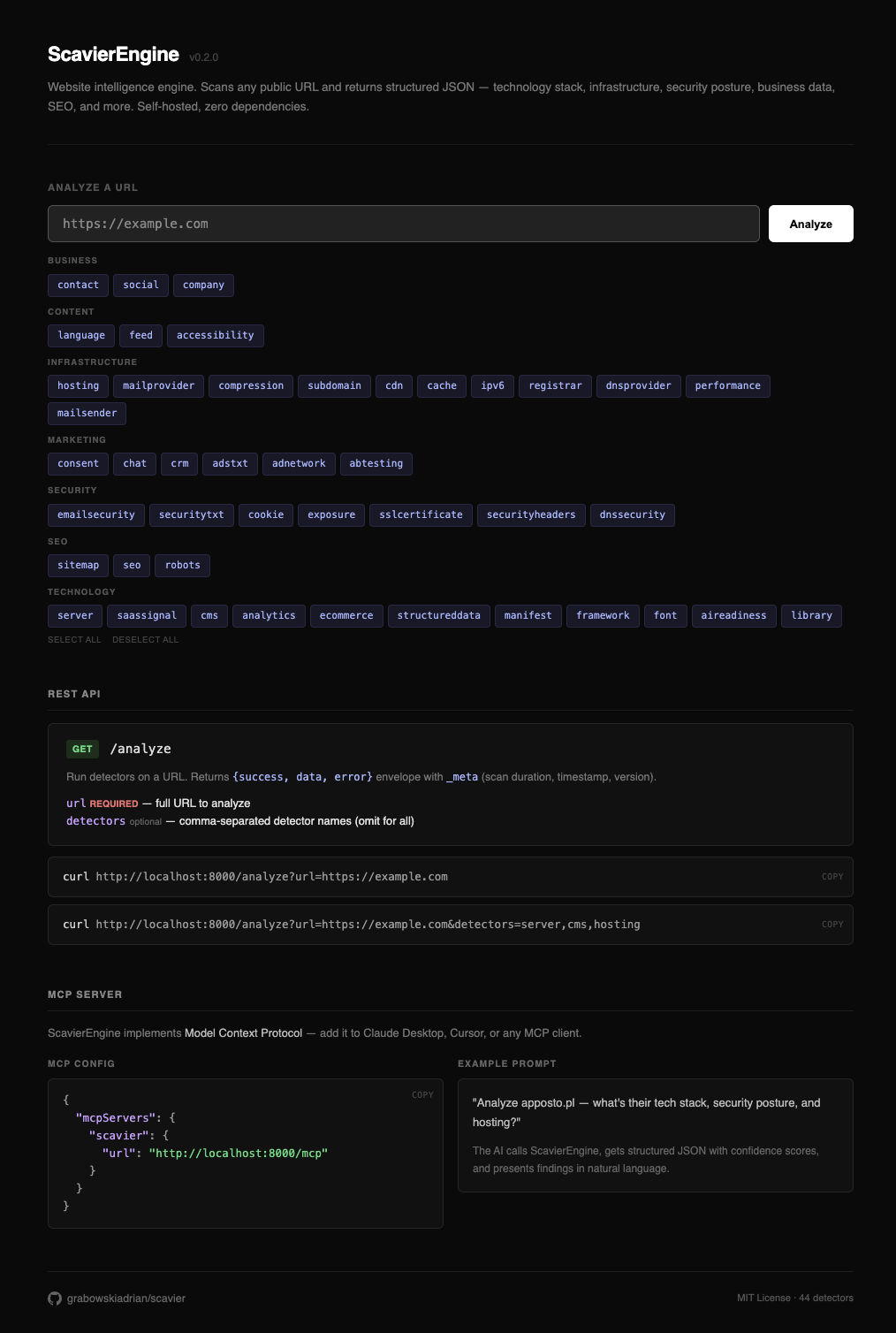
Live demo: engine.scavier.io — try the API directly. A graphical web interface is also in development at scavier.io.
What it detects: CMS, frameworks, libraries, analytics, hosting provider, CDN, DNS, SSL/TLS, security headers, email security, e-commerce platforms, payment providers, CRM, chat widgets, A/B testing tools, social profiles, company data, SEO health, AI readiness, and much more — 44 detectors across 8 categories.
Quick Start
Docker (recommended)
git clone https://github.com/grabowskiadrian/scavier-engine.git
cd scavier
docker compose up -d
Scavier is now running at http://localhost:8000.
Manual
Requires PHP 8.3+ with curl and dom extensions. System tools: dig, openssl, whois.
git clone https://github.com/grabowskiadrian/scavier-engine.git
cd scavier
composer install
php -S localhost:8000 -t public
Usage
REST API
# All detectors
curl "http://localhost:8000/analyze?url=https://example.com"

# Specific detectors
curl "http://localhost:8000/analyze?url=https://example.com&detectors=cms,hosting,analytics"
Response:
{
  "success": true,
  "url": "https://example.com",
  "data": {
    "technology": {
      "cms": {
        "value": "WordPress",
        "confidence": 0.95,
        "evidence": "Meta generator tag",
        "version": "6.4",
        "plugins": ["woocommerce", "yoast-seo"],
        "theme": "flavor"
      },
      "frameworks": [
        { "value": "React", "type": "frontend", "confidence": 0.85, "evidence": "Script src match" }
      ]
    },
    "infrastructure": {
      "hosting": { "value": "Hetzner", "confidence": 0.8, "evidence": "WHOIS ASN match" },
      "cdn": { "value": "Cloudflare", "confidence": 1, "evidence": "HTTP header: cf-ray" }
    },
    "security": {
      "headers": {
        "present": [
          { "header": "Strict-Transport-Security", "value": "max-age=31536000; includeSubDomains" }
        ],
        "missing": ["Content-Security-Policy", "Permissions-Policy"]
      }
    },
    "audit": {
      "security_score": { "score": 0.6, "grade": "C", "present_count": 6, "total_count": 10 },
      "seo_score": { "score": 0.82, "passed": 9, "total": 11 }
    },
    "_meta": {
      "scan_duration": 14.2,
      "timestamp": "2025-01-15T10:30:00+00:00",
      "engine_version": "0.2.0",
      "detectors_run": ["cms", "hosting", "analytics"],
      "tags": ["Cloudflare", "Google Analytics", "React", "WordPress"]
    }
  }
}
Open http://localhost:8000 in a browser for interactive docs with a detector picker UI.
MCP Server
Scavier implements Model Context Protocol — add it to Claude Desktop, Cursor, or any MCP client:
{
  "mcpServers": {
    "scavier": {
      "url": "http://localhost:8000/mcp"
    }
  }
}
Then ask your AI: "Analyze example.com and tell me what tech stack they use"
PHP API
use Scavier\Engine\Scavier;

$scavier = new Scavier();
$result = $scavier->analyze('https://example.com');

if ($result['success']) {
    $data = $result['data'];
    // $data['technology']['cms']['value'] => 'WordPress'
}
Detectors
44 detectors organized in 8 categories. Use short names with the detectors query parameter.
Technology (11)
| Short name | Description |
|---|---|
server |
Web server software and runtime (nginx, Apache, PHP version) |
cms |
CMS with version, plugins, theme (WordPress, Drupal, Joomla, Wix, ...) |
framework |
Frontend and backend frameworks (React, Vue, Next.js, Laravel, Django, ...) |
library |
JS/CSS libraries with versions (jQuery, Bootstrap, HTMX, D3.js, ...) |
analytics |
Analytics tools and tracking IDs (GA4, GTM, Hotjar, Mixpanel, ...) |
ecommerce |
E-commerce platform and 14 payment processors |
font |
Font services and families (Google Fonts, Adobe Fonts, Bunny Fonts) |
structureddata |
JSON-LD structured data types |
manifest |
PWA manifest detection |
aireadiness |
AI readiness: llms.txt, MCP server, OpenAPI docs, AI crawler policy |
saassignal |
Strategic SaaS signals: auth, search, push, monitoring, feature flags, headless CMS |
Infrastructure (11)
| Short name | Description |
|---|---|
hosting |
Hosting provider via headers, CNAME, IP, ASN (30+ providers) |
cdn |
Content delivery network (Cloudflare, Fastly, CloudFront, Akamai, ...) |
dnsprovider |
DNS hosting provider (16 providers) |
mailprovider |
Mailbox hosting via MX records (Google Workspace, Microsoft 365, ...) |
mailsender |
Email sending services from SPF (Mailchimp, SendGrid, ...) |
registrar |
Domain registration, registrar, age, WHOIS data |
subdomain |
Subdomain discovery via TLS SAN, crt.sh, DNS brute force |
performance |
Response timing, TTFB grading, page weight, HTTP version |
compression |
HTTP compression (gzip, brotli) |
cache |
Caching headers analysis |
ipv6 |
IPv4/IPv6 dual-stack support |
Security (7)
| Short name | Description |
|---|---|
securityheaders |
Security headers audit with A-F grading (HSTS, CSP, X-Frame-Options, ...) |
sslcertificate |
SSL certificate, TLS config, OCSP stapling, issuer identification |
cookie |
Cookie analysis and tracker identification |
emailsecurity |
Email authentication (SPF, DMARC) |
dnssecurity |
DNS security (DNSSEC, CAA, DANE) |
exposure |
Sensitive file exposure (.env, .git, DNS zone transfer) |
securitytxt |
security.txt vulnerability disclosure file |
Business (3)
| Short name | Description |
|---|---|
company |
Company identity, registration numbers (NIP, REGON, KRS, VAT) |
contact |
Contact info from multi-page scan (email, phone, address) |
social |
Social media profiles (8 platforms) |
Marketing (6)
| Short name | Description |
|---|---|
crm |
CRM and marketing automation (HubSpot, Salesforce, Marketo, ...) |
adnetwork |
Advertising networks (AdSense, Ad Manager, Taboola, ...) |
adstxt |
ads.txt file and programmatic ad exchanges |
abtesting |
A/B testing tools (Optimizely, VWO, LaunchDarkly, ...) |
chat |
Live chat widgets (Intercom, Drift, Zendesk, Crisp, ...) |
consent |
Cookie consent management (Cookiebot, OneTrust, ...) |
SEO (3)
| Short name | Description |
|---|---|
robots |
robots.txt analysis and AI bot blocking detection |
sitemap |
sitemap.xml detection and structure |
seo |
SEO audit: meta tags, Open Graph, canonical, structured data (11 checks) |
Content (3)
| Short name | Description |
|---|---|
language |
Website language and multilingual support |
accessibility |
Accessibility signals and overlay tool detection |
feed |
RSS/Atom feed detection |
Architecture
URL -> Target (SSRF check) -> Collectors (fetch data) -> Context -> Detectors (extract knowledge) -> JSON
- 11 Collectors fetch raw data: HTTP response, HTML DOM, DNS records, TLS certificate, WHOIS, RDAP, Certificate Transparency, subdomain brute-force, zone transfer testing
- 44 Detectors analyze collected data and extract structured knowledge with confidence scores
- Context is a shared typed data store between collectors and detectors
- Auto-discovery — drop a PHP class in the right directory, it's available instantly
- Dependency resolution — topological sort ensures correct execution order
Full architecture documentation: doc/architecture.md
Output format
Every detected fact carries:
| Field | Description |
|---|---|
value |
The detected technology/service name |
confidence |
0.0 - 1.0 — how certain the detection is |
evidence |
What signal triggered the detection |
Confidence is calibrated by evidence type: HTTP headers = 1.0, meta generator = 0.95, script URL = 0.9, inline pattern = 0.85, cookies = 0.8, HTML patterns = 0.7, text patterns = 0.6.
The _meta.tags array provides a flat, deduplicated list of all technology/service names found — a quick summary without traversing the full result tree.
The audit section aggregates cross-detector scores: security grade (A-F), SEO score, SSL issues, and exposure alerts.
Extending
Adding a detector
Drop a PHP class into any subdirectory of src/Detector/ — it's auto-discovered and available via API and MCP instantly.
<?php

namespace Scavier\Detector\Technology;

use Scavier\Collector\HtmlCollector;
use Scavier\Collector\Data\HtmlData;
use Scavier\Engine\Context;
use Scavier\Engine\Contract\Detector;

class MyDetector extends Detector
{
    public static function dependencies(): array
    {
        return [HtmlCollector::class];
    }

    public function detect(Context $context): ?array
    {
        $html = $context->get(HtmlData::class);

        if ($html->hasScriptMatching('/my-tool\.js/')) {
            return [
                'technology' => [
                    'my_tool' => [
                        'value' => 'MyTool',
                        'confidence' => 0.9,
                        'evidence' => 'Script src match',
                    ],
                ],
                '_tags' => ['MyTool'],
            ];
        }

        return null;
    }
}
Adding a collector
Same pattern — drop a class into src/Collector/:
<?php

namespace Scavier\Collector;

use Scavier\Engine\Context;
use Scavier\Engine\Contract\Collector;
use Scavier\Engine\Target;

class MyCollector extends Collector
{
    public static function dependencies(): array
    {
        return []; // other collectors this one depends on
    }

    public function execute(Target $target, Context $context): void
    {
        // Fetch data, store in context via $context->set(new MyData(...))
    }
}
Documentation
- Architecture — pipeline, components, output structure, security model
- Collectors reference — all 11 collectors with fields and implementation notes
- Detectors reference — all 44 detectors with detection logic and output keys
Development
composer install        # install dependencies (including dev)
composer test           # run PHPUnit tests (250 tests, 541 assertions)
php -S localhost:8000 -t public   # start dev server
Contributing
Contributions are welcome. See CONTRIBUTING.md for details and Code of Conduct.
License
Установка Scavier Engine
У этого сервера нет опубликованного пакета — он собирается из исходников. Открой репозиторий и следуй инструкции в README.
▸ github.com/grabowskiadrian/scavier-engineFAQ
Scavier Engine MCP бесплатный?
Да, Scavier Engine MCP бесплатный — установка в пару кликов через Unyly без оплаты.
Нужен ли API-ключ для Scavier Engine?
Нет, Scavier Engine работает без API-ключей и переменных окружения.
Scavier Engine — hosted или self-hosted?
Self-hosted: сервер запускается локально на твоей машине командой из раздела установки.
Как установить Scavier Engine в Claude Desktop, Claude Code или Cursor?
Открой Scavier Engine на unyly.org, выбери вкладку своего клиента (Claude Desktop, Claude Code, Cursor) и нажми Install — конфиг сгенерируется автоматически, без правки JSON.
Похожие MCP
GitHub
PRs, issues, code search, CI status
 автор: GitHub
Filesystem
Secure file operations with configurable access controls.
Memory
Knowledge graph-based persistent memory system.
Template MCP Server
A CLI tool to create a new Model Context Protocol server project with TypeScript support, dual transport options, and an extensible structure
 автор: mcpdotdirect
Amap Maps Mcp Server
MCP server for using the AMap Maps API
 автор: duxiaohui
Supabase
Database, auth and storage
 автор: Supabase
Everything
Reference / test server with prompts, resources, and tools.
Git
Tools to read, search, and manipulate Git repositories.
Sequential Thinking
Dynamic and reflective problem-solving through thought sequences.
Time
Time and timezone conversion capabilities.
Compare Scavier Engine with
Не уверен что выбрать?
Найди свой стек за 60 секунд
Автор?
Embed-бейдж для README
Похожее
Все в категории development