
Scope
БесплатноНе проверенA transparent JSON-RPC capture, viewer, and diff tool for the Model Context Protocol

Описание
A transparent JSON-RPC capture, viewer, and diff tool for the Model Context Protocol
README
Your MCP server works in Inspector. It fails silently in Claude Desktop, Cursor, or Gemini CLI. There are no logs. You can't reproduce it outside the real client. mcp-scope shows you exactly what flowed on the wire — without changing the client or the server.
┌──────────────┐    JSON-RPC    ┌────────────┐    JSON-RPC    ┌──────────────┐
│  MCP client  │ ◄────────────► │ mcp-scope  │ ◄────────────► │  MCP server  │
│ Claude/Cursor│                │  (proxy)   │                │  your server │
└──────────────┘                └─────┬──────┘                └──────────────┘
                                      │
                                      ▼
                                session.jsonl   ← every frame, timestamped
Prepend mcp-scope capture -- to your server command. Keep using your real client normally.
When something goes wrong, the capture has the answer.
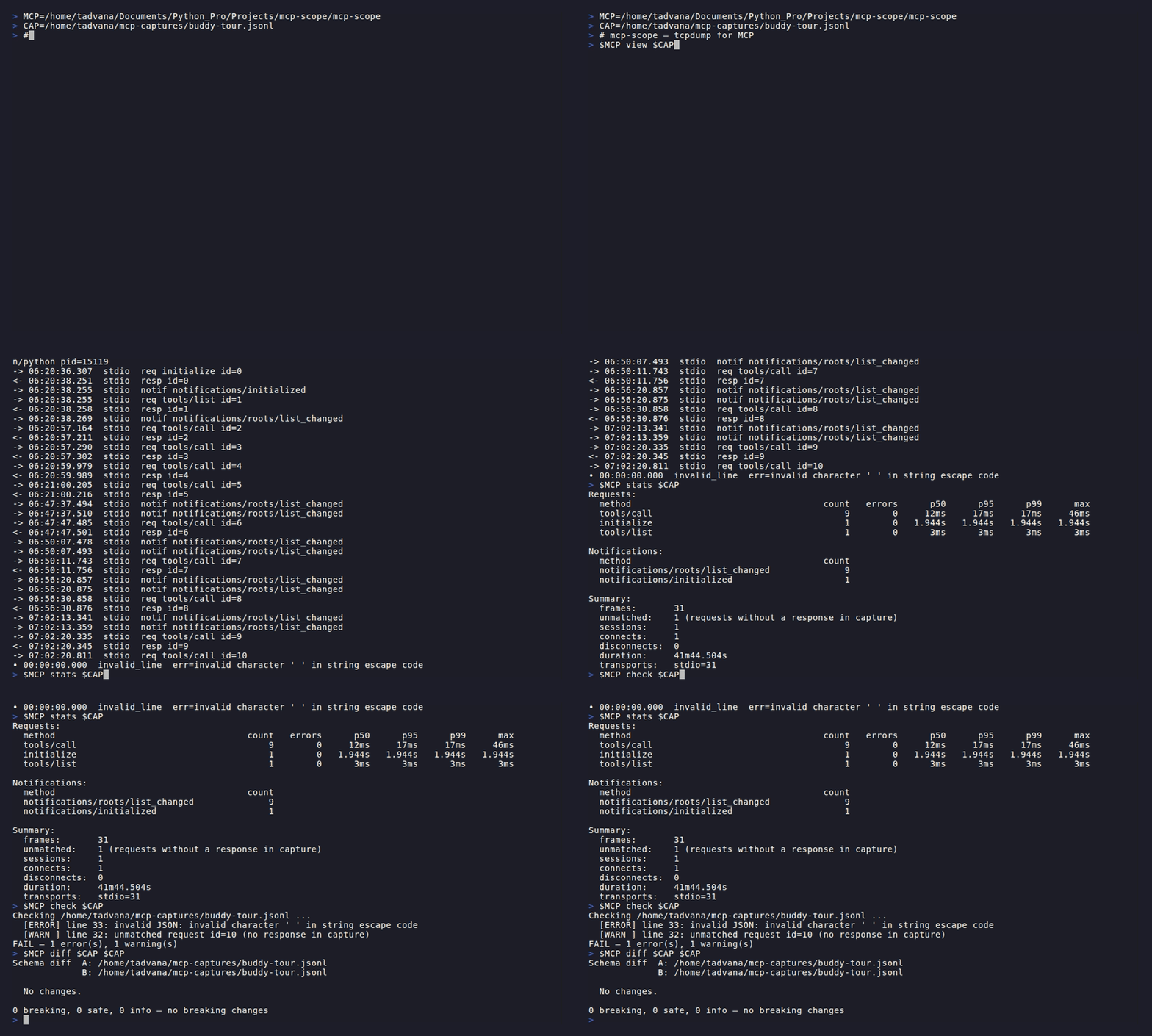
What it does
mcp-scope is a passive proxy: it sits between a real MCP client and server, records every
JSON-RPC frame to a .jsonl file, and gives you six tools to answer every question that comes after:
| Command | Question it answers |
|---|---|
view |
What exactly flowed on the wire? What was in that frame? |
stats |
Which methods are slow? Where are errors coming from? |
check |
Is this server speaking valid JSON-RPC? Will it break clients? |
diff |
Did my server's tool schemas change between versions? Is any change breaking? |
replay |
Does the new server version behave the same as the old one? |
tui |
Let me explore this interactively with live filtering. |
Why it exists
Every other MCP debugging tool is active — you sit at the keyboard and drive it. That works until the bug only reproduces inside Claude Desktop, a CI runner, or a real AI agent in flight. Then you're stuck.
mcp-scope captures what actually happened in a real session. Then you analyse it offline at your own pace.
Install
macOS / Linux — download a pre-built binary:
# macOS (Apple Silicon)
curl -L https://github.com/SSanju/mcp-scope/releases/latest/download/mcp-scope_darwin_arm64.tar.gz | tar xz
sudo mv mcp-scope /usr/local/bin/

# macOS (Intel)
curl -L https://github.com/SSanju/mcp-scope/releases/latest/download/mcp-scope_darwin_amd64.tar.gz | tar xz
sudo mv mcp-scope /usr/local/bin/

# Linux (amd64)
curl -L https://github.com/SSanju/mcp-scope/releases/latest/download/mcp-scope_linux_amd64.tar.gz | tar xz
sudo mv mcp-scope /usr/local/bin/
macOS / Linux — Homebrew tap:
brew tap SSanju/mcp-scope
brew install mcp-scope
Go install (requires Go 1.22+):
go install github.com/SSanju/mcp-scope/cmd/mcp-scope@latest
Single static Go binary. No Node, no Python, no browser, no localhost port.
Quick start
Capture a session
Wrap a stdio server — place mcp-scope capture -o session.jsonl -- before the server command:
mcp-scope capture -o session.jsonl -- node build/index.js
mcp-scope capture -o session.jsonl -- python server.py --port 0
Wrap an HTTP/SSE server — point your client at the proxy, proxy forwards to upstream:
mcp-scope capture --upstream https://my-server.internal/mcp --listen :8080 -o session.jsonl
# then point your client at http://localhost:8080 instead of the real server
Every JSON-RPC frame in either direction is timestamped and written to session.jsonl.
View a capture
# Non-interactive — pipe-friendly, composable with grep/less
mcp-scope view session.jsonl
mcp-scope view --kind req --method tools/call session.jsonl
mcp-scope view --grep '"isError":true' -v session.jsonl

# Live tail — prints new frames as they arrive (like tail -f)
mcp-scope view --follow session.jsonl

# Interactive TUI — scrollable two-pane explorer with live regex filter
mcp-scope tui session.jsonl
Get a summary
mcp-scope stats session.jsonl
Requests:
  method                                    count   errors      p50      p95      p99      max
  tools/call                                   47        1     22ms     89ms    180ms    340ms
  tools/list                                    3        0      8ms     14ms     14ms     14ms
  initialize                                    1        0     12ms     12ms     12ms     12ms

Notifications:
  method                                    count
  notifications/cancelled                       2

Summary:
  frames:       56
  unmatched:    0 (requests without a response in capture)
  sessions:     1
  connects:     1
  disconnects:  1
  duration:     41m44s
  transports:   stdio=56
Diff two captures
mcp-scope diff baseline.jsonl candidate.jsonl
Schema-level diff. Extracts tools/list, resources/list, and prompts/list declarations
from each capture and classifies every change:
BREAKING  tools/call:write_file          required param "mode" added
BREAKING  tools/call:delete_file         tool removed
SAFE      tools/call:read_file.encoding  optional param added
SAFE      tools/call:list_dir            new tool
INFO      tools/call:read_file           description changed
Exit code 1 if any breaking change is found — drop into CI to gate server upgrades:
- run: mcp-scope diff baseline.jsonl candidate.jsonl
Use --frames to compare raw frame sequences instead of schemas:
mcp-scope diff --frames session-a.jsonl session-b.jsonl
When to use mcp-scope vs other tools
| Situation | Use this |
|---|---|
| "My server works in Inspector but fails in Claude Desktop" | mcp-scope — captures the real client session |
| "I need to see what a Gemini CLI MCP call returns right now" | MCP Inspector or mcptools |
| "I want to interactively call my server's tools" | mcp-tui or mcp-probe |
| "I shipped a new server version — did anything break for clients?" | mcp-scope diff |
| "My CI needs to block on protocol violations" | mcp-scope check --strict |
| "I need to replay old traffic against a new server" | mcp-scope replay |
See the examples/ folder for step-by-step walkthroughs for Gemini CLI, Google ADK MCPToolset, mcp-toolbox, and CI/CD pipelines.
Examples
- examples/mcp-toolbox/ — Capturing and validating a Google mcp-toolbox session; protocol bugs found with
check --strict - examples/gemini-cli/ — Debugging a Gemini CLI MCP integration silently failing
- examples/adk-mcptoolset/ — Diagnosing a Google ADK MCPToolset agent making unexpected tool calls
- examples/ci-github-actions/ — Full CI workflow: protocol validation + breaking-change gate on every server push
Roadmap
MVP ✅
-
capture— stdio + SSE + streamable HTTP proxy,--redactfor secret scrubbing -
view— non-interactive pretty-printer with composable filter flags -
tui— interactive two-pane TUI explorer (bubbletea) -
stats— per-method latency (p50/p95/p99/max) and error summary
v0.2 ✅
-
diff— schema diff (tools/resources/prompts), breaking-change classifier, CI exit codes -
check— JSON-RPC protocol validator, CI exit codes
v0.3 ✅
-
replay— fire recorded calls at a different server for regression testing
Explicitly not building
- An interactive debugger to drive tool calls (mcp-tui, par's, mcp-probe already do this)
- A web UI (official Inspector does this)
- LLM-in-the-loop testing (MCPJam does this)
- A YAML test DSL (the diff exit code is the contract gate)
- Schema-aware input forms (no input forms — this is a passive tool)
Contributing
Open an issue describing your use case before sending a PR — the scope is deliberately narrow and the answer to most "could it also do X" questions is no.
License
MIT.
Установка Scope
У этого сервера нет опубликованного пакета — он собирается из исходников. Открой репозиторий и следуй инструкции в README.
▸ github.com/SSanju/mcp-scopeFAQ
Scope MCP бесплатный?
Да, Scope MCP бесплатный — установка в пару кликов через Unyly без оплаты.
Нужен ли API-ключ для Scope?
Нет, Scope работает без API-ключей и переменных окружения.
Scope — hosted или self-hosted?
Self-hosted: сервер запускается локально на твоей машине командой из раздела установки.
Как установить Scope в Claude Desktop, Claude Code или Cursor?
Открой Scope на unyly.org, выбери вкладку своего клиента (Claude Desktop, Claude Code, Cursor) и нажми Install — конфиг сгенерируется автоматически, без правки JSON.
Похожие MCP
Fetch
Web content fetching and conversion for efficient LLM usage.
AWS KB Retrieval
Retrieval from AWS Knowledge Base using Bedrock Agent Runtime.
 автор: modelcontextprotocol
Spring AI MCP Server
Provides auto-configuration for setting up an MCP server in Spring Boot applications.
llm-analysis-assistant
A very streamlined mcp client that supports calling and monitoring stdio/sse/streamableHttp, and can also view request responses through the /logs page. It also
 автор: xuzexin-hz
Compare Scope with
Не уверен что выбрать?
Найди свой стек за 60 секунд
Автор?
Embed-бейдж для README
Похожее
Все в категории ai