
Scorm Server
БесплатноНе проверенPackages self-contained HTML or Claude Design bundles into SCORM 2004 courses any LMS can import, with offline asset inlining, milestone-based completion/progre

Описание
Packages self-contained HTML or Claude Design bundles into SCORM 2004 courses any LMS can import, with offline asset inlining, milestone-based completion/progress and score tracking. Fully local, no telemetry; validated end-to-end on SCORM Cloud.
README
Turn self-contained HTML, a Claude Design
.dcbundle or a mobile-learning platform content export (Excel activity templates + media) into a SCORM 2004 (or 1.2) package ready to import into any LMS — assets inlined for 100% offline, completion / progress / score tracking injected, ADL schemas bundled.






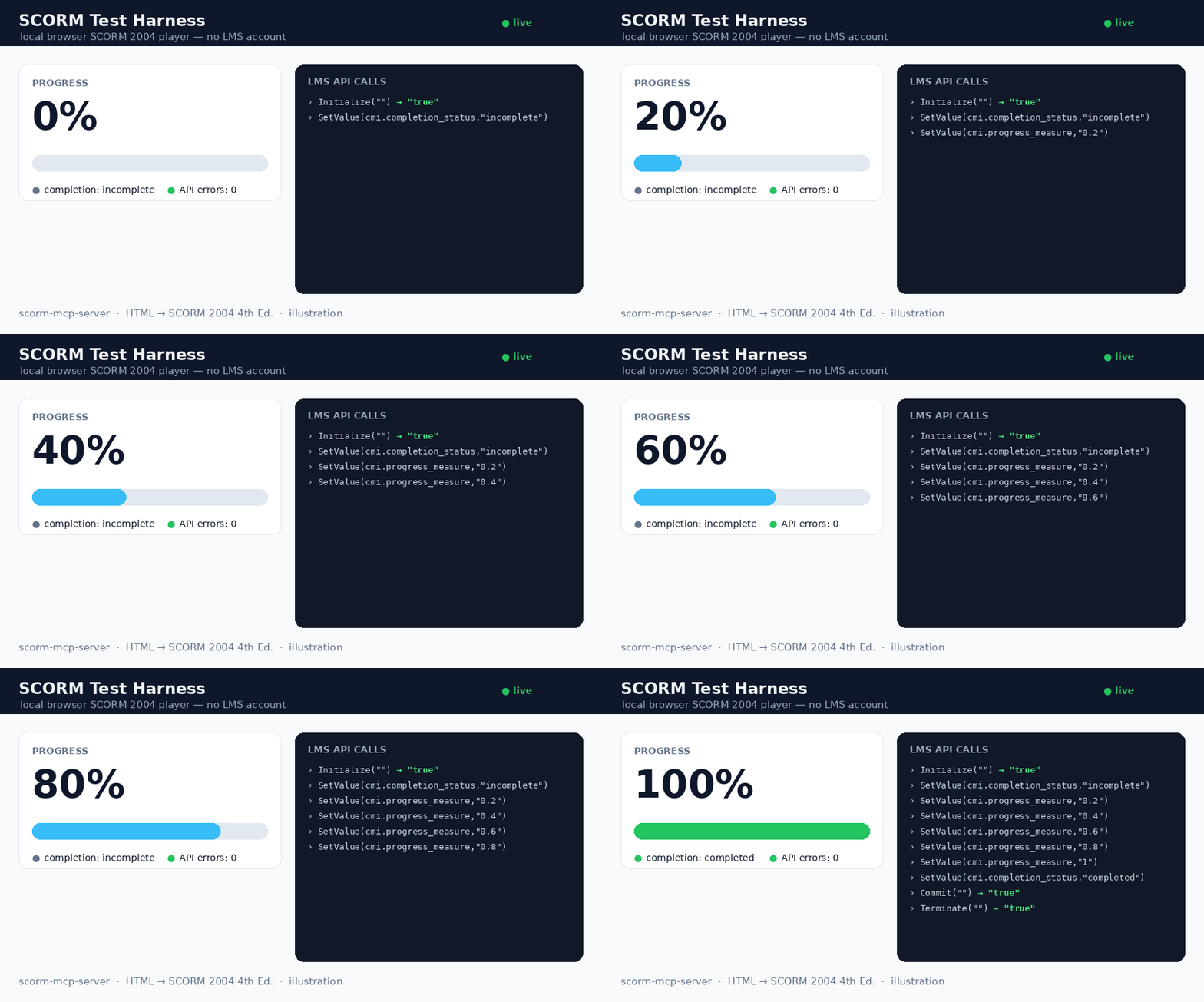
The bundled local harness (scorm-test-harness.html) playing a package: progress 0 → 100%, completion, and the live LMS API-call log (0 errors). Illustration.
An MCP server exposing a single tool, scorm_package, that converts a finished HTML learning module into a .zip (PIF) any SCORM-compliant LMS can import.
Principle: WRAP, don't rewrite. Your HTML is preserved; the tool only:
- Inlines every asset (CSS,
@import, fonts, JS, images,srcset, favicons) as data URIs → runs 100% offline. - Injects a small runtime that reports completion, progress (%) and time spent, with resume across sessions.
- Generates the manifest and bundles the 15 official ADL XSD schemas — the manifest is validated against them (real conformance, not just "well-formed").
🇫🇷 README in English for reach; the in-depth handoff doc (
PASSATION.md) and guides are in French.
✅ Status — validated on a real LMS
- 256/256 automated checks green: 23 converter · 15 runtime · 14 MCP · 1 schema conformance (
xmllint) · 6 security · 11 features · 13 auto-milestones · 21 V2 (bundle /.dc/ score) · 10 output-dir · 9 tracking-signal · 32 hardening · 29 SCORM 1.2 · 12 CLI/batch · 16 web UI · 44 mobile-learning migration — plus 6 bonus strict-runtime checks (scorm-again). - SCORM Cloud (real LMS): imports cleanly (recognized as SCORM 2004 4th Ed., "manifest looks great"), and the dashboard reports completion = complete, success = passed, time tracked.
Input formats
Input (input_path or html) |
Handling |
|---|---|
A single self-contained .html (e.g. Claude Design "standalone HTML" export) |
assets inlined, runtime injected — v1 path |
A folder or .zip (multi-file module) |
whole tree preserved; entry HTML inlined; manifest lists every file |
A Claude Design .dc bundle (*.dc.html + support.js + _ds/) |
auto-detected; CDN libs (React/Babel…) vendored offline via window.__resources (no source patch); runtime injected before support.js |
A mobile-learning platform content export (Excel activity templates + media/) |
auto-detected; an interactive HTML course is rebuilt from the templates — info / transition / flash cards, quiz questions, media codes ([media:…], [H1:…], [quote:…], !!), scored quizzes reporting cmi.score — then packaged. Course title derived from the template names; with --batch, a whole catalogue migrates in one run |
Pass a .dc bundle as its folder or .zip (not the lone .dc.html, which is inert without its siblings).
Scores & quizzes (optional)
Set mastery_score (0..1) to enable score-based success and add sequencing objectives to the manifest. Report the score from your content in one line — no SCORM knowledge required:
window.SCORM2004.score(8, 0, 10);                                   // raw, min, max
window.dispatchEvent(new CustomEvent("scorm:score",    { detail: { raw: 8, min: 0, max: 10 } }));
window.dispatchEvent(new CustomEvent("scorm:progress", { detail: 0.5 }));  // 0..1
window.dispatchEvent(new CustomEvent("scorm:complete"));
The runtime maps these to cmi.score.*, sets success_status = passed/failed against mastery_score, and reports completion/progress. (dc:* event names are accepted as aliases.)
SCORM 1.2, batch mode, CLI (v2.1)
SCORM 1.2 — pass scorm_version: "1.2" and you get a 1.2 manifest (validated
against the bundled 1.2 XSDs, with adlcp:masteryscore when mastery_score is
set). The injected runtime is adaptive: it speaks to whichever API the hosting
LMS exposes (API_1484_11 or API), maps the data model (single
lesson_status, 0-100 score, HH:MM:SS session time, 4096-char suspend data)
and never downgrades a passed status.
Batch — batch: true treats input_path as a directory of courses (each
sub-directory, .zip or .html = one course). One package per course, one
consolidated batch-report.json, and a broken course never sinks the others.
CLI — no MCP client required:
npx -y scorm-mcp-server ui            # local drag & drop web UI
npx -y scorm-mcp-server pack course.html --title "My course"
npx -y scorm-mcp-server pack ./courses --batch --scorm-version 1.2
npx -y scorm-mcp-server selftest      # 1-second health check
Web UI — ui opens a localhost page: drop an .html or .zip, pick the SCORM
edition and an optional pass mark, download the package. Runs entirely on your
machine; nothing is uploaded anywhere.
Library — buildPackage() is a public API for pipelines and SaaS backends:
import { buildPackage } from "scorm-mcp-server";
const r = await buildPackage({ html, title: "My course", scormVersion: "1.2", masteryScore: 0.6 });
// r.zip (Buffer) · r.fileName · r.warnings · r.milestoneIds …
Diagnostic — the scorm_selftest MCP tool packages a constant built-in HTML
and reports version, duration and output path: it separates "server broken"
from "input problem" in one second.
Install
Option 0 — try it online, no install
https://scormpackager.vercel.app — drop a course, pick the SCORM edition, download the package. Files are processed in memory and never stored, but they do travel to a server; for real work use the local options below, where nothing leaves your machine (and there is no 4 MB limit).
Option A — one-click (recommended)
Download scorm-mcp-server-x.y.z.mcpb from the Releases, then in Claude Desktop → Settings → Extensions, drag-drop the .mcpb, pick an output folder, and enable it.
Option B — npm (any MCP client)
No install step: add this to your client's MCP config (~/Library/Application Support/Claude/claude_desktop_config.json for Claude Desktop):
{
  "mcpServers": {
    "scorm": {
      "command": "npx",
      "args": ["-y", "scorm-mcp-server"],
      "env": { "SCORM_OUTPUT_DIR": "/ABSOLUTE/PATH/scorm-packages" }
    }
  }
}
Registry name: io.github.giacomomaria81/scorm-mcp-server (MCP registry).
Option C — from source (developer)
git clone <this-repo> && cd scorm-mcp-server
npm install        # dist/ is prebuilt; npm run build is optional
Then point the config at node /ABSOLUTE/PATH/scorm-mcp-server/dist/index.js.
Restart Claude. The scorm_package tool is now available.
Usage
In a conversation: build your module with Claude Design, then say "package this module as SCORM." Claude calls scorm_package and returns the path to the .zip.
Progress & completion — it just works
You don't have to prepare anything: if your HTML declares no milestone, the packager auto-generates them from the document structure (sections → articles → headings, capped at 8, trigger view). Plain HTML gets meaningful progress out of the box. Disable with auto_milestones: false. Want success_status = passed on completion without touching the HTML? Pass success_on_completion: true.
Declarative milestones (recommended for fine control)
Mark the meaningful steps directly in your HTML — explicit milestones always take precedence over auto-generation. The runtime computes progress_measure = milestones_reached / total, and sets completion_status = "completed" once all are reached.
| Attribute | Effect |
|---|---|
data-jalon="unique-id" |
declares a milestone |
data-trigger="view" |
reached when scrolled into view (default) |
data-trigger="click" |
reached on click |
data-trigger="ended" |
reached when a video/audio ends |
<section data-jalon="intro"       data-trigger="view">…</section>
<button  data-jalon="read-pitch"  data-trigger="click">I read it</button>
<video   data-jalon="demo"        data-trigger="ended">…</video>
Recommended: 4–8 milestones per micro-module. Resume is automatic (cmi.suspend_data + cmi.location); progress never regresses.
Programmatic milestones — window.SCORM2004.reach("quiz-passed") works even if the id has no data-jalon element: unknown ids are declared on the fly and count in the total. To register one before it's reached (accurate denominator), use window.SCORM2004.declare("quiz-passed") early. Both survive resume.
Success status (opt-in) — add data-scorm-success="on-completion" on any element (e.g. <body>) and the runtime also sets cmi.success_status="passed" when the module completes. Without it, success_status is never written.
Language — the tool's language (BCP-47, default fr-FR) is applied as <html lang="…"> when the source HTML doesn't declare one.
Security — asset references are confined to the module folder: ../ or absolute paths outside it are never inlined (a warning is emitted instead).
Test it without an LMS account
Open scorm-test-harness.html via a tiny local server and drop a generated .zip into it:
python3 -m http.server 8000 # then open http://localhost:8000/scorm-test-harness.html
You'll see live progress %, completion, and the full log of LMS API calls (0 errors expected).
Build & test
npm install
npm run build     # tsc -> dist/
npm test          # 102 checks: converter + runtime + mcp + schema + security + v2 (xmllint required)

# bonus: validate against a strict independent SCORM 2004 runtime
npm i -D scorm-again && node test/scorm-again.test.mjs
Requirements: Node ≥ 20, and xmllint (libxml2-utils) for the schema test.
Project structure
src/        index.ts (MCP server) · converter.ts (inlining + manifest + zip) · runtime.ts (injected SCORM runtime)
dist/       compiled output (shipped)
schemas/    15 ADL XSD (SCORM 2004 4th Ed.), bundled into every package
test/       converter / runtime / mcp / schema tests + fixtures + sample module
scorm-test-harness.html   local browser SCORM player (fake LMS, no account)
manifest.json             MCPB manifest (for building the .mcpb desktop extension)
Privacy Policy
This extension runs entirely locally: no data collection, no telemetry, no third parties. The only network activity is downloading assets that your own HTML references, to embed them into the offline package. Full policy: PRIVACY.md.
License
Установка Scorm Server
У этого сервера нет опубликованного пакета — он собирается из исходников. Открой репозиторий и следуй инструкции в README.
▸ github.com/giacomomaria81/scorm-mcp-serverFAQ
Scorm Server MCP бесплатный?
Да, Scorm Server MCP бесплатный — установка в пару кликов через Unyly без оплаты.
Нужен ли API-ключ для Scorm Server?
Нет, Scorm Server работает без API-ключей и переменных окружения.
Scorm Server — hosted или self-hosted?
Self-hosted: сервер запускается локально на твоей машине командой из раздела установки.
Как установить Scorm Server в Claude Desktop, Claude Code или Cursor?
Открой Scorm Server на unyly.org, выбери вкладку своего клиента (Claude Desktop, Claude Code, Cursor) и нажми Install — конфиг сгенерируется автоматически, без правки JSON.
Похожие MCP
LibreOffice Tools
Enables AI agents to read, write, and edit Office documents via LibreOffice with token-efficient design. Supports multiple formats including DOCX, XLSX, PPTX, a
 автор: passerbyflutter
dannote/figma-use
Full Figma control: create shapes, text, components, set styles, auto-layout, variables, export. 80+ tools.
 автор: dannote
Logo.dev
Search and retrieve company logos by brand or domain. Customize size, format, and theme to match your design needs. Accelerate design, prototyping, and content
 автор: NOVA-3951
Design Inspiration Server
Searches top design platforms like Dribbble and Behance to provide UI inspiration, color palettes, and layout patterns via the Serper API. It allows users to re
 автор: YonasValentin
Compare Scorm Server with
Не уверен что выбрать?
Найди свой стек за 60 секунд
Автор?
Embed-бейдж для README
Похожее
Все в категории design