
Scryfall
БесплатноНе проверенIntegrates with the Scryfall Magic: The Gathering API to enable card searches, retrieval of card details, rulings, and pricing information for deck building and

Описание
Integrates with the Scryfall Magic: The Gathering API to enable card searches, retrieval of card details, rulings, and pricing information for deck building and game analysis.
README
A Model Context Protocol (MCP) server for interacting with the Scryfall API. It provides tools to look up Magic: The Gathering card details, card rulings, and price information.
Features
- search_cards
Perform a text-based search on Scryfall. Returns a list of matching cards. - get_card_by_id
Retrieve a card directly via its Scryfall UUID. - get_card_by_name
Retrieve a card by exact English name. - random_card
Get a random card from the entire Scryfall database. - get_rulings
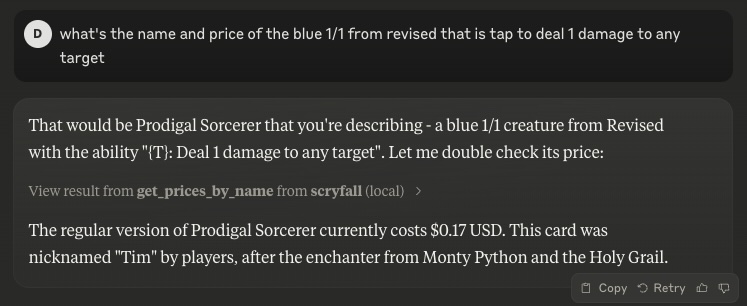
Retrieve official rulings for a card, which may clarify card interactions or rules. - get_prices_by_id
Retrieve current pricing information (USD, USD foil, EUR, TIX) for a given card by Scryfall ID. - get_prices_by_name
Retrieve current pricing information (USD, USD foil, EUR, TIX) for a given card by exact name.
Usage
The server can be run in two modes:
- Standard stdio mode (default)
- Server-Sent Events (SSE) mode with HTTP endpoints
Using NPX
If you have Node.js installed locally:
# Stdio mode
npx scryfall-mcp-server

# SSE mode
npx scryfall-mcp-server --sse
Connecting to the Server
Stdio Mode
Your application or environment (like Claude Desktop) can communicate directly via stdio with the server.
SSE Mode
When running in SSE mode (with --sse), you can connect using the MCP CLI:
npx @wong2/mcp-cli --sse http://localhost:3000/sse
The server will be available at:
- SSE endpoint:
http://localhost:3000/sse - Message endpoint:
http://localhost:3000/messages
Integration in claude_desktop_config.json
Example snippet for stdio mode:
{
  "mcpServers": {
    "scryfall": {
      "command": "docker",
      "args": ["run", "-i", "--rm", "mcp/scryfall"]
    }
  }
}
Or with npx:
{
  "mcpServers": {
    "scryfall": {
      "command": "npx",
      "args": ["scryfall-mcp-server"]
    }
  }
}
Building from Docker
docker build -t mcp/scryfall .
Then you can run in stdio mode:
docker run -i --rm mcp/scryfall
Or in SSE mode:
docker run -i --rm -p 3000:3000 mcp/scryfall --sse
License
Licensed under the MIT License.
Установка Scryfall
У этого сервера нет опубликованного пакета — он собирается из исходников. Открой репозиторий и следуй инструкции в README.
▸ github.com/cryppadotta/scryfall-mcpFAQ
Scryfall MCP бесплатный?
Да, Scryfall MCP бесплатный — установка в пару кликов через Unyly без оплаты.
Нужен ли API-ключ для Scryfall?
Нет, Scryfall работает без API-ключей и переменных окружения.
Scryfall — hosted или self-hosted?
Self-hosted: сервер запускается локально на твоей машине командой из раздела установки.
Как установить Scryfall в Claude Desktop, Claude Code или Cursor?
Открой Scryfall на unyly.org, выбери вкладку своего клиента (Claude Desktop, Claude Code, Cursor) и нажми Install — конфиг сгенерируется автоматически, без правки JSON.
Похожие MCP
GitHub
PRs, issues, code search, CI status
 автор: GitHub
Filesystem
Secure file operations with configurable access controls.
Memory
Knowledge graph-based persistent memory system.
Template MCP Server
A CLI tool to create a new Model Context Protocol server project with TypeScript support, dual transport options, and an extensible structure
 автор: mcpdotdirect
Compare Scryfall with
Не уверен что выбрать?
Найди свой стек за 60 секунд
Автор?
Embed-бейдж для README
Похожее
Все в категории development