
Semantic Grep
БесплатноНе проверенMake multiple codebases available as context for any coding agent without spending too many resources or sacrificing quality

Описание
Make multiple codebases available as context for any coding agent without spending too many resources or sacrificing quality
README
💡 Motivation: Semantic Grep
In modern agentic harness workflows, grep is powerful and often is all you need. However, raw grep alone is highly token-inefficient because it returns unscoped matching lines and massive boilerplate noise, forcing the agent to ingest everything into its context window, driving up API costs. With an attempt to resolve this, we are introducing Semantic Grep. By running the grep command on your codebase and filtering the results on-the-fly using semantic meaning, we locate, extract, and load only the exact, containing AST functions. This delivers 100% precise retrieval with ~0 token waste
The agent can also trace the function's execution paths bidirectionally using our lightweight AST Call Graph tool. Instead of forcing the agent to read and piece together dozens of separate files, this relational graph lets the agent query callers and callees on-demand, explaining complex execution flows with minimal context usage.
⚠️ Note: Currently, the codebase indexer and call graph builder support indexing
.go,.tf,.pyand.ymlfiles.
🛠 Exposed MCP Tools
search_memory: Semantic search across indexed workspace code blocks.search_call_graph: Explores bidirectional call chains (caller/callee)
🚀 Quick Start
1. Build and Install
You can register the codebase indexer extension with both Gemini CLI and Claude Code CLI. Run the following to automatically build and register with whichever CLIs are available on your system:
make install
Alternatively, install individually depending on your preferred CLI environment:
- For Gemini CLI:
make install-gemini - For Claude Code CLI:
make install-claude
2. Index a Codebase
Before querying, index your codebase directory. This recursively scans, chunks, and quantizes vectors into DuckDB and TurboQuant files:
make index DIR=/path/to/your/codebase
3. Run Tests
make test         # Run unit tests
make test-all     # Run all tests & database self-checks
⚙ Configuration
Configure via environment variables:
LITELLM_BASE_URL: API base URL (Default:http://localhost:36253/v1)LITELLM_EMBEDDING_MODEL: Embedding model (Default:gemini-embedding-001)
📐 System Architecture
flowchart TD
    %% Entrypoints & Client
    subgraph Client ["Client / Agent Entrypoints"]
        cli[Agent]
        idx_cli[Indexer CLI]
    end

    %% Core Components
    subgraph Core ["semantic-grep Core Engine & Server"]
        merkle[Merkle Sync<br/>internal/merkle]
        splitter[Splitter<br/>internal/splitter]
        llm[LLM Client<br/>internal/llm]
        callgraph[Call Graph<br/>internal/callgraph]
        mcp_srv[MCP Server<br/>cmd/server]
    end

    subgraph Toolings
        ggrep[ggrep - faster grep]
    end

    %% Shared Environment & Databases
    subgraph Storage ["Shared Environment & Storage"]
        duckdb_file[(DuckDB<br/> Codebases Metadata)]
        tqv_file[(semantic-grep.tqv<br/>Quantized Vectors)]
    end

    %% User's Environment
    subgraph Workspace ["User's Local Workspace (On Disk)"]
        code_files[User's Source Code<br/>.go, .tf, .py, .yaml]
    end

    %% External Provider
    litellm[LiteLLM Embedding Provider]

    %% ──────────────────────────────────────────────────────────
    %% WRITE PATH: Indexing & Ingestion (Thin lines / Dashes)
    %% ──────────────────────────────────────────────────────────
    idx_cli -->|1. Run index| merkle
    mcp_srv -->|Periodically refresh the indexed codebases| merkle
    code_files -.->|Scan Directory| merkle
    merkle -->|2. Split Files| splitter
    merkle -->|3. Get Embeddings| llm
    llm <-->|4. API Call| litellm
    merkle -->|5. Save Function Metadata| duckdb_file
    merkle -->|5. Save Quantized Vectors| tqv_file
    merkle -->|6. Parse Call Graph| callgraph
    callgraph -->|7. Save Nodes & Edges| duckdb_file

    %% ──────────────────────────────────────────────────────────
    %% READ PATH: MCP Search & Retrieval (Thick Double Lines)
    %% ──────────────────────────────────────────────────────────
    cli ===>|1. Call search_memory| mcp_srv
    cli ===>|1. Call search_call_graph| mcp_srv
    mcp_srv ===>|2. Get Query Embedding| llm
    mcp_srv ===>|3. Search Vectors| tqv_file
    mcp_srv ===>|4. Run ggrep on Local Disk| ggrep
    ggrep ===>|5. Read Source Code| code_files
    mcp_srv ===>|6. Invert matched lines to function scopes| duckdb_file
    mcp_srv ===>|7. Read top-scoring code chunks on-the-fly| code_files
    mcp_srv ===>|8. Return Context| cli

    %% ──────────────────────────────────────────────────────────
    %% FLOW LEGEND (Self-Explanatory Arrow Styles)
    %% ──────────────────────────────────────────────────────────
    subgraph Legend ["Legend / Flow Styles"]
        direction LR
        style_w[ ] -->|Thin line / Dashed| desc_w(Write / Ingestion Flow)
        style_r[ ] ===>|Thick double line| desc_r(Read / Search Query Flow)
    end
📐 Core Technical Pillars & Decisions
Cryptographic Merkle Trees for Incremental Syncs: To prevent expensive, redundant re-indexing of unaltered codebases,
semantic-greprecursively structures directory states as SHA-256 cryptographic Merkle Trees. During subsequent indexing sweeps, it diffs node hashes in milliseconds to isolate only the filesystem delta (added, modified, or deleted files). Only the delta is processed and embedded, drastically reducing API token costs and sweep times.DuckDB for Relational Metadata and Call Graphs: We utilize DuckDB as our metadata and relational store. DuckDB is a highly performant, serverless, in-process analytical (OLAP) database engine that excels at complex queries and joins. It provides complete transactional safety (ACID), runs entirely locally with zero daemon processes, and is optimized for querying dense AST call graph nodes, edges, and function scopes (
function_name,cwd,line_start,line_end) with zero raw source code stored in-databaseTurboQuant for In-Process Vector Quantization: Instead of depending on an expensive, resource-heavy external vector database that is costly to host, run, and maintain,
semantic-grepruns TurboQuant directly inside the Go process. TurboQuant compresses high-dimensional vectors (by up to 14x on disk) using random orthogonal rotation and Lloyd-Max scalar quantization on the Beta distribution. Most importantly, TurboQuant requires no pre-training data or prebuilt codebooks, providing a highly optimized, zero-maintenance, local vector quantization engine without sacrificing similarity search accuracy.Zero-Storage Metadata-Guided Hybrid Search with RRF & ggrep: To guarantee absolute retrieval accuracy without code footprint replication,
semantic-grepfuses Dense Semantic search (TurboQuant) and Sparse Lexical search using Reciprocal Rank Fusion. Our custom, ultra-fastggreplibrary is linked natively within the server process, running high-speed multi-threaded Regex scans directly on the local codebase. When lines match, the engine performs an inverted query in DuckDB to map matched lines to their containing logical AST functions on-the-fly (line_start <= matched_line <= line_end). Raw code contents of top-scoring candidates are streamed from the local filesystem on-the-fly, achieving sub-millisecond search latencies and a pure zero-copy storage footprint!
📊 Token Saved by using Semantic Grep
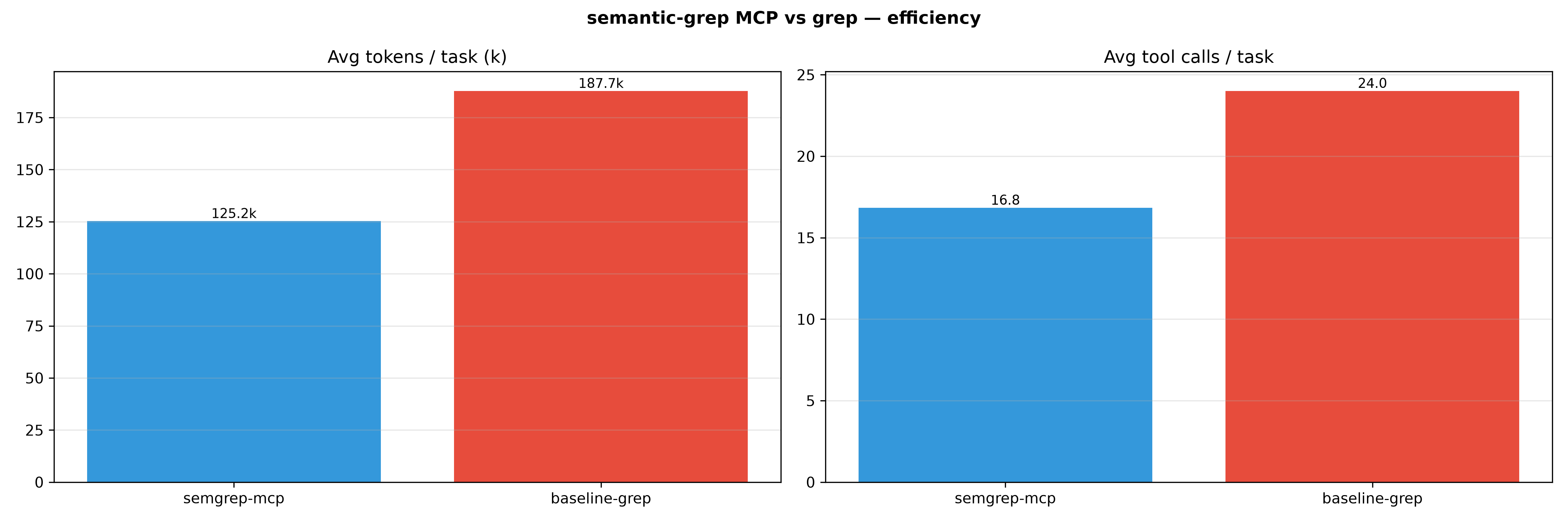
Our controlled evaluation demonstrates that by using Semantic grep, we can achieve ~30% token reduction under the condition of equivalent retrieval quality. See our setup for more detail
📊 TurboQuant Vector Compression Benchmark
See script
================================================================================
        📊  TURBOQUANT VECTOR COMPRESSION BENCHMARK SUITE  📊
================================================================================

📁 Targets: Aggregated Index (across 11 codebases)
   • Scanned Files: 17,839 | Total Semantic Chunks: 139,072 | Dimensions: 3072
   • Total Lines of Code (LOC): 3,435,711 | DuckDB Metadata Size: 0.76 MiB
  --------------------------------------------------------------------------------
   │ Data Footprint Type            │ Footprint Size │ Comp. Ratio │ Savings    │
   ├────────────────────────────────┼────────────────┼─────────────┼────────────┤
   │ [1] Standard Float32[] RAM     │    1629.75 MiB │      1.0x   │     0.0%   │
   │ [2] TurboQuant In-Memory Map   │     206.11 MiB │      7.9x   │    87.4%   │
   │ [3] TurboQuant On-Disk .tqv    │     108.76 MiB │     15.0x   │    93.3%   │
   └────────────────────────────────┴────────────────┴─────────────┴────────────┘

   📈 Visual Storage Footprint Comparison (Bar Scale):

   Standard Float32[] RAM   : [████████████████████████████████████████] (1629.75 MiB)
   TurboQuant In-Memory Map : [█████░░░░░░░░░░░░░░░░░░░░░░░░░░░░░░░░░░░] (206.11 MiB)
   TurboQuant On-Disk .tqv  : [██░░░░░░░░░░░░░░░░░░░░░░░░░░░░░░░░░░░░░░] (108.76 MiB)

================================================================================
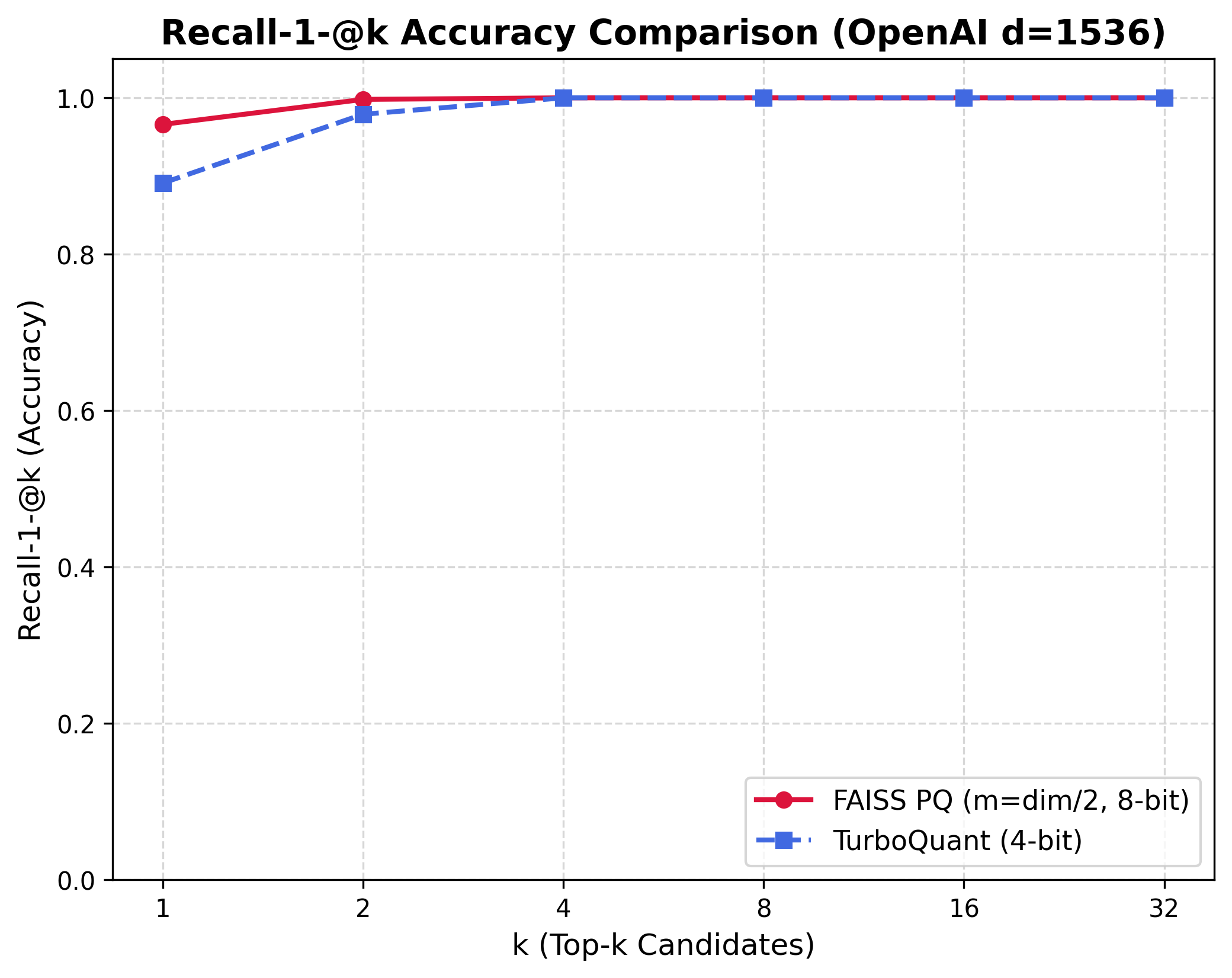
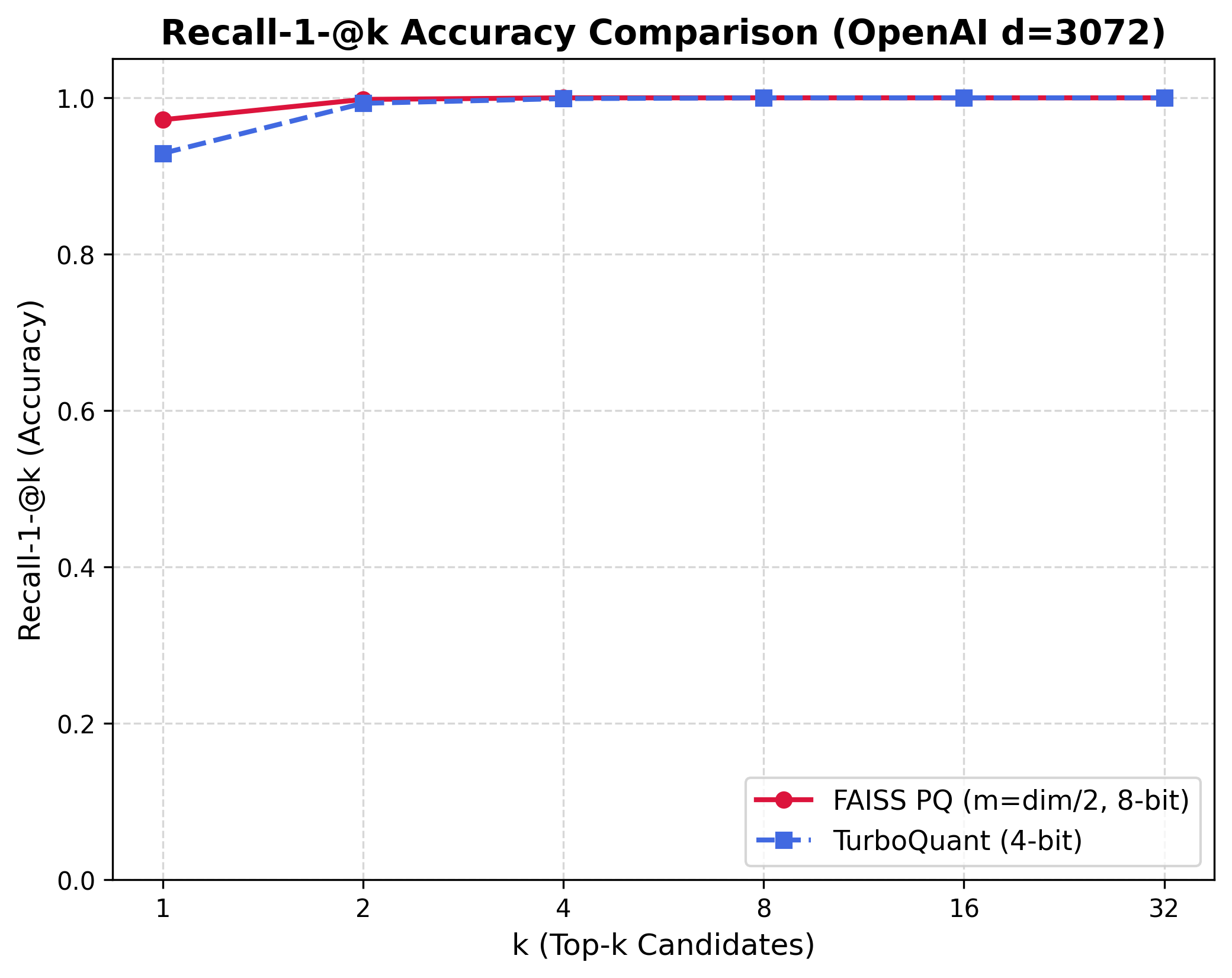
📈 FAISS vs. TurboQuant Recall Accuracy Comparison
To evaluate the mathematical accuracy of our quantized TurboQuant local vector index compared to industry-standard Product Quantization (FAISS), we measure Recall-1-@k—the frequency with which the absolute true nearest neighbor (ground-truth unquantized top-1) is captured within the top-$k$ quantized results.
We run the comparision with the dbpedia-entities-openai3-text-embedding-3-large-1536-1M dataset. See script
- 1536 dimensions
- 3072 dimensions
📊 Search Effectiveness Benchmark (Semantic vs. Grep vs. Semantic Grep)
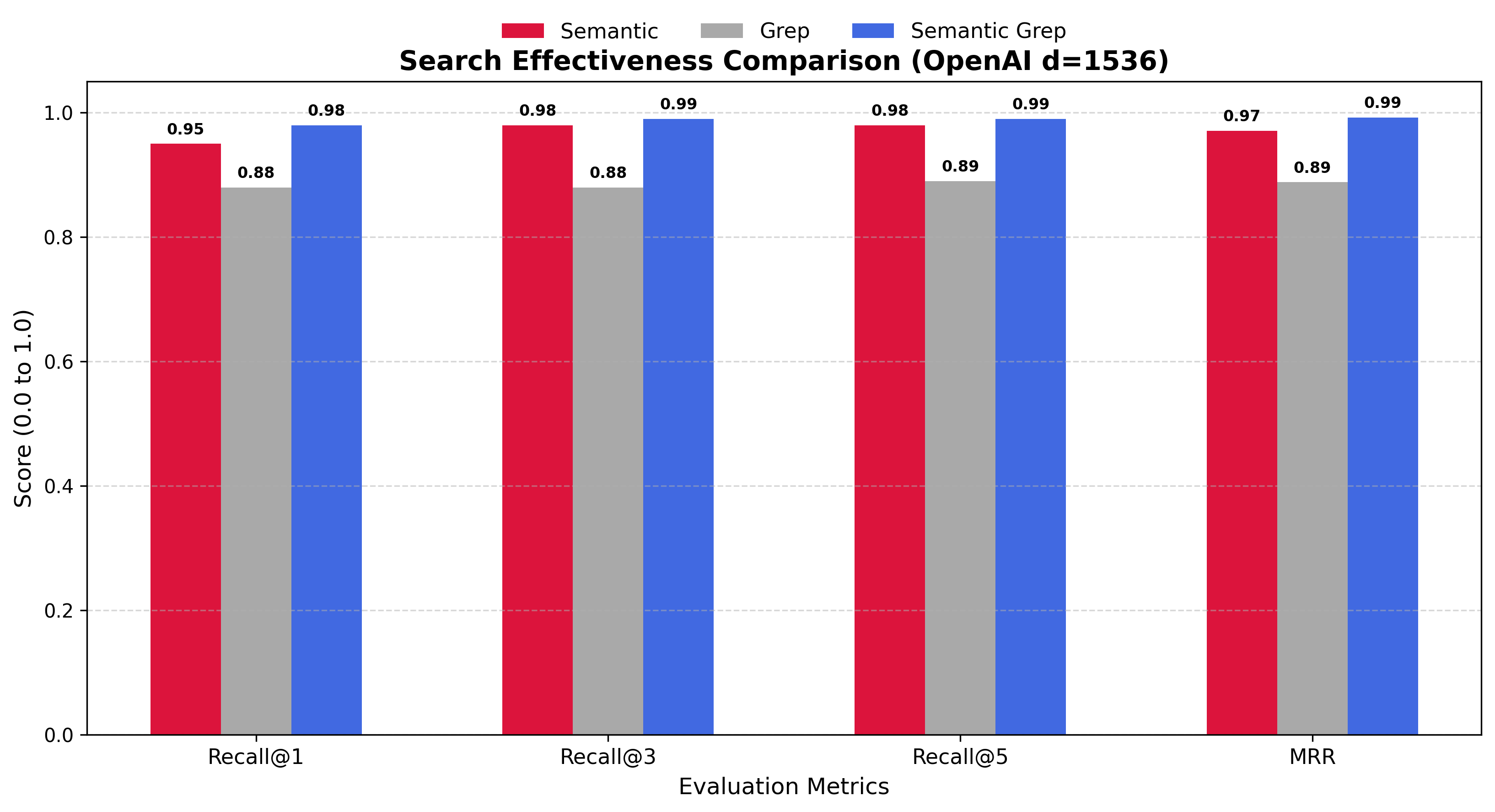
To evaluate real-world retrieval effectiveness under realistic search conditions, we measure how frequently each search pipeline captures the correct document under deterministic query-vector perturbation (20% noise factor). We evaluate 3 search strategies:
- Semantic: Concepts-only dense semantic search using our compressed 4-bit
turbovecindex. - Grep: Precise literal/keyword matching via our
ggreplexical search path. - Semantic Grep: Our optimized hybrid path fusing semantic conceptually-guided results with exact keyword matches using Reciprocal Rank Fusion (RRF).
Running the benchmarks outputs a comparative dashboard summarizing Recall-1-@k and Mean Reciprocal Rank (MRR).
We run the comparison with the dbpedia-entities-openai3-text-embedding-3-large-1536-1M dataset. See script
- 1536 Dimensions (100,000 documents):
- 3072 Dimensions (50,000 documents):
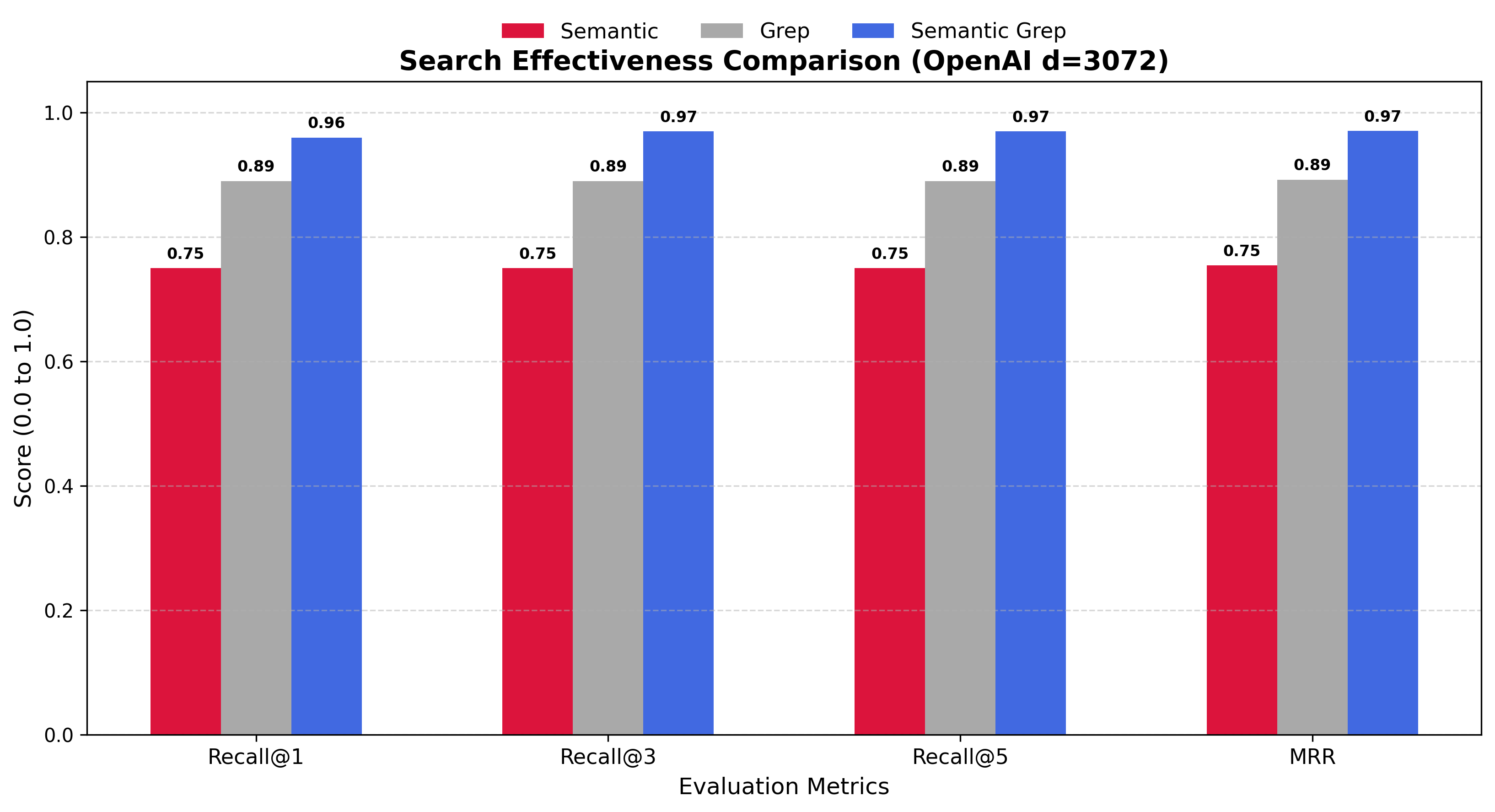
This scientifically proves how our Semantic Grep—fusing the conceptual power of semantic search with the absolute precision of lexical ggrep—achieves near-perfect retrieval recall and rank elevation.
⚡ ggrep Performance Benchmark
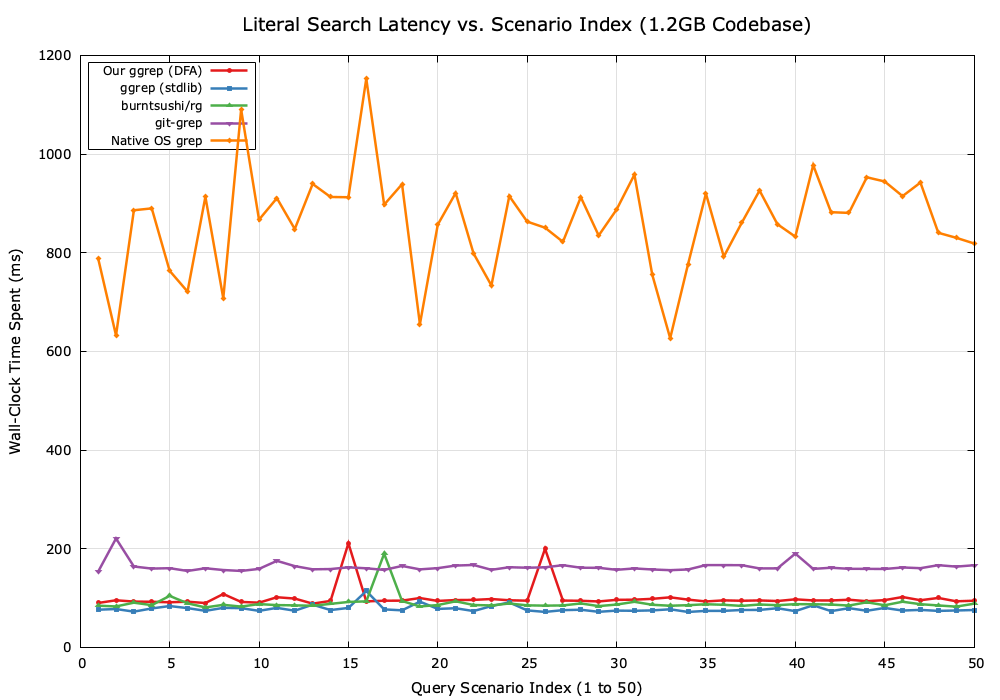
To evaluate the scanning speed and scalability of our custom ggrep engine, we benchmarked it against industry-standard tools: OS grep, git-grep, ripgrep (rg), our ggrep using the standard library regexp package (ggrep-std), and our optimized custom DFA-based regular expression engine.
The benchmarks evaluate scaling across 50 production-grade literal search queries and 50 POSIX-ERE compatible regular expression queries over large source code repositories.
- Literal Scaling Performance Comparison:
- Regex Scaling Performance Comparison:
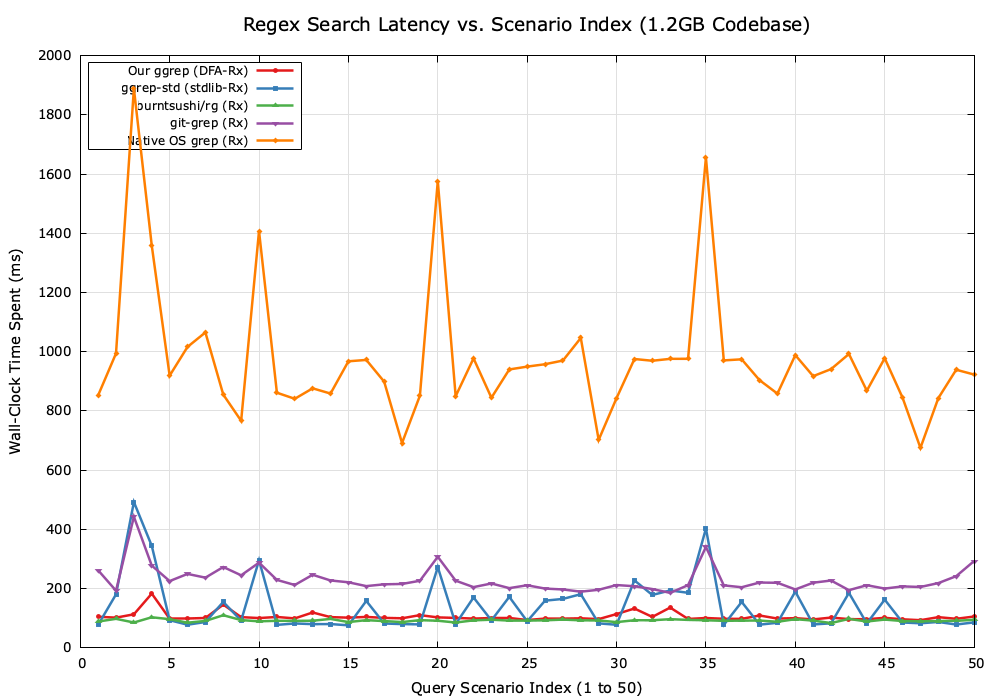
This demonstrates that our custom ggrep with the native DFA regex resolver matches or outperforms standard grep utilities, delivering sub-millisecond scanning latencies by using concurrent, lock-free, zero-allocation scheduling.
Установка Semantic Grep
У этого сервера нет опубликованного пакета — он собирается из исходников. Открой репозиторий и следуй инструкции в README.
▸ github.com/datnguyenzzz/semantic-grepFAQ
Semantic Grep MCP бесплатный?
Да, Semantic Grep MCP бесплатный — установка в пару кликов через Unyly без оплаты.
Нужен ли API-ключ для Semantic Grep?
Нет, Semantic Grep работает без API-ключей и переменных окружения.
Semantic Grep — hosted или self-hosted?
Self-hosted: сервер запускается локально на твоей машине командой из раздела установки.
Как установить Semantic Grep в Claude Desktop, Claude Code или Cursor?
Открой Semantic Grep на unyly.org, выбери вкладку своего клиента (Claude Desktop, Claude Code, Cursor) и нажми Install — конфиг сгенерируется автоматически, без правки JSON.
Похожие MCP
GitHub
PRs, issues, code search, CI status
 автор: GitHub
Filesystem
Secure file operations with configurable access controls.
Memory
Knowledge graph-based persistent memory system.
Template MCP Server
A CLI tool to create a new Model Context Protocol server project with TypeScript support, dual transport options, and an extensible structure
 автор: mcpdotdirect
Amap Maps Mcp Server
MCP server for using the AMap Maps API
 автор: duxiaohui
Supabase
Database, auth and storage
 автор: Supabase
Everything
Reference / test server with prompts, resources, and tools.
Git
Tools to read, search, and manipulate Git repositories.
Sequential Thinking
Dynamic and reflective problem-solving through thought sequences.
Time
Time and timezone conversion capabilities.
Compare Semantic Grep with
Не уверен что выбрать?
Найди свой стек за 60 секунд
Автор?
Embed-бейдж для README
Похожее
Все в категории development