
Serverless Framework
БесплатноНе проверенA framework to deploy MCP servers on AWS using serverless services like Lambda, API Gateway, and EventBridge, with dynamic tools, prompts, and resources managed

Описание
A framework to deploy MCP servers on AWS using serverless services like Lambda, API Gateway, and EventBridge, with dynamic tools, prompts, and resources managed via SSM parameters and Lambda functions.
README


MCP Server implementation with AWS Serverless services.
Created resources
A set of Lambda function connected to EventBridge rules that handle start, stop and task start. Create StepFunction state machine to wait until a specific date and send events.
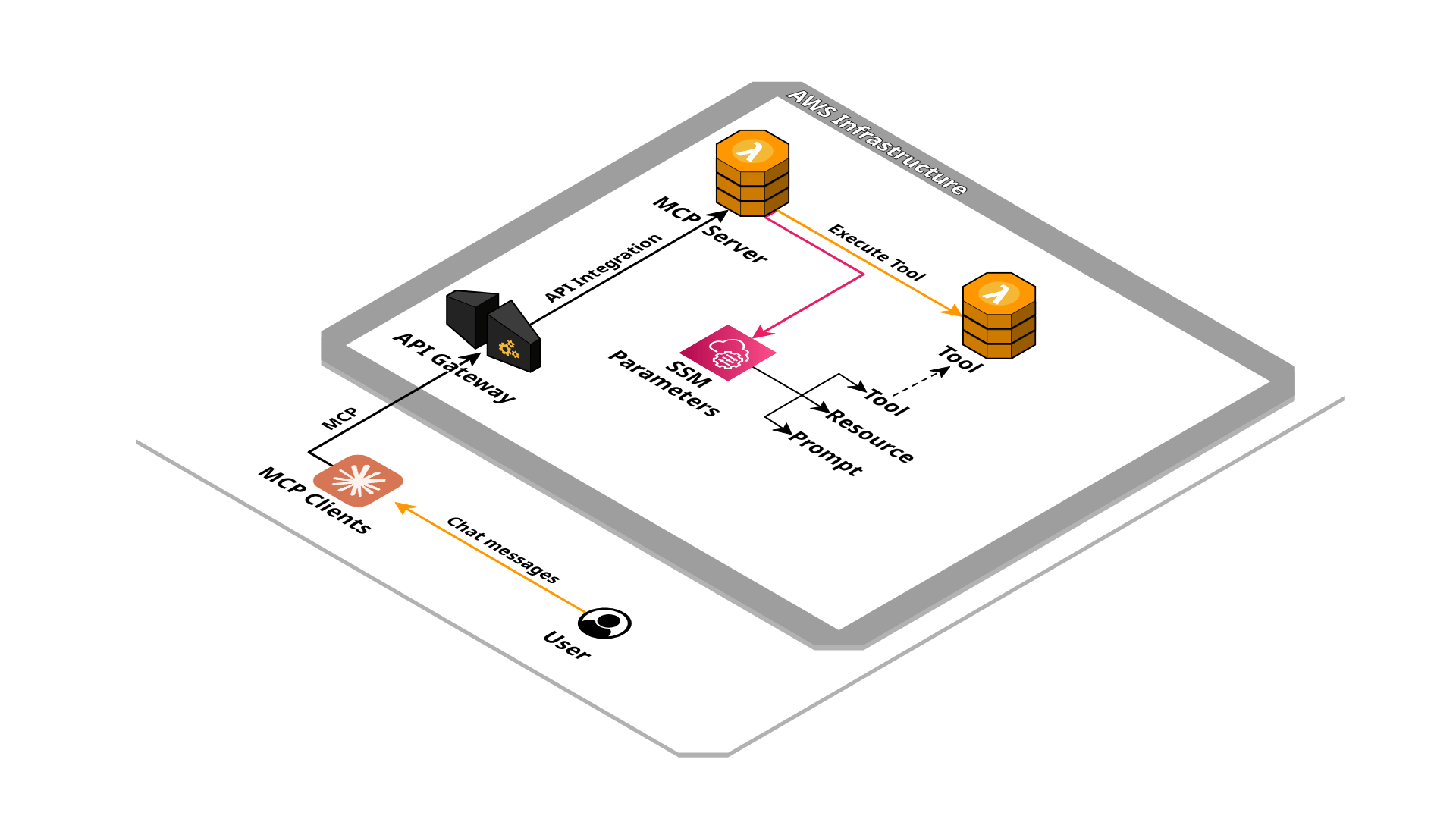
Installation
Using the SAM CLI:
sam build
sam deploy --guided
Parameters
This application need some parameters when you deploy it:
EventBusName: The event bus name to connect the integration to
Project: Project identifier
Environment: Environment identifier
ServerName: The MCP server name
ServerVersion: The MCP server version
Instructions: The MCP server instructions
DomainName: The domain name of the endpoint
AcmCertificateArn: The certificate arn for the domain name provided
AuthenticationType: Authentication type for the MCP server
AuthenticationToken: The authentication token for the MCP server
OAuthIssuerUrl: The issuer URL for OAuth authentication
OAuthAuthorizationUrl: The authorization URL for OAuth authentication
OAuthTokenUrl: The token URL for OAuth authentication
OAuthRevocationUrl: The revocation URL for OAuth authentication
OAuthRedirectUris: The redirect URIs for OAuth authentication
Outputs
- ServerEndpoint: The MCP server endpoint
Development
Requirements:
- NodeJS >= 22.x
Install NPM modules
npm install
Configure the .env file with MCP server specifications:
SERVER_NAME=local
SERVER_VERSION=1.0.0
INSTRUCTIONS=""
Configure the .env file with AWS environment configuration:
AWS_PROFILE=<your AWS profile>
AWS_REGION=<selected AWS region>

SSM_PREFIX=
TOOLS_SSM_PREFIX=
RESOURCES_SSM_PREFIX=
PROMPTS_SSM_PREFIX=
TOOL_LAMBDA_PREFIX=
Run local MCP server
npm run dev
The MCP server is running on http://localhost:3000/mcp.
Tool Inspector
Run the MCP Inspector
npm run inspector
Configure the inspector with:
- Transport Type:
Streamable HTTP - URL:
http://localhost:3000/mcp
Connect to the MCP server with "Connect" button.
Claude Desktop
Use mcp-remote to proxy HTTP to STDIO:
{
  "mcpServers": {
    "example": {
      "command": "npx",
      "args": [
        "-y",
        "mcp-remote",
        "https://xxxxxxxxxx.execute-api.eu-west-1.amazonaws.com/dev/mcp",
        "--transport",
        "http-only"
      ]
    }
  }
}
Deploy
Requirements:
Build project
sam build
Deploy the stack
sam deploy --profile <your AWS profile> --guided
Usage
Once the solution is installed, you can extend the MCP server with resources, prompts or tools using SSM parameters and Lambda functions.
The SSM parameters must begin with the prefix /<project name>/<environment name>/, for example /mcp/dev/tools/echo.
As an example of integration you can take inspiration from the template: template.integration.yaml.
Resources
The SSM parameters must begin with prefix /<project name>/<environment name>/resources/, for example /mcp/dev/resources/example.
The content must be in valid JSON format and have the properties:
- name: Resource name
- uri: Resource URI, for example "config://example"
- content: Resource text content
It can be declared in a SAM template as:
ExampleResourceParameter:
  Type: AWS::SSM::Parameter
  Properties:
    Name: !Sub "/${Project}/${Environment}/resources/example"
    Type: String
    Value: |
      {
        "name": "example",
        "uri": "config://example",
        "content": "Just an example resource"
      }
Prompts
The SSM parameters must begin with prefix /<project name>/<environment name>/prompts/, for example /mcp/dev/prompts/echo.
The content must be in valid JSON format and have the properties:
- name: Prompt name
- description: Prompt description
- inputSchema.json: JSON schema
- content: Prompt template content
The content template will be elaborate with ejs with input data interpolation.
It can be declared in a SAM template as:
EchoPromptParameter:
  Type: AWS::SSM::Parameter
  Properties:
    Name: !Sub "/${Project}/${Environment}/prompts/echo"
    Type: String
    Value: |
      {
        "name": "echo",
        "description": "Execute the example tool",
        "inputSchema": {
          "json": {
            "type": "object",
            "properties": {
              "message": {
                "type": "string"
              }
            },
            "required": ["message"]
          }
        },
        "content": "Execute the tool 'echo' with the message '<%= message %>'"
      }
Tools
The SSM parameters must begin with prefix /<project name>/<environment name>/tools/, for example /mcp/dev/tools/echo.
The content must be in valid JSON format and have the properties:
- name: Prompt name
- description: Prompt description
- inputSchema.json: JSON schema
The related Lambda function that will be executed must be name as <project name>-<environment name>-tools-<tool name>, for example mcp-dev-tools-echo.
The function input and output must respect the Converse API pattern.
The parameter can be declared in a SAM template as:
EchoToolParameter:
  Type: AWS::SSM::Parameter
  Properties:
    Name: !Sub "/${Project}/${Environment}/tools/echo"
    Type: String
    Value: |
      {
        "name": "echo",
        "description": "Print the message provided in input",
        "inputSchema": {
          "json": {
            "type": "object",
            "properties": {
              "message": {
                "type": "string"
              }
            },
            "required": ["message"]
          }
        }
      }
The Lambda function implementation could be:
exports.handler = async ({ toolUseId, name, input }, context) => {
  return {
    name,
    toolUseId,
    status: 'success',
    content: [{
      text: input.message
    }]
  }
}
declared inline in a SAM template:
EchoToolFunction:
  Type: AWS::Serverless::Function
  Properties:
    FunctionName: !Sub "${Project}-${Environment}-tools-echo"
    Handler: index.handler
    InlineCode: |
      exports.handler = async ({ toolUseId, name, input }, context) => {
        return {
          name,
          toolUseId,
          status: 'success',
          content: [{
            text: input.message
          }]
        }
      }
Credits
- Repository badges by Shields.io
- Infrastructure schema by Cloudcraft
Установка Serverless Framework
У этого сервера нет опубликованного пакета — он собирается из исходников. Открой репозиторий и следуй инструкции в README.
▸ github.com/daaru00/aws-serverless-mcpFAQ
Serverless Framework MCP бесплатный?
Да, Serverless Framework MCP бесплатный — установка в пару кликов через Unyly без оплаты.
Нужен ли API-ключ для Serverless Framework?
Нет, Serverless Framework работает без API-ключей и переменных окружения.
Serverless Framework — hosted или self-hosted?
Self-hosted: сервер запускается локально на твоей машине командой из раздела установки.
Как установить Serverless Framework в Claude Desktop, Claude Code или Cursor?
Открой Serverless Framework на unyly.org, выбери вкладку своего клиента (Claude Desktop, Claude Code, Cursor) и нажми Install — конфиг сгенерируется автоматически, без правки JSON.
Похожие MCP
GitHub
PRs, issues, code search, CI status
 автор: GitHub
Filesystem
Secure file operations with configurable access controls.
Memory
Knowledge graph-based persistent memory system.
Template MCP Server
A CLI tool to create a new Model Context Protocol server project with TypeScript support, dual transport options, and an extensible structure
 автор: mcpdotdirect
Compare Serverless Framework with
Не уверен что выбрать?
Найди свой стек за 60 секунд
Автор?
Embed-бейдж для README
Похожее
Все в категории development