
Shared Skills Registry
БесплатноНе проверенA self-hosted registry and MCP server for reusable AI-agent skills that enables agents to discover, retrieve, and install skills with guardrails.

Описание
A self-hosted registry and MCP server for reusable AI-agent skills that enables agents to discover, retrieve, and install skills with guardrails.
README
Open SSR — Shared Skills Registry MCP
One self-hosted registry for your AI-agent skills — served to every MCP-capable agent you run.
PyPI CI Python MCP Status License Twitter
Quickstart · Connect an agent · What it does · Starter catalog · Security · Contributing
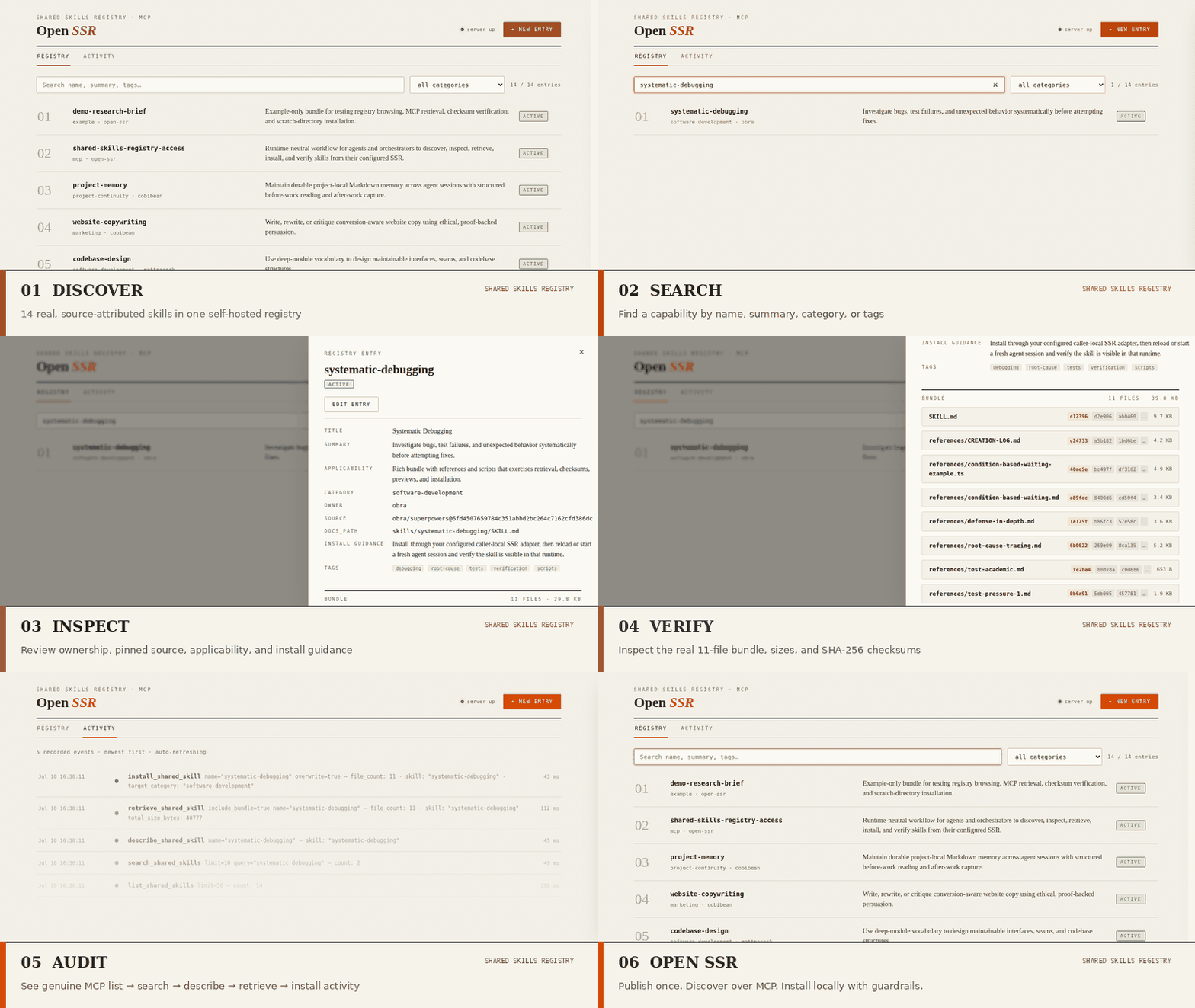
Publish a skill bundle once → any MCP client discovers it, inspects its checksums, and installs it locally with guardrails. No plugin-marketplace lock-in, no copy-pasting
SKILL.mdfolders between machines.
Open SSR is a runtime-neutral skill registry. Publish a skill bundle (SKILL.md plus its references, templates, and scripts) once, and any MCP client — Claude Code, Claude Desktop, Cursor, Windsurf, Hermes, or your own SDK — can discover it, inspect the exact files and SHA-256 checksums, and install it into a local skills directory with guardrails. Every tool call and every install lands in a human-readable audit trail.
It is one small Python service you run yourself:
- Runtime-neutral — skills are served over plain MCP, so they are not siloed inside one vendor's plugin marketplace or a single agent's profile directory.
- Self-hosted — a single
pip install, no accounts, no hosted service, no lock-in; your skills stay on your machines. - Trust-inspectable — checksum-bearing bundle retrieval, caller-local installs bounded to an explicitly configured directory, whole-bundle replacement so stale files never survive updates, and a JSONL audit log of every action.
- Honestly scoped — an alpha for loopback or controlled private networks, with a written threat model and known limitations instead of marketing claims.
Why this exists
Agent skills are becoming multi-file capabilities — prompts plus templates, scripts, references, and provenance. But they usually live in scattered local folders:
- one skill copy on a laptop;
- another inside a Claude Code project;
- another inside a Hermes profile;
- another pasted into a repo or chat thread;
- no clear version, source, owner, or install history.
That gets messy fast. Skills drift, agents miss updates, and humans lose track of what is actually installed where.
First-party marketplaces solve this for one runtime at a time. Open SSR solves the part they won't: a registry you host, that every MCP-capable agent can pull from, with an audit trail a human can read. Shared Skills Registry MCP gives those skills a home — the public, SSR-only extraction of a working private MCP server (see docs/PRIVATE-MCP-REFERENCE.md).
What it does
The first public slice is intentionally narrow:
- Registry — stores public-safe skill metadata and bundle paths.
- HTTP tools — exposes
/tools/list_shared_skills,/tools/search_shared_skills,/tools/describe_shared_skill,/tools/retrieve_shared_skill, and/tools/install_shared_skill. - MCP access — exposes the same SSR operations to MCP-compatible agents through the packaged
shared-skills-registry-stdiocommand. - Local install path — installs only into an explicitly configured local skills root, with path/frontmatter/checksum validation.
- Audit trail — records every tool call and local install result to a JSONL activity log, readable via
GET /audit/recent. - Control panel — a zero-build web UI at
/uifor browsing/searching the registry, inspecting bundles and checksums, watching the activity timeline, and editing registry entries.
The core path is:
publish a skill → discover it over MCP → inspect/retrieve the bundle → install it locally
Included starter catalog
The default registry ships with a deliberately curated catalog rather than a dump of one private agent environment:
- 12 public seed skills:
project-memory,website-copywriting,codebase-design,diagnosing-bugs,domain-modeling,prototype,tdd,triage,handoff,teach,writing-great-skills, andsystematic-debugging. - One Open SSR companion skill:
shared-skills-registry-access, a runtime-neutral workflow for both orchestrators and consumer agents using their own SSR. - One explicit example:
demo-research-brief, labeled example-only and intended for smoke tests and tutorials.
The catalog intentionally contains no default Hermes skills. Imported bundles come from pinned public repositories and retain source/owner metadata. See docs/SEED-CATALOG.md and THIRD_PARTY_NOTICES.md.
Quickstart
[!IMPORTANT] Open SSR
0.1.xis a self-hosted alpha for loopback or controlled private networks. It has no TLS and only optional shared-token authentication (SSR_MCP_AUTH_TOKEN), and it is not safe for direct public Internet exposure. Read the Known Limitations and Threat Model before a cross-machine deployment.
Requires Python 3.11–3.14. CI tests the supported floor and ceiling on Linux.
Install and run (60 seconds)
From PyPI (prerelease, so pass the prerelease flag):
# pipx
pipx install --pip-args=--pre shared-skills-registry-mcp

# or uv
uv tool install --prerelease=allow shared-skills-registry-mcp

# or plain pip in a venv
pip install --pre shared-skills-registry-mcp
Then start the service — the wheel bundles the full 14-entry starter catalog and UI, so no checkout is needed:
shared-skills-registry-http
Or from source:
git clone https://github.com/cobibean/shared-skills-registry-mcp
cd shared-skills-registry-mcp
python -m venv .venv && . .venv/bin/activate
pip install -e .
shared-skills-registry-http
(Contributors: install with pip install -e '.[test]' and run pytest -q — see CONTRIBUTING.md.)
Either way, the launcher prints the control-panel URL at startup. Open http://127.0.0.1:8765/ui in a browser, or check from another shell:
curl -s http://127.0.0.1:8765/healthz
If port 8765 is already in use, pick another loopback port and use it consistently in the browser, curl commands, and SSR_MCP_URL:
SSR_MCP_PORT=18765 shared-skills-registry-http
Connect an MCP client
With the HTTP service running, point your agent at the packaged stdio adapter. For Claude Code:
mkdir -p ~/ssr-skills   # start with a scratch install root; review bundles before pointing at a real one
claude mcp add shared-skills-registry \
  --env SSR_MCP_URL=http://127.0.0.1:8765 \
  --env SSR_MCP_SKILLS_ROOT="$HOME/ssr-skills" \
  -- shared-skills-registry-stdio
For Claude Desktop, Cursor, Windsurf, Hermes, or a generic MCP SDK, see docs/MCP-CLIENT-CONFIG.md for copy-pasteable configs. All five tools (list, search, describe, retrieve, install) work the same over every client.
Optional (recommended for any cross-machine use): require a bearer token
shared-skills-registry-generate-token
# prints: SSR_MCP_AUTH_TOKEN=<random-token>
Set the same SSR_MCP_AUTH_TOKEN in the HTTP service environment and in every MCP adapter or client .env. With it set, the /tools/..., /registry/..., and /audit/... routes require Authorization: Bearer <token>; /healthz and the static UI stay open, and the UI's Token button stores the token in your browser's localStorage. The token is a single shared secret, not TLS: on an untrusted network it can be intercepted, so the loopback/private-network boundary still applies.
Control panel
The UI is a single static file (ui/index.html) served by the same FastAPI process — no Node toolchain, no build step, works offline, and respects prefers-color-scheme for light/dark.
It gives you:
- Registry — search/filter every entry (including drafts and deprecated ones), with a warning chip when an entry's
docs_pathdoes not resolve on the server. - Skill detail — full metadata plus the retrieved bundle: file list, sizes, and SHA-256 checksums (click to copy, click a file to preview its content).
- Activity — the audit timeline, auto-refreshing, newest first.
- Registry editing — add, edit, deprecate, or delete entries. Edits are validated with the same rules as the registry loader and written atomically to
shared_skills.yaml. Editing is metadata-only: it points at bundle files already on the server host and never uploads or executes anything.
The editing surface lives on separate /registry/... admin routes, not on the agent-facing /tools/... surface, and every edit is recorded in the audit log. Set SSR_MCP_AUTH_TOKEN to require a bearer token on the tool, admin, and audit routes (the UI's Token button stores it in this browser only); still keep the service on loopback or behind authenticated transport for any private-network deployment.
MCP usage
The installed MCP stdio entry point is:
shared-skills-registry-stdio
It talks to the HTTP service through SSR_MCP_URL and installs skills only beneath the adapter-configured SSR_MCP_SKILLS_ROOT. Model-supplied per-call root overrides are rejected by default. The repository-relative client/stdio_server.py remains as a compatibility shim.
Example environment:
export SSR_MCP_URL=http://127.0.0.1:8765
export SSR_MCP_SKILLS_ROOT=/tmp/ssr-demo-skills
export SSR_MCP_AUDIT_LOG=$PWD/data/ssr_audit.jsonl
shared-skills-registry-stdio
MCP tools exposed:
list_shared_skillssearch_shared_skillsdescribe_shared_skillretrieve_shared_skillinstall_shared_skill
For copy-pasteable client configs, see:
- docs/MCP-CLIENT-CONFIG.md
- examples/mcp-client-config/shared-skills-registry.mcp.json
- examples/mcp-client-config/hermes-add-shared-skills-registry.sh
Verify the actual MCP stdio path
With the HTTP service running, exercise the adapter through a generic MCP client session rather than only calling HTTP endpoints:
tmp="$(mktemp -d)"
python scripts/mcp_stdio_smoke.py \
  --url http://127.0.0.1:8765 \
  --skills-root "$tmp/skills" \
  --audit-log "$tmp/local-audit.jsonl"
The smoke initializes MCP, verifies the five-tool catalog, then lists, searches, describes, retrieves, and installs project-memory. It exits nonzero if protocol initialization, a tool call, the caller-local install, or the local audit record fails. Use a scratch directory unless you intentionally want to install into a real agent skill root.
Registry schema
The public schema is intentionally close to the working private SSR schema:
version: 1
skills:
  - name: demo-research-brief
    title: "Example: Demo Research Brief"
    summary: Example-only bundle for testing registry browsing, MCP retrieval, checksum verification, and scratch-directory installation.
    category: example
    owner: open-ssr
    source: shared-skills-registry-mcp-example
    docs_path: examples/skills/demo-research-brief/SKILL.md
    applicability: Use only as a tutorial or smoke-test bundle.
    lifecycle_status: active
    install_guidance: Install only into a configured scratch skills directory.
    tags:
      - example
      - demo
      - smoke-test
See:
Add your own skill
Bundled and user-added production skills share one canonical tree:
skills/
  your-skill/
    SKILL.md
    references/
    templates/
    scripts/
    assets/
Place the bundle under skills/<name>/, then add a matching entry to config/shared_skills.yaml with:
docs_path: skills/your-skill/SKILL.md
The control panel's registry editor can create or update that metadata entry after the files exist on the server host. There is no separate seed namespace: starter status is provenance/catalog information, not a different installation layout.
Bundle rules
A skill bundle is rooted at the directory containing SKILL.md.
Always included:
SKILL.md
Allowed support directories:
references/
templates/
scripts/
assets/
Every retrieved file includes:
- relative path;
- size in bytes;
- SHA-256 checksum;
- content.
Install validation checks:
- no absolute paths;
- no null bytes;
- no
..path escapes; - only allowed support directories;
SKILL.mdis required;SKILL.mdfrontmatter must be valid YAML;- frontmatter
namemust match the requested skill; - checksums must match before writing;
- writes are atomic;
- destination must stay inside the configured local skills root.
Audit / activity log
The service attempts to append one JSON audit event after each handled HTTP tool call, and the stdio adapter records local install results when SSR_MCP_AUDIT_LOG is set. Malformed requests rejected before a handler and audit-write failures may leave no event. Records omit bundle content and redact common secret-like fields, but heuristic redaction can miss arbitrary sensitive prose.
- Default location:
data/ssr_audit.jsonl(gitignored). - Override with
SSR_MCP_AUDIT_LOG=/path/to/audit.jsonl. - Read recent events:
curl -s http://127.0.0.1:8765/audit/recent.
Event shape:
{
  "created_at": "2026-07-08T18:00:00+00:00",
  "event_type": "tool_call",
  "tool_name": "retrieve_shared_skill",
  "arguments": {"name": "demo-research-brief", "include_bundle": true},
  "result_summary": {"skill": "demo-research-brief", "file_count": 2, "total_size_bytes": 620},
  "status": "ok",
  "error_class": null,
  "latency_ms": 3
}
Known limitations
Open SSR is deliberately a narrow self-hosted alpha:
- only optional shared-token authentication (
SSR_MCP_AUTH_TOKEN); no authorization model, TLS, rate limiting, or multi-tenant isolation; - not supported for direct public Internet exposure;
- SHA-256 checks bundle integrity but does not prove publisher identity or make a skill benign;
- installation does not execute content, but agents may later follow instructions or run scripts from an installed skill;
- no package signing, dependency resolution, uninstall/version-history command, or automatic upstream updates;
- registry edits and installs are atomic but assume one writer at a time;
- audit JSONL is operational visibility, not signed or tamper-evident forensic evidence;
- release-gated CI currently targets Linux only.
Read the complete docs/KNOWN-LIMITATIONS.md, docs/THREAT-MODEL.md, and SECURITY.md before deployment. Undisclosed vulnerabilities should be reported through GitHub private vulnerability reporting, not a public issue.
What this is not
This project is deliberately not a full agent fleet control plane.
It is not:
- fleet orchestration;
- A2A messaging;
- remote control of agents;
- a hosted marketplace;
- arbitrary code execution;
- a secret-bearing internal ops dashboard.
The registry can return a checked bundle. The local adapter decides whether and where to install it. That boundary is the product.
Current project layout
client/                         Compatibility shim for older repo-relative stdio configs
config/shared_skills.yaml        Starter registry: 12 seeds + companion + example
docs/assets/                     README UI screenshot/GIF assets
examples/mcp-client-config/      Copy-pasteable MCP client configs
examples/skills/                 Public-safe example skill bundles
skills/                         Canonical skill bundles: bundled starters and user-added skills
scripts/mcp_stdio_smoke.py       Standalone generic MCP protocol smoke
src/shared_skills_registry_mcp/  FastAPI app, settings, SSR core
  app.py                         SSR-only HTTP tools
  audit.py                       Narrow JSONL activity log
  config.py                      Local/private bind-safe settings
  registry_edit.py               Registry editing (UI-facing admin routes)
  shared_skills.py               Ported registry/retrieve/install logic
tests/                           SSR core, HTTP, guardrail, and real MCP stdio tests
ui/index.html                    Control panel (served at /ui, zero build step)
docs/                            Product, demo, security, and extraction reference docs
Reference
- docs/PRIVATE-MCP-REFERENCE.md explains the public-safe architecture extraction from the larger private MCP server.
- docs/DEMO-SCRIPT.md contains the truthful launch post, README GIF, and three-minute video outline.
- docs/SECURITY-BOUNDARY.md summarizes what the registry does and does not do.
- docs/THREAT-MODEL.md documents assets, actors, boundaries, implemented controls, residual risks, and safe deployment profiles.
- docs/KNOWN-LIMITATIONS.md lists current alpha constraints without marketing shorthand.
- SECURITY.md explains private vulnerability reporting and support expectations.
- CONTRIBUTING.md covers setup, real MCP and release-artifact verification, catalog rules, attribution, and pull-request expectations.
- docs/RELEASE-CHECKLIST.md gates version selection, artifact verification, publication, consumer smoke, and failure handling.
- docs/releases/v0.1.0a1.md contains the approved first-alpha release notes and security boundary.
- docs/releases/v0.1.0a2.md contains the second-alpha (first PyPI) release notes.
- docs/LAUNCH-POST.md contains the platform-ready launch post drafts and posting sequence.
Установка Shared Skills Registry
У этого сервера нет опубликованного пакета — он собирается из исходников. Открой репозиторий и следуй инструкции в README.
▸ github.com/cobibean/shared-skills-registry-mcpFAQ
Shared Skills Registry MCP бесплатный?
Да, Shared Skills Registry MCP бесплатный — установка в пару кликов через Unyly без оплаты.
Нужен ли API-ключ для Shared Skills Registry?
Нет, Shared Skills Registry работает без API-ключей и переменных окружения.
Shared Skills Registry — hosted или self-hosted?
Self-hosted: сервер запускается локально на твоей машине командой из раздела установки.
Как установить Shared Skills Registry в Claude Desktop, Claude Code или Cursor?
Открой Shared Skills Registry на unyly.org, выбери вкладку своего клиента (Claude Desktop, Claude Code, Cursor) и нажми Install — конфиг сгенерируется автоматически, без правки JSON.
Похожие MCP
Fetch
Web content fetching and conversion for efficient LLM usage.
AWS KB Retrieval
Retrieval from AWS Knowledge Base using Bedrock Agent Runtime.
 автор: modelcontextprotocol
Spring AI MCP Server
Provides auto-configuration for setting up an MCP server in Spring Boot applications.
llm-analysis-assistant
A very streamlined mcp client that supports calling and monitoring stdio/sse/streamableHttp, and can also view request responses through the /logs page. It also
 автор: xuzexin-hz
Compare Shared Skills Registry with
Не уверен что выбрать?
Найди свой стек за 60 секунд
Автор?
Embed-бейдж для README
Похожее
Все в категории ai