
shayaShav/flatten-mcp
БесплатноНе проверенFlatten Claude Code sessions: keep every prompt verbatim, resume at a lower token count instead of lossy compaction.

Описание
Flatten Claude Code sessions: keep every prompt verbatim, resume at a lower token count instead of lossy compaction.
README

flatten-mcp






macOS · Linux · Windows · WSL2
Your exact Claude Code session, resumed for a fraction of the tokens. A long session quietly re-sends its entire history on every message — so you keep paying, turn after turn, for files Claude has already digested and drawn its conclusions from. flatten-mcp sets that spent weight aside and keeps it within reach, so the session you resume is the same one, only lighter, sharper, and far cheaper.
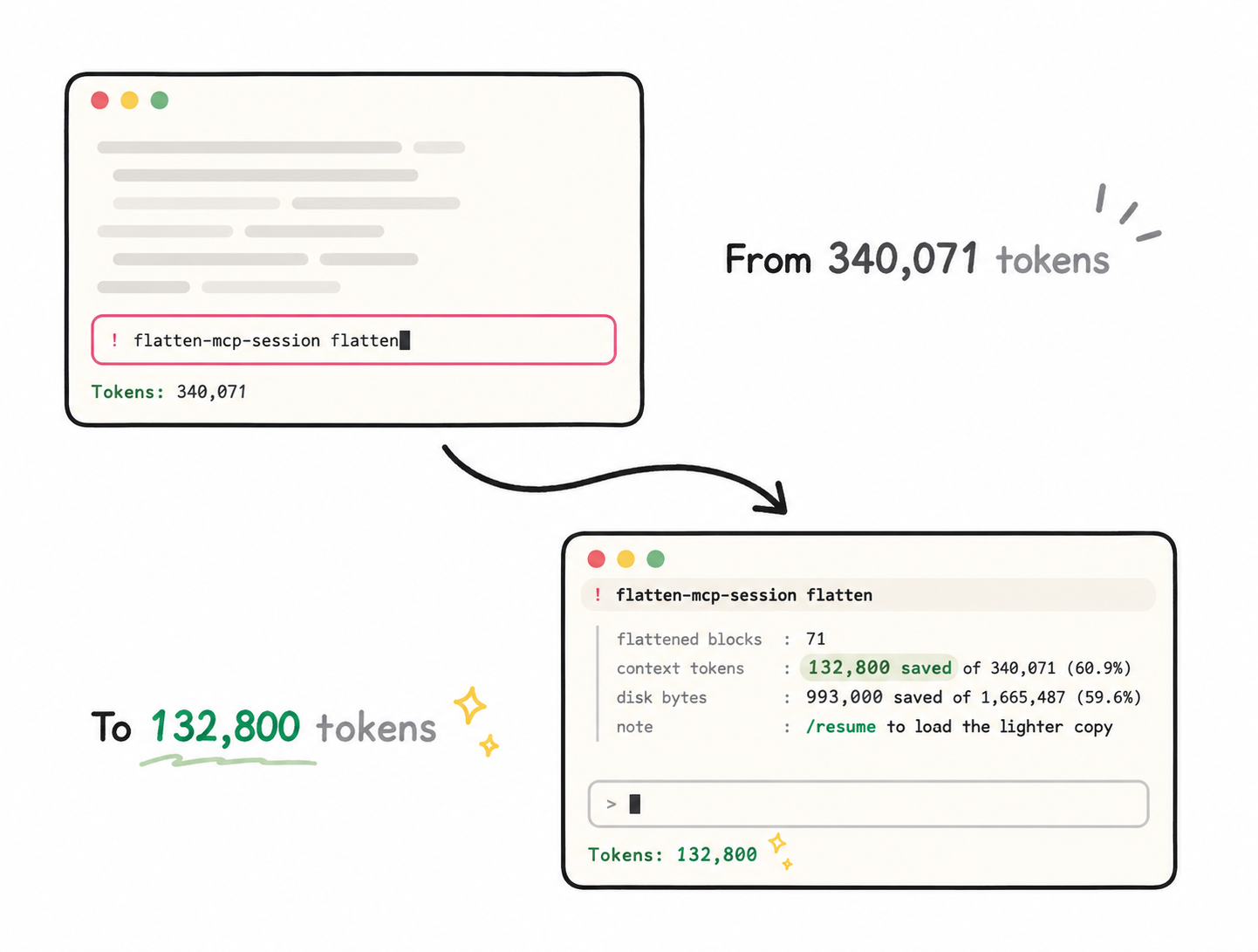
One flatten: 340,071 → 132,800 tokens — the same session, /resume'd back 61% lighter, every line intact.
What is all that weight? The 2 MB log Claude boiled down to one line, the screenshot it
described, the five files it summarized — raw source that did its job and turned into a
sentence. flatten-mcp moves each tool result above a size threshold into a local backup next
to the session and leaves a small [FLATTENED …] marker in its place; any block is one call
from coming back.
/compact |
Auto tool-result clearing | flatten-mcp | |
|---|---|---|---|
| What happens | history rewritten into a summary | old tool results cleared as the limit nears | bulk moved to a local backup, markers remain |
| Speed & cost | slow — a full model pass over your history, spends tokens/budget | automatic, no token cost | instant, zero tokens — a file move |
| Lossy? | yes — an interpretation | cleared content is gone from context | no — byte-identical restore any time |
| You choose when? | you or the auto-cliff | automatic | yes |
| Session file on disk | rewritten | unchanged | shrinks; the backup keeps every original |
Taste it first — nothing installed, nothing written:
npx -y flatten-mcp-session flatten --dry-run
Run it from a project you use Claude Code in: it prints the exact savings a flatten would give your most recent session and writes nothing.
Quick start
Runs through npx — no global install, nothing added to your project. Every read/write
stays inside Claude Code's own session store under ~/.claude/projects/, and there are
zero network calls by default. (Node ≥ 18, which Claude Code already runs on.)
1. Install — either path:
# Terminal: register the server user-wide (pinned; use @latest if you prefer auto-updates)
claude mcp add flatten -s user -- npx -y [email protected]

# Optional: the /flatten slash command
curl -fsSL https://raw.githubusercontent.com/shayaShav/flatten-mcp/main/commands/flatten.md -o ~/.claude/commands/flatten.md
# Or as a Claude Code plugin — registers the server AND bundles /flatten in one step
claude plugin marketplace add shayaShav/flatten-mcp
claude plugin install flatten-mcp@flatten-mcp
2. Restart Claude Code (or open a new session) — an already-open session does not pick
up a newly added server. Check with /mcp: flatten should be listed as connected.
3. Use it — two steps, always:
/flatten     → the session file is rewritten in place, right after a complete backup is written
/resume      → switch to another session and back; the reloaded copy is the lighter one
Until you /resume, the window you are in still holds the full pre-flatten copy in memory —
nothing will look different. After it, watch the context indicator drop.
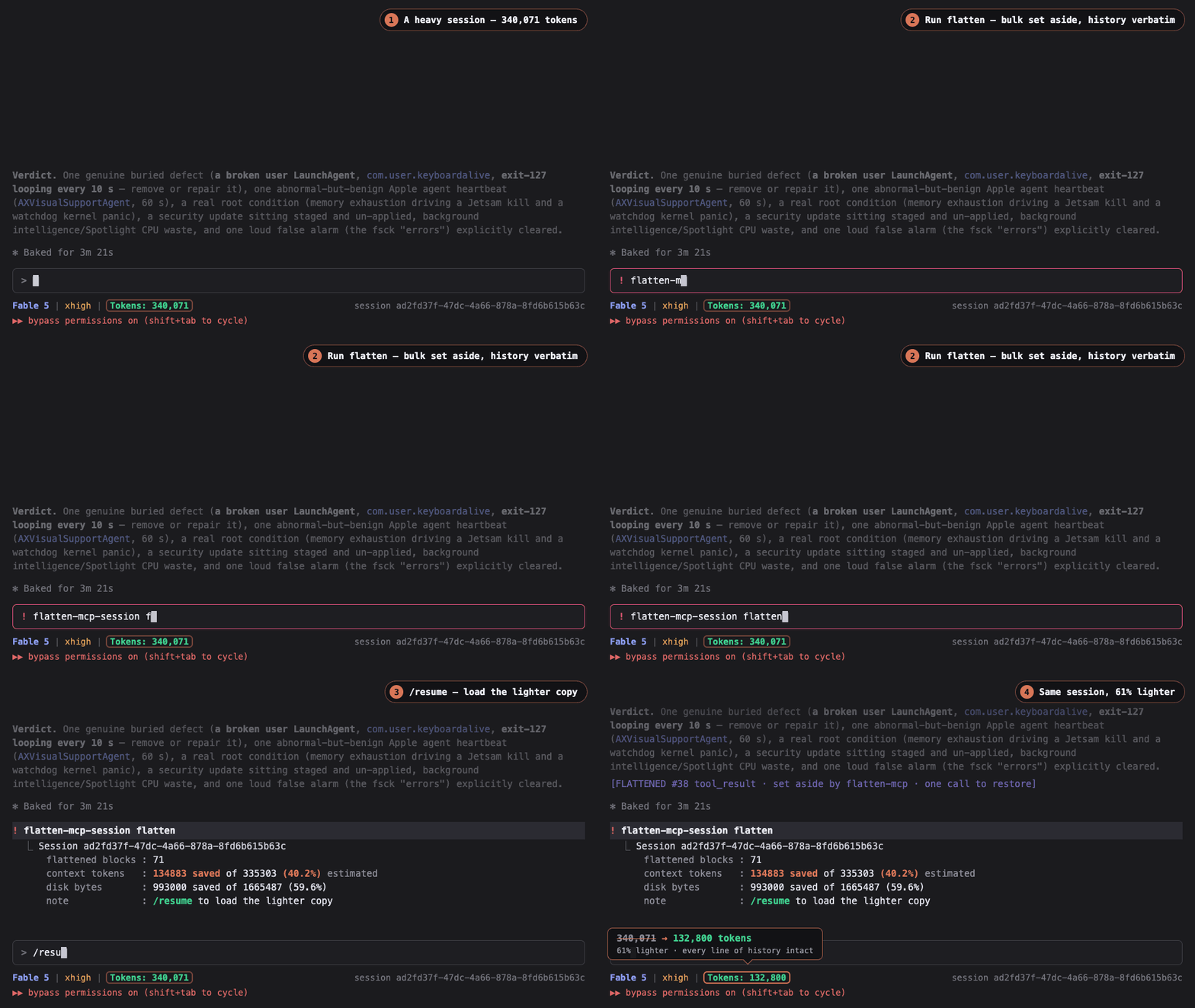
The full run, captured live: /flatten reports the savings, /resume loads the lighter copy.
Manual registration / from source
In ~/.claude.json or your project's .mcp.json:
{
    "mcpServers": {
        "flatten": { "command": "npx", "args": ["-y", "[email protected]"] }
    }
}
For development: git clone https://github.com/shayaShav/flatten-mcp.git && cd flatten-mcp && npm install, then point the config at node /absolute/path/to/dist/index.js.
Usage
- Bare
/flatten(or asking "flatten this session") targets the current session — the server identifies it fromCLAUDE_CODE_SESSION_ID. Pass a UUID to target another session. - Preview first with a dry run — "dry-run flatten this session" — nothing is written.
- Undo completely by asking to unflatten: every block returns to its exact original value.
- Don't flatten a session that is mid-generation; flatten between turns, or from a second window — which also keeps the tool schemas out of your working session entirely.
[!TIP] Flattening is pure file surgery — no model intelligence involved — so a fast, inexpensive model (
/model haiku) flattens just as well as a frontier one.
What you'll actually save
The reduction is the bulk you remove, not a fixed percentage:
- Read-heavy sessions (large files, long logs, screenshots): the demo above measured 340,071 → 132,800 tokens, a 61% cut. The more ingested bulk, the bigger the cut — base64-screenshot-heavy sessions can go higher.
- Prose-heavy sessions (little external data): savings are small — there's not much bulk to move.
A common point to reach for it is around 200k tokens; the most dramatic cuts show up at 250k–400k. It's repeatable — a re-flatten only touches bulk that arrived since the last one. The three tool schemas cost ~1,200 tokens per turn while the server is connected; one flatten of a read-heavy session removes orders of magnitude more from every later turn (207k in the demo), and the separate-window pattern above makes even that overhead zero.
Tools
| Tool | What it does |
|---|---|
flatten_session |
Move bulky tool results into the backup, leaving [FLATTENED …] markers. Crash-safe, reversible. No argument = current session; supports dry_run, min_size, include_tool_use_result. |
retrieve_flattened |
Fetch one original block back by id — text, or a flattened screenshot re-rendered as a real image. |
unflatten_session |
Reverse everything: re-inline every block from the backup, then delete the backup. |
In a flattened session the model sees markers like this, carrying everything needed to fetch the original:
[FLATTENED id=toolu_01AbC… tool=Read file_path=/src/server.ts | text 48213B/612L | session=2f9c… | retrieve_flattened(id,session) for raw content]
How it works
- One backup, not deletion.
<session>.jsonl.bakholds the complete session fully inlined; the live file carries markers. Kept in lockstep every run (backup = unflatten(live),live = flatten(backup)). - Crash-safe. Originals are written to the backup before bulk leaves the session, each write via atomic temp-file-and-rename — an interrupted run can't leave a half-written session.
- Self-cleaning. A full unflatten restores everything inline and deletes the backup — zero artifacts left.
- Re-flatten friendly. As the session grows, run it again; only new bulk is touched, and content added after a flatten is never lost on restore.
- Lossless. Text and base64 images are stored exactly as they appeared —
unflatten_sessionrestores byte-identical values. - Honest numbers. Claude Code stores each tool result twice on disk but sends one to
the model; reports separate
diskBytesSavedfromcontextTokensSaved(the number that matters), estimated locally — or exact viacount_tokenswhen you opt in withFLATTEN_COUNT_EXACT=1(plusANTHROPIC_API_KEY).
Details — session JSONL format, backup model, marker protocol — in docs/ARCHITECTURE.md.
Validate the claims yourself: (1) pick a meaty session; (2) ask for a dry run and read
the report; (3) /flatten for real, /resume, and watch the context indicator drop by the
reported amount; (4) unflatten and confirm the session file returns byte-identical (diff
against a copy if you kept one).
Security & verification
- Provenance you can check. Every release is published from CI via npm trusted
publishing (OIDC) with provenance attestations, from a signed tag — no npm
token exists anywhere. Verify:
npm audit signatures. Pin an exact version (as the Quick start does) and the committedpackage-lock.jsondocuments the tree we test against;npxresolves the two direct dependencies' own trees at install time — audit withnpm ls --omit=dev. - File access. Confined to the session store,
<CLAUDE_CONFIG_DIR or ~/.claude>/projects/<encoded-project-dir>/— rewriting session files there is the tool's entire job, always backup-first and atomic. The one exception:flatten-mcp-session retrieve --outwrites a retrieved image where you tell it to. - Network. Zero outbound calls unless you explicitly opt in to exact token counts.
With both
FLATTEN_COUNT_EXACT=1andANTHROPIC_API_KEYset — key presence alone is not enough — exactly one endpoint is ever contacted:POST api.anthropic.com/v1/messages/count_tokens(free). The request body contains the counting model id (FLATTEN_COUNT_MODEL) and a single user message holding the tool results being flattened, reduced to their text and image blocks; a second identical call counts the replacement markers. Sent only to Anthropic; the key is read from the environment and never stored or logged. There is no other outbound URL in the codebase. The optionalflatten-mcp-httpbin (below) accepts inbound connections when you run it — localhost by default — and makes no outbound calls. - Small enough to audit in one sitting. A few small TypeScript files, two direct dependencies, no telemetry, no shell, no hooks — no analytics, no spawned processes, no permission bypasses. Vulnerability reports: SECURITY.md.
Beyond Claude Code — CLI & library
The same engine ships as a terminal CLI, an in-memory library, and a Streamable HTTP server, so raw Messages API callers (any language) get the identical flatten/unflatten semantics with no MCP and no session files.
flatten-mcp-session — flatten Claude Code sessions from the terminal (no LLM turn, zero tokens)
npx -y flatten-mcp-session flatten                     # most-recent session in this project
npx -y flatten-mcp-session flatten <session> --dry-run
npx -y flatten-mcp-session list
npx -y flatten-mcp-session unflatten <session>
npx -y flatten-mcp-session retrieve <session> <tool_use_id> --out shot.png
<session>: UUID,last,"last N",current, or a keyword — same grammar as the MCP tool. Shared flags:--project-dir,--claude-dir,--json.- Drives the exact same on-disk engine as the MCP server — ideal for cron and scripts.
After a real flatten,
/resumethe session in Claude Code to load the lighter copy.
flatten-mcp-cli — flatten a raw Messages API conversation over stdin/stdout
echo '[{"role":"user","content":"hi"}]' | npx -y flatten-mcp-cli --flatten
npx -y flatten-mcp-cli --flatten --min-size 2000 < body.json > flattened.json
npx -y flatten-mcp-cli --unflatten < flattened.json > restored.json
--flattenprints{ messages, extracted, flattenedCount, contextTokensSaved, … }— persistextractedyourself; you are the store.--unflattenrestores byte-for-byte. No server, no disk, no network. Bad input → stderr + exit 1.
Library API — flattenMessages / unflattenMessages in-memory
import { flattenMessages, unflattenMessages } from 'flatten-mcp';

const { messages, extracted, contextTokensSaved } = flattenMessages(myMessages);
// send `messages` to the API; persist `extracted` yourself — you are the store.
const original = unflattenMessages(messages, extracted);   // byte-for-byte restore
- Synchronous, never mutates input (deep-copies first).
flattenRequestBody/unflattenRequestBodyhandle a full{ system, messages, tools, … }body. - Exact token counts (optional, async):
flattenMessagesExactuses Anthropic's freecount_tokenswhenANTHROPIC_API_KEYis set — calling the*Exactvariant is the opt-in here (countExact: falseforces the estimate); theFLATTEN_COUNT_EXACTvariable gates only the MCP server and session CLI. - Prompt-caching caveat: flattening earlier messages changes the cached prefix and
invalidates
cache_controlbreakpoints from that point on — flatten before establishing a breakpoint, or the cache re-write can cost more than the flatten saves in short-lived conversations.
flatten-mcp-http — the in-memory engine over MCP Streamable HTTP
npx -y flatten-mcp-http            # POST http://127.0.0.1:8787/mcp
npx -y flatten-mcp-http --port 3000 --host 0.0.0.0
- Serves
flatten_messages/unflatten_messages— the same stateless in-memory engine as the library, callable from any MCP client or hosted registry inspector. Persist the returnedextractedyourself and feed it back to restore, exactly like the library. - The three disk tools are not exposed over HTTP: they operate on the local Claude
Code session store, which does not exist wherever a remote client calls from. (On the
stdio server,
FLATTEN_INMEMORY_TOOLS=1adds these two tools alongside the disk ones.) - No auth, permissive CORS, no outbound network calls — the tools are pure functions
over the request's JSON. Binds
127.0.0.1by default; put your own proxy/auth in front before exposing it further. Note the transport cost: the conversation you flatten travels to this server and back — inside your own process, prefer the library.
Hosted endpoint — call the engine with nothing installed
A public flatten-mcp-http instance runs at https://shaya.cloud/flatten-mcp
(Streamable HTTP, no credentials). Same contract as the library: it serves
flatten_messages / unflatten_messages only — persist the returned extracted
yourself — and the disk tools still need the local install above. Mind the transport:
your conversation travels to this server and back, so send only what you would route
through a third-party service.
# Claude Code
claude mcp add --transport http flatten-remote https://shaya.cloud/flatten-mcp
- Claude (claude.ai / Desktop): Settings → Connectors → Add custom connector → paste the URL.
- Cursor: Add to Cursor, or
"flatten": { "url": "https://shaya.cloud/flatten-mcp" }inmcp.json. - VS Code:
"flatten": { "type": "http", "url": "https://shaya.cloud/flatten-mcp" }inmcp.json. - Liveness:
curl https://shaya.cloud/flatten-mcp/health
FAQ
Won't Anthropic just build this in? Claude Code already clears old tool results
automatically near the limit (see the table up top). Flatten is a different contract:
you pick the moment, the restore is byte-identical, and the on-disk session you
/resume from actually shrinks.
Will the model fetch a flattened block, or hallucinate around it? Each marker carries
the id and session, and in practice the model calls retrieve_flattened when it needs raw
bytes back. Deterministic recovery is always there regardless: unflatten_session
re-inlines everything.
Does it need Node in my project? No — it runs through npx ephemerally and touches
only Claude Code's files, not your project or toolchain.
Can a team use it? It's per-developer (each dev's local session store). Standardize by
committing the mcpServers block to your project's .mcp.json, or point the team at the
plugin install.
Compatibility & roadmap
- Claude Code's session store only, for now — the paths and JSONL schema are specific to it. WSL2 counts as Linux: if your Claude Code runs inside WSL2, flatten-mcp runs in the same environment and targets those sessions normally. Native Windows is untested.
- The CLI and library above are the first adapter over the shared block logic; porting to other agents means abstracting the storage seam — contributions welcome (CONTRIBUTING.md).
Configuration
Operates on the project the CLI runs in; pass project_dir on any call to target another.
| Env var | Required | Purpose |
|---|---|---|
CLAUDE_CONFIG_DIR |
no | Claude config dir whose projects/ store is read (default ~/.claude). Same variable Claude Code uses for profiles, so an alternate-profile server targets its own sessions automatically; override per call with claude_dir. |
FLATTEN_COUNT_EXACT |
no | Set to 1 to count token savings exactly via Anthropic's free count_tokens — the only outbound call, and it needs ANTHROPIC_API_KEY too. Off by default: key presence alone never triggers the request (see Security). |
ANTHROPIC_API_KEY |
no | The key for the exact count. Ignored by the MCP server and session CLI unless FLATTEN_COUNT_EXACT=1. |
FLATTEN_COUNT_MODEL |
no | Model id for the exact count (default claude-haiku-4-5-20251001). |
FLATTEN_INMEMORY_TOOLS |
no | Set to 1 to also register flatten_messages/unflatten_messages on the stdio server (see the HTTP section above). Off by default to keep the local tool surface lean. |
Uninstall
Unflatten anything you want back inline first — a flattened session needs its
<session>.jsonl.bak for retrieve_flattened/unflatten_session, and uninstalling does
not remove backups. Then:
claude mcp remove flatten -s user && rm -f ~/.claude/commands/flatten.md   # terminal install
claude plugin uninstall flatten-mcp                                        # plugin install
To reclaim disk for sessions you'll never restore, delete their .jsonl.bak files from
~/.claude/projects/<encoded-project-dir>/.
Contributing
Issues and PRs welcome — dev setup, project map, and workflow in CONTRIBUTING.md; security reports via SECURITY.md.
License
MIT © Shaya Shaviv
Установка shayaShav/flatten-mcp
У этого сервера нет опубликованного пакета — он собирается из исходников. Открой репозиторий и следуй инструкции в README.
▸ github.com/shayaShav/flatten-mcpFAQ
shayaShav/flatten-mcp MCP бесплатный?
Да, shayaShav/flatten-mcp MCP бесплатный — установка в пару кликов через Unyly без оплаты.
Нужен ли API-ключ для shayaShav/flatten-mcp?
Нет, shayaShav/flatten-mcp работает без API-ключей и переменных окружения.
shayaShav/flatten-mcp — hosted или self-hosted?
Self-hosted: сервер запускается локально на твоей машине командой из раздела установки.
Как установить shayaShav/flatten-mcp в Claude Desktop, Claude Code или Cursor?
Открой shayaShav/flatten-mcp на unyly.org, выбери вкладку своего клиента (Claude Desktop, Claude Code, Cursor) и нажми Install — конфиг сгенерируется автоматически, без правки JSON.
Похожие MCP
GitHub
PRs, issues, code search, CI status
 автор: GitHub
Filesystem
Secure file operations with configurable access controls.
Memory
Knowledge graph-based persistent memory system.
Template MCP Server
A CLI tool to create a new Model Context Protocol server project with TypeScript support, dual transport options, and an extensible structure
 автор: mcpdotdirect
Compare shayaShav/flatten-mcp with
Не уверен что выбрать?
Найди свой стек за 60 секунд
Автор?
Embed-бейдж для README
Похожее
Все в категории development