
Sheltie
БесплатноНе проверенArrange live web pages on an infinite canvas and review your whole site like artboards in a design tool. macOS.

Описание
Arrange live web pages on an infinite canvas and review your whole site like artboards in a design tool. macOS.
README

Sheltie is a macOS app that arranges live web pages on an infinite canvas, so you can review a whole site the way you would review artboards in a design tool.
English | 日本語
Why I built Sheltie
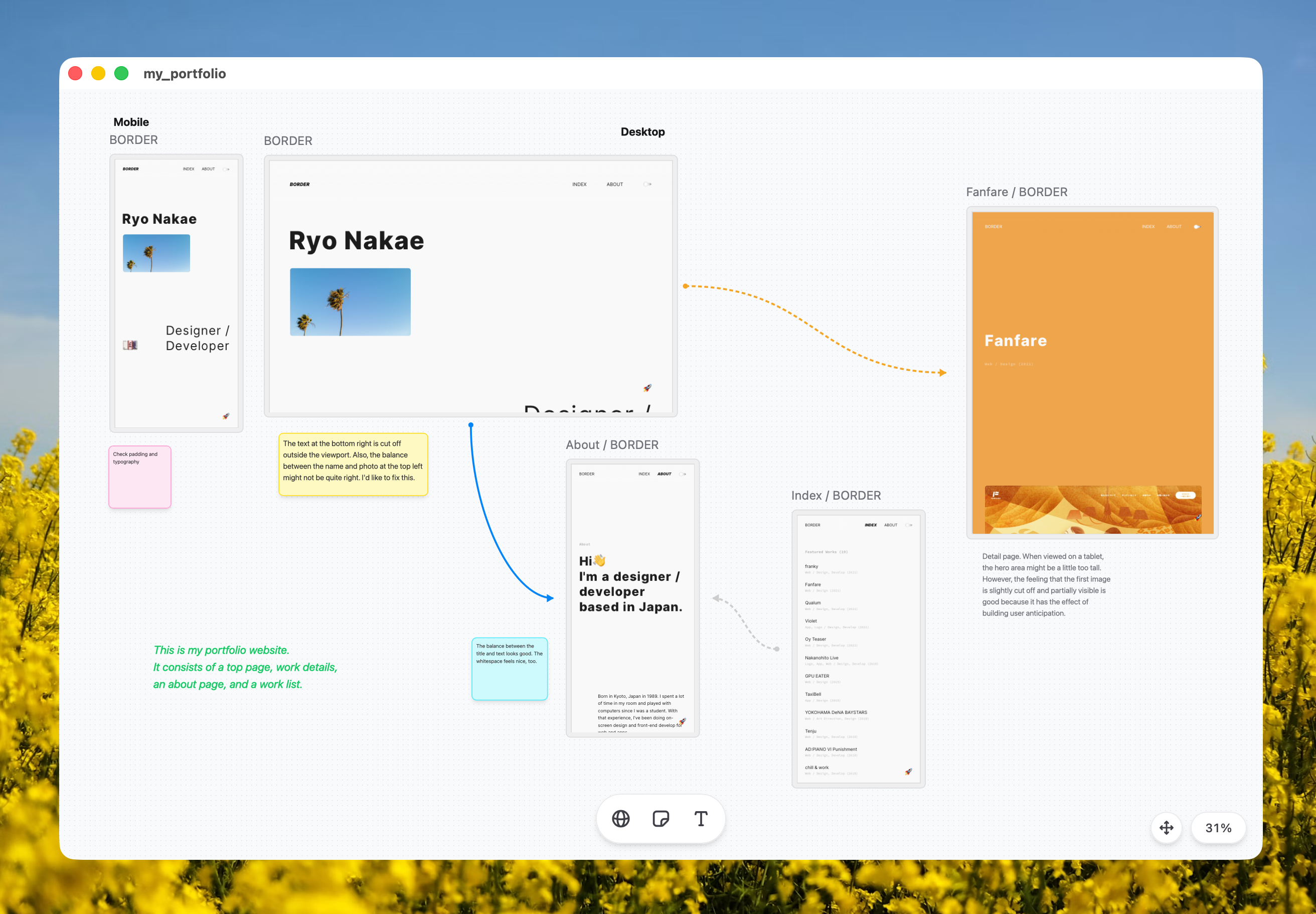
More teams now use AI coding agents to prototype in code from the start and iterate on the running app. Designers who don't write code are building web apps themselves, with an AI doing the coding.
A browser, though, shows one page at a time. Visual tone across screens, spacing, typography, and the flow between pages are hard to judge without stepping back. Checking them one page at a time takes effort, and for this part of the review you still end up back in Figma or Sketch.
I built Sheltie to fill that gap. It sits somewhere between a browser and a design tool: you arrange web pages on a canvas, zoom out to see the whole picture, and zoom in to work with any page directly.
What you can do
- Put running pages on the board: Each website on the board is a native webview (WebKit, the same engine as Safari). You can scroll and click, the same as in a browser.
- Step back and compare: Pan and zoom across the board to spot inconsistencies in spacing, typography, and color across screens.
- Sketch the flow: Connect pages with arrows to diagram how screens lead to each other, and leave notes with sticky notes and text.
- Save and share boards: A board saves to a
.sheltiefile, so you can track it in Git like any other file. Boards open as native macOS windows and tabs. - Pair it with a coding agent: Sheltie has a built-in local MCP server. Ask an agent like Claude Code to fix a screen, then compare the result right on the board. An Agent Skill is also available to teach agents how to use Sheltie.
Install
Install with Homebrew:
brew install --cask ryonakae/tap/sheltie
Or download the latest Sheltie_<version>_universal.dmg from GitHub Releases, open it, and drag Sheltie into Applications.
Either way you get the same universal binary (Apple Silicon and Intel), signed and notarized.
Sheltie currently supports macOS only.
Quick start
- Launch Sheltie and create a new board.
- Add a web page and enter a URL, either your local dev server (
http://localhost:3000) or a live site. - Add more pages, drag them into place, and zoom out to look at the flow.
- Connect pages with arrows and drop sticky notes where something needs attention.
- Save the board as a
.sheltiefile to continue later.
Use with coding agents (MCP)
Sheltie can also run as an MCP server, so local AI agents can work with the board and its pages. Enable it from Sheltie › Settings › Enable MCP Server, then register the endpoint in your MCP client:
{
  "mcpServers": {
    "sheltie": {
      "type": "http",
      "url": "http://127.0.0.1:29978/mcp"
    }
  }
}
A connected agent can read the board, operate the pages, and take screenshots.
An Agent Skill is also available that teaches agents how to work with Sheltie through these MCP tools. Install it with the skills CLI:
npx skills add ryonakae/sheltie
Note that there is no authentication. The server listens on localhost only, but it trusts any local client that connects, so enable it only on machines you trust.
Development
Sheltie is built with Tauri v2, React, TypeScript, and Tailwind CSS v4.
git clone https://github.com/ryonakae/sheltie.git
cd sheltie
npm install
npm run dev
Requires Node.js 22 and Rust (version pinned in mise.toml). See AGENTS.md and docs/agents/ for architecture notes and contribution guidelines.
License
Установка Sheltie
У этого сервера нет опубликованного пакета — он собирается из исходников. Открой репозиторий и следуй инструкции в README.
▸ github.com/ryonakae/sheltieFAQ
Sheltie MCP бесплатный?
Да, Sheltie MCP бесплатный — установка в пару кликов через Unyly без оплаты.
Нужен ли API-ключ для Sheltie?
Нет, Sheltie работает без API-ключей и переменных окружения.
Sheltie — hosted или self-hosted?
Self-hosted: сервер запускается локально на твоей машине командой из раздела установки.
Как установить Sheltie в Claude Desktop, Claude Code или Cursor?
Открой Sheltie на unyly.org, выбери вкладку своего клиента (Claude Desktop, Claude Code, Cursor) и нажми Install — конфиг сгенерируется автоматически, без правки JSON.
Похожие MCP
LibreOffice Tools
Enables AI agents to read, write, and edit Office documents via LibreOffice with token-efficient design. Supports multiple formats including DOCX, XLSX, PPTX, a
 автор: passerbyflutter
dannote/figma-use
Full Figma control: create shapes, text, components, set styles, auto-layout, variables, export. 80+ tools.
 автор: dannote
Logo.dev
Search and retrieve company logos by brand or domain. Customize size, format, and theme to match your design needs. Accelerate design, prototyping, and content
 автор: NOVA-3951
Design Inspiration Server
Searches top design platforms like Dribbble and Behance to provide UI inspiration, color palettes, and layout patterns via the Serper API. It allows users to re
 автор: YonasValentin
Compare Sheltie with
Не уверен что выбрать?
Найди свой стек за 60 секунд
Автор?
Embed-бейдж для README
Похожее
Все в категории design