
Shohei
БесплатноНе проверенInfrastructure diagnostics library with MCP server for Claude. Automate DNS, TLS, email security, and DNS propagation checks via AI agents. DNSSEC, DANE/TLSA su

Описание
Infrastructure diagnostics library with MCP server for Claude. Automate DNS, TLS, email security, and DNS propagation checks via AI agents. DNSSEC, DANE/TLSA support.
README
Crates.io CI License: MIT MSRV
SHOHEI — Security Host Observation & Healthy Evaluation Instrument
shohei v2.5.1 — Rust infrastructure diagnostics library with 168 MCP tools across 62 modules. Comprehensive security, OSINT, threat intelligence, and governance coverage. DNSSEC chain validation, DANE/TLSA, modern protocols, IPv6 dual-stack, security headers, technology fingerprinting, CVE lookup, typosquatting detection, and redirect analysis built in. 0 API keys required — all free/open APIs. Use in Rust projects or hand to Claude for autonomous diagnosis.
Core Diagnostics (v1.0+)
- MCP server for Claude — 168 diagnostic tools; ask "Check example.com's TLS certificate, DNSBL status, IPv6 support, technology stack, CVE vulnerabilities, typosquatting variants, and redirect chain" for autonomous analysis
- TLS certificate inspection — DANE/TLSA validation (RFC 6698), chain analysis, OCSP responder detection, IPv6 support, OCSP stapling detection, TLS version probing (1.0–1.3), cipher suite enumeration
- Email security scoring — MX records, SPF, DKIM, DMARC, BIMI, MTA-STS, TLS-RPT validation with 0–100 compliance score + issue linting
- IP reputation — DNSBL checks against Spamhaus, Barracuda, SORBS; reverse DNS (PTR) + forward-confirmed reverse DNS (FCrDNS)
- CDN/WAF detection — Identify Cloudflare, AWS CloudFront, Fastly, Akamai, Vercel, Netlify, Imperva via HTTP headers
- DNS delegation audit — SOA serial consistency check, lame delegation detection across authoritative NS
- Domain health report — Composite scoring across MX, SPF, DMARC, TLS, DNSSEC
- Security headers audit — CSP, HSTS, X-Frame-Options, X-Content-Type-Options, Referrer-Policy, Permissions-Policy with risk scoring
DNS & Network (v1.0+)
- DNS propagation checker — Verify domain consistency across 6 global resolvers (Google, Cloudflare, Quad9, OpenDNS, 1.1.1.1, 8.8.8.8)
- DNSSEC chain tree — see every DS, DNSKEY, and trust step from
.to your domain; per-zone validation runs in parallel; add-vfor key tags and algorithm names - Iterative resolution trace — watch queries travel from root servers to TLD to authoritative NS
- Latency benchmarking — Multi-transport timing: System, DoH, DoT, DoQ across multiple rounds
- Reverse DNS — PTR lookups for IPv4/IPv6 with FCrDNS validation
- Subdomain enumeration — Check common subdomains (www, mail, api, staging, dev, etc.) with DNS resolution + HTTP status + TLS validity
- Port reachability — TCP connectivity test for 15 common ports (SSH/22, HTTP/80, HTTPS/443, SMTP/25, MySQL/3306, etc.) with banner grab
- IPv6 dual-stack checker — Verify AAAA records, IPv6 TCP/TLS/HTTP reachability, dual-stack completeness
- DNS amplification potential — Measure UDP query/response size ratio, DDoS attack risk assessment
- Wildcard DNS detection — Probe random subdomains to detect misconfigured
*.domainrecords - Traceroute / hop analysis — Multi-platform hop-by-hop latency measurement (Linux/macOS/Windows)
Advanced Features (v1.0+)
- DoH, DoT, and DoQ — DNS-over-HTTPS, DNS-over-TLS, and DNS-over-QUIC built in
- Zone transfer (AXFR) — dump an entire zone from an authoritative server; detect critical misconfiguration
- N-way server comparison — diff any number of resolvers simultaneously with
--compare - Multiple record types —
--type a --type aaaa --type mxqueries all types concurrently in a single invocation - Stdin and file batch mode — pipe a list of domains or use
-f domains.txt - JSON output — pipe-friendly for scripting and automation
- Watch mode — auto-refresh at a set interval with
--watch - Interactive TUI — browse records, DNSSEC chain, and trace in a single terminal window (
--features tui) - HTTP protocol detection — Automatically detect HTTP/1.1, HTTP/2, HTTP/3 version in responses
- RPKI/ROA validation — BGP origin authorization checks via Cloudflare API
- ARC authentication — Email chain authentication record validation (DNS-level)
- TLS-RPT checking — SMTP TLS Reporting Policy record discovery and parsing
Web Reconnaissance & Threat Intelligence (v1.3–1.4)
- Technology stack fingerprinting — Identify web server, language runtime, CMS (WordPress/Drupal), frameworks from HTTP headers
- CVE lookup via NVD API — Search for known vulnerabilities (no API key required); integrates with tech fingerprinting
- Typosquatting detection — Generate 200+ domain variants (TLD swap, missing char, transposition, homoglyph, etc.); parallel DNS resolution to find live squats
- URL redirect chain tracing — Follow HTTP redirects hop-by-hop; detect HTTPS→HTTP downgrades and redirect loops
- Parked domain detection — Identify domains parked for sale via header signatures (Sedo, GoDaddy, Bodis, etc.)
Why shohei?
AI-First Infrastructure Diagnostics
Most infrastructure tools are CLI-only. shohei is built for AI agents:
- MCP Server Ready: Expose all diagnostics to Claude, ChatGPT, and custom AI agents without writing integration code
- Claude Desktop Integration: Ask Claude "Check example.com's TLS certificate" → get automated diagnosis with full chain analysis
- Structured Async APIs: Every function returns serializable types (
DnsCheckResult,TlsCheckResult,EmailSecurityResult) — perfect for agents - No CLI, No Python: Pure Rust library + MCP server; scales from single checks to automated monitoring
Developer-Friendly
- Library-first design: Import into Rust projects, CI/CD pipelines, or automation frameworks
- Trust chain validation: The only open-source library that validates DNS → DNSSEC → TLS → DANE/TLSA in one call
- Modern protocols: DoH, DoT, DoQ, DNSSEC, DANE/TLSA all built in
- Automation-friendly: Concurrent queries, batching, multi-resolver checks, and programmatic APIs
Compared to alternatives (dig, dog, drill): shohei is composable—use it in tests, monitoring, CI/CD, or hand it to Claude for autonomous diagnosis.
| Feature | shohei | dig | dog | doggo | q | delv | drill |
|---|---|---|---|---|---|---|---|
| Colored output | ✓ | ✓ | ✓ | ✓ | |||
| DNSSEC chain-of-trust tree | ✓ | ||||||
| DNSSEC validation | ✓ | ✓ | ✓ | ✓ | |||
| Iterative resolution trace (visual) | ✓ | ||||||
| Authority + Additional sections | ✓ | ✓ | ✓ | ✓ | |||
N-way server comparison (--compare) |
✓ | ||||||
| Zone transfer (AXFR) | ✓ | ✓ | ✓ | ||||
Watch / auto-refresh (--watch) |
✓ | ||||||
Script-friendly output (--short) |
✓ | ||||||
Multiple record types (--type a --type mx) |
✓ | ✓ | |||||
Reverse DNS shorthand (-x 1.2.3.4) |
✓ | ✓ | ✓ | ||||
Force TCP (--tcp) |
✓ | ✓ | ✓ | ||||
Disable recursion (--no-recurse) |
✓ | ✓ | ✓ | ✓ | |||
| Query latency display | ✓ | ✓ | ✓ | ✓ | |||
| DNS-over-HTTPS (DoH) | ✓ | ✓ | ✓ | ✓ | ✓ | ||
| DNS-over-TLS (DoT) | ✓ | ✓ | ✓ | ✓ | ✓ | ||
| DNS-over-QUIC (DoQ) | ✓ | ✓ | |||||
| JSON output | ✓ | ✓ | ✓ | ✓ | ✓ | ||
| Interactive TUI | ✓ | ||||||
| Technology stack fingerprinting | ✓ | ||||||
| CVE lookup (no API key) | ✓ | ||||||
| Typosquatting detection | ✓ | ||||||
| URL redirect chain tracing | ✓ | ||||||
| Parked domain detection | ✓ |
dig = BIND utils 9.16+; q = natesales/q; delv = BIND DNSSEC-validating resolver; drill = ldns-based
v2.4.0 additions: 168 MCP tools across 62 modules, robots.txt/OAuth/OIDC/API exposure, unauthenticated DB/container detection, subdomain takeover (30+ services), DGA risk scoring, DKIM key strength, attack surface composite score, RIPE Stat passive DNS, Azure AD exposure.
v2.5.1 security patch: 9 CRITICAL/HIGH SSRF fixes (VMC fetch, TCP port scan, MX connect, redirect-follow without per-hop validation across 8 modules), 15+ bug fixes (IPv6 DNSBL trailing-dot, Levenshtein panic on IDN, crypto stubs returning
valid=true, hardcoded year comparisons, SPFallqualifier never populated, sequential awaits parallelised), 4× performance improvement on trust/threat scoring viatokio::join!.
MCP Security Servers Comparison
shohei v2.5.1 stands out as the most comprehensive free, API-key-free MCP security server:
| Feature | shohei | honeylabs | kastell | unphurl | cloud-audit | maigret |
|---|---|---|---|---|---|---|
| MCP Tools | 168 | ~25 | ~30 | ~15 | ~20 | ~35 |
| Modules | 62 | ~8 | ~10 | ~5 | ~7 | ~12 |
| DNS/DNSSEC | ✓ | ✓ | ✓ | |||
| TLS/Certificate | ✓ | ✓ | ✓ | |||
| Email Security | ✓ | |||||
| OSINT/Recon | ✓ | ✓ | ✓ | ✓ | ||
| Threat Intel | ✓ | |||||
| WHOIS/Domain | ✓ | ✓ | ||||
| Port/Service | ✓ | |||||
| IP Reputation | ✓ | ✓ | ||||
| Compliance/Governance | ✓ | ✓ | ||||
| Crypto/Blockchain | ✓ | |||||
| Web Headers | ✓ | ✓ | ✓ | |||
| API Keys Required | 0 | Multiple | Multiple | Some | Multiple | Multiple |
| Free/Open APIs Only | ✓ | Partial | Partial | Partial | Partial | Partial |
| Active Maintenance | ✓ | ✓ | ||||
| Open Source | ✓ (MIT) | ✓ |
Key Advantages:
- 168 MCP tools — largest comprehensive security toolkit (v2.5.1)
- 0 API keys — all tools use free/open public APIs
- 62 modules — DNS, TLS, email, OSINT, threat intel, governance, crypto, web security, supply chain, compliance
- Zero setup cost — no vendor API accounts or authentication required
- Pure library + MCP — Rust library for CI/CD + MCP server for Claude Desktop/agents
Installation
As a library (Rust projects)
Add to your Cargo.toml:
[dependencies]
shohei = "2.4"
Then import and use:
use shohei::resolver::standard::query;

#[tokio::main]
async fn main() {
    let result = query("example.com", "A").await;
    println!("{:?}", result);
}
For full API documentation: cargo doc --open or docs.rs/shohei.
As a CLI (manual diagnosis)
cargo install shohei
Or download a pre-built binary from the releases page.
For the interactive TUI mode:
cargo install shohei --features tui
Library Examples
shohei is designed to be imported and composed in Rust projects. See the examples/ directory:
- propagation_check.rs — Check if a domain is propagated globally
- tls_chain_verify.rs — Validate TLS certificate chains (Phase 2)
- email_security.rs — Check email security records (Phase 1)
Run examples:
cargo run --example propagation_check -- example.com
cargo run --example tls_chain_verify -- example.com
cargo run --example email_security -- example.com
CLI Usage
The CLI is a convenient wrapper around the library for manual inspection and testing.
DNS record query
shohei google.com              # A records (default)
shohei google.com --type AAAA  # AAAA records
shohei google.com --type NS    # Nameservers
shohei gmail.com  --type MX    # Mail exchangers

# Multiple record types in one command
shohei google.com --type a --type aaaa --type mx
# Security / DNSSEC-related record types
shohei google.com --type caa       # Certificate Authority Authorization
shohei github.com --type sshfp     # SSH fingerprints
shohei _443._tcp.example.com --type tlsa  # DANE TLSA
Reverse DNS
Resolve the PTR record for an IP address. IPv4 and IPv6 are both supported.
shohei -x 1.1.1.1              # → one.one.one.one
shohei -x 2606:4700:4700::1111 # IPv6 reverse lookup
DNSSEC chain of trust
Validate the full DNSSEC chain from the root trust anchor down to the target domain. Each zone's DS and DNSKEY records are checked individually.
shohei cloudflare.com --dnssec

# Verbose: show key tags, algorithm names, and KSK/ZSK roles
shohei cloudflare.com --dnssec --verbose
Iterative resolution trace
Step through the full resolution path — root servers → TLD nameservers → authoritative nameservers.
shohei google.com --trace
Modern transports
# DNS-over-HTTPS
shohei google.com --doh https://dns.google/dns-query

# DNS-over-TLS
shohei google.com --dot 1.1.1.1:853

# DNS-over-QUIC
shohei google.com --doq 8.8.8.8

# Custom resolver
shohei google.com --server 8.8.8.8
Authority and Additional sections
When querying an authoritative server directly, shohei displays the Authority Section (NS referrals) and Additional Section (glue A/AAAA records) — matching dig's default behavior.
# Query the .com TLD nameserver for google.com — shows NS referral + glue records
shohei google.com -s 192.5.6.30 --no-recurse

# Query an authoritative nameserver directly
shohei example.com -s 199.43.135.53 --no-recurse --type ns
Force TCP
Force DNS queries over TCP instead of UDP. Useful for large responses that get truncated (TC bit set) or environments that block UDP/53.
shohei example.com -s 8.8.8.8 --tcp
Short output
Strip all decoration and return just the record data — one value per line. Ideal for shell scripting.
shohei gmail.com --type MX --short
Compare resolvers
Query the same domain from multiple DNS servers simultaneously and diff the results. Useful for detecting CDN anycast differences or verifying a new resolver. Repeat --compare for N-way comparison.
# Show that both servers return the same NS records
shohei cloudflare.com --type NS --server 8.8.8.8 --compare 1.1.1.1

# Reveal CDN-induced A record differences
shohei google.com --server 8.8.8.8 --compare 1.1.1.1

# N-way comparison across three resolvers
shohei google.com --server 8.8.8.8 --compare 1.1.1.1 --compare 9.9.9.9
Zone transfer (AXFR)
Fetch the complete zone from an authoritative server. Requires -s to specify the authoritative nameserver.
shohei zonetransfer.me --axfr -s 81.4.108.41
Batch / stdin mode
Pipe a newline-separated list of domains and shohei queries each one in sequence.
Lines starting with # are ignored as comments. You can also read targets from a file with -f.
echo -e "google.com\nexample.com\ncloudflare.com" | shohei
cat domains.txt | shohei --type mx --short
shohei -f domains.txt --type mx --short
Watch mode
Repeat the query every N seconds and auto-refresh the display. Press Ctrl+C to stop.
shohei google.com --watch 5         # refresh every 5 seconds
shohei google.com --type A --watch 10
Output formats
shohei google.com --output json   # JSON for scripting
shohei google.com --output plain  # No colors (CI-friendly)
Interactive TUI (requires --features tui)
Pre-loads records, DNSSEC chain, and trace in parallel, then presents all three as navigable views.
shohei google.com --tui
 shohei — google.com
┌─ Records ──────────────────────────────────────────────────────────┐
│ Query: google.com (A IN)                                           │
│                                                                    │
│ NAME                                    TTL   TYPE   DATA          │
│ ────────────────────────────────────────────────────────────────── │
│ google.com.                             120   A      142.250.x.x   │
│ ...                                                                │
└────────────────────────────────────────────────────────────────────┘
 [r] Records  [d] DNSSEC  [t] Trace  [↑↓/jk] Scroll  [q] Quit
| Key | Action |
|---|---|
r |
Records view |
d |
DNSSEC chain view |
t |
Iterative trace view |
↑ / k |
Scroll up |
↓ / j |
Scroll down |
q / Esc |
Quit |
Options
| Flag | Short | Description |
|---|---|---|
--type <TYPE> |
-t |
Record type (repeatable): a, aaaa, mx, ns, txt, cname, soa, ptr, srv, https, svcb, naptr, dnskey, ds, rrsig, caa, tlsa, sshfp, nsec, nsec3, any |
--reverse <IP> |
-x |
Reverse DNS — auto-converts IP to PTR query (IPv4 and IPv6) |
--file <FILE> |
-f |
Read domains from a file (one per line), like dig -f |
--dnssec |
-d |
DNSSEC chain-of-trust validation tree |
--verbose |
-v |
Show verbose detail (key tags, algorithms) in DNSSEC chain |
--trace |
Iterative resolution path from root servers | |
--no-recurse |
Clear RD bit — query authoritative servers directly; shows Authority + Additional sections | |
--axfr |
Full zone transfer from the server specified with -s |
|
--tcp |
Force TCP instead of UDP (requires -s; useful for large/truncated responses) |
|
--timeout <SECS> |
DNS query timeout in seconds (default: 5, max: 60) | |
--short |
Output data values only, one per line (script-friendly) | |
--watch <SECS> |
Repeat query every N seconds; Ctrl+C to stop | |
--compare <ADDR> |
Query an additional server and diff; repeat for N-way comparison | |
--doh <URL> |
DNS-over-HTTPS (e.g. https://dns.google/dns-query) |
|
--dot <IP:PORT> |
DNS-over-TLS (e.g. 1.1.1.1:853) |
|
--doq <IP:PORT> |
DNS-over-QUIC (e.g. 8.8.8.8 or 8.8.8.8:853) |
|
--server <ADDR> |
-s |
Custom DNS server (8.8.8.8 or 8.8.8.8:53) |
-4 |
Force queries over IPv4 transport | |
-6 |
Force queries over IPv6 transport | |
--output <FORMAT> |
-o |
colored (default) · plain · json |
--tui |
Interactive TUI (requires --features tui) |
Trust States
| Badge | Meaning |
|---|---|
✓ SECURE |
DNSSEC-validated, full chain of trust verified |
⚠ INSECURE |
Zone unsigned, but parent has no DS delegation (expected) |
✗ BOGUS |
Validation failed — signature mismatch or broken chain |
? INDETERMINATE |
DNSSEC not requested, or result unclear |
MCP Server & Claude Integration
✅ Live Now (v2.5.1+)
MCP (Model Context Protocol) Server with 168 tools lets Claude Desktop and other AI agents call shohei diagnostics directly:
# 1. Install shohei
cargo install shohei

# 2. Register MCP server in Claude Desktop config:
# ~/.config/Claude/claude_desktop_config.json
{
  "mcpServers": {
    "shohei": {
      "command": "/path/to/shohei-mcp"
    }
  }
}

# 3. Restart Claude Desktop
# 4. Ask Claude: "Check example.com's TLS certificate"
168 Tools Available to Claude (62 modules):
- DNS & DNSSEC (10+ tools) — Query records, DNSSEC validation, propagation checks, zone transfers, latency benchmarking
- TLS & Certificates (8+ tools) — Chain inspection, DANE/TLSA validation, certificate transparency (CT) logs, OCSP checks, cipher suites
- Email Security (6+ tools) — SPF, DKIM, DMARC, BIMI, MTA-STS, TLS-RPT validation with compliance scoring
- IP & Network (10+ tools) — IP reputation, reverse DNS, ASN/GeoIP, port scanning, traceroute, IPv6 dual-stack checks
- Web Security (12+ tools) — Security headers audit, WAF/CDN detection, technology fingerprinting, HTTP/2/3 detection, redirect analysis
- OSINT & Recon (15+ tools) — WHOIS, domain age, subdomain enumeration, typosquatting detection, parked domain detection, brand name checker
- Threat Intelligence (10+ tools) — CVE lookup, VirusTotal integration, URLhaus checking, Shodan queries, breach database lookups
- Governance & Compliance (8+ tools) — BGP/RPKI validation, GDPR compliance checking, email authentication chain (ARC), DNS amplification risk
- Crypto & Blockchain (10+ tools) — Ethereum address validation, cryptocurrency holder detection, blockchain WHOIS
- Advanced Analysis (19+ tools) — Entity relationship graphs, brand detection, URL analysis, redirect domain age, compliance reports, HASSH fingerprinting, cloud exposure, network reputation
- URL Intelligence (4 tools) — URL parsing, security intelligence, defacement detection, analytics
- Cloud Exposure (4 tools) — Cloud provider asset detection, misconfiguration scanning, cloud infrastructure analysis
- OSINT Expansion (4 tools) — Advanced recon techniques, infrastructure mapping, historical data queries
- Network Reputation (3 tools) — ISP reputation, network behavior analysis, threat scoring
- Cloud Infrastructure (4+ tools) — AWS/GCP/Azure resource exposure, misconfigured storage detection, IAM policy analysis
- Credential Security (4+ tools) — Leaked credential checks, API key exposure scanning, secret detection in public resources
- Supply Chain Security (4+ tools) — Dependency vulnerability analysis, package registry integrity checks, typosquatting in package names
- Web Intelligence (5 tools) — robots.txt analysis, .well-known discovery, OAuth/OIDC audit, cert pinning, API debug endpoint exposure
- Service Exposure (4 tools) — Unauthenticated database access (Redis/MongoDB/Elasticsearch), Docker/Kubernetes API exposure, service fingerprinting, DGA risk scoring
- Subdomain Takeover (3 tools) — 30+ service signatures (GitHub Pages, Heroku, Netlify, Vercel, Azure, AWS, Shopify…), RIPE Stat passive DNS, Azure AD tenant exposure
- Email Advanced (2 tools) — DKIM key strength (1024 vs 2048 vs Ed25519), MX server STARTTLS deep audit
- Attack Surface (1 tool) — Composite CVSS-like score aggregating TLS + web headers + email + network exposure
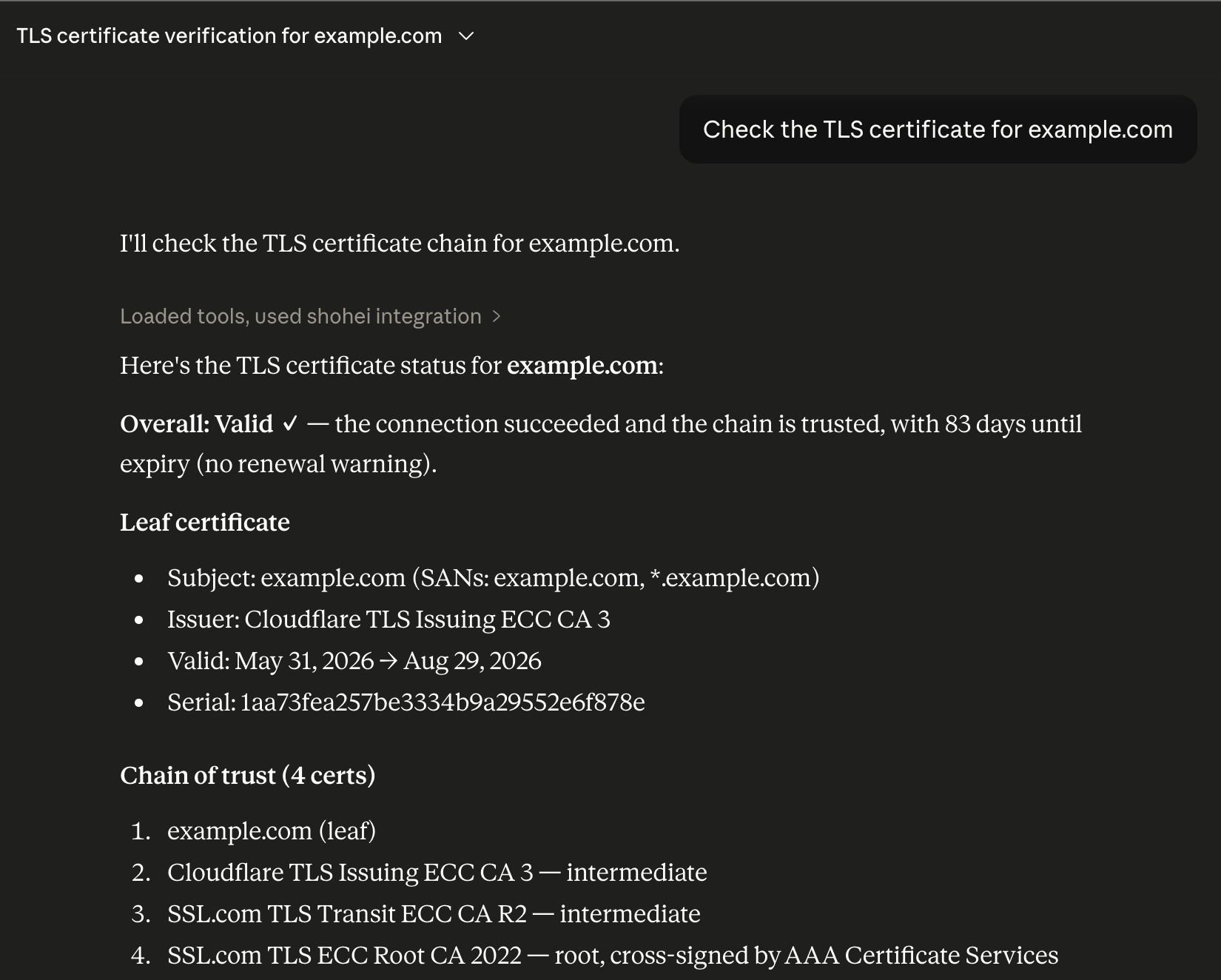
Example: Claude diagnoses a domain autonomously:
"Check if example.com's mail configuration is correct, and verify its TLS certificate chain" → Claude calls check_email_security + check_tls_chain → returns full analysis
Other Integrations
- Rust Library:
use shohei;in your projects — structured async APIs - CLI: Manual inspection:
shohei example.com --dnssec --trace - JSON output: Scripting and tooling:
shohei example.com --output json
See docs/INTEGRATIONS.md for full details.
Built with
- hickory-dns — DNSSEC, DoH, DoT support
- clap — CLI argument parsing
- ratatui — TUI framework (optional
tuifeature) - owo-colors — Terminal colors
- comfy-table — Record table rendering
License
MIT — see LICENSE
Установка Shohei
У этого сервера нет опубликованного пакета — он собирается из исходников. Открой репозиторий и следуй инструкции в README.
▸ github.com/kent-tokyo/shoheiFAQ
Shohei MCP бесплатный?
Да, Shohei MCP бесплатный — установка в пару кликов через Unyly без оплаты.
Нужен ли API-ключ для Shohei?
Нет, Shohei работает без API-ключей и переменных окружения.
Shohei — hosted или self-hosted?
Доступен hosted-вариант: Unyly запускает сервер в облаке, локальная установка не обязательна.
Как установить Shohei в Claude Desktop, Claude Code или Cursor?
Открой Shohei на unyly.org, выбери вкладку своего клиента (Claude Desktop, Claude Code, Cursor) и нажми Install — конфиг сгенерируется автоматически, без правки JSON.
Похожие MCP
Gmail
Read, send and search emails from Claude
 автор: Google
Slack
Send, search and summarize Slack messages
 автор: Slack
Runbear
No-code MCP client for team chat platforms, such as Slack, Microsoft Teams, and Discord.
Discord Server
A community discord server dedicated to MCP by [Frank Fiegel](https://github.com/punkpeye)
Compare Shohei with
Не уверен что выбрать?
Найди свой стек за 60 секунд
Автор?
Embed-бейдж для README
Похожее
Все в категории communication