
Simple Calculator Server
БесплатноНе проверенEnables basic arithmetic operations (add, subtract, multiply, divide, modulo) via natural language, with a FastMCP-based server and client for exploring MCP too

Описание
Enables basic arithmetic operations (add, subtract, multiply, divide, modulo) via natural language, with a FastMCP-based server and client for exploring MCP tool calling.
README
Purpose of this repo
To explore basic building blocks of MCP and intricacies of tool calling within MCP, from scratch. Keeping it as simple as possible without handling many edge cases. Understand how to build both MCP Server and clients.
Core Features
Future possibilities for quick concept exploration
🚨 Most of the technolgies used in this repo like FastMCP, tool calling in anthropic and MCP itself are very recent. So there are some features in these technologies that are either not available or buggy. But the main goal is a simple exploration without using cursor or Claude Desktop 🚨
MCP compliant Calculator Server
Is built using FastMCP, due to its simplicty and automatic error handling. Points to remember:-
MCP client
Makes a connection to MCP server and should have access to LLM Would higly suggest to explore and inspect the objects returned when the model uses a tool and a genertic reponse Try to stress test giving numbers in different format. Eg:- Add 2 and 3 v/s Add two and three. Eg:- Try to use ambiguous and large numbers:- Add seven hundred thousand trillion with three hundred billion
Workflow overview
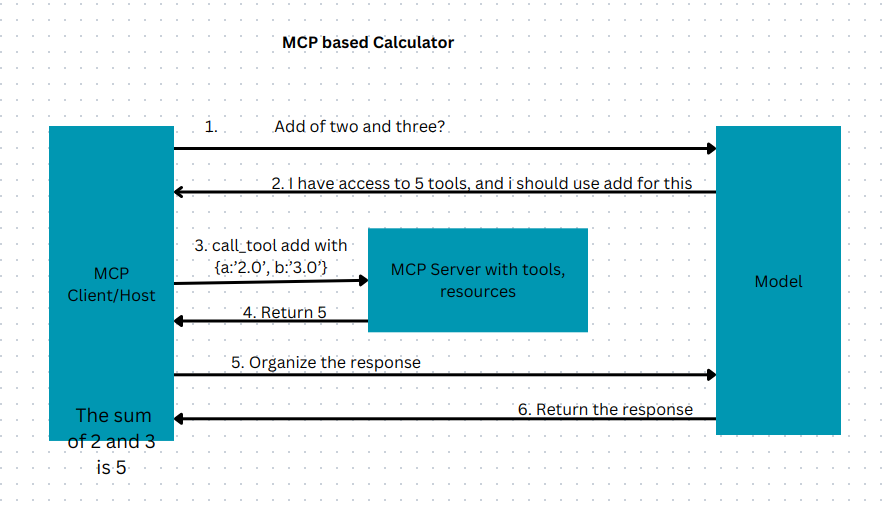
To reproduce the working environment whre .toml file is located
uv sync
TO activate the working environment use
source .venv/bin/activate
To simply inspect the server
Go to fastmcp_calculator_server folder and run
mcp dev server.py
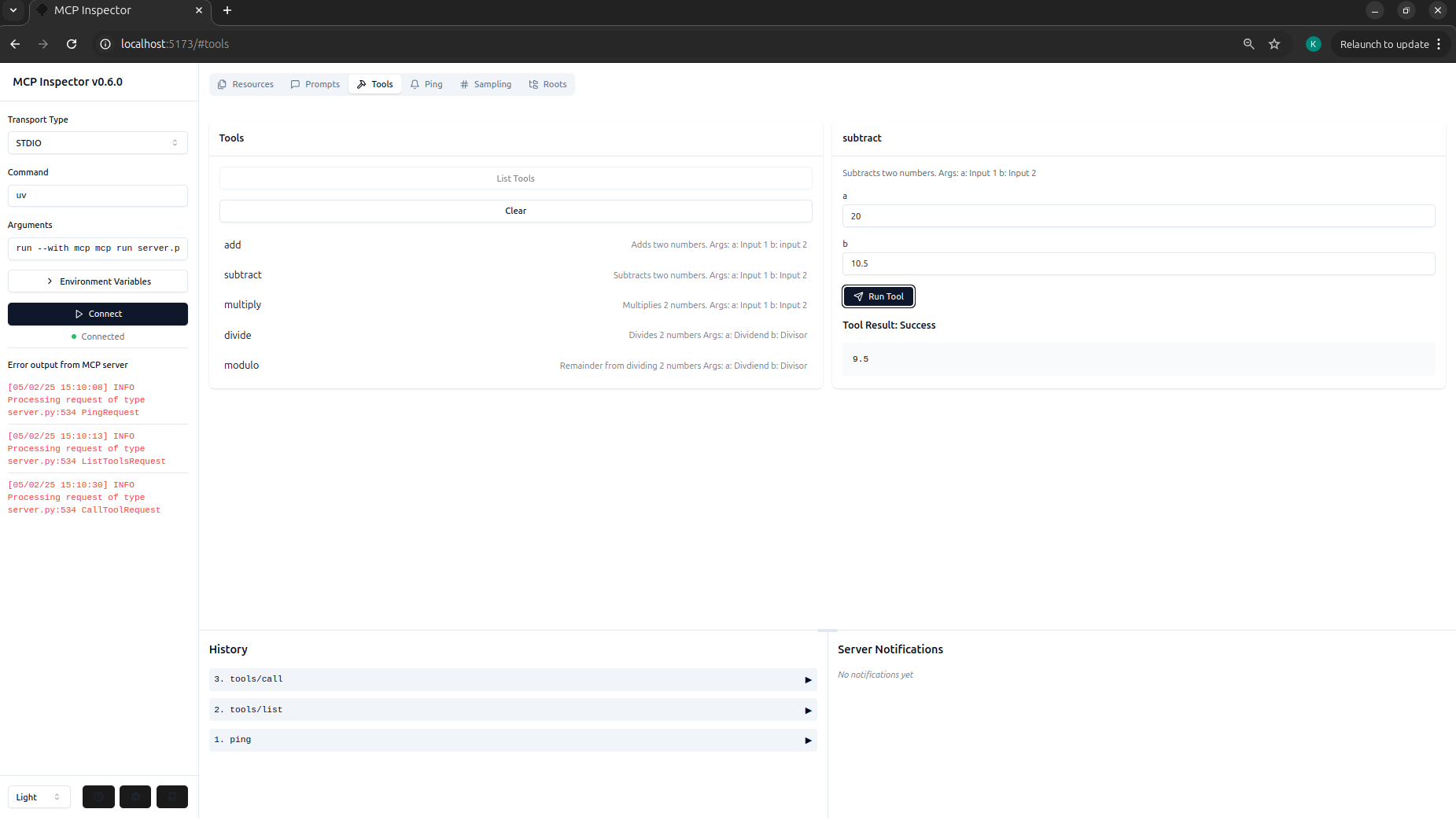
Add your anthropic API key to .env file
To run the whole MCP app
Go to mcp_calculator/mcp_compliant_client and run
python client.py <path to server.py>
More about this on medium.
Установка Simple Calculator Server
У этого сервера нет опубликованного пакета — он собирается из исходников. Открой репозиторий и следуй инструкции в README.
▸ github.com/KeerthiNingegowda/mcp_calculatorFAQ
Simple Calculator Server MCP бесплатный?
Да, Simple Calculator Server MCP бесплатный — установка в пару кликов через Unyly без оплаты.
Нужен ли API-ключ для Simple Calculator Server?
Нет, Simple Calculator Server работает без API-ключей и переменных окружения.
Simple Calculator Server — hosted или self-hosted?
Доступен hosted-вариант: Unyly запускает сервер в облаке, локальная установка не обязательна.
Как установить Simple Calculator Server в Claude Desktop, Claude Code или Cursor?
Открой Simple Calculator Server на unyly.org, выбери вкладку своего клиента (Claude Desktop, Claude Code, Cursor) и нажми Install — конфиг сгенерируется автоматически, без правки JSON.
Похожие MCP
GitHub
PRs, issues, code search, CI status
 автор: GitHub
Filesystem
Secure file operations with configurable access controls.
Memory
Knowledge graph-based persistent memory system.
Template MCP Server
A CLI tool to create a new Model Context Protocol server project with TypeScript support, dual transport options, and an extensible structure
 автор: mcpdotdirect
Compare Simple Calculator Server with
Не уверен что выбрать?
Найди свой стек за 60 секунд
Автор?
Embed-бейдж для README
Похожее
Все в категории development