
Simple Weather Tool
БесплатноНе проверенFetches live weather data from Open-Meteo without an API key and returns structured JSON with location disambiguation, enabling weather queries in LM Studio cha

Описание
Fetches live weather data from Open-Meteo without an API key and returns structured JSON with location disambiguation, enabling weather queries in LM Studio chat.
README
Minimal MCP weather server for LM Studio. Fetches live weather from Open-Meteo. No API key required. Returns structured JSON with location disambiguation.
Use it as a drop-in tool in LM Studio chat, or run the optional Python CLI demo.
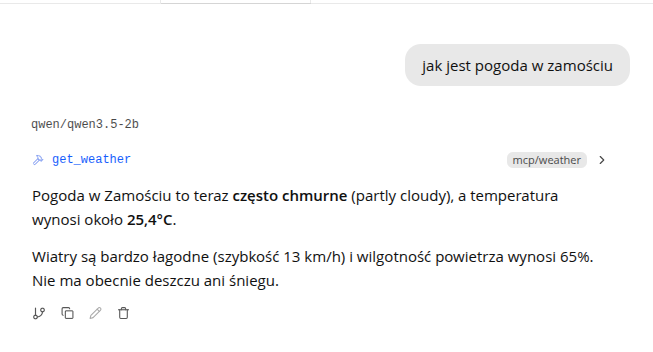
Features
- MCP stdio server compatible with LM Studio 0.3.17+
- Structured JSON weather output (temperature, conditions, humidity, wind, etc.)
- Location disambiguation via
country_codeand optionalregion - Optional travel-advisor system prompt
- Optional CLI agent demo for developers
Requirements
- Python 3.12+
- LM Studio 0.3.17+ (for chat integration)
- Internet access (Open-Meteo API)
- A local model with tool/function calling support
Install
git clone https://github.com/yourname/simple-mcp-weather.git
cd simple-mcp-weather
python -m venv .venv
source .venv/bin/activate   # Windows: .venv\Scripts\activate
pip install -r requirements.txt
Use with LM Studio
- Open LM Studio: Program tab, then Install, then Edit mcp.json
- Add the weather server (use absolute paths):
{
  "mcpServers": {
    "weather": {
      "command": "/absolute/path/to/.venv/bin/python",
      "args": ["/absolute/path/to/mcp_server.py"]
    }
  }
}
See mcp.json.example for a template.
- Save. LM Studio will spawn the MCP server automatically.
- In chat, enable tools and select a model that supports function calling.
- Ask a question, for example:
- Is a trip to the Polish seaside a good idea right now?
- Czy wyjazd nad morze w Helu to dobry pomysł?
Recommended system prompt
For travel recommendations instead of raw weather data, paste the contents of prompts/travel_advisor.txt into LM Studio's System Prompt field.
Tool: get_weather
| Parameter | Required | Description |
|---|---|---|
city |
yes | City name, e.g. Gdansk, Hel, Warsaw |
country_code |
no | ISO code, e.g. PL, DE, US. Always provide when known |
region |
no | Admin region to disambiguate similar city names |
Example output
{
  "requested_city": "Hel",
  "requested_country_code": "PL",
  "requested_region": null,
  "resolved_city": "Hel",
  "resolved_region": "Pomerania",
  "country": "Poland",
  "country_code": "PL",
  "latitude": 54.60384,
  "longitude": 18.80351,
  "temperature_c": 17.2,
  "apparent_temperature_c": 16.2,
  "condition": "overcast",
  "humidity_percent": 90,
  "precipitation_mm": 0.0,
  "wind_speed_kmh": 20.0,
  "measured_at": "2026-07-13T14:30"
}
Project structure
.
├── mcp_server.py           # MCP tool server (LM Studio entry point)
├── mcp.json.example        # LM Studio config template
├── prompts/
│   └── travel_advisor.txt  # Optional system prompt for chat
├── requirements.txt        # Server dependencies
├── requirements-demo.txt   # CLI demo dependencies
├── example.env             # CLI demo environment template
└── examples/
    └── cli-agent/          # Optional Python agent demo
Optional CLI demo
A Python agent that connects to LM Studio via the OpenAI-compatible API and calls the MCP server programmatically.
pip install -r requirements-demo.txt
cp example.env .env
python examples/cli-agent/main.py "Is a trip to Hel, Poland a good idea?"
See examples/cli-agent/README.md for details.
Troubleshooting
| Problem | Fix |
|---|---|
| Wrong city / weather from another country | Pass country_code (e.g. PL) when calling the tool |
| Model ignores the tool | Use a model with function calling; set temperature to ~0.1-0.2 |
| MCP server not loading | Check absolute paths in mcp.json; ensure venv has deps installed |
| Region name mismatch | Translated names (e.g. Pomorskie vs Pomerania) are handled; retry with country_code |
License
MIT. See LICENSE.
Установка Simple Weather Tool
У этого сервера нет опубликованного пакета — он собирается из исходников. Открой репозиторий и следуй инструкции в README.
▸ github.com/pi0tr010/Simple-MCP-Weather-ToolFAQ
Simple Weather Tool MCP бесплатный?
Да, Simple Weather Tool MCP бесплатный — установка в пару кликов через Unyly без оплаты.
Нужен ли API-ключ для Simple Weather Tool?
Нет, Simple Weather Tool работает без API-ключей и переменных окружения.
Simple Weather Tool — hosted или self-hosted?
Self-hosted: сервер запускается локально на твоей машине командой из раздела установки.
Как установить Simple Weather Tool в Claude Desktop, Claude Code или Cursor?
Открой Simple Weather Tool на unyly.org, выбери вкладку своего клиента (Claude Desktop, Claude Code, Cursor) и нажми Install — конфиг сгенерируется автоматически, без правки JSON.
Похожие MCP
Gmail
Read, send and search emails from Claude
 автор: Google
Slack
Send, search and summarize Slack messages
 автор: Slack
Runbear
No-code MCP client for team chat platforms, such as Slack, Microsoft Teams, and Discord.
Discord Server
A community discord server dedicated to MCP by [Frank Fiegel](https://github.com/punkpeye)
Compare Simple Weather Tool with
Не уверен что выбрать?
Найди свой стек за 60 секунд
Автор?
Embed-бейдж для README
Похожее
Все в категории communication