

Описание
AI-powered website automation via Telegram
README
SitePilot is a Telegram-controlled, AI-assisted static website maintenance system.
You send a request from Telegram, and the project uses an MCP-style operation loop to read/edit files in site/, then deploy changes through Git.
What this project does
- Accepts website change requests from Telegram (
/pilot ...) - Uses a local LLM (via Ollama) to generate structured file operations
- Executes file operations inside the
site/folder - Auto-commits and pushes updates for deployment (for example, GitHub Pages)
- Optionally sends Telegram deployment notifications
MCP role in this project
The file mcp_server.py is the core operation engine.
It works like an MCP-style controller by:
- receiving a user task
- exposing available project files to the model
- asking the model to return explicit commands only
- parsing and executing those commands deterministically
Supported operation commands
The model is instructed to return only these operations:
READ: <filename>- read a file fromsite/FILE: <filename>+ content block - create/update a file insite/DELETE: <filename>- delete a file fromsite/
This command-contract is the project's MCP-like interface between AI planning and actual file execution.
Architecture
telegram_bot.pyTelegram bot entrypoint and command handlers (/start,/pilot,/status).mcp_server.pyMCP-style operation server: model prompt, command parsing, filesystem operations, Git deploy, and notifications.site/The actual website files that the AI edits.requirements.txtPython dependencies.
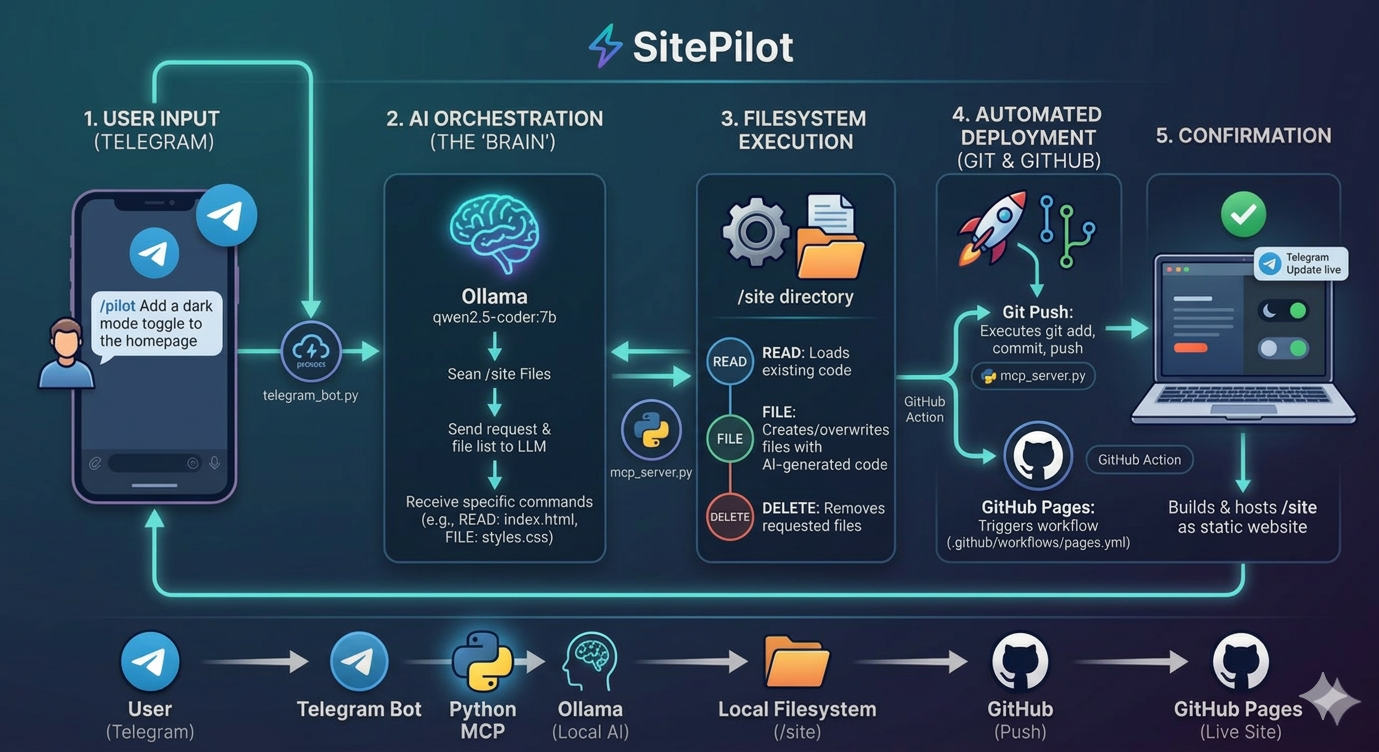
End-to-end workflow
- User sends
/pilot <change request>in Telegram. - Bot launches:
python mcp_server.py "<change request>" mcp_server.pygathers currentsite/structure.- Ollama model returns operation commands (
READ,FILE,DELETE). - Server executes commands against
site/. - Server runs Git deploy steps (
add,commit,push). - Optional Telegram notification is sent.
Workflow Diagram
Prerequisites
- Python 3.12+
- Ollama installed locally
- Ollama model available locally:
qwen2.5-coder:7b - Telegram bot token from @BotFather
- Git remote configured (if you want automatic push/deploy)
Installation
git clone <your-repo-url>
cd MCP
pip install -r requirements.txt
Environment variables
Create a .env file in the project root:
TELEGRAM_TOKEN=your_bot_token_here
TELEGRAM_NOTIFY_IDS=your_chat_id
TELEGRAM_TOKEN: required for bot + notificationsTELEGRAM_NOTIFY_IDS: optional comma-separated chat IDs to notify after deploy
Run the bot
python telegram_bot.py
Then in Telegram:
/start- usage help/status- health check/pilot Add a dark mode toggle to the homepage
Direct MCP operation run (without Telegram)
You can run the MCP server directly:
python mcp_server.py "Update hero section text and CTA button"
Demo
Video: https://youtu.be/wWsGnYfuECk
Установка SitePilot
У этого сервера нет опубликованного пакета — он собирается из исходников. Открой репозиторий и следуй инструкции в README.
▸ github.com/MUBENDIRAN/SitePilotFAQ
SitePilot MCP бесплатный?
Да, SitePilot MCP бесплатный — установка в пару кликов через Unyly без оплаты.
Нужен ли API-ключ для SitePilot?
Нет, SitePilot работает без API-ключей и переменных окружения.
SitePilot — hosted или self-hosted?
Self-hosted: сервер запускается локально на твоей машине командой из раздела установки.
Как установить SitePilot в Claude Desktop, Claude Code или Cursor?
Открой SitePilot на unyly.org, выбери вкладку своего клиента (Claude Desktop, Claude Code, Cursor) и нажми Install — конфиг сгенерируется автоматически, без правки JSON.
Похожие MCP
Gmail
Read, send and search emails from Claude
 автор: Google
Slack
Send, search and summarize Slack messages
 автор: Slack
Runbear
No-code MCP client for team chat platforms, such as Slack, Microsoft Teams, and Discord.
Discord Server
A community discord server dedicated to MCP by [Frank Fiegel](https://github.com/punkpeye)
Compare SitePilot with
Не уверен что выбрать?
Найди свой стек за 60 секунд
Автор?
Embed-бейдж для README
Похожее
Все в категории communication