
Snappshop
БесплатноНе проверенUnofficial read-only MCP server for Snapp! Shop (snappshop.ir): search, seller offers in Toman, reviews, flash sales

Описание
Unofficial read-only MCP server for Snapp! Shop (snappshop.ir): search, seller offers in Toman, reviews, flash sales
README
snappshop-mcp: Snapp! Shop MCP server for AI agents
Let your AI agent shop around on Snapp! Shop (اسنپشاپ).
An unofficial, read-only MCP server for Snapp! Shop, the Snapp marketplace in Iran:
search products, compare every seller's price in Toman, filter by specs, read buyer reviews and catch today's flash sales, all from Claude, Cursor or Copilot.
PyPI Python CI MCP Registry License: PolyForm Noncommercial
Install in Cursor Install in VS Code
For AI agents · Why · What it can do · Quick start · Tools · Good to know · FAQ · Configuration · فارسی · Development
For AI agents
- What: unofficial MCP server (model context protocol) for Snapp! Shop (snappshop.ir), a marketplace of many shops and pharmacies in Iran: electronics, phones, health and beauty, home, fashion. Queries in Persian match best; prices in Toman.
- Install:
uvx snappshop-mcporclaude mcp add snappshop -- uvx snappshop-mcp. Transport: stdio. Needs uv (Python 3.10+). - Auth: none, no API key or account (it uses the guest session the site gives every visitor). Snapp! Shop only accepts Iranian IPs: run it from Iran without a VPN, or set
SNAPPSHOP_MCP_PROXYto an HTTP proxy that exits in Iran. System proxy settings are ignored. - Access: read-only. No login, basket, orders or payment, so no confirmation is needed before calling any tool. All 13 tools carry
readOnlyHint: true. - Tools: 13:
ss_search,ss_suggest,ss_filters,ss_categories,ss_category,ss_brand,ss_product,ss_compare,ss_reviews,ss_similar,ss_seller,ss_promotions,ss_collection. Typical sequence:ss_search->ss_product(all sellers, cheapest first) ->ss_reviews. Browsing:ss_categories->ss_filters->ss_category. - Ids:
product_id(digits) goes toss_productandss_compare;id(6 characters) toss_reviewsandss_similar;seller_idtoss_seller;collection_idtoss_collection. - Units: prices in Toman, for delivery to Tehran, as the site shows them.
- Use when: comparing prices, sellers, specs and reviews of products sold in Iran, or watching flash sales.
- Do not use when: the user wants to order or pay, or is outside Iran with no Iranian IP or proxy (the site answers HTTP 403).
- Output: compact JSON. Null and empty fields are omitted (a missing
rating= not rated). Lists are 12 items per page; the site caps a list at 10,000 items. Reviewer names are left out. - Machine-readable: server.json and the iran-mcp catalog once the server is listed there.
Why
Snapp! Shop sells one product through many sellers at different prices, warranties and delivery terms. Finding the
best offer means opening product pages one by one. An agent with snappshop-mcp reads them all in seconds:
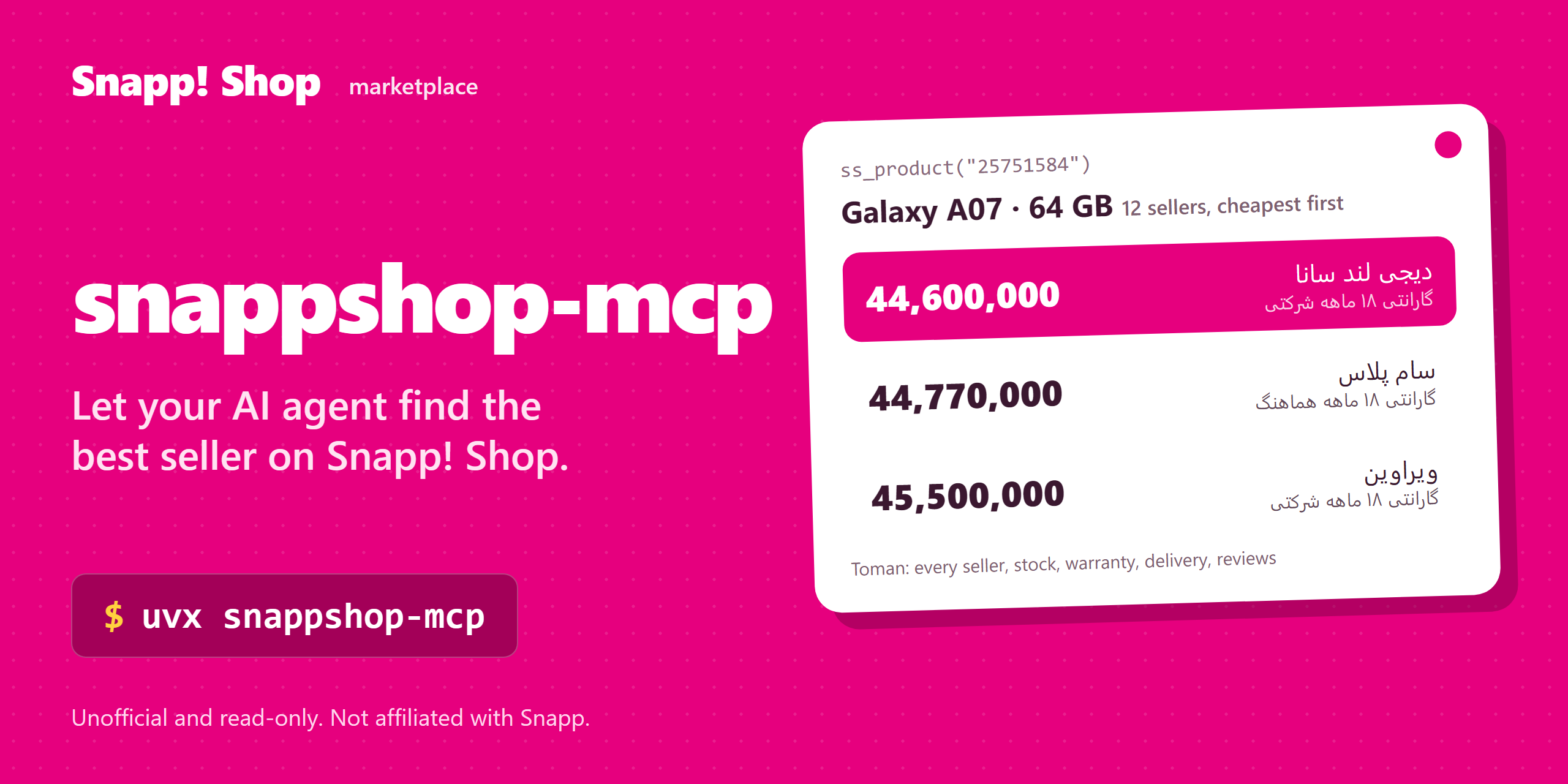
You: Who sells the Samsung Galaxy A07 (64 GB) cheapest on Snapp! Shop, and with what warranty?
Agent: calls
ss_search(query="Galaxy A07 64")→ss_product(product="25751584")
Price (Toman) Seller Colour Warranty 44,600,000 دیجی لند سانا سبز گارانتی ۱۸ ماهه شرکتی 44,770,000 سام پلاس بنفش گارانتی ۱۸ ماهه هماهنگ (داریا همراه) 45,500,000 ویراوین سبز گارانتی ۱۸ ماهه شرکتی 12 sellers in total, rating 4.3 from 370 ratings. Want the reviews with
ss_reviews?
Real tool output from 2026-11-04; prices and stock change all the time. Prices are in Toman.
What it can do
- Search products by name, with price range, brand, spec, colour, stock, discount and fast-delivery filters
- Compare sellers: every offer of a product with price, discount, stock, warranty, delivery method and seller rating
- Compare products side by side: price, rating and only the specs that differ
- Browse the category tree, brand pages and seller pages;
ss_filtersshows the real filters of a list - Read reviews with scores, pros and cons, and find similar products
- Catch deals: flash sales with end times, campaign pages and every product in a promotion
- Read-only by design: no login, no basket, no orders, no payment
Example prompts:
- "Cheapest Samsung phone in stock, with 256 GB storage and a black colour."
- "Compare the Xiaomi Poco X7 Pro and the Galaxy A56: what differs in the specs?"
- "Which seller of this magnesium supplement has the lowest price, and what do buyers say?"
- "What flash sales end tonight on Snapp! Shop?"
- ارزانترین گوشی سامسونگ موجود با حافظه ۲۵۶ گیگابایت را پیدا کن.
- فروشندههای این محصول را با قیمت و گارانتی مقایسه کن.
- امروز چه فروش ویژههایی در اسنپشاپ هست؟
Quick start
You need uv and an Iranian IP address (Snapp! Shop blocks foreign IPs; see FAQ). No API key or account.
Claude Code
claude mcp add snappshop -- uvx snappshop-mcp
Claude Desktop
Settings → Developer → Edit Config, then add:
{
  "mcpServers": {
    "snappshop": { "command": "uvx", "args": ["snappshop-mcp"] }
  }
}
Cursor
Click Install in Cursor above, or add the Claude Desktop block to ~/.cursor/mcp.json (or .cursor/mcp.json in a project).
VS Code (Copilot agent mode)
Click Install in VS Code above, or add to .vscode/mcp.json:
{
  "servers": {
    "snappshop": { "type": "stdio", "command": "uvx", "args": ["snappshop-mcp"] }
  }
}
Codex CLI
codex mcp add snappshop -- uvx snappshop-mcp
Or in ~/.codex/config.toml:
[mcp_servers.snappshop]
command = "uvx"
args = ["snappshop-mcp"]
Gemini CLI
Add to ~/.gemini/settings.json:
{
  "mcpServers": {
    "snappshop": { "command": "uvx", "args": ["snappshop-mcp"] }
  }
}
Windsurf
Add the Claude Desktop block to ~/.codeium/windsurf/mcp_config.json.
Anything else
It's a standard stdio MCP server: run uvx snappshop-mcp, or pip install snappshop-mcp and run snappshop-mcp.
Tools
All tools are read-only. Lists return 12 items per page (page starts at 1).
| Tool | What it does |
|---|---|
ss_search |
Find products by name; filters: price range, brands, specs, colours, in stock, discounted, fast delivery; sort |
ss_suggest |
Popular search phrases for a prefix, with popularity scores |
ss_filters |
Price range, colours, brands and spec filters (with options) of a category or a search |
ss_categories |
Category paths: the top level, or the children of one |
ss_category |
Products of a category or category-brand page, with the same filters as ss_search |
ss_brand |
Products of a brand page |
ss_product |
Specs, rating and every seller's offer (price, discount, stock, warranty, delivery, seller rating), cheapest first |
ss_compare |
2-4 products side by side: price, rating, seller count and the specs that differ |
ss_reviews |
Buyer reviews: score, text, pros and cons, votes, date; with total and pages |
ss_similar |
Similar products, or accessories sold with the product |
ss_seller |
Products of one seller, with the seller's name and score |
ss_promotions |
Flash sales (with end times), carousels and campaign pages; links to the tool that opens each |
ss_collection |
Every product of one promotion from ss_promotions |
Filters use names, not ids: specs=["حافظه داخلی=256 گیگابایت"], colors=["مشکی"]. Call ss_filters first to see
what a category offers.
Good to know
- Iranian IPs only. From abroad the site answers HTTP 403 ("turn off your VPN"). Use an Iranian connection or
SNAPPSHOP_MCP_PROXY. - Prices are Toman, as the site shows them, for delivery to Tehran. Stock and prices move during the day.
- Totals are capped at 10,000 by the site and can differ by one or two between calls.
- A phrase nothing matches falls back to unrelated products, so check the titles.
- Top-level categories (such as
mobile) have no product list: pick a subcategory fromss_categories. - Reviewer names are not returned.
FAQ
Does it need an API key or an account? No. It uses the guest session every visitor gets.
Can it buy something or add to the basket? No. It is read-only by design.
Why do I get HTTP 403? The site only answers Iranian IPs. Run the server from Iran without a VPN, or set SNAPPSHOP_MCP_PROXY to an HTTP proxy that exits in Iran.
Is this the same as snapp-mcp? No. snapp-mcp covers Snappfood (restaurants) and SnappMarket (groceries); this server covers the Snapp! Shop marketplace.
Which language should I ask in? Persian matches best because titles and specs are Persian; English brand and model names work too.
How do I filter a phone by storage? Call ss_filters(path="mobile/samsung"), then ss_category(path="mobile/samsung", specs=["حافظه داخلی=256 گیگابایت"]).
Configuration
| Variable | Required | Default | Meaning |
|---|---|---|---|
SNAPPSHOP_MCP_PROXY |
no | unset | HTTP proxy for every request, e.g. http://user:pass@host:port. A comma-separated list is used one at a time: the next proxy takes over when one is blocked (403/429) or cannot connect |
فارسی: سرور MCP اسنپشاپ
snappshop-mcp یک سرور MCP غیررسمی و فقطخواندنی برای اسنپشاپ (بازار آنلاین اسنپ با هزاران فروشنده و داروخانه) در ایران است. این سرور به دستیار هوش مصنوعی شما (Claude، Cursor، Copilot و ...) اجازه میدهد در اسنپشاپ جستجو کند، قیمت و گارانتی همهٔ فروشندههای یک کالا را مقایسه کند، مشخصات و نظرات خریداران را بخواند و فروش ویژههای فعال را پیدا کند.
- فقط خواندنی است: وارد حساب نمیشود، سبد خرید نمیسازد و سفارش ثبت نمیکند.
- قیمتها به تومان هستند، همانطور که سایت نشان میدهد.
- روی سیستم خود شما اجرا میشود و به هیچ سرور واسطی داده نمیفرستد.
- نیازی به کلید API یا حساب کاربری ندارد.
نصب در Claude Code:
claude mcp add snappshop -- uvx snappshop-mcp
بعد بپرسید: «ارزانترین گوشی سامسونگ موجود با حافظهٔ ۲۵۶ گیگابایت کدام است و کدام فروشنده ارسال سریع دارد؟»
نکته: سرور باید روی سیستمی با IP ایران و بدون VPN اجرا شود، چون اسنپشاپ درخواستهای خارج از ایران را مسدود میکند. اگر ناچار به VPN هستید، متغیر SNAPPSHOP_MCP_PROXY را روی یک پروکسی HTTP با خروجی ایران بگذارید.
عبارتهای پرجستجو: اسنپشاپ، خرید آنلاین، مقایسه قیمت، قیمت گوشی، مقایسه فروشنده، گارانتی، فروش ویژه، تخفیف، دستیار هوش مصنوعی، سرور MCP فارسی.
Development
git clone https://github.com/sepehr071/snappshop-mcp && cd snappshop-mcp
uv sync
uv run python -m pytest            # offline, against recorded responses
uv run python -m pytest -m live    # real API (needs an Iranian IP)
uv run ruff check .
Tools live in src/snappshop_mcp/shop.py; each is a typed async function with a docstring that tells the agent when
to use it. Issues and PRs are welcome, especially new tools and fixes for API changes.
Releases: bump the version in pyproject.toml and server.json, then push a v* tag. GitHub Actions tests,
publishes to PyPI and the MCP Registry, and creates the GitHub Release.
Related servers
- iran-mcp: catalog of all Iranian-service MCP servers
- snapp-mcp: Snappfood and SnappMarket (restaurants and groceries)
- digikala-mcp: Digikala product search and prices
- torob-mcp: price comparison across Iranian shops
- basalam-mcp: handmade and local products on Basalam
Disclaimer
Unofficial and not affiliated with or endorsed by Snapp. It is read-only: it only reads the public endpoints of the snappshop.ir web app, which can change without notice. Please keep request rates reasonable.
Author
Built and maintained by Sepehr Radmard (سپهر رادمرد). Connect on LinkedIn or follow @sepehr071 on GitHub for more MCP servers for Iranian websites, all listed in iran-mcp. If this saves you time, a star on the repo helps other people find it.
مجوز استفاده (License)

استفادهٔ شخصی و غیرتجاری رایگان است. استفاده در شرکت، محصول پولی یا پروژهٔ مشتری به مجوز تجاری نیاز دارد؛ از راه لینکدین یا گیتهاب با سپهر رادمرد تماس بگیرید. متن کامل: PolyForm Noncommercial 1.0.0. نسخههای پیش از 0.2.1 با مجوز MIT منتشر شدهاند و همان مجوز را دارند.
Free for personal and non-commercial use under the PolyForm Noncommercial License 1.0.0. Using it in a company, a paid product or a client project needs a commercial license: contact Sepehr Radmard on LinkedIn or GitHub. Versions before 0.2.1 were released under MIT and stay under it.
If this saves you clicks, a star helps others find it.
Установка Snappshop
У этого сервера нет опубликованного пакета — он собирается из исходников. Открой репозиторий и следуй инструкции в README.
▸ github.com/sepehr071/snappshop-mcpFAQ
Snappshop MCP бесплатный?
Да, Snappshop MCP бесплатный — установка в пару кликов через Unyly без оплаты.
Нужен ли API-ключ для Snappshop?
Нет, Snappshop работает без API-ключей и переменных окружения.
Snappshop — hosted или self-hosted?
Self-hosted: сервер запускается локально на твоей машине командой из раздела установки.
Как установить Snappshop в Claude Desktop, Claude Code или Cursor?
Открой Snappshop на unyly.org, выбери вкладку своего клиента (Claude Desktop, Claude Code, Cursor) и нажми Install — конфиг сгенерируется автоматически, без правки JSON.
Похожие MCP
Opencode Omniroute Plugin
OpenCode plugin for the OmniRoute AI Gateway. Drives dynamic model discovery, /connect auth flow, and multi-instance OmniRoute providers via the official @openc
 автор: GitHub Actions
Roblox Studio
Enables AI coding tools to control Roblox Studio for workspace exploration, instance manipulation, and script management. It provides tools for playtesting, sce
 автор: paralov
Antigravity Drawio
MCP server that enables AI assistants to create, parse, render, and validate Draw.io diagrams programmatically.
 автор: S-SUJAN-S
Fetch
Web content fetching and conversion for efficient LLM usage.
Mcp
ModelContextProtocol server for enhancing JSON Resumes
 автор: mcpflow.io
Vault
Bitwarden/Vaultwarden MCP server — BYOK vault access with 6 tools, Send-based reveal, TOTP, and safe agent-write
 автор: agbergsmann
AWS KB Retrieval
Retrieval from AWS Knowledge Base using Bedrock Agent Runtime.
 автор: modelcontextprotocol
Spring AI MCP Server
Provides auto-configuration for setting up an MCP server in Spring Boot applications.
llm-analysis-assistant
A very streamlined mcp client that supports calling and monitoring stdio/sse/streamableHttp, and can also view request responses through the /logs page. It also
 автор: xuzexin-hz
MCP-Agent
A simple, composable framework to build agents using Model Context Protocol by [LastMile AI](https://www.lastmileai.dev)
 автор: lastmile-ai
Compare Snappshop with
Не уверен что выбрать?
Найди свой стек за 60 секунд
Автор?
Embed-бейдж для README
Похожее
Все в категории ai