
Sonu DavinceResolve
БесплатноНе проверенAn MCP server that connects LLMs (Ollama, OpenAI, Anthropic) with desktop automation (mouse, keyboard, screenshots) using PyAutoGUI, with exclusive task locking

Описание
An MCP server that connects LLMs (Ollama, OpenAI, Anthropic) with desktop automation (mouse, keyboard, screenshots) using PyAutoGUI, with exclusive task locking to prevent concurrent execution.
README
license: mit language:
- en tags:
- mcp
- model-context-protocol
- desktop-automation
- llm
- ollama
- openai
- anthropic
- pyautogui
- python pipeline_tag: text-generation library_name: mcp
sonu-davinceResolve-mcp
A Model Context Protocol (MCP) server that acts as a desktop automation assistant. It connects local or cloud LLMs (Ollama, OpenAI, Claude/Anthropic) with desktop automation capabilities (PyAutoGUI mouse, keyboard, shortcuts, screenshots) and implements an exclusive task lock to ensure tasks run to completion without interruption.
Features
- Multi-LLM Router:
- Query local models run through Ollama (e.g. Llama 3, Mistral, Gemma).
- Route query requests to OpenAI (GPT-4o, etc.) and Anthropic (Claude 3.5 Sonnet, etc.).
- Unified interface for all local and cloud prompt routing.
- Desktop Control & Shortcuts:
- Complete keyboard control: write text, press specific keys, or dispatch multi-key hotkey combos (like
Ctrl + Alt + TorCtrl + S). - Mouse control: clicks (left, right, middle), dragging, relative or absolute moves, and scroll wheel actions.
- Screen capture utility to take snapshots and save to files.
- Complete keyboard control: write text, press specific keys, or dispatch multi-key hotkey combos (like
- Exclusive Task Locking:
- Prevent parallel task execution or concurrent client requests.
- Once a task starts via
start_task, an exclusive cross-process lock is acquired. All subsequent automation tools are guarded and verified against this lock. - Once complete,
complete_taskreleases the lock, restoring the server to an idle state.
Architecture Flow
The operational flow of the server is represented in the diagram below:
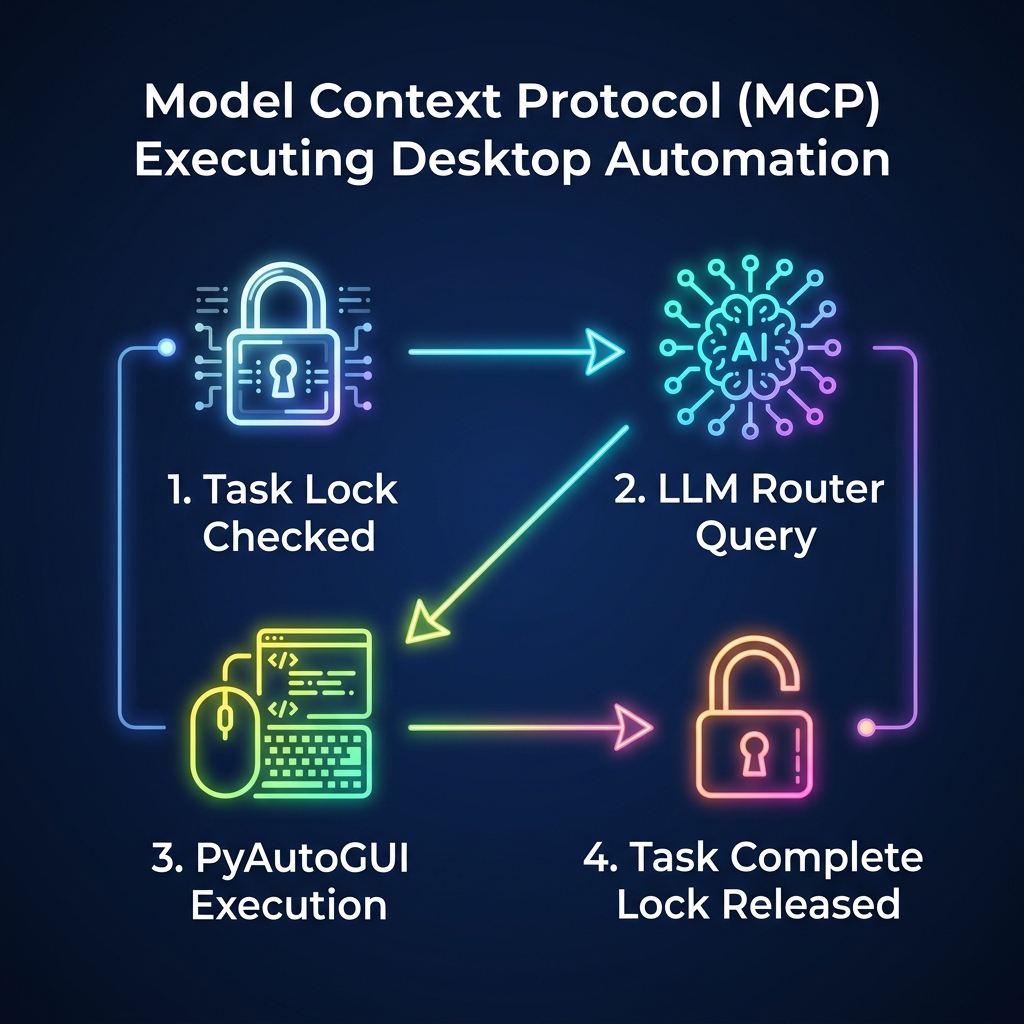
(For raw vector format, see docs/architecture.svg)
Setup & Installation
1. Prerequisites
- Python >= 3.10
- Ollama (Optional, for running free local models)
2. Install Dependencies
Initialize a virtual environment and install dependencies:
python -m venv venv
source venv/Scripts/activate  # On Windows: venv\Scripts\activate
pip install -r requirements.txt
3. Environment Configuration
Copy .env.example to .env and fill in your API credentials:
cp .env.example .env
Update any API keys:
OPENAI_API_KEY: Required if routing to GPT models.ANTHROPIC_API_KEY: Required if routing to Claude models.OLLAMA_BASE_URL: Defaults tohttp://localhost:11434.
Usage
Run the Server
The server runs over standard I/O (stdio). You can start it using python:
python -m src.server
Or install it as a package and use the console entry point:
pip install -e .
sonu-mcp-server
Client Simulation Test
We provide a standalone test script to simulate client-side tool activation, task locking, mouse movement, key combos, and model list querying:
python examples/client_example.py
MCP Tool Definition Registry
The following tools are exposed by this MCP server:
| Tool Category | Tool Name | Parameters | Description |
|---|---|---|---|
| Lifecycle | start_task |
task_id (str), description (str) |
Start a task and lock the automation session. |
complete_task |
task_id (str), success (bool), details (str) |
Complete the active task and release the lock. | |
get_task_status |
None | Get current active task status. | |
force_unlock |
None | Reset and clear locks in case of error. | |
| Automation | click_mouse |
x (int), y (int), button (str), clicks (int) |
Mouse click at coordinates. Guarded. |
move_mouse |
x (int), y (int), duration (float) |
Cursor move. Guarded. | |
drag_mouse |
x (int), y (int), duration (float), button (str) |
Mouse drag. Guarded. | |
scroll_mouse |
clicks (int) |
Scroll up/down. Guarded. | |
type_keyboard |
text (str), interval (float) |
Type string. Guarded. | |
press_key |
key (str) |
Press single keyboard button. Guarded. | |
press_hotkey |
keys (list[str]) |
Press hotkey combo (e.g. ['ctrl', 'c']). Guarded. |
|
take_screenshot |
filename (str) |
Capture screen snapshot. Guarded. | |
| LLM Router | route_llm_query |
provider (str), model (str), prompt (str), system_prompt (str) |
Query a provider (ollama/openai/anthropic). |
list_llm_models |
None | List active provider models. |
Integration with Claude Desktop
To integrate with Claude Desktop, add the server to your claude_desktop_config.json:
{
  "mcpServers": {
    "sonu-davinceResolve-mcp": {
      "command": "python",
      "args": ["-m", "src.server"],
      "cwd": "C:/Users/janmw/.gemini/antigravity-ide/scratch/sonu-davinceResolve-mcp",
      "env": {
        "OPENAI_API_KEY": "your-openai-api-key",
        "ANTHROPIC_API_KEY": "your-anthropic-api-key"
      }
    }
  }
}
Установка Sonu DavinceResolve
У этого сервера нет опубликованного пакета — он собирается из исходников. Открой репозиторий и следуй инструкции в README.
▸ github.com/S-onu112/sonu-davinceResolve-mcpFAQ
Sonu DavinceResolve MCP бесплатный?
Да, Sonu DavinceResolve MCP бесплатный — установка в пару кликов через Unyly без оплаты.
Нужен ли API-ключ для Sonu DavinceResolve?
Нет, Sonu DavinceResolve работает без API-ключей и переменных окружения.
Sonu DavinceResolve — hosted или self-hosted?
Self-hosted: сервер запускается локально на твоей машине командой из раздела установки.
Как установить Sonu DavinceResolve в Claude Desktop, Claude Code или Cursor?
Открой Sonu DavinceResolve на unyly.org, выбери вкладку своего клиента (Claude Desktop, Claude Code, Cursor) и нажми Install — конфиг сгенерируется автоматически, без правки JSON.
Похожие MCP
Notion
Read and write pages in your workspace
 автор: Notion
Linear
Issues, cycles, triage — from Claude
 автор: Linear
Google Drive
Search and read your Drive files
 автор: Google
mindsdb/mindsdb
Connect and unify data across various platforms and databases with [MindsDB as a single MCP server](https://docs.mindsdb.com/mcp/overview).
 автор: mindsdb
Compare Sonu DavinceResolve with
Не уверен что выбрать?
Найди свой стек за 60 секунд
Автор?
Embed-бейдж для README
Похожее
Все в категории productivity